
Smarter by Design.Simpler for Business
HTTP Cookie Security
What Is the HTTP Cookie Security Action?
The HTTP Cookie Security action enables the security attributes to be added automatically to the cookies in the responses returning from the Backend Services. These attributes increase the session security by preventing the misuse of the cookies.
This action works only at the response stage and adds the selected security attributes to the Set-Cookie headers in the response.
The Importance of the HTTP Cookie Security Action
The cookie security attributes provide critical protection against session hijacking, cross-site scripting (XSS) and cross-site request forgery (CSRF) attacks. Modern security standards make the use of these attributes mandatory in all the cookies.
The HTTP Cookie Security action;
- prevents the session cookies from being stolen,
- prevents cookie access with JavaScript in XSS attacks,
- provides protection against CSRF attacks,
- guarantees that the cookies are transmitted only over a secure connection,
- prevents cookie leakage in cross-site requests.
For this reason, the HTTP Cookie Security action is a critical component for providing the session security of web applications.
Supported Security Attributes
The cookie security attributes below can be added with this action.
| Attribute | Description |
|---|---|
| Secure | Ensures that the cookie is sent only over HTTPS connections. It prevents cookie transmission over HTTP. |
| HttpOnly | Prevents access to the cookie with JavaScript. It prevents cookie theft in XSS attacks. |
| SameSite=Strict | Ensures that the cookie is sent only in the requests within the same site. It offers the strongest protection against CSRF attacks. |
Supported vService Types
HTTP
L7 TCP
Network
Execution Timing
On Request
On Response
How to Add?
A new HTTP Cookie Security Action can be added through the TR7 web management interface by following the steps below:
- The Configuration Menu is opened by clicking the TR7 logo at the bottom left.
- The Load Balancer → Actions → Add steps are followed.
- A unique and descriptive name is entered for the action.
- HTTP Cookie Security is selected as Action Type.
- The related configurations of the action are made.
- The action is added by clicking the
Addbutton.
HTTP Cookie Security Action Add Form
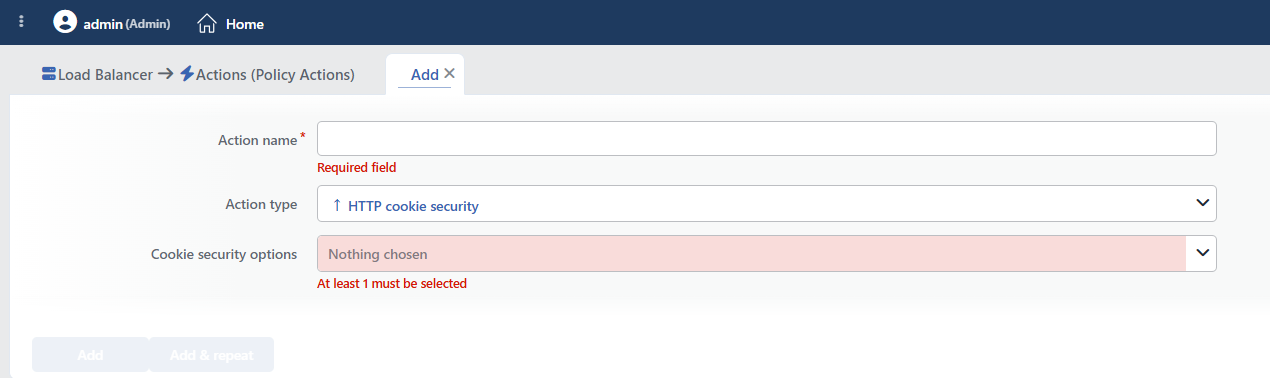 HTTP Cookie Security Action Add Form
INFO
Action Type
HTTP Cookie Security is selected as the action type.
Since this action works in HTTP vServices and only at the response stage, the Execution Level and Rule Protocol fields are not located in the form. The action does not support a counter; the Hit Counter and Set Variable on Hit fields are not present either.
INFO
Cookie Security Options Required Default: Empty
The security attributes to be added to the cookies are selected in this field. More than one attribute can be selected at the same time; the form opens with no option checked.
The attributes that can be selected:
- Mark as Secure: Ensures that the cookie is sent only over HTTPS connections. It prevents cookie transmission over HTTP.
- Mark as HttpOnly: Prevents access to the cookie with JavaScript. It prevents cookie theft in XSS attacks.
- Mark as SameSite=Strict: Ensures that the cookie is sent only in the requests within the same site. It offers the strongest protection against CSRF attacks.
At least one attribute must be selected; the action cannot be added without any of them being checked (the warning At least 1 must be selected is given).
The selection order is preserved and determines the order in which the attributes are added to the cookie.
How the Attributes Are Applied
| Attribute | If there is an existing value | Application condition |
|---|---|---|
| Secure | If the expression secure occurs in the header line, the attribute is not added at all. | It is added only in the responses of the requests coming over HTTPS. |
| HttpOnly | If the expression httponly occurs in the header line, the attribute is not added at all. | Unconditional. |
| SameSite=Strict | The existing SameSite value is removed and Strict is written instead. | Unconditional. |
The SameSite value is overwritten
Even if the Backend Service has produced the cookie with SameSite=Lax or SameSite=None, while this option is checked the value is not preserved; it is always replaced with Strict. The action does not have a field that lets a value be selected for SameSite.
The cookies whose name contains "secure" or "httponly" are skipped
The "does it already exist" check made for Secure and HttpOnly scans not the attribute but the whole header line, and it does not distinguish between upper and lower case.
For this reason, the cookies whose name or value contains these words are never marked: the __Secure-SID=…, secure_token=… and insecure=0 cookies are not given Secure; the httponly_flag=… cookie is not given HttpOnly. Considering that, for the cookies with the __Secure- prefix, browsers keep the Secure attribute mandatory, these cookies must have been produced correctly on the application side.
The action is applied to all the Set-Cookie headers in the response; there is no field that targets specific cookies by name.
The attributes are added at the last stage of the response flow. For this reason, not only the cookies returning from the Backend Service but also the cookies in the responses produced by TR7 itself are covered: the connection persistence cookie, the CAPTCHA verification cookie, and the redirection and error page responses.
There is no limit to the number of the action per vService; if it is added to the same vService more than once, the SameSite=Strict attribute can be written to the cookie twice.
INFO
Form Buttons
Add
The action adding process is completed by clicking the Add button.
Add & Repeat
With the Add & Repeat button, the action adding process is completed, and another new action can be added with different configurations without leaving the related window.
 Action Added
WARNING
The HTTP Cookie Security action does not require a condition and is applied unconditionally (Always) on the vService on which it is defined.
Actions that run unconditionally directly affect all traffic or behavior on the related vService, without an evaluation based on traffic content.
In live environments, it is recommended that target service behaviors and possible effects be evaluated carefully before such actions are enabled. Otherwise, unexpected service behaviors or operational problems can occur.
Operational and Safe Usage Recommendations
- The Secure Attribute Is Added Only over HTTPS. Even if Mark as Secure is checked, the attribute is added only to the responses of the requests coming over HTTPS; it is not added to the responses of the requests coming over unencrypted HTTP. In a vService that does not perform TLS termination, the option appears checked but
Secureis not applied to any cookie. For this reason, the option is meaningful in the vServices where the HTTPS configuration is complete. - The Session Can Be Broken in Mixed HTTP/HTTPS Publishing. A cookie marked with
Secureis never sent by the browser over unencrypted HTTP connections. If the same application is published both over HTTP and over HTTPS, the session on the HTTP side is broken; in this case, all the traffic must first be moved to HTTPS with Redirect to HTTPS. - Do Not Forget That the LB Cookies Are Also Affected. The attributes are applied to the connection persistence and CAPTCHA cookies as well; selecting
SameSite=Strictcan cause the persistence cookie not to be sent in the flows returning from external sites and the request to fall to another Backend Service. - HttpOnly Is Always Recommended. The
HttpOnlyattribute should always be enabled for the session cookies. This prevents the cookies from being stolen with JavaScript in XSS attacks. - SameSite=Strict Should Be Used Carefully.
SameSite=Strictprovides the strongest CSRF protection, but it can create problems in some scenarios: the links coming from external sites do not send the cookie, the OAuth/SSO flows can be affected, and the payment integrations may not work. If these situations are in question, the application may need to useSameSite=LaxorSameSite=None. Since this action uses theStrictvalue, the Replace HTTP Header Content action can be used for custom values. - Use All the Attributes Together. For maximum security, it is recommended to use all the attributes together:
Secure(the HTTPS requirement),HttpOnly(JavaScript protection) andSameSite=Strict(CSRF protection). - It is verified in a test environment. Especially
SameSite=Strictcan cause unexpected behavior in some applications; all the user flows are tested before it is taken to the live environment.
Common Usage Scenarios in Live Environments
The examples below show how the related action is applied in the most frequently encountered use cases in real systems. These scenarios are based on practices that are widely preferred in live environments and rest on experience gained in the field.
Scenario 1: Maximum Security for a Banking/E-Commerce Application
Problem: A banking application sends the session cookies (SESSIONID) without security attributes. The users are open to man-in-the-middle attacks, cookie theft with XSS and CSRF attacks.
Solution: Provide maximum session security by activating all the security attributes (Secure, HttpOnly, SameSite=Strict).
Configuration:
- Cookie Security Options:
- Mark as Secure ✓
- Mark as HttpOnly ✓
- Mark as SameSite=Strict ✓
Result:
- ✅ The HTTPS requirement → The cookies are transmitted only over HTTPS and do not work over HTTP.
- ✅ XSS protection → Access to
document.cookiewith JavaScript is prevented, and the cookie cannot be stolen. - ✅ CSRF protection → The cookie is not sent in cross-site requests, and the CSRF attacks fail.
- ✅ Security standards → Meets the PCI-DSS and OWASP requirements.
Scenario 2: Security after the Transition from HTTP to HTTPS
Problem: A web site has moved from HTTP to HTTPS, but the Backend Service still sends the cookies without a security attribute. The users can be downgraded to HTTP and their cookies can be stolen (an SSL stripping attack).
Solution: Make it mandatory for the cookies to be transmitted only over HTTPS by adding the Secure attribute.
Configuration:
- Cookie Security Options:
- Mark as Secure ✓
Result:
- ✅ The HTTPS requirement → The cookies given over HTTPS are marked with
Secureand the browser sends them only over HTTPS connections. - ✅ SSL stripping protection → A cookie given over HTTPS is not sent by the browser even if the connection is downgraded to HTTP.
- ✅ Gradual transition → The other attributes (HttpOnly, SameSite) can be added later.
- ❌ The requests coming over HTTP →
Secureis not added to the responses of these requests; the protection is valid only for the cookies given over HTTPS. Moving the whole site to HTTPS (e.g. Redirect to HTTPS) closes this gap.
Scenario 3: Protection of a Legacy Application with an XSS Vulnerability
Problem: There is an XSS (Cross-Site Scripting) vulnerability in an old PHP application and it is not possible to fix the code immediately. Attackers can steal the session cookies with JavaScript and access the user accounts.
Solution: By adding the HttpOnly attribute, the access of JavaScript to the cookies is prevented and the impact of the XSS is reduced.
Configuration:
- Cookie Security Options:
- Mark as HttpOnly ✓
Result:
- ✅ XSS protection →
document.cookiedoes not work with JavaScript, and the cookie cannot be read. - ✅ Session theft is prevented → Even if there is an XSS vulnerability, the session cookies cannot be stolen.
- ✅ No code change → The security is increased without making any change in the Backend Service.
- ❌ The XSS attack → Can still manipulate the page content but cannot steal the cookie.
Scenario 4: Cookie-Level Protection against CSRF Attacks
Problem: There is no CSRF token mechanism on an e-commerce site. Attackers can redirect the users to malicious sites and, by using their session, make them perform unintended operations (a CSRF attack).
Solution: By adding the SameSite=Strict attribute, cookie sending in cross-site requests is prevented.
Configuration:
- Cookie Security Options:
- Mark as SameSite=Strict ✓
Result:
- ✅ CSRF protection → The cookie is not sent in cross-site requests, and the CSRF attacks fail.
- ✅ Third-party blocking → The requests coming from external sites do not carry session information.
- ⚠️ Attention to OAuth/SSO → The users coming from external links can lose their session information.
- ⚠️ Payment gateway → The payment integrations can be affected, they should be tested.
