
Smarter by Design.Simpler for Business
Network Type Group
What Is the Network Type Group Condition?
Network Type Group is a condition type that evaluates traffic according to the fine network type group to which the source IP address of the requesting client belongs. TR7 looks up the client's IP address in the embedded network type classification and determines which specific group (for example, Amazon AWS, Microsoft Azure, Tor Exit Node or Mobile/CGNAT) that IP belongs to.
The evaluated address is the effective source IP of the client: if a Trusted Proxy configuration is used on the vService, the check is performed on the real client IP behind the proxy. The classification data is compiled from the official IP range publications of cloud providers, verified bot lists, the Tor exit list and network (ASN) records, and is updated together with the IP database updates. The Residential, Mobile / CGNAT and Generic Hosting classification is heuristic, based on network records; in cases that require certainty, it should be used together with the Source IP condition.
This condition is the more detailed counterpart of the Network Type Category condition: while the category divides the IP into 5 coarse classes, the group divides the same IP into 21 fine groups and shows which provider or network type it belongs to.
Client IP 52.94.x.x → Network Type Group: Amazon AWS (Category: Datacenter)
Each group belongs to exactly one parent category. If only the coarse class (data center, anonymizer, etc.) is sufficient, the Network Type Category condition is used.
The Importance of the Network Type Group Condition
Fine-grained network classification is necessary for policies that target specific providers or network types.
With the Network Type Group condition:
- Specific cloud providers (e.g. only AWS or Azure) can be targeted and monitored or restricted,
- Anonymous access coming from Tor exit nodes can be handled separately,
- Mobile/CGNAT networks (shared IPs) can be recognized, and rate limit policies can be adjusted accordingly,
- Residential (real home user) traffic can be separated from infrastructure traffic,
- Detailed access and security policies can be applied per provider.
Network Type Group vs Network Type Category:
| Condition | Granularity | Number of values | Example |
|---|---|---|---|
| Network Type Group | Fine (provider/network type) | 21 groups | Amazon AWS, Tor Exit Node, Mobile / CGNAT |
| Network Type Category | Coarse (parent class) | 5 categories | Datacenter, Anonymizer |
TIP
Groups are predefined and fixed; users do not create their own groups. Each group is bound to a category: for example, the Amazon AWS, Hetzner and Generic Hosting groups belong to the Datacenter category.
Supported vService Types
HTTP
L7 TCP
Network
The condition can be used at both the request (At Request) and response (At Response) stages; the network type is detected at the time of the request.
How to Add?
A new Network Type Group Condition can be added through the TR7 web management interface by following the steps below:
- The Configuration Menu is opened by clicking the TR7 logo at the bottom left.
- The Load Balancer → Conditions → Add steps are followed.
- Network type group is selected as Criteria.
- The related configurations of the condition are made.
- The condition is added by clicking the
Addbutton.
Network Type Group Condition Add Form
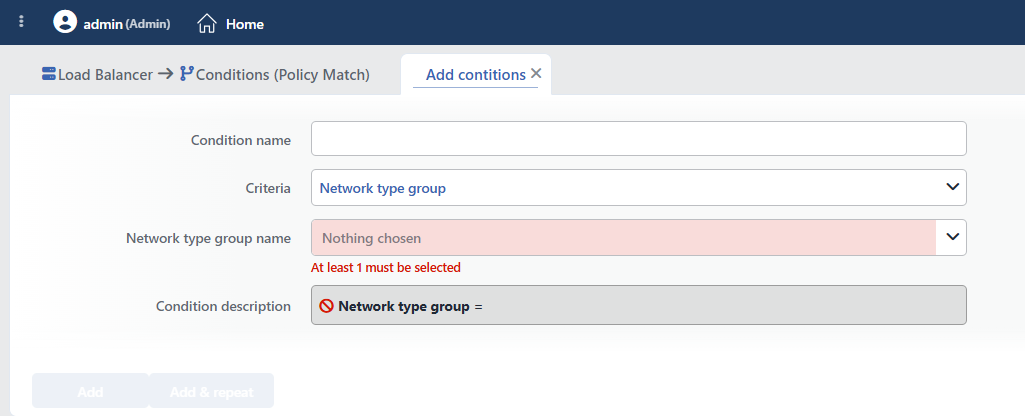 Network Type Group Condition Add Form
INFO
Condition Name
An optional name can be entered for the condition to be created.
This field is especially important in the following scenarios:
- When many conditions are defined under the same vService,
- When conditions with similar criteria need to be distinguished,
- When it is necessary to quickly understand which business rule the condition represents.
When this field is left empty, TR7 analyzes the content of the related condition and creates an automatic, descriptive name in the Condition Description field. This generated description is used as the name in condition lists.
INFO
Criteria Required
The field that determines the type of the condition; Network type group is selected from the searchable dropdown list. This selection determines the fields displayed in the form. The criterion cannot be changed after the condition is saved: if a different criterion is needed, a new condition is defined. For all criteria in the list and their scopes, the criteria catalog on the Conditions page can be referred to.
INFO
Network Type Group Name Required
The network type groups to be matched are selected from the searchable list; selecting at least one group is required (the form opens empty). TR7 can recognize 21 different groups. Each group is listed below together with the parent category it belongs to:
| Group | Parent Category |
|---|---|
| Amazon AWS | Datacenter |
| Microsoft Azure | Datacenter |
| Google Cloud | Datacenter |
| Oracle Cloud | Datacenter |
| Alibaba Cloud | Datacenter |
| Tencent Cloud | Datacenter |
| Huawei Cloud | Datacenter |
| OVH | Datacenter |
| Hetzner | Datacenter |
| DigitalOcean | Datacenter |
| Linode | Datacenter |
| Vultr | Datacenter |
| LeaseWeb | Datacenter |
| Scaleway | Datacenter |
| Contabo | Datacenter |
| Generic Hosting | Datacenter |
| CDN | CDN |
| Verified Bot | Verified Bot |
| Tor Exit Node | Anonymizer (VPN / Proxy / Tor) |
| Residential | End User |
| Mobile / CGNAT | End User |
More than one group can be selected. It works with OR logic, and the condition is met when the client's IP belongs to any of the selected groups. The match is an exact match; each IP belongs to exactly one group, and the groups do not overlap.
An IP that is not included in the classification data does not fall into any group: in this case, the condition is not met; the Residential group is not a "remainder" class.
TIP
The detected group name can be used in actions with the Network type group smart variable (e.g. as the value of an HTTP header or a log field).
INFO
Condition Description
It is created automatically by TR7 in line with the entered criteria and values.
This description:
- which value the condition applies to,
- which criterion it works on,
- the quick understanding of the condition on listing screens
is produced dynamically by the system so as to provide these.
INFO
Form Buttons
Add
The condition adding process is completed by clicking the Add button.
Add & Repeat
With the Add & Repeat button, the condition adding process is completed, and another new condition can be added with different configurations without leaving the related window.
 Condition Added
Operational Usage Recommendations
- The Category Should Be Selected If a Coarse Distinction Is Enough. For a broad target such as "all data centers", the Network Type Category condition should be used; the Network Type Group condition should be used only for specific providers.
- CGNAT Should Be Taken into Account. In the Mobile / CGNAT group, many real users share a single IP. In this group, a more flexible rate limit should be preferred instead of strict IP-based blocking.
- Tor Access Should Be Managed Separately. A Tor-specific policy should be applied by targeting the Tor Exit Node group separately from the Anonymizer category, which covers all anonymous traffic.
- Monitoring Should Be Done per Provider. Abnormal traffic coming from a specific cloud (e.g. only AWS) should first be marked and logged, and then restricted if necessary.
Common Usage Scenarios in Live Environments
The examples below show how the related condition is applied in the most frequently encountered use cases in real systems. These scenarios are based on practices that are widely preferred in live environments and rest on experience gained in the field.
Scenario 1: Blocking Scraper Traffic Coming from Specific Cloud Providers
Purpose: To target and block intensive scraper traffic coming only from specific cloud providers (e.g. AWS and Azure) during a campaign, without affecting other infrastructure traffic.
Configuration: Network Type Group → Amazon AWS, Microsoft Azure
Action Recommendations:
- ✅ Block → Requests coming from these providers are blocked with 403 Forbidden.
- ✅ Advanced Traffic Inspection → Scraper behavior is analyzed by monitoring the source distribution.
Scenario 2: Blocking Tor Exit Nodes from the Management Panel
Purpose: To completely block anonymous access coming from Tor exit nodes on management and payment pages, while leaving other anonymous types (VPN, etc.) untouched.
Configuration: Network Type Group → Tor Exit Node
Action Recommendations:
- ✅ Block → Tor access on the
/adminand/checkoutpaths is blocked with 403 Forbidden (together with the Path condition). - ✅ Show Content → Access policy information is shown to the blocked user.
Scenario 3: Flexible Rate Limit for Mobile/CGNAT Traffic
Purpose: Since many real users share a single IP in Mobile/CGNAT networks, to apply a flexible rate limit with a higher threshold to this group instead of strict IP-based blocking.
Configuration: Network Type Group → Mobile / CGNAT
Action Recommendations:
- ✅ Bandwidth Limitation → By applying a rate limit with a higher threshold to this group, legitimate users on shared IPs are protected.
- ✅ Add HTTP Header → By adding the
X-Network: cgnatheader, the Backend Service is informed about the shared IP situation.
Scenario 4: Priority Experience for Residential Users
Purpose: To separate real home user traffic from infrastructure and bot traffic, mark these users and prioritize them on the backend.
Configuration: Network Type Group → Residential
Action Recommendations:
- ✅ Add HTTP Header → By adding the
X-Network: residentialheader, the Backend Service prioritizes real user traffic. - ✅ Conditional Silent Log → Residential traffic is logged separately, and real user behavior is analyzed.
