
Smarter by Design.Simpler for Business
Portal
What Is Portal?
In the Portal mode the vService works as the common entry point at which the users log in and reach the published applications: the identity of the visitor is verified with the flow defined on the Flowchart tab of the portal vService, and with the session opened the applications in the Portal Applications list are accessed without logging in again. To the authenticated user, the portal page on which the published applications are listed is served at the address of the portal vService.
Every application is published with an Access Mode. In the Domain Tunnel and Private Domain Tunnel modes the application traffic is tunneled over the portal vService to the vService of the application; in the TR7 Application mode the application is accessed from its own vService address and, in order for it to accept the portal session, the vService of the application is configured in the Portal Application mode.
In order to protect a single application with its own login page, the Standalone Application mode is enough; this mode is used when a single login is required for more than one application.
6 Fields
Gateway Mode Section
Gateway Mode · Cookie Domain · Cookie Name Prefix · Portal URL · Private Tunnel Domain · Portal Applications
3 Modes
Access Mode
Domain Tunnel · TR7 Application · Private Domain Tunnel
The AGS Engine
Default Target
The requests that do not match a tunnel and an action go to the AGS engine
At Least 1
Portal Applications
There is always at least one application card on the list
64 × 64
Application Image
The image uploaded with a file is reduced below 64 × 64 pixels and is limited to 50 KB
12 Characters
Private Domain Tunnel
The application address is produced with a label specific to the user or to the session
How Does the Portal Work?
The request that comes to the portal vService is evaluated in the traffic engine in the following order:
- The tunnel rules: If the request has come to the address of an application in the Domain Tunnel or Private Domain Tunnel mode and carries a valid authenticated portal session, it is tunneled to the Application vService of the application. The visitor who has no session is redirected to the portal address or to the handoff address of the portal. The private addresses that are authenticated but do not match any application label get HTTP 404 at this step (Private Domain Tunnel).
- The AGS rules: The requests that start with the AGS Root Path and the requests that match the AGS Activation Condition condition and have no session go to the AGS engine; the visitor enters the login flow of the portal from the step to which the Start box is connected.
- The vService actions: The requests that match the actions of the portal vService are forwarded to the Backend Service in question.
- The default target: The requests that match no rule go to the AGS engine. The authenticated user gets the portal page over this path.
In this mode the default Backend Service of the vService is not used. The requests that do not match the AGS Activation Condition condition also go to the AGS engine unless they match the actions of the vService; the condition is not enough on its own to leave a path outside AGS in a portal vService.
The request forwarded over the tunnel first passes through the rules of the portal vService: the session protection settings of the portal (the extension of the idle time, the session binding) and the Backend SSO injections are applied to the tunneled requests with a session as well. Since the bot protection policies of the portal are evaluated only in the requests directed to the AGS engine, they do not work in the tunneled requests. The request then enters the Application vService with its own address and passes through the rules of that vService as well. The portal session is accepted only with the session cookie issued by the portal vService; the requests that come with a session cookie that carries the same name and is valid but has been issued by another vService get HTTP 403 with the text Session cookie issuer not trusted by this gateway.
The Comparison of the Access Modes
| Feature | Domain Tunnel | TR7 Application | Private Domain Tunnel |
|---|---|---|---|
| The address of the application | The Application URL domain name | Application URL (the own vService address of the application) | An address specific to the user or to the session under Private Tunnel Domain |
| The path of the traffic | The portal vService → the tunnel → the Application vService | Directly the Application vService | The portal vService → the tunnel → the Application vService |
| The rule created in the portal vService | A domain name match | None | A wildcard domain name and an address label match |
| The visitor who has no session | Is redirected to the portal address or to the handoff address of the portal | Is met by the vService of the application | Is redirected to the portal address |
| DNS and the certificate | The application domain name resolves to the portal vService, the portal certificate covers the domain name | In the own vService of the application | *.<Private Tunnel Domain> resolves to the portal vService, the portal certificate covers the wildcard domain name |
| The Application vService mode | AGS off (if the application domain name is under Cookie Domain) or Portal Application | Portal Application | AGS off or Portal Application |
Accessing the Portal Mode
- Left Monitor Panel is opened.
- AGS-Enabled vServices is selected from the category tabs at the top left.
- The vServices defined on TR7 with AGS access control enabled are listed.
- The vService to be monitored is clicked; the screen opens with the Dashboard tab that carries the vService's name.
- On the screen that opens, the Flowchart tab is clicked.
- The switch at the top left is taken to the Edit Mode position.
- The General Settings button on the toolbar is clicked; in the Gateway Mode section of the window that opens, Portal is selected in the Gateway Mode field.
The same fields are edited on the AGS Management tab as well: Gateway Mode, Portal URL, Private Tunnel Domain and Portal Applications are in the Edit / Scope & identity window of the mode section; Portal URL, Private Tunnel Domain and Portal Applications are also in the Edit / Portal & applications window of the Portal & Applications section; and Cookie Domain and Cookie Name Prefix are in the Edit / Session window of the Session section. In these windows the change is saved directly with Accept and the format errors are reported at that moment. The transition to the Portal Application mode is made from the General Settings window on the Flowchart tab.
The Gateway Mode Section
While Portal is selected, six fields are displayed in the Gateway Mode section of the General Settings window. The moment the mode is selected, the Portal URL, Private Tunnel Domain and Portal Applications fields appear; the Portal Applications list opens with an empty application card and, until the mandatory fields are filled, the warning Required field is displayed below the fields and the Accept button stays inactive.
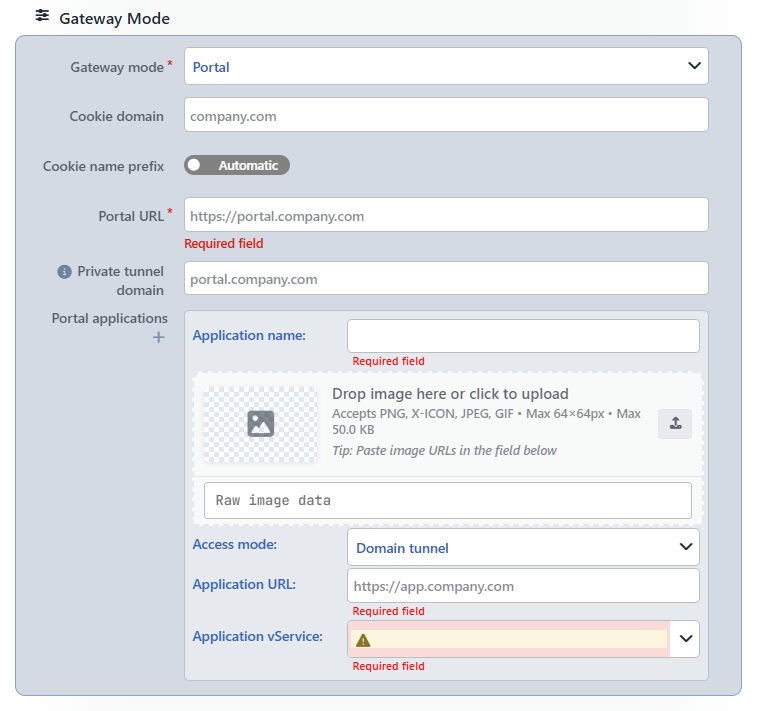 The Gateway Mode Section
INFO
Gateway Mode Mandatory Default: Standalone Application
The working mode of AGS is selected. The options in order are Standalone Application, Portal and Portal Application. When the mode is changed, the fields specific to the mode appear or disappear in the window immediately (The Mode Change).
INFO
Cookie Domain
The domain name for which the session cookie will be valid is entered (the placeholder is company.com); the format and the behavior when it is left empty are the same as those of the field in the Standalone Application mode.
In the Portal mode this field also determines how the applications take the session. If the domain name of a Domain Tunnel application is under Cookie Domain (e.g. under company.com, app.company.com), the portal session cookie reaches the application address directly. If the domain name is outside Cookie Domain, or if it is different from the portal address while Cookie Domain is empty, the session is carried to the application domain name over the handoff address (Domain Tunnel). Private Tunnel Domain has to be under this domain name as well.
INFO
Cookie Name Prefix Default: Automatic
The prefix to be added to the names of the AGS cookies is determined; the Automatic and Choose positions are the same as those of the field in the Standalone Application mode. While their own prefix is empty, the applications in the Portal Application mode use the prefix of the first portal for which a prefix has been defined in the Trusted Portals list; when the prefix used in the application is different from that of this portal, the portal session is not recognized in that application.
INFO
Portal URL Mandatory
The address of the portal open to the users is entered (the placeholder is https://portal.company.com). The visitors who have no session are redirected from the application addresses to the AGS Root Path path of this address (e.g. https://portal.company.com/ags-portal); the same address is used in the handoff of the portal session, in the Go to portal link on the invalid private address page and in the redirection of the Portal Application vServices that trust the portal.
The address is entered with the scheme and the domain name (with the port if necessary), without a / and a path at the end; the value is combined directly with the AGS Root Path. While the field is empty, the warning Required field is displayed. The address format is not checked in the window; an invalid address is reported during Save with an error text that starts with Invalid URL.
INFO
Private Tunnel Domain
The base domain name on which the applications in the Private Domain Tunnel mode are served is entered (the placeholder is portal.company.com). In front of the label there is the icon; when the label is hovered over, the following information is displayed: Base domain for private domain tunnel apps: each app is served at https://{hash}.{thisDomain}/ with a per-user (or per-session) hashed label. Requires a wildcard DNS record (*.domain) pointing at this vService and a certificate covering *.domain. Must sit under the gateway's cookie domain scope so the portal session cookie reaches the hashed hosts.
- The value is entered as a domain name that contains at least one dot; a dot at the beginning,
*.or a port is not accepted. The format is checked during Save. - For the addresses under the domain name, a wildcard DNS record (
*.portal.company.com) that resolves to this vService and a wildcard certificate that covers these addresses are required. - The domain name has to be under Cookie Domain; otherwise the portal session cookie does not reach the application addresses and the user is redirected back to the portal from the application link. This compatibility is not checked during the save.
- The domain name must not cover the own address of the portal (e.g. while Portal URL is
https://portal.company.com,company.comis not entered); when it covers it, the requests that come to the portal address are evaluated as a private address as well and the portal pages do not open. - When the field is left empty, no traffic rule is created for the applications in the Private Domain Tunnel mode; no warning is shown during the save.
INFO
Portal Applications Mandatory
The applications published on the portal are defined card by card; the fields of the card are explained in the The Portal Applications Card section. There is no mandatory mark on the label; since there is at least one card on the list and Accept is not enabled without the mandatory fields on the card being filled, at least one application is defined.
- A new card is added to the end of the list by clicking the icon below the label. There is no upper limit for the number of cards.
- The icon on the right of the card removes the card without asking for confirmation. There is at least one card on the list; when a single card is left, the deletion icon is not displayed.
- When there are two or more cards, the cards are ordered by being dragged from the handle on their left.
The Portal Applications Card
The fields on the card change according to the Access Mode selection:
| Field | Domain Tunnel | TR7 Application | Private Domain Tunnel |
|---|---|---|---|
| Application Name | Mandatory | Mandatory | Mandatory |
| The image field | Optional | Optional | Optional |
| Access Mode | Mandatory | Mandatory | Mandatory |
| Application URL | Mandatory | Mandatory | Not displayed |
| Application vService | Mandatory | Mandatory | Mandatory |
| Address Scope | Not displayed | Not displayed | Displayed |
INFO
Application Name Mandatory
The name of the application that will be displayed on the portal and on the AGS Management tab is entered. There is no length and character limit.
INFO
The Image Field
The image of the application is uploaded; the field has no label on the card. The image is selected by being dragged to the area that contains the text Drop image here or click to upload, or by clicking the image square on the left or the button on the right.
- The accepted formats are PNG, X-ICON (ICO), JPEG and GIF (
Accepts PNG, X-ICON, JPEG, GIF • Max 64×64px • Max 50.0 KB). - The PNG, JPEG and GIF images uploaded are cropped as a square; the images whose edge exceeds 64 pixels are reduced below 64 pixels (e.g. a 256 × 256 image to 51 × 51 pixels). The GIF images are converted to PNG; if the processed PNG image exceeds 50 KB, it is converted to the JPEG format and the transparency is lost. The ICO files are stored without being resized. When a file of an unaccepted type is dragged,
Invalid image formatis displayed. - If the source file exceeds 500 KB, the warning
File is too large, and if the processed image exceeds 50 KB, the warningProcessed image is still too largeis displayed. - An image address or image data in the
data:image/...;base64,form is also pasted into theRaw image databox below (Tip: Paste image URLs in the field below). In the value entered this way only the format is checked; the size and pixel limits are not applied. - When an image is uploaded, next to the preview the source type (
BASE64orURL), the size in theBASE64value, the pixel measure together with the Remove, Upload and, according to the source, the Download or Copy buttons are displayed.
INFO
Access Mode Mandatory Default: Domain Tunnel
How the application will be accessed is selected. The options in order are Domain Tunnel, TR7 Application and Private Domain Tunnel. When the mode is changed, the value of the fields that are not displayed in the new mode is removed from the card; e.g. when it is passed to the Private Domain Tunnel mode, the Application URL value is deleted.
INFO
Application URL Mandatory
It is displayed on the card when Domain Tunnel or TR7 Application is selected in the Access Mode field. The address of the application is entered (the placeholder is https://app.company.com). In the Domain Tunnel mode only the domain name of the address is used; the path and the port are not taken into account. In this mode the domain name is not entered the same as the own address of the portal; when it is entered the same, the requests that come to the portal address are tunneled to the application as well or are redirected to the portal address again and the portal pages do not open. This compatibility and the address format are not checked in the window; the format is checked during Save.
INFO
Application vService Mandatory
The vService that serves the application is selected. Only the vServices of the HTTP type are located on the list; no filtering is done according to the AGS state and mode. While no selection has been made or while the selected vService has been deleted, a warning icon is displayed in the box. The portal vService itself is located on the list as well; it should not be selected as an application, as the tunneled request returns to the own rules of the portal.
INFO
Address Scope Default: Per User (Stable Address)
It is displayed on the card when Private Domain Tunnel is selected in the Access Mode field. To whom the application address will be produced specifically is selected:
| Option | Description |
|---|---|
| Per User (Stable Address) | The address is produced from the userId attribute of the user; the same user uses the same address in different sessions and devices. |
| Per Session (Rotates Every Login) | The address is produced from the session; the address changes every time the user logs in. |
INFO
The changes made in the window are transferred to the diagram with Accept and are saved with Save on the toolbar (The General Settings Window).
The Access Modes
Domain Tunnel
The application is published with its own domain name, over the portal vService. The DNS record of the Application URL domain name resolves to the address of the portal vService and the certificate of the portal vService covers this domain name.
- All the requests that come to the domain name and carry an authenticated portal session (without a path distinction) are tunneled to the Application vService. The request reaches the application with its own domain name; the client IP address is preserved and the TLS information of the connection is transferred to the vService of the application.
- If the application domain name is under Cookie Domain (if it is the same as the portal address while Cookie Domain is empty), the visitor who has no session is redirected to the AGS Root Path path of the Portal URL address; the application address requested first is not carried in the redirection.
- If the application domain name is outside Cookie Domain (if it is different from the portal address while Cookie Domain is empty), the visitor is redirected to the
/handoffhandoff address of the portal together with the address requested first. The portal session is carried to the application domain name with a timed and signed token; in order for the handoff to be completed, the Application vService is configured in the Portal Application mode and this portal is selected in the Trusted Portals list. - In the tunnel request the AGS cookies of the portal are stripped from the request if an AGS configuration has never been created for the Application vService; they are not stripped in the request that goes to a vService whose AGS has been turned on and off before. If the Application vService is in the Portal Application mode and this portal is selected in its Trusted Portals list, the cookies are stripped from the request that goes to the Backend Service of that vService.
TR7 Application
The application is accessed directly from its own vService address; no traffic rule is created for this application in the portal vService. The own address of the application is entered in the Application URL field.
- In order for the portal session to be accepted in the application, the Application vService is configured in the Portal Application mode and this portal is selected in the Trusted Portals list. In that case the visitor who comes to the application without a session is redirected to the handoff address of the first portal for which the Portal URL value is defined in the Trusted Portals list and the session is carried to the application.
- If the Application vService is in another mode or if this portal is not in the Trusted Portals list, no warning is shown on the portal side; the application opens its own login flow or refuses the portal session.
Private Domain Tunnel
The application is published at an address specific to the user or to the session under Private Tunnel Domain (e.g. https://<label>.portal.company.com/). The first part of the address is a label of 12 characters produced for the user or the session according to the application and the Address Scope selection; this address is not valid for another user.
- The authenticated requests whose label matches the label produced for that user or session are tunneled to the Application vService.
- At the addresses that are opened with a valid session but do not match any application label (an address belonging to another user, an expired address or an address that does not exist), an HTTP 404 page is displayed: the texts
This address is not available for your account.andThe link may have expired, or it may belong to another user.together with theGo to portallink. - The visitor who has no session is redirected from every address under this domain name to the AGS Root Path path of the Portal URL address.
- The Private Tunnel Domain address itself is not counted as a private address; only its subaddresses match.
- If the traffic engine version used does not support the feature, the private address rules are not created and the row
The selected core engine does not support: Private domain tunnel (portal)is displayed in the status texts of the vService; the state of the vService does not change.
The Places Where the Mode Is Displayed
| Place | What is displayed |
|---|---|
| Flowchart | The PORTAL badge next to the Start box. |
| AGS-Enabled vService List | Portal in the Gateway Mode column. |
| AGS-Enabled vServices (the Left Monitor Panel) | The number of published applications in the Portal Applications column. |
| The Dashboard and AGS Management preview drawing | Portal under the label of the AGS strip. In the Portal & Applications box every application is a row; an application for which no Application vService has been selected is displayed faded, and in the information window of the row <vService> · <access mode> · <address> is written. |
| The AGS Management mode section | The title Portal, the subtitle This gateway is a portal: users sign in here and reach the published applications from it. The Applications chip is added to the title chips; if Portal URL is defined, the row Portal address <address> is written. |
| The AGS Management Portal & Applications section | It is displayed only in this mode. If there is an application, the number of applications is added to the title and the applications are listed with the Application, Access, Address and Target vService columns; the address of a Private Domain Tunnel application is written as private address. If Private Tunnel Domain is defined, Private-address applications are served under <domain>, at per-user addresses, and if there is no application, No applications are published yet is displayed. |
| The AGS Management windows | In the Edit / Session window, if there is a saved Private Tunnel Domain, This gateway is a portal; its private tunnel domain <domain> must stay within the cookie domain you set here, or app links will keep bouncing back to the portal; and in the Edit / Portal & applications window, if there is a saved Cookie Domain, the information box The cookie domain is <domain>; the private tunnel domain must sit under it so the portal session reaches the applications is displayed at the very top. The boxes show the saved values, they are not updated with the value written in the window. |
The Mode Change
When Gateway Mode is changed, the Cookie Domain, Cookie Name Prefix, the policies and the Backend SSO Config values are preserved. No confirmation is asked for the change. In order to return before saving on the Flowchart, the unsaved changes are discarded by passing to the View Mode; in the AGS Management Edit / Scope & identity window the change is saved directly with Accept.
| Transition | Result |
|---|---|
| Standalone Application → Portal | Portal URL, Private Tunnel Domain and Portal Applications with an empty card appear; until the mandatory fields are filled, Accept stays inactive. The flow and the Start connection are preserved. |
| Portal Application → Portal | The Trusted Portals value is removed. If the record has been saved in the Portal Application mode, the Start box comes unconnected; it is connected to the first step of the flow before saving. |
| Portal → Standalone Application | The Portal URL, Private Tunnel Domain and Portal Applications values are removed from the diagram with Accept and are deleted from the record with Save. |
| Portal → Portal Application | The values of the portal fields are removed and the Trusted Portals field appears. With Accept the Start box is removed from the diagram, and with Save the Start connection is deleted from the record; the steps of the flow are not deleted. |
If the mode is changed while the window is open and Portal is selected again, the values entered are not lost; the values are filtered according to the current mode only at the moment of Accept. The Portal Application vServices that keep a vService taken out of the Portal mode in their Trusted Portals list are not updated by themselves; until the list is edited, the sessions issued by this vService continue to be accepted in the applications and the list is edited again while the settings of the application are being saved.
Its Relation with Portal Application and Authentication Providers
- Only the vServices in the Portal mode are displayed in the Trusted Portals list of the vServices in the Portal Application mode. The session of the portal selected on the list is accepted in the application vService; while its own prefix is empty, the application uses the Cookie Name Prefix value of the first portal for which a prefix has been defined on the list.
- On the Authentication Providers screen the provider of the Portal type is not a gateway mode but a step added to the flow; one of the vServices in this mode is selected in the Portal Gateway field.
- An application on the Portal Applications list working with the portal session depends on the mode of the Application vService: a vService in the Standalone Application mode does not accept the portal session; a vService whose AGS is off makes do with the portal session in the tunnel modes if the application domain name is in the domain name the portal session cookie reaches; and a vService in the Portal Application mode accepts the session when it carries the portal in its Trusted Portals list.
Scope and Limits
INFO
- The default target is the AGS engine. The requests that do not match a tunnel and an action go to the AGS engine independently of the AGS Activation Condition condition; the default Backend Service of the portal vService is not used.
- A part of the portal settings is applied to the tunnel traffic as well. The session protection and Backend SSO settings of the portal work in the tunneled application requests with a session as well; the Backend SSO injections specific to an application are limited with a condition in the profile. The bot protection policies of the portal do not work in the tunneled requests.
- The domain name compatibility is not checked in the record. Private Tunnel Domain being under Cookie Domain, not covering the portal address and being defined for the Private Domain Tunnel applications, together with the domain name of a Domain Tunnel application being different from the portal address, are not checked during the save.
- The format checks are done during Save. The format of Portal URL, Application URL and Private Tunnel Domain is checked not in the window but during the save.
- The image limits are applied only in the file upload. No size limit is applied in the value pasted into the
Raw image databox. - The appearance of the portal page is in the AGS engine. The layout of the application cards on the portal page is not changed from this screen.
