
Smarter by Design.Simpler for Business
Session Protection Policies
What Are Session Protection Policies?
Session Protection Policies are the profiles that determine how the user sessions opened on a vService with AGS enabled are protected: to which client properties the session is bound (the IP address, the IP + User-Agent or the selected smart variable combination), how many sessions a user can open at the same time and what is done when the limit is exceeded, the requests to be exempted from the binding check (the whitelist conditions) and the idle and absolute duration limits of the session are kept in this profile. The session binding prevents a stolen session cookie from being used from another client.
The policy is selected from the Session Protection Policy field in the AGS settings of the vService with AGS enabled; each vService uses a single policy. Four built-in profiles come with TR7 (Standard Session Protection, Strict Session Protection, Relaxed Session Protection, Single Device Session); a new vService comes with Standard Session Protection by default. The built-in profiles do not appear in the list of this screen, they are selected directly in the selector in the vService settings.
4
Session Binding Type
None · IP Address · IP + User Agent · Composite (a smart variable combination)
3
Exceeding Actions
Deny New Session · Logout Oldest Session · Logout All Sessions
8 h / 7 days
Default Timeouts
The idle duration 5 min – 7 days, the absolute duration 1 h – 365 days
4
Built-in Profiles
Standard · Strict · Relaxed · Single Device (they do not appear in the list, they are selected in the vService setting)
Whitelist
Exempt Requests
The requests that match a condition are exempted from the binding check
How does it work?
- The policy is defined on this screen: the Session Binding Type is selected and, if necessary, the concurrent session limit, the whitelist conditions and the timeouts are configured.
- This policy (or one of the built-in profiles) is selected from the Session Protection Policy field in the AGS settings of the vService with AGS enabled.
- When the user logs in, the session is associated with a signature derived from the client properties according to the selected binding type; if the signature does not hold on the following requests, the session is considered invalid and the user is directed to verification again.
- A session that receives no request during the Session Idle Timeout duration or that completes the Session Absolute Timeout duration ends. The open sessions are monitored and terminated from the Sessions tab of the vService.
Built-in Profiles
| Profile | Session Binding Type | Maximum Concurrent Sessions | Session Idle Timeout | Session Absolute Timeout |
|---|---|---|---|---|
| Standard Session Protection (the vService default) | IP Address | No Restriction | 8 hours | 7 days |
| Strict Session Protection | IP + User Agent | 1 (Logout Oldest Session) | 30 minutes | 8 hours |
| Relaxed Session Protection | None | No Restriction | 7 days | 90 days |
| Single Device Session | IP Address | 1 (Logout Oldest Session) | 8 hours | 7 days |
Since the built-in profiles are not in the list, they are not edited or deleted from this screen; for different settings a new profile is created on this screen.
Operational Best Practices
- Mobile users and the users behind NAT. The IP Address binding leads to the session being dropped on the clients whose address changes frequently (mobile networks, VPN transitions); None or a different component combination must be considered for this user base.
- The Composite components must be selected carefully. The components must be smart variables that produce the same value on every request; the headers that change by request invalidate the session on every request.
- The concurrent session limit. On shared accounts Deny New Session blocks the new login; on personal accounts Logout Oldest Session closes the oldest session without locking the user out.
- The whitelist must be kept narrow. The requests that match Whitelist Conditions are exempt from the binding check; it must be used only for compulsory cases such as health check or integration requests with a fixed address.
- The timeouts compatible with the policy. The idle duration must be kept shorter than the absolute duration; the built-in Strict profile (30 min / 8 h) is a starting point for high risk applications.
- The vServices before deleting. The delete confirmation does not show the usage locations; the vServices that use the policy must be checked on the Used in tab in the preview.
How to Add?
A new Session Protection Policies profile is added through the TR7 web management interface with the following steps:
- The Configuration Menu is opened by clicking the TR7 logo at the bottom left.
- The AGS → Protection Policies → Session Protection Policies → Add steps are followed.
- A unique and descriptive name is entered for the profile.
- The Session Binding Type is selected; if necessary, the concurrent session limit, the whitelist conditions and the timeouts are configured.
- The profile is added by clicking the
Addbutton.
TIP
Reaching the page via quick search
Instead of navigating the menu step by step, the related page is reached directly by using the search bar in the bottom left corner of the screen. The search bar opens with the Alt + T shortcut on Windows and Opt + T on macOS; typing the name of the feature being searched for is then sufficient.
The created profile is used in the Session Protection Policy field of one or more vServices with AGS enabled. The profile is also defined without leaving the vService settings with the add icon next to this field; the created profile comes selected in the field.
Session Protection Policies Listing Screen
The list of all Session Protection Policies profiles that are added on the TR7 device is reached by following the AGS → Protection Policies → Session Protection Policies path. Profile adding, editing and deleting operations are performed on this screen. The built-in profiles are not listed.
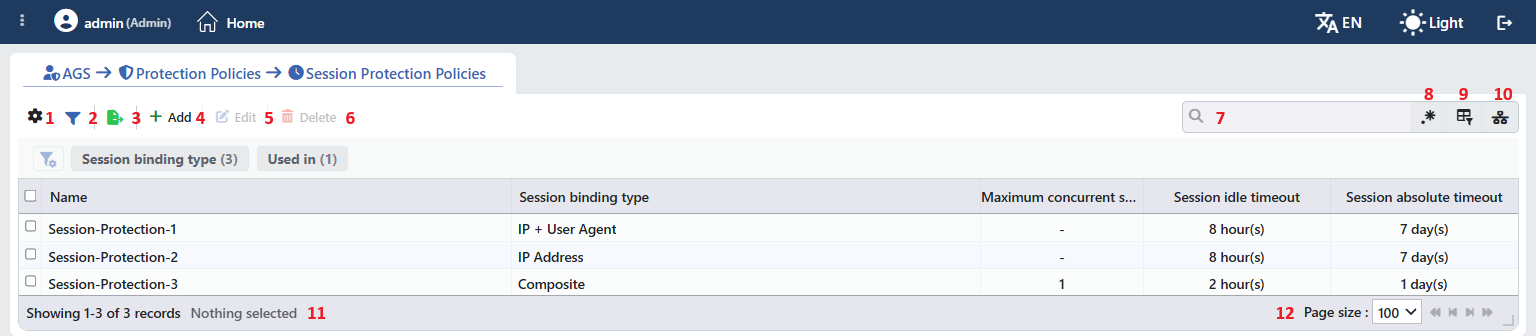 Session Protection Policies Profiles Listing Form
The table opens with the following columns by default:
| Column | Description |
|---|---|
| Name | The name of the profile. |
| Session Binding Type | The client property the session is bound to. |
| Maximum Concurrent Sessions | The concurrent session limit per user; - if there is no limit. |
| Session Idle Timeout | The idle duration (e.g. 8 hour(s)). |
| Session Absolute Timeout | The absolute session duration (e.g. 7 day(s)). |
There is no column that is hidden by default. The table is not sorted when it opens; when a column header is clicked, first a descending and then an ascending sort is applied, and on the third click the sort is removed.
The items in the toolbar are arranged from left to right in the following order; the last two items (Page Information and Page Size) are located in the information strip below the table.
Columns
Which columns are shown in the table is selected; all five of the columns come on. In the same panel the columns are reordered by dragging and the alignment is selected per column; the row height is fitted to the page with the Fit rows to the page button and the column layout is returned to the default with the Reset button. When the width badge next to a manually widened column is clicked, the column returns to the automatic width.
Filter
The Filter button is used to filter the profiles shown in the list according to certain criteria. There are two cards in the filter strip; the number next to the card name shows how many different values are found for that card in the profiles in the list:
| Card | What it filters |
|---|---|
| Session Binding Type | By the binding type. |
| Used in | The vServices that use the profiles and the Unused Entries value, which lists the profiles that are not used anywhere. |
Export
The table is exported as Excel, CSV or PDF by clicking the Export button. In the window that opens, the Filename, Format and Data Source, together with the Columns to be exported, are determined; the remaining fields are displayed according to the format: CSV Separator for CSV, Excel Sheet Name for Excel, and Page Orientation and Page Size for PDF.
Add
By clicking the Add button, the form for creating a new profile opens in the Add tab.
Edit
By clicking the Edit button, the edit form of the selected profile opens in the Edit tab. The button becomes enabled only when a single profile is selected.
The edit form is the same as the add form; all the fields including the name are changed and the button at the bottom of the form carries the name Edit. The change is saved without asking for confirmation and the configuration of the vServices that use the profile is applied again.
Delete
When one or more profiles are selected and the Delete button is clicked, the related profiles are deleted. Before deleting, the "Are you sure?" confirmation is asked for.
WARNING
A profile that is in use can also be deleted and the confirmation window does not show the usage locations.
The Session Protection Policy reference is not cleared automatically on the vServices that use the profile; since the policy cannot be found, the vService configuration is produced without binding and with a 1 hour idle duration. The same result occurs when no policy is selected at all on the vService; in this case the No session protection policy selected — the default behaviour applies warning is displayed on the settings canvas. For the concurrent limit and the absolute duration the default of the access engine applies. When the AGS settings of the vService are opened again, the invalid selection is cleared and another policy must be selected. The delete operation is written to the user operation record.
Search
Used to search all information in the table.
RegExp Search
Used to search all the information in the table with a regular expression (RegExp). While the usage filter is active, this button is hidden.
Column Based Search
Used to perform a column-based search on the information in the table.
Usage Filter
Used to filter to which vServices the profiles are bound. While the filter is active, a selector takes the place of the search box; when the icon is clicked again, the search box returns.
Page Information
Contains information about the total number of defined profiles and the number of profiles displayed in the list: Showing N-M of T records and the number of selected profiles (N selected, or Nothing selected when there is no selection).
Page Size
The maximum number of profiles to be displayed on the page is selected. On this screen the default is 100; the options are 5, 10, 20, 50, 100, 200, 500 and All.
Right-Click Menu
When a row is right-clicked, a menu with the profile's name in its title opens. Both operations in the menu apply only to the right-clicked profile; a selection made in the list does not affect the menu.
| Operation | What it does |
|---|---|
| Edit | Opens the editing form of the profile in the Edit tab; it is the same as the form opened by the Edit button in the toolbar. |
| Delete | Deletes the right-clicked profile; the same confirmation question as the deletion in the toolbar is displayed. |
Preview of the Selected Profile
When a row in the list is clicked, the preview of the profile opens on the right of the screen; when the selected row is clicked again, the panel closes. The header contains the clock icon, the name of the profile and the Session Protection Policy subtitle, and the single operation is at the top right.
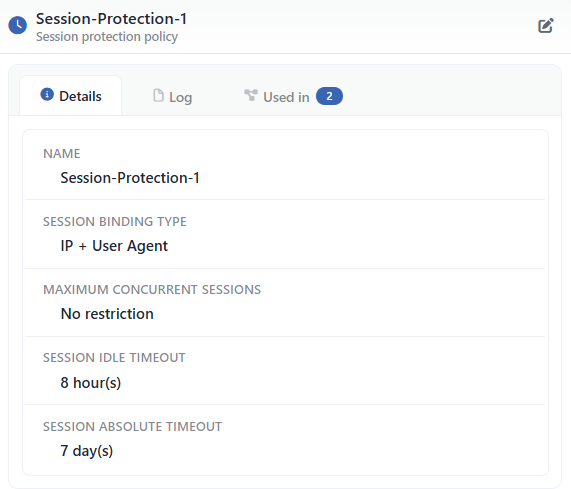 Preview of the Selected Profile
| Operation | What it does |
|---|---|
| Edit | Opens the editing form of the profile in the Edit tab. |
There are three tabs in the panel; Used in is displayed only if the profile is used on at least one vService:
Details
Lists the settings of the profile row by row (the table below).
Log
Lists the user operations on the profile (adding, editing, deleting) as a timeline.
Used in
Lists the vServices that use the profile. The badge next to the tab name shows the usage count.
The rows in the Details tab are as follows, in order:
| Row | Description | Visibility condition |
|---|---|---|
| Name | The name of the profile. | Always |
| Session Binding Type | The binding type. | Always |
| Session Binding Components | The component smart variables, row by row. | Composite |
| Maximum Concurrent Sessions | A number or No Restriction. | Always |
| Action When Max Sessions Exceeded | The action applied when the limit is exceeded. | If a limit is defined |
| Whitelist Conditions | The condition tree (read-only). | If a condition is defined |
| Session Idle Timeout | The duration and the unit (e.g. 8 hour(s)). | Always |
| Session Absolute Timeout | The duration and the unit (e.g. 7 day(s)). | Always |
Profile Add Form
A new Session Protection Policies profile is added on the TR7 device by following the AGS → Protection Policies → Session Protection Policies → Add steps.
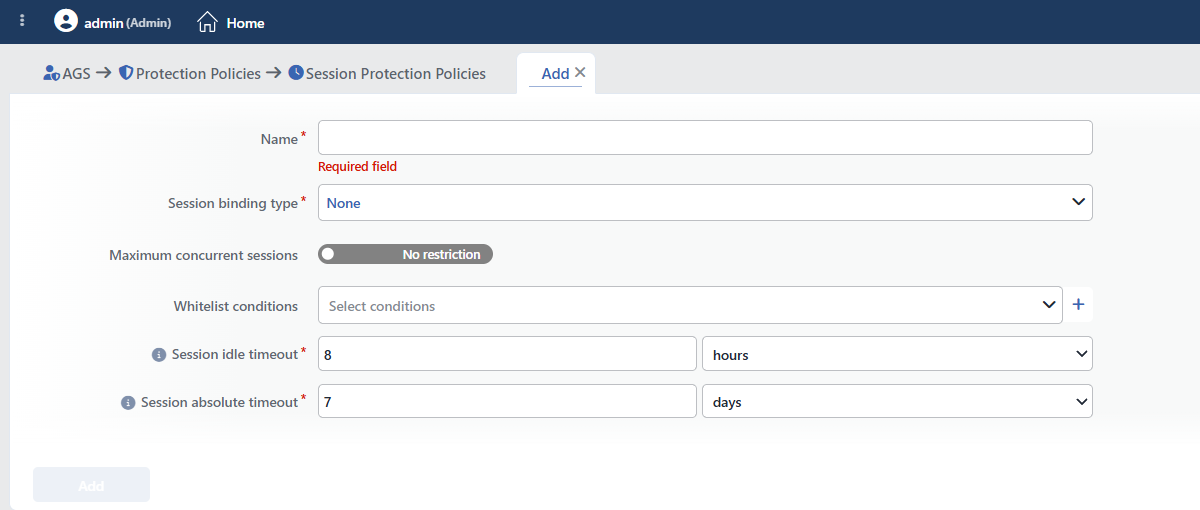 Session Protection Policies Profile Add Form
INFO
Name Required
The name of the profile; it identifies the profile in the selection in the vService settings and in the logs. The name must be unique among the user profiles; a second profile with the same name is not saved and the Name is used warning is displayed. When it is left empty, the Required field warning is displayed. The name is at most 64 characters.
INFO
Session Binding Type Required Default: None
The client property the session is bound to is selected:
| Option | Meaning |
|---|---|
| None | No binding is performed; the session is recognized only by the cookie. It is suitable for the clients whose address changes frequently, it provides no protection against cookie theft. |
| IP Address | The session is bound to the source IP address of the client; when the cookie is used from another address, the session is considered invalid. |
| IP + User Agent | The source IP address and the User-Agent header are bound together; a use made from the same address with a different browser is rejected as well. |
| Composite | The combination of the Smart Variables values selected in the Session Binding Components field is bound. |
Session Binding Components Required (Composite)
Displayed only in the Composite type. An HTTP request Smart Variables variable is selected on each row (the source address, the request headers and so on); the rows do not repeat and at least one row is present. A new row is added with the first variable that is not used in the list yet (with %SRCIP if none is left).
INFO
Maximum Concurrent Sessions Default: No restriction
The number of sessions a user can keep open at the same time. While the switch is in the No Restriction position, no limit is applied; when it is moved to the Restrict position, a number field is displayed next to it and a value between 1 and 100 is entered.
 While Maximum Concurrent Sessions Is On
Action When Max Sessions Exceeded Required Default: Deny New Session
Displayed only in the Restrict position; the action to be applied when the limit is exceeded is selected:
| Option | Meaning |
|---|---|
| Deny New Session | The new login is rejected; the open sessions are preserved. |
| Logout Oldest Session | The oldest session is closed and the new session is opened. |
| Logout All Sessions | All the open sessions of the user are closed. |
INFO
Whitelist Conditions
The requests to be exempted from the binding check; the conditions defined on the Conditions screen are selected from the Select Conditions selector or a new condition is created with the + icon next to it. Since the check runs at the request stage, HTTP request conditions must be selected; response stage conditions can also be selected, but they produce no result. The matching requests are not passed through the session binding check; when it is left empty, all the requests are checked.
INFO
Session Idle Timeout Required Default: 8 hours
A session that receives no request during this duration ends; a value and a unit (minutes, hours or days) are entered, and a duration between 5 minutes and 7 days is accepted.
INFO
Session Absolute Timeout Required Default: 7 days
The longest lifetime of the session independently of the activity; a value and a unit (hours or days) are entered, and a duration between 1 hour and 365 days is accepted.
INFO
Add
The profile is added by clicking the Add button; the tab closes and the profile is displayed in the list.
Operating Mechanism
INFO
- Distribution. The policies are written into the vService configuration and transferred to the AGS access engine; after a change the configuration is applied again.
- The binding. In the IP Address type the source address and in the IP + User Agent type the source address and the
User-Agentheader are hashed together and the session signature is produced; in the Composite type the signature is checked after the component variables are evaluated and on a request on which it does not hold the session is put into the re-verification state. When the binding type or the policy is changed, the sessions opened with the previous signature fall into re-verification as well. - The whitelist. An exemption mark is added to the requests that match Whitelist Conditions and these requests are not passed through the binding check; the concurrent session limit is not applied to these requests either.
- The timeout. The duration of a session on which activity is seen is renewed by the Session Idle Timeout at most once a minute and cannot exceed the remaining absolute duration; Session Absolute Timeout is checked on every request and Maximum Concurrent Sessions is applied in the access engine.
- Cluster. The profiles are synchronized between the devices with the LB configuration.
- Logs. Adding, editing and deleting are monitored on the User Logs screen as the session protection policy object.
Scope and Limits
INFO
- Permission. The AGS screens depend on the Load Balancer permission area; for a user who does not have the permission the You don't have access to this page card is displayed instead of the page.
- The name is unique. A second user profile carrying the same name is not saved; the names of the built-in profiles do not enter this check.
- License. The screen requires the AGS license.
- The built-in profiles are not listed, they are not edited or deleted from this screen.
- A single policy per vService. A vService uses only one session protection policy.
- The whitelist conditions are evaluated at the request stage; response stage conditions produce no result.
- Deleting does not perform a reference check; a profile in use is deleted as well.
Usage Locations
| Usage location | Field | Purpose |
|---|---|---|
| A vService with AGS enabled → AGS Management | Session Protection Policy | The binding, concurrency and timeout rules of the vService sessions; Standard Session Protection on a new vService, it can be left empty |
| A vService with AGS enabled → the Sessions tab | The open session list | The monitoring and the termination of the sessions opened under the policy |
