
Smarter by Design.Simpler for Business
AI Learning Settings
What Is AI Learning Settings?
AI Learning Settings gathers in a single editing window the settings that determine how the learning engine will work: in which mode the engine will run, looking at which history it will learn, how often it will run in the automatic mode, and which countries and network type groups will be counted as our own infrastructure are defined from here.
The settings are applied across the vService: the learning of the three protections is also fed from the same mode, the same history and the same trust declaration. The window is opened from two places and both of them bring the same screen:
| Entry point | Its place |
|---|---|
| AI Learning Settings → | The link at the bottom right corner of the upper band of Learning. |
| The How It Learns card | When anywhere on the card is clicked, the same window opens; the pencil icon at the bottom right corner states this. |
The name of the link and the name of the window are different
The link on the strip says AI Learning Settings; the title of the window that opens, on the other hand, is Edit - Smart Advisor. The two are the same screen: Smart Advisor is the name of the learning engine inside the product and at the same time it is the name of one of the modes.
 The Learning Strip - The AI Learning Settings Link
The AI Learning Settings Edit Screen
- The Bot/DDoS Management tab is opened.
- The AI Learning Settings → link at the bottom right corner of the learning strip is clicked; the edit window titled Edit - Smart Advisor opens.
- The fields below are edited and confirmed with the
Editbutton. The selected mode determines which fields will be seen in the form; when the mode is changed, the form is rearranged immediately.
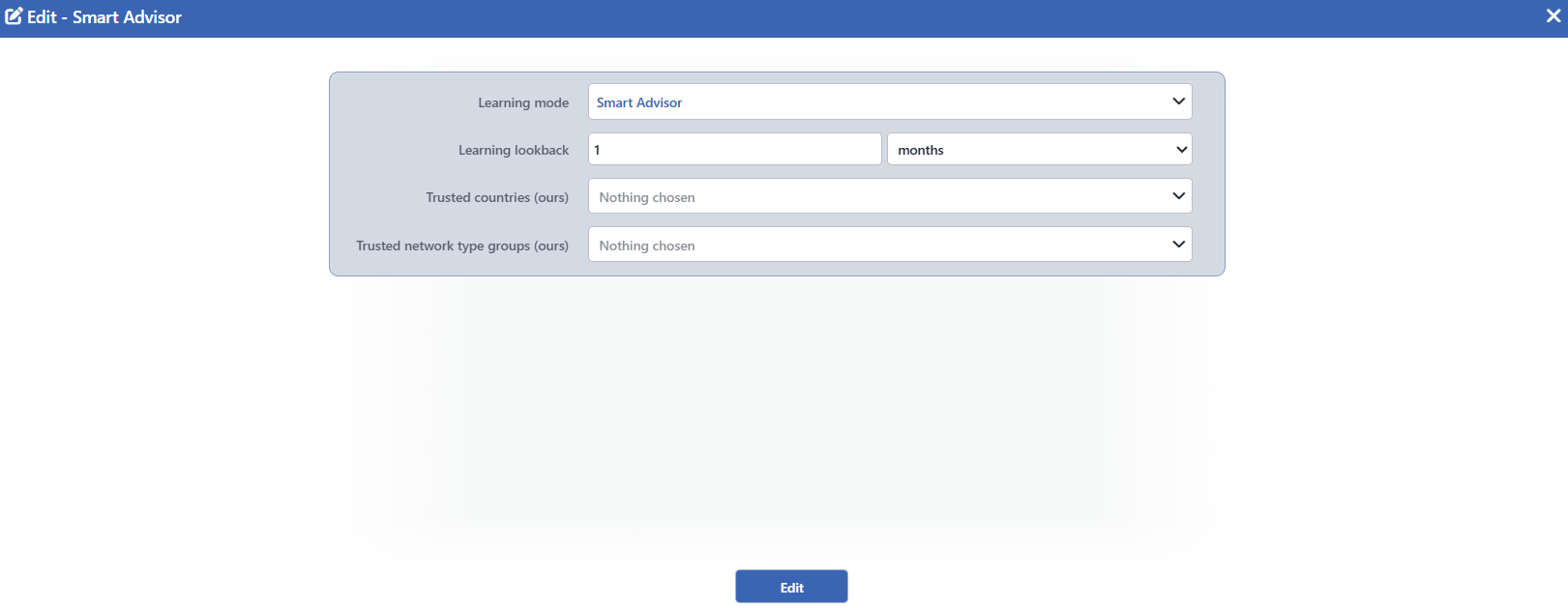 The AI Learning Settings Edit Screen
Two fields exist only in the Automatic mode
The screenshot above is in the Smart Advisor mode and for this reason it shows four fields. The Tune Limits Only and Learning Interval fields are not in the form; these two fields appear only when Learning Mode is selected as Automatic. When Off is selected, on the other hand, all the fields other than Learning Mode disappear and a single row remains in the form. The full list: The Visibility of the Fields According to the Mode.
INFO
Learning Mode Default: Smart Advisor
The working form of the engine is selected; its default value is Smart Advisor. This field also determines the visibility of the other fields in the window.
| Option | Behavior |
|---|---|
| Off | No periodic learning is made and no recommendation notification is produced. |
| Smart Advisor | The engine learns regularly and submits every change for approval; it applies nothing by itself. |
| Automatic | The engine applies what it has learned itself in the defined period. |
If the field has not been written at all, the effective value is Smart Advisor: every vService whose protection has been enabled starts to learn without the setting being entered.
The selection also determines the rest of the form: when Off is selected, no other field remains in the form; when Smart Advisor is selected, the history and the two trust lists are added; and when Automatic is selected, Tune Limits Only and Learning Interval are added to these as well.
INFO
Learning Lookback Default: 1 months
Visibility: It is seen in the Smart Advisor and Automatic modes, and it is removed from the form in the Off mode.
Looking at which history the engine will learn is defined. The value is entered with a number and unit pair; days, weeks or months can be selected as the unit. Its default value is 1 months; at least 7 days and at most 90 days can be defined. A month unit is counted as 30 days.
The history affects not only how much data will be looked at but also when a recommendation will be counted as mature: the maturity threshold is the smaller of the selected history and 14 days.
INFO
Trusted Countries (ours) Default: Empty
Visibility: It is seen in the Smart Advisor and Automatic modes, and it is removed from the form in the Off mode.
The countries from which the traffic of this vService comes legitimately are checked: our own infrastructure, our business partners and our monitoring points. Besides the countries, the list also carries the Local Networks entry at the beginning. More than one selection can be made; the field is empty by default.
The countries checked do not change the numbers learned, they only shape the rule structure: these countries are excluded from the calibration and from the race for winning a row, an allow row is placed at the beginning of the rule list produced for them, and while the engine is setting up the rule list, it adds these countries to the exemption list of the block.
INFO
Trusted Network Type Groups (ours) Default: Empty
Visibility: It is seen in the Smart Advisor and Automatic modes, and it is removed from the form in the Off mode.
The same declaration is made for the network type groups: groups such as the hosting provider on which our own servers are located are checked here. The options come from the network type taxonomy; the field is empty by default.
For the groups checked, the suspicious network warning is muted, the groups are excluded from the recommendation production and they are added to the exemption list of the block while the rule list is being set up. This field does not touch the numbers learned either.
INFO
Tune Limits Only Default: Off
Visibility: ⚠️ It is seen ONLY in the Automatic mode. It is not located in the form at all in the Off and Smart Advisor modes.
It is the brake of the automatic mode; it is off by default. While it is off, the engine works with full authority: it adjusts the thresholds, writes the rule rows that mature and enables the protections that are ready. When it is checked, it touches only the numeric settings; writing rules and enabling protections remain as recommendations waiting for approval.
INFO
Learning Interval Default: Daily
Visibility: ⚠️ It is seen ONLY in the Automatic mode. It is not located in the form at all in the Off and Smart Advisor modes; in these modes a period setting is already meaningless, because the Smart Advisor evaluation runs fixedly every hour.
How often the evaluation will be made in the automatic mode is selected; its default value is Daily.
| Option | Meaning |
|---|---|
| Hourly (observe/debug) | Once an hour. As is also understood from its label, it has been defined for observation and debugging. |
| Every 6 hours | Once every six hours. |
| Every 12 hours | Once every twelve hours. |
| Daily | Once a day. |
| Weekly | Once a week. |
The evaluations are aligned to the clock wall and a fixed shift is added onto the selected moment: in the daily selection the evaluation runs five minutes past midnight, and in the weekly selection on Monday night. Whatever period is selected, it is not run more often than once an hour. In a cluster installation only the first device carries out the periodic evaluation and the application.
INFO
Edit
The changes in the form are saved by clicking the Edit button. There is no additional confirmation window or deployment (deploy) step; the change becomes valid the moment it is written. The operation is written to the user log with a change summary.
The Visibility of the Fields According to the Mode
The window shows one, four or six fields according to the selected mode. The written values of the hidden fields are not deleted; when the mode is taken back, the fields come back with the same values.
| Field | Off | Smart Advisor | Automatic |
|---|---|---|---|
| Learning Mode | ✅ | ✅ | ✅ |
| Learning Lookback | - | ✅ | ✅ |
| Trusted Countries (ours) | - | ✅ | ✅ |
| Trusted Network Type Groups (ours) | - | ✅ | ✅ |
| Tune Limits Only | - | - | ✅ |
| Learning Interval | - | - | ✅ |
| The number of fields seen | 1 | 4 | 6 |
Some changes invalidate the waiting result
Learning Mode, Learning Lookback and the two trusted lists are the inputs that produce the result of the engine: when one of them changes, the result standing on the screen becomes invalid and, until the new evaluation is completed, the What It Concluded card writes Preparing suggestions…. Tune Limits Only and Learning Interval do not invalidate the result; they only change what will be done afterwards.
Mute Suggestion Notifications is not in this window
The Mute Suggestion Notifications switch that mutes the recommendation notifications is a notification setting and is located on the Notifications card. It is meaningful only in the Smart Advisor mode and when it is turned on, not only is no notification produced, but the periodic learning evaluation is not run at all either.
Scope and Limits
INFO
- The settings are applied across the vService. The learning of the three protections is fed from a single mode, a single history and a single trust declaration; there is no separate learning setting per protection.
- The trust declarations do not touch the numbers. The Trusted lists only shape the rule structure: exclusion from the calibration, an allow row and the exemption list. The learned values of the existing rows are not affected by these lists.
- The learning history is rounded on the engine side. The period selected is brought closer to the ready windows in which the engine works; the selections above 45 days correspond to the same window.
- The window opens only on the users that have edit permission. On a user that does not have the permission, although the link and the card appear clickable, the window does not open. Saving, on the other hand, requires write permission in the Load Balancer area.
- The change becomes valid immediately. There is no separate confirmation or deployment step; after the save, the strip makes one more evaluation with the new settings.
