
Smarter by Design.Simpler for Business
L4 DDoS Protection Mode
What Is L4 DDoS Protection Mode?
L4 DDoS Protection Mode is the card at the very top of the L4 DDoS Management screen and does two jobs at once: it summarizes the protection status of the route table in a single word, and in its body it gathers in three boxes the settings that are read jointly by all the rules: the blacklist, the quarantine duration and quarantine log forwarding, the exemption list and the trust in one's own servers.
The word the card chooses is not a preference but a measurement. The protection rules in the route table are gone through one by one, the mode of each of them is read and the result is reduced to one of three words.
The card has no title of its own: the title seat is filled by the status word and the subtitle seat by the definition sentence of the module. The name on this page is not a label the card carries on the screen but its name within the section.
There is no mode selected on this screen
Unlike on the WAF Mode screen, here there is no working mode selected manually. The Active, Monitoring or Not Active text on the card is not a setting but a reading derived from the mode of the protection rules. The modes are changed not from this card but from every rule's own editing window.
The card has no pencil icon of its own either: there is no field to be edited from here. The editing belongs to the boxes inside the card.
Active
At least one of the evaluated rules is applying enforcement
The card is displayed green and no explanation sentence is written below it: a second "everything is fine" line is not added below a green status word.
Monitoring
"No rule is blocking — rules are only monitoring."
No rule is applying enforcement, at least one is monitoring. The card is displayed amber. The attacks are measured and recorded, but no packet is dropped.
Not Active
"This route table has no active DDoS protection."
All the evaluated rules are disabled. The card is displayed red: this state is deliberately presented not as a notification of being off but as a warning.
The Status Card in L4 DDoS Management
The card is the first element of the screen. On its left there are the icon of the status, its name and the number of evaluated rules; below them the definition sentence that tells what the module does; at its top right the mode distribution badges. In the body of the card there are three boxes.
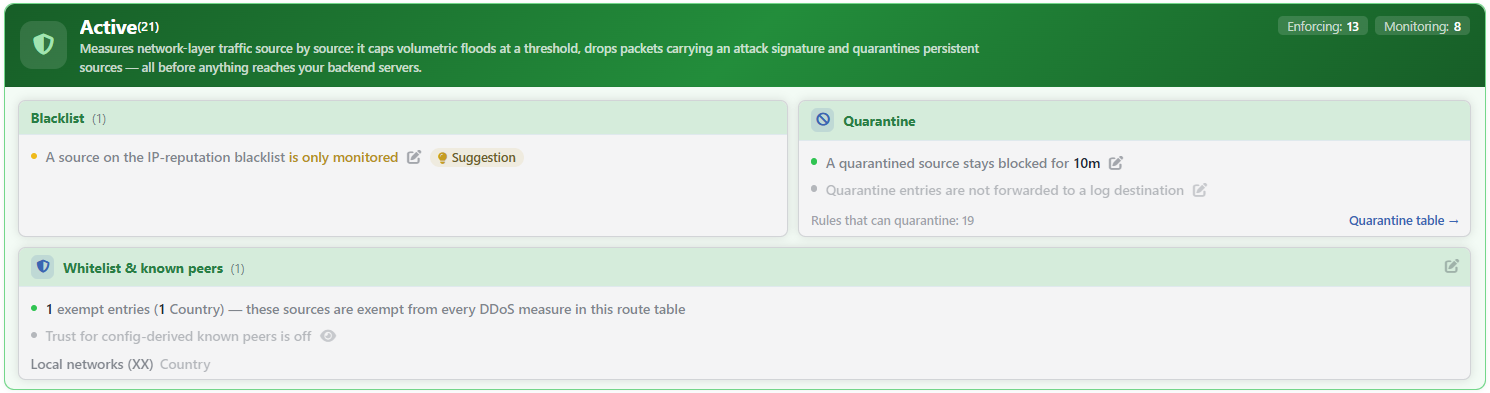 L4 DDoS Protection Mode Card
| Element | Meaning |
|---|---|
| The status icon and name | The reading derived from the mode of the rules: Active with the shield icon, Monitoring with the eye icon and Not Active with the warning triangle. |
| The number | It is written right next to the status name in a small font (Active(21)). It is the number of rules that enter the evaluation; it shows not how many rules are on but from how many rules the status is calculated. |
| The definition sentence | The fixed text that summarizes what the module does. It speaks of measuring source by source, of cutting the floods above the threshold, of dropping the packets that carry an attack signature and of taking the persistent sources into quarantine; it emphasizes that all of them are done before reaching the Backend Services. |
| The status sentence | The one-line warning written in the body of the card only in the Monitoring and Not Active states. It is not displayed at all in the Active state. |
| The distribution badges | The mode distribution of the rules: the Enforcing (applying enforcement), Monitoring (monitoring) and Off (disabled) numbers. A badge whose number is zero is not displayed at all; the total of the three badges is always equal to the number next to the status name. |
The Enforcing badge counts two modes together
The editing window of a rule offers four values: Disabled, Monitor, Block and Quarantine. The badges, on the other hand, are three; the rules in Block and in Quarantine mode are both gathered under Enforcing. The reason for this is that both of them actually intervene in the traffic: one drops the packet directly and the other takes the source into quarantine. The rules in the Disabled state are also counted in the badge under the Off heading.
The fourth value is not present in every rule: Quarantine is offered only in the rules that can send to quarantine. The card's own Blacklist box is also outside this rule and is limited to three values.
Which rule is in which mode is read not from the badges but from the rule's row in its own band.
How Is the Status Calculated?
The status is derived with a single rule:
| Condition | Result |
|---|---|
| At least one of the evaluated rules is in Block or Quarantine mode | Active |
| None of them is applying enforcement, at least one is in Monitor mode | Monitoring |
| All the evaluated rules are disabled | Not Active |
The rule is deliberately generous: a single rule applying enforcement is enough to move the card to Active. This means that the "Active" text shows not that all the protections are working but that there is at least one rule that actually intervenes in the traffic.
The Rules That Enter the Evaluation
Not all the settings in the route table enter this calculation. In order for a setting to be taken into the jury, it must meet two conditions at once: it must be producing its own measurement and it must be using the enforcement levels (Off → Monitor → Block → Quarantine).
| What stays outside | Why |
|---|---|
| Quarantine Time, Quarantine Log Forwarding, DDoS Whitelist and Trust Known Peers | These are not a defense but the common conditions under which the other rules are read. They have no measurements of their own either. |
| SYN Cookies and Source Routing | They have an on/off structure, they do not use the mode levels. |
| Allow ICMP | It is not a blocking but a permission switch: its value lets the traffic pass, it does not stop it. |
| Zombie TCP and Smurf: TCP Reset Limit | One is a connection timeout setting and the other a rate-limited pass-through rule; they have no drop paths. |
The remaining 18 rules determine the calculation. Since the three rules that protect the device's own management ports are displayed only in the DEFAULT route table of the main device, there this number becomes 21.
The number being small is not a deficiency
It is normal for different numbers to be read in two route tables of the same device: the management access rules are seen only in the DEFAULT route table. The number shows all the rules that can be evaluated in that route table; how many of them are on is told by the badges.
The catalog defaults are in force from day one
The defaults defined in the catalog are written to the table while the route table is being created and in the configuration check at device startup, and they are in force from that moment on. For this reason the card does not read Not Active in a route table that has never been touched: the catalog default of the signature class rules is, in the great majority, blocking and a single enforcement rule is enough to move the card to the Active state.
A rule departs from this default in one of three ways:
- the rule's own editing window is opened, another mode is selected and it is saved,
- a recommendation the learning engine has produced for that rule is applied,
- the returning of all the L4 DDoS settings to the default operation on the Learning strip is run; this operation writes all the fields except Quarantine Log Forwarding back to the catalog value.
When a rule is saved, all the L4 DDoS fields of the route table are written again; the fields whose value remains undefined are filled with the catalog default.
The Boxes on the Card
The three boxes in the body of the card carry the settings the rules read jointly. These are not protection layers; each of them affects all the rules in a different way:
- Blacklist is a box with a single rule, but its rule is different from the others: it uses as its source not a threshold but the reputation list kept device-wide.
- Quarantine is not an enforcement but the duration of the enforcement: all the rules that can send to quarantine share the same duration. The box also carries the forwarding of the quarantine entries to log destinations.
- Whitelist & Known Peers is an exemption list: the sources here stay outside the L4 DDoS measurements in the route table. The only exception is the blacklist rule; the country entries do not bypass it and exempt sources continue to be seen in its counter.
The boxes are always arranged in this order.
| Box | Its content | Editing gate |
|---|---|---|
| Blacklist | The mode applied to the sources in the IP reputation blacklist. | The pencil icon of the row |
| Quarantine | For how long a source taken into quarantine will be held and the log destinations to which the quarantine entries will be sent. In its lower band there are the number of rules that can send to quarantine and the Quarantine table → link that goes to the live table. | The own pencil icon of each of the two rows |
| Whitelist & Known Peers | The exemption entries and the trust in one's own servers derived from the configuration. In its header there is the number of entries and in its body the entries themselves. | The pencil icon at the top right of the box |
The learning badge appears only in the Blacklist row
The recommendations of the learning engine are attached to the rule rows as a badge. Since of the three boxes on the card only Blacklist carries a protection rule, the badge is displayed only there. Since the quarantine duration and the exemption list are not protection rules, they do not produce recommendations.
The place of the pencil icon changes according to the box
In the Blacklist and Quarantine boxes the editing belongs to the row itself: the pencil is right of the sentence and every row opens its own window.
In the Whitelist & Known Peers box, on the other hand, the pencil is at the top right of the box. The reason for this is that the two rows (the exemption list and the peer trust) are two faces of a single decision: both of them open to the same editor, so the rows do not have their own pencils.
The pencil icons are displayed only for the users who have change authorization in the Network area, and none of them is displayed while the network configuration is locked.
The warning and the bulk operations are not on this card
The warning that the exemption list is empty, the operation that turns on the trust in one's own servers with a single click and the operation that returns all the L4 DDoS settings to the default are not on this card. All three are on the Learning strip right below the card, which carries the AI Learning title in the interface, and none of them is displayed until the learning engine has run at least once.
The returning to the default operation preserves the learning settings and the quarantine log forwarding selection, but it also resets the exemption list.
Scope and Limits
INFO
- The card is not a setting but a reading. The status word is calculated from the mode of the rules; the card has no pencil icon, mode selector or save operation of its own.
- The number of rules that enter the evaluation changes according to the route table: the management access rules are seen only in the DEFAULT table of the main device.
- The total of the badges is always equal to the number in the superscript. Since a badge that is zero is not displayed, a badge being absent is not an error.
- The titles of the boxes are the box names. The upper headings that group them are not displayed at all in the interface; in the body of the card only three boxes are seen.
- The frame of the card and of the boxes never goes dim. A row whose content is empty is only displayed pale: while the exemption list is empty, while the trust in one's own servers is off and while no quarantine log forwarding is defined, the related rows look dim.
- Editing requires change authorization in the Network area. With monitoring-only authorization the card and the boxes are displayed and the pencil icons are not displayed. While the network configuration is locked during synchronization, editing is also disabled.
Subpages
Blacklist
The mode applied to the sources in the IP reputation blacklist, the source of the list and its relation to the exemption.
→
Quarantine
The quarantine duration, the rules that can send to quarantine and the ways out of quarantine.
→
Whitelist & Known Peers
The exemption entries, the local network default, the trust in one's own servers and the effect area of the exemption.
→
