
Smarter by Design.Simpler for Business
URL Normalization
What Is the URL Normalization Action?
The URL Normalization action converts the URLs in the incoming HTTP requests into a standard format. This action provides security, caching and routing consistency by normalizing the URLs that belong to the same resource but come in different formats.
This action works only at the request stage and can be used on HTTP vServices.
Before normalization (different spellings)
/path//to//page/path/./to/../to/page
/path/to/%70age
↓ normalize
After normalization (a single consistent form)
/path/to/pageWhy Is URL Normalization Necessary?
The URLs that point to the same resource can be written in different ways. This situation can lead to security vulnerabilities and caching problems.
Example - Different URLs for the Same Resource:
| URL | Its Normalized Form |
|---|---|
/path/to/page | /path/to/page |
/path//to//page | /path/to/page |
/path/./to/../to/page | /path/to/page |
/path/to/%70age | /path/to/page |
Without URL normalization, these URLs are processed as different resources and:
- The Backend Service receives the same resource with different addresses.
- It can cause cache poisoning and unnecessary cache entries.
- The address-based rules on the Backend Service can give inconsistent results.
The Importance of the URL Normalization Action
URL normalization is an important component for the consistency of the addresses forwarded to the Backend Service.
The URL Normalization action;
- simplifies the directory references (
/./,/../) before forwarding them to the Backend Service, - decodes the unnecessary percent encoding of letters and digits,
- reduces the addresses that contain a double slash (
//) to a single form, - provides cache consistency,
- forwards consistent URLs to the Backend Service applications.
For this reason, the URL Normalization action is an important tool for secure and consistent traffic management.
Supported vService Types
HTTP
L7 TCP
Network
Execution Timing
On Request
On Response
How to Add?
A new URL Normalization Action can be added through the TR7 web management interface by following the steps below:
- The Configuration Menu is opened by clicking the TR7 logo at the bottom left.
- The Load Balancer → Actions → Add steps are followed.
- A unique and descriptive name is entered for the action.
- URL Normalization is selected as Action Type.
- The related configurations of the action are made.
- In the Conditions tab, the condition/conditions under which the action takes effect are determined.
- The action is added by clicking the
Addbutton.
URL Normalization Action Add Form
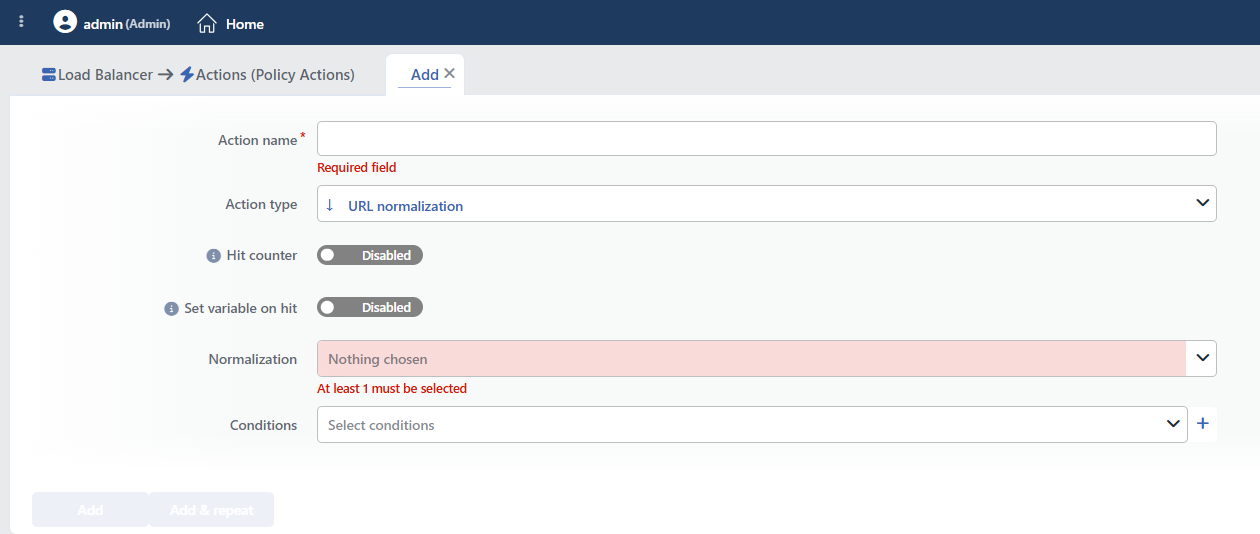 URL Normalization Action Add Form
INFO
Hit Counter Default: Off
Hit Counter counts every run of the action (it is evaluated together with the action's own condition; the count is not lost even in terminating actions such as Deny). Action-based rates and totals are displayed in the Action Hits tab of the vService dashboard and on the live statistics screen; they do not appear as a separate column in the lists. The counter is cumulative; there is no interface for resetting it manually: it starts from zero when the set of counted actions changes or when the vService is reloaded, while the history is preserved on the dashboard as a rate (hit/s).
When only the two RFC options that work independently of the condition are marked, no rule line is written to the configuration, so the counter does not work either.
INFO
Set Variable on Hit
A variable name whose value is assigned each time the action runs can be entered (optional; empty by default). The name can consist of letters, digits and underscores (at most 32 characters). When the action is triggered, the variable is set to 1, and chained behaviors can be built by reading it with the %TR7VAR(name) smart variable in other conditions and actions on the same vService.
INFO
Normalization
The normalization options to be applied are determined. More than one option can be selected at the same time; marking at least one option is required.
The selection order affects the result
The normalization steps are applied in the order in which the labels in the Normalization field are displayed. The newly marked option is added to the end of the list; the labels can be reordered by dragging and dropping. For example, whether the Decode percent-encoded characters option will run before or after the Re-evaluate path in accordance with two dot (..) option is determined by this order.
The saved order is displayed in the same way on the Edit screen and can be changed. The Accept HTTP/1.0 GET/HEAD/DELETE request with payload (Condition independent) and Accept headers not compatible with RFC7230 HTTP/0.9,HTTP/1.0 (Condition independent) options are not affected by this ordering; they are applied as a general setting independent of the condition.
Percent decoding covers only the safe characters
The Decode percent-encoded characters option decodes only the percent encoding of letters, digits and the -, ., _, ~ characters. Separator characters such as %2F (slash) and %3F (question mark) are not decoded; %2E (dot), on the other hand, is decoded. Since %25 is not decoded, multi-layer encoding (%252F) is not opened at all.
The requests that contain broken percent encoding are not rejected; the related part is left as it is.
Options:
| Option | Description | Example |
|---|---|---|
| Decode percent-encoded characters | Decodes the percent encoding of letters, digits and the -, ., _, ~ characters | %61dmin → admin |
| Make percent-encoded characters uppercase | Converts the percent encoding to uppercase | %2f → %2F |
| URL Encode # character | Encodes the fragment character | # → %23 |
| Strip # character | Removes the fragment character | /page#section → /page |
| Merge slash characters | Merges the double slashes | /path//to → /path/to |
| Re-evaluate path in accordance with one dot (.) | Removes the single dot directory references | /path/./to → /path/to |
| Re-evaluate path in accordance with two dot (..) | Applies the parent directory references; the /../ segment at the beginning of the path is not removed | /path/../to → /to |
| Sort query parameters by name | Sorts the query parameters alphabetically | ?b=2&a=1 → ?a=1&b=2 |
| Accept HTTP/1.0 GET/HEAD/DELETE request with payload (Condition independent) | Accepts the GET/HEAD/DELETE requests that contain a body | - |
| Accept headers not compatible with RFC7230 HTTP/0.9,HTTP/1.0 (Condition independent) | Accepts the headers that are not compatible with RFC7230 | - |
The Most Common Combinations
Address simplification:
- Merge slash characters
- Re-evaluate path in accordance with one dot (.)
- Re-evaluate path in accordance with two dot (..)
- Decode percent-encoded characters
Cache consistency:
- Sort query parameters by name
- Make percent-encoded characters uppercase
INFO
Conditions
In this field, it is defined under which condition or conditions the related action takes effect.
By adding one or more conditions, the behavior can be applied in a targeted and controlled way with the and/or structure.
Detailed information about conditions is on the Conditions page.
WARNING
If no condition is defined in this field, the related action runs unconditionally (Always). In this case, the action is applied to all traffic coming to the related vService.
In live environments, using an action without defining a condition can lead to unexpected situations (service outages). For this reason, it is recommended that at least one condition always be defined when an action is created.
INFO
Form Buttons
Add
The action adding process is completed by clicking the Add button.
Add & Repeat
With the Add & Repeat button, the action adding process is completed, and another new action can be added with different configurations without leaving the related window.
 Action Added
RFC Compatibility Options (Backward Compatibility)
Two options are designed for compatibility with old or non-standard clients.
Accept HTTP/1.0 GET/HEAD/DELETE Request With Payload
- The HTTP/1.0 specification does not allow a body in the GET, HEAD and DELETE methods.
- Some old clients do not obey this rule.
- This option makes it possible for such requests to be accepted.
Accept Headers not Compatible with RFC7230 HTTP/0.9, HTTP/1.0
- RFC7230 defines the HTTP header format.
- Some old systems send headers that do not comply with this standard.
- This option makes it possible for such headers to be accepted.
WARNING
These options work independently of the condition and affect all the vService traffic; they are used only in the necessary situations.
Normalization runs AFTER the security checks
The correction produced by this action is applied at the end of the request processing flow. This has two important results:
- The WAF inspects the request in its non-normalized (raw) form. This action does not prevent the WAF rules from being bypassed; it cannot be used as a security layer against bypass attempts made with encoding or directory traversal.
- The conditions also read the raw address. Even if they are ordered after this action, the Path and Path + Query conditions evaluate the original form of the request;
/api//adminand/api/adminremain different in terms of the conditions.
The real benefit of the action is that a consistent address is forwarded to the Backend Service and that the cache keys are simplified. Access control and attack detection must be designed with the WAF and the conditions, according to the original form of the address.
Operational and Safe Usage Recommendations
- The basic normalizations are enabled for security. The following options are used together for protection against path traversal and slash manipulation attacks: Merge slashes, Re-evaluate path (.), Re-evaluate path (..).
- Query Sorting for Cache Consistency.
?a=1&b=2and?b=2&a=1can create different cache entries. The Sort query parameters by name option solves this problem. - The compatibility options are used carefully. The RFC compatibility options loosen the security checks; they are turned on only when integration with old systems is needed.
- Do Not Base the Security Check on Normalization. The WAF and the conditions evaluate the raw form of the request; this action does not run before the security rules. Protection against encoding variants must be established separately with the WAF rules and the conditions.
- The Backend Service behavior is tested. It is verified that the URLs are processed correctly by the Backend Service application after the normalization.
Common Usage Scenarios in Live Environments
The examples below show how the related action is applied in the most frequently encountered use cases in real systems. These scenarios are based on practices that are widely preferred in live environments and rest on experience gained in the field.
Scenario 1: Simplifying the Directory References
Problem: By using path traversal techniques (../, ./, //), attackers try to navigate in the directory structure and to access unauthorized files (/etc/passwd, web.config). There are WAF rules, but the attackers bypass the WAF with URL encoding (%2e%2e%2f) and slash manipulation (/admin//..//config).
Solution: With URL normalization, the directory references and the double slashes are simplified and a simplified address is forwarded to the Backend Service.
Configuration:
- Normalization:
- Re-evaluate path in accordance with one dot (.)
- Re-evaluate path in accordance with two dot (..)
- Merge slash characters
- Conditions:
- Unconditional (it is applied to all the traffic)
Result:
- ✅ The directory references → The intermediate
/../and/./segments are simplified; the/../segment at the beginning of the path is not removed. - ✅ A consistent address to the Backend Service →
/images/../../../etc/passwdis forwarded simplified; the path resolution on the application side becomes single. - ⚠️ Security → This simplification is done after the WAF inspection; access blocking must be provided with the WAF rules.
- ✅ Slash manipulation prevention →
/admin//./config→/admin/config(a consistent check).
URL Conversion Examples:
| The Original URL | Normalized | Result |
|---|---|---|
/images/../../../etc/passwd | /../../etc/passwd | A simplified address goes to the Backend Service; the /../ segments at the beginning remain |
/admin//./config | /admin/config | The access control works correctly |
/app/./data/../secrets | /app/secrets | The authorization rule applies |
Scenario 2: Making the Percent Encoding Consistent
Problem: The WAF rules block the /admin path, but the attackers bypass the WAF by using URL encoding (%2Fadmin, %2f%61dmin). Since the Backend Service decodes and processes the encoded URLs, the attacker can access the protected endpoints.
Solution: The percent-encoded characters are decoded and uppercase standardization is applied, so the encoding form in the address forwarded to the Backend Service becomes consistent. The blocking, on the other hand, is established with the WAF rules and the conditions, taking the encoded variants of the address into account as well.
Configuration:
- Normalization:
- Decode percent-encoded characters
- Make percent-encoded characters uppercase
- Conditions:
- Unconditional (it is applied to all the traffic)
Result:
- ⚠️ The scope → The encoding of the separator characters (
%2F) is not decoded with this option; only letters, digits and the-,.,_,~characters are decoded. - ✅ Case normalization →
%2fand%2Fare processed in the same way. - ⚠️ Multi-layer encoding →
%252Fis not decoded with this option.
Encoding Examples:
| The Attempt | Forwarded to the Backend Service |
|---|---|
/%2Fadmin | /%2Fadmin (unchanged) |
/%2f%61dmin | /%2Fadmin |
/%2e%2e/config | /../config |
/admin%2f%2e%2e%2fconfig | /admin%2F..%2Fconfig |
Scenario 3: CDN Cache Hit Rate Optimization
Problem: The same static content is requested with different URL formats (/page?a=1&b=2 vs /page?b=2&a=1, /static//images//logo.png vs /static/images/logo.png). The CDN sees every URL as a different cache key and the cache hit rate stays at 40%. The bandwidth cost is high and the origin server load is excessive.
Solution: The query parameters are sorted alphabetically, the slashes are merged, the fragments are removed and cache key consistency is provided.
Configuration:
- Normalization:
- Sort query parameters by name
- Make percent-encoded characters uppercase
- Merge slash characters
- Strip # character
- Conditions:
Result:
- ✅ An increase in the cache hit rate → It rises from 40% to 85%.
- ✅ Bandwidth saving → The same content is served from a single cache entry.
- ✅ The origin server load decreases → The cache misses decrease by 60%.
- ✅ CDN cost reduction → The bandwidth usage drops by 50%.
Cache Key Standardization:
| The Original Request | The Normalized Cache Key | Result |
|---|---|---|
/page?b=2&a=1 | /page?a=1&b=2 | Cache hit |
/page?a=1&b=2 | /page?a=1&b=2 | Cache hit (the same key) |
/static//images//logo.png | /static/images/logo.png | Cache hit |
/page#section | /page | Cache hit (fragment strip) |
Scenario 4: API Security - Preventing Slash Manipulation
Problem: The REST API endpoints use path-based authorization (/api/v1/users public, /api/v1/admin protected). The attackers try to bypass the authorization rules with slash manipulation (/api//v1//admin, /api/v1/./admin). Some frameworks perceive the non-normalized paths as a different route.
Solution: By applying slash normalization and dot resolution on the API paths, consistent routing and access control are provided.
Configuration:
- Normalization:
- Merge slash characters
- Re-evaluate path in accordance with one dot (.)
- Re-evaluate path in accordance with two dot (..)
- Conditions:
- Path starts with
/api/
- Path starts with
Result:
- ✅ Access control bypass prevention → All the path formats are normalized, a consistent check.
- ✅ Routing consistency → The framework path matching works correctly.
- ✅ Authorization enforcement →
/api//adminand/api/adminmatch the same rule. - ✅ API security hardening → The path manipulation attack vector is closed.
API Path Normalization:
| The Attack Attempt | The Normalized Path | Access Control |
|---|---|---|
/api//v1//admin | /api/v1/admin | 403 Forbidden (protected) |
/api/v1/./admin | /api/v1/admin | 403 Forbidden |
/api/v1/users/../admin | /api/v1/admin | 403 Forbidden |
/api/v1/users | /api/v1/users | 200 OK (public) |
Scenario 5: Legacy ERP System Compatibility
Problem: The old ERP system (SAP R/3 v4.6) sends a body in the HTTP/1.0 GET requests and uses custom headers that are not compliant with RFC7230. TR7 rejects these requests with a 400 Bad Request because of the RFC violation. The ERP system cannot be updated and the integration does not work.
Solution: On this vService, the RFC compatibility checks are loosened and the non-standard requests are accepted.
Configuration:
- Normalization:
- Accept HTTP/1.0 GET/HEAD/DELETE request with payload (Condition independent)
- Accept headers not compatible with RFC7230 HTTP/0.9,HTTP/1.0 (Condition independent)
- Conditions: No condition is defined (these two options work independently of the condition)
Result:
- ✅ Legacy system compatibility → The ERP requests are accepted, the integration works.
- ✅ No application change is needed → The ERP system remains as it is.
- ⚠️ The scope → The loosening cannot be limited with a condition; even if a source IP condition is added, these two options are applied to all the traffic. In addition, the response parsing is loosened as well.
- ⚠️ Recommendation → For this reason, the loosening should be enabled only on a separate vService that carries the traffic of the old system.
Legacy Request Handling:
Legacy ERP Request:
GET /sap/bc/gui/data HTTP/1.0
X-Custom-SAP-Header: value-with-invalid-chars
Content-Length: 256
[Request Body with data]

TR7 (Normal): 400 Bad Request (RFC violation)
TR7 (Normalized): 200 OK (request accepted and forwarded)
Security Warning
RFC relaxation loosens the security checks. This configuration:
- It is used only from trusted source IPs.
- Limit it with the legacy system subnet.
- Network segmentation is applied.
- IDS/IPS monitoring is added.
