
Smarter by Design.Simpler for Business
Periodic Reporting
What Is Periodic Reporting?
Periodic Reporting makes the WAF report of the vService be produced automatically in certain periods and sent as an e-mail attachment: the sending periods, the recipient addresses and the format of the attachment file (PDF, XLSX) are defined from this screen.
The report is produced in every period with the data of the previous full period: in the daily sending the previous day, in the weekly sending the previous week is covered. The produced file is not stored and is not listed in the interface; the access to the report is provided only with the e-mail attachment.
The report content and the report itself
This screen manages only the sending. The content of the report (the sections, the data covered, the ordering) is produced from the same template as the one on the WAF Report screen, but the periodic sending does not use the filter and section selections made on that screen; it is produced with the standard scope. The report language is not selected separately in the form: the default interface language in the Localization setting of the device is used and the organization logo is printed on the report cover.
The scope
The Periodic Reporting settings are valid across the vService. In a cluster setup the report is produced and sent only by the primary device; the report data, on the other hand, covers the records of all the devices in the cluster.
The Periodic Reporting Card on WAF Management
The Periodic Reporting card in the Learning & Reporting section of the WAF Management screen summarizes the sending configuration in a single sentence: The WAF report is e-mailed Daily, Weekly to 2 addresses (PDF, XLSX). In the sentence the periods and the number of recipients are emphasized; the recipient addresses are not displayed on the card. If the sending is on but no address is defined, the sentence turns into the warning E-mail reporting is on but no address is defined. While the sending is off, the card goes dim, the Disabled pill is displayed and the summary sentence does not take place.
The Generate Report link on the lower strip of the card is displayed while the card is off as well and when it is clicked, it opens a WAF Report tab that can be closed on the same screen; from here a report is produced manually at any moment. While the tab is being opened for the first time, it inherits the time range selected on the Dashboard; a report tab that is already open preserves its own range. The detail of the tab is explained on the WAF Report page.
When the pencil icon at the top right of the card is clicked, the edit screen opens.
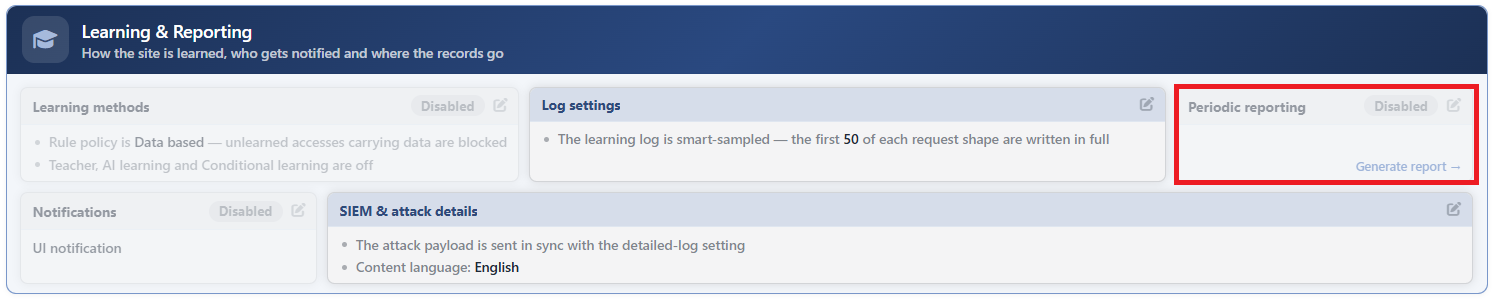 WAF Management - The Periodic Reporting Card
The Periodic Reporting Edit Screen
- The WAF Management tab is opened.
- The pencil icon at the top right of the Periodic Reporting card in the Learning & Reporting section is clicked; the editing window titled Periodic Reporting opens.
- The following fields are edited and confirmed with the
Editbutton.
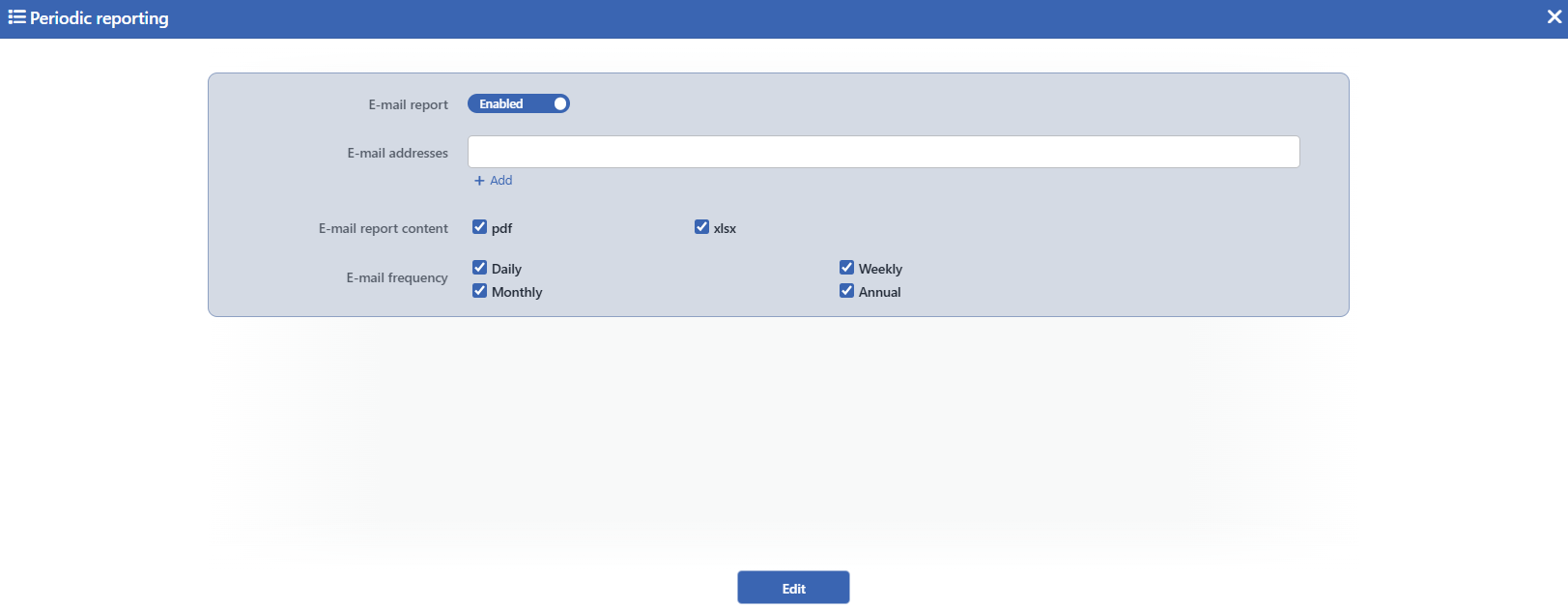 The Periodic Reporting Edit Screen
INFO
E-mail Report Default: Off
It turns on the periodic report sending; it is off by default. When it is turned on, the three fields below appear in the form. When the switch is turned off, these fields are hidden but their values are preserved; when the sending is turned on again, the same addresses and selections become valid.
E-mail Addresses
Into this field that appears in the form when the switch is turned on, the e-mail addresses to which the report will be sent are entered line by line. The address format is not validated in the form; a faulty address can be saved and fails only at the moment of the sending.
E-mail Report Content
With this field that appears in the form when the switch is turned on, the file formats to be attached to the e-mail are selected:
| Option | Meaning |
|---|---|
| The report is attached to the e-mail as a PDF file. | |
| xlsx | The report is attached to the e-mail as an Excel workbook. |
At least one format must be selected; by default both of them come checked. When both formats are selected, two attachments are put into the e-mail at once.
E-mail Frequency
With this field that appears in the form when the switch is turned on, the sending periods are selected: Daily, Weekly, Monthly, Annual. At least one period must be selected; by default all four come checked and in this case four separate reports are sent. The run times of the periods are according to the local time of the device:
| Option | The production time | The range covered |
|---|---|---|
| Daily | Every day at 07:30 | The previous day |
| Weekly | Every Monday at 03:30 | The previous week (Monday-Sunday) |
| Monthly | The 1st of every month at 05:30 | The previous month |
| Annual | 1 January at 06:30 | The previous year |
INFO
Edit
The changes in the form are saved by clicking the Edit button; the button becomes enabled when no error remains in the form. There is no additional confirmation window or deployment (deploy) step. The change becomes valid in the next period sending; a service interruption or a restart is not needed.
The e-mail that is sent
The subject and the body of the e-mail are produced in the report language (the default interface language of the device). In an English installation the subject is in the pattern [TR7-NOTIFIER] <vService name> daily WAF report and the body For <vService name>, WAF report of dates <start> - <end> is given as an attachment; in a Turkish installation the Turkish counterparts of the same patterns are used. The attachment file is delivered with the name waf_report_<vService name>_<start>-<end> and with the extension of the selected format (.pdf, .xlsx).
An e-mail server must be defined
The sending uses the e-mail (SMTP) setting defined on the Notification Management screen. If the server is not defined, the report is produced but cannot be sent and this situation is not displayed as a warning in the interface; the card continues to summarize the sending configuration as it is. In the same way, if the file format cannot be produced, the e-mail is not sent for that period.
