
Smarter by Design.Simpler for Business
Mobile Platform
What Is the Mobile Platform Condition?
Mobile Platform is a condition type that detects the user's mobile operating system by analyzing the User-Agent header of the HTTP request, and is used to make traffic routing and manipulation decisions according to this information.
The User-Agent header contains the platform information:
User-Agent
Mozilla/5.0 (Linux; Android 13; Pixel 7) AppleWebKit/537.36
(KHTML, like Gecko) Chrome/120.0.0.0 Mobile Safari/537.36
(KHTML, like Gecko) Chrome/120.0.0.0 Mobile Safari/537.36
Mobile Platform: Android
With this condition, TR7 can recognize 5 different mobile platforms by comparing the User-Agent header with known platform signatures (pattern matching). For a manual mobile platform type check within the User-Agent HTTP header, the HTTP Header condition can be used.
The Importance of the Mobile Platform Condition
With the spread of mobile devices, platform-based content optimization has become critical.
With the Mobile Platform condition:
- Mobile users can be separated from desktop users,
- Platform-specific content or application routing can be performed,
- iOS/Android-specific optimizations can be applied,
- Mobile traffic statistics can be collected,
- A mobile version can be served on sites that are not responsive.
Mobile Platform vs Bot Type vs Browser:
| Condition | What It Detects | Example |
|---|---|---|
| Mobile Platform | Mobile platform | Android, iOS |
| Operating System | All operating systems | Windows, iOS, KaiOS |
| Bot Type | Automation software | Googlebot, Bingbot |
| Browser | Browser application | Chrome, Firefox, Safari |
TIP
Chrome, Firefox or Samsung Internet can be used on an Android device. The Mobile Platform condition detects the operating system independently of the browser.
Supported vService Types
HTTP
L7 TCP
Network
The condition can be used at both the request (At Request) and response (At Response) stages; the platform information is detected at the time of the request.
How to Add?
A new Mobile Platform Condition can be added through the TR7 web management interface by following the steps below:
- The Configuration Menu is opened by clicking the TR7 logo at the bottom left.
- The Load Balancer → Conditions → Add steps are followed.
- Mobile Platform is selected as Criteria.
- The related configurations of the condition are made.
- The condition is added by clicking the
Addbutton.
Mobile Platform Condition Add Form
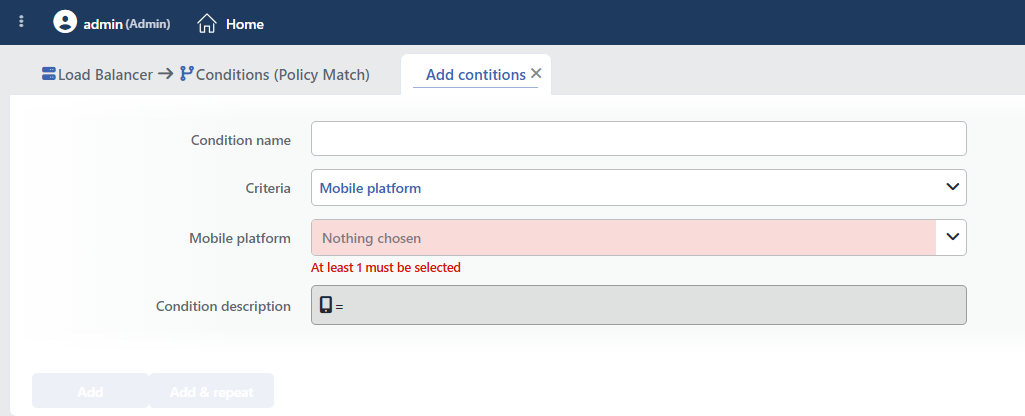 Mobile Platform Condition Add Form
INFO
Condition Name
An optional name can be entered for the condition to be created.
This field is especially important in the following scenarios:
- When many conditions are defined under the same vService,
- When conditions with similar criteria need to be distinguished,
- When it is necessary to quickly understand which business rule the condition represents.
When this field is left empty, TR7 analyzes the content of the related condition and creates an automatic, descriptive name in the Condition Description field. This generated description is used as the name in condition lists.
INFO
Criteria Required
The field that determines the type of the condition; Mobile Platform is selected from the searchable dropdown list. This selection determines the fields displayed in the form. The criterion cannot be changed after the condition is saved: if a different criterion is needed, a new condition is defined. For all criteria in the list and their scopes, the criteria catalog on the Conditions page can be referred to.
INFO
Mobile Platform Required
The mobile platforms to be detected are selected from the searchable list; selecting at least one platform is required (the form opens empty). TR7 can recognize 5 different mobile platforms.
Available Mobile Platforms:
| Platform | Description |
|---|---|
| Android | Google Android operating system |
| BlackBerry | BlackBerry OS |
| iOS | Apple iPhone/iPad operating system |
| Opera | Opera Mobile browser platform |
| Windows Phone | Microsoft mobile operating system |
More than one platform can be selected. It works with OR logic, and if any of the selected platforms matches, the condition is met. Matching is done with substring logic; for this reason, platform names should be selected from the list in their full form.
TIP
If only a check of "whether the client is mobile" is wanted without distinguishing between platforms, the If the client is mobile condition, which is offered ready-made in the condition selection lists, can be used; there is no need to define a separate condition for this.
TIP
The detected platform name can be used in actions with the Mobile platform smart variable (e.g. as the value of an HTTP header or a log field).
INFO
Condition Description
It is created automatically by TR7 in line with the entered criteria and values.
This description:
- which value the condition applies to,
- which criterion it works on,
- the quick understanding of the condition on listing screens
is produced dynamically by the system so as to provide these.
INFO
Form Buttons
Add
The condition adding process is completed by clicking the Add button.
Add & Repeat
With the Add & Repeat button, the condition adding process is completed, and another new condition can be added with different configurations without leaving the related window.
 Condition Added
Operational Usage Recommendations
- All Mobile Traffic Should Be Captured. A mobile/desktop distinction can be made by selecting all mobile platforms.
- Tablet vs Phone. The mobile platform condition does not distinguish between tablets and phones. For a more detailed distinction, the HTTP Header User-Agent header condition should be used.
- Progressive Web App. A PWA installation suggestion should be shown to mobile users.
Common Usage Scenarios in Live Environments
The examples below show how the related condition is applied in the most frequently encountered use cases in real systems. These scenarios are based on practices that are widely preferred in live environments and rest on experience gained in the field.
Scenario 1: Automatic Redirection to the Mobile Site
Purpose: For websites without a responsive design, to redirect all mobile platform users (Android, iOS, Windows Phone, BlackBerry) to the mobile-optimized subdomain.
Configuration: Mobile platform → Android, iOS, Windows Phone, BlackBerry, Opera
Action Recommendations:
- ✅ Location Redirection → Mobile users are redirected to the
https://m.tr7.comsubdomain with a 302 redirect, and the URL changes. - ✅ Add HTTP Header → The
X-Mobile-Device: trueheader is added, and the Backend Service performs mobile device detection.
Scenario 2: App Store Redirection for iOS Users
Purpose: To redirect iOS device users to the native application in the Apple App Store when they access the /download path, and to increase the application download rate.
Configuration: Mobile platform → iOS
Action Recommendations:
- ✅ Location Redirection → iOS users are redirected to the
https://apps.apple.com/app/...App Store link with a 302 redirect (together with the Path condition:/download). - ✅ Add HTTP Header → The
X-Platform: iOSheader is added, and the platform detection is marked.
Scenario 3: Play Store Redirection for Android Users
Purpose: To redirect Android device users to the native application in the Google Play Store when they access the /download path.
Configuration: Mobile platform → Android
Action Recommendations:
- ✅ Location Redirection → Android users are redirected to the
https://play.google.com/store/apps/...Play Store link with a 302 redirect (together with the Path condition:/download). - ✅ Add HTTP Header → The
X-Platform: Androidheader is added, and the platform detection is marked.
Scenario 4: Blocking Unsupported Mobile Platforms
Purpose: To block old mobile platforms (BlackBerry, Windows Phone) that are no longer supported or no longer receive security updates, and to inform users.
Configuration: Mobile platform → BlackBerry, Windows Phone
Action Recommendations:
- ✅ Block → Old platform users are blocked with 403 Forbidden, and system security is protected.
- ✅ Show Content → The information page "Your platform is no longer supported. Please upgrade to iOS or Android" is shown.
Scenario 5: Access Control to the Admin Panel from Mobile Devices
Purpose: To block access to the admin panel from mobile devices as required by the security policy, and to allow only desktop access.
Configuration: Mobile platform → Android, iOS, Windows Phone, BlackBerry, Opera
Action Recommendations:
- ✅ Block → Access to the
/adminpath from mobile devices is blocked with 403 Forbidden (together with the Path condition:/admin). - ✅ Show Content → The security warning "Admin panel access is restricted to desktop devices only" is shown.
