
Smarter by Design.Simpler for Business
Certificate Profiles
What Is a Certificate Profile?
Certificate Profile is the reusable template that determines how the certificates TR7 produces with its internal certificate authority (internal PKI) will be cut. The profile defines the area of use of the certificate (server or client), its validity period, how many days before the end it will be renewed by itself, its key algorithm, its extended key usage (EKU) values and the SAN template for the additional domain names. While a certificate is being produced, a profile is selected together with an internal CA; the profile values are read again at the moment of production and at every automatic renewal.
The profiles are used in two places: while a server certificate is being produced with the Internal CA type on the SSL/TLS Certificates screen (the profiles with TLS Server usage) and while a client certificate is being produced from an internal CA on the Client Certificates screen (the profiles with Client / mTLS usage).
2
Area of use
TLS Server (the vService certificates) and Client / mTLS (the client identities)
365 days
Default period
The validity is between 1–3650 days; the default is 365
30 days
Renewal threshold
This many days before the end the server certificate is produced again by itself; 0 turns the renewal off
5
Key algorithm
RSA 2048 / 3072 / 4096, ECDSA P-256 / P-384
EKU
Key usage
Server Authentication and/or Client Authentication
{cn}
SAN template
In the productions in which a domain name is not given, it derives the SAN list from the template
How does it work?
- The profile is defined on this screen; the Usage field determines whether the profile will be used for the server certificates (TLS Server) or for the client certificates (Client / mTLS) and the profile is listed only in the selector of the appropriate screen.
- While the certificate is being produced, the internal CA and the profile are selected; TR7 produces the key with the algorithm in the profile and cuts the certificate with the period and EKU values in the profile. If the SAN list has been left empty in the server certificate, SAN Template is applied; in the server certificates the CN is added to the SAN list in every case.
- A production record is written to the Issued Certificates (Internal PKI) tab for the produced server certificate; in the check that is made twice a day and after the device starts up, the certificates whose remaining period falls below the Renew this many days before expiry threshold in the profile are produced again with the current values of the profile and with a new key and serial number.
- When the profile is edited, the change is not applied retrospectively; the new values are used in the subsequent productions and in the automatic renewals.
The Effect of the Profile Parameters
| Parameter | Server certificate (Internal CA) | Automatic renewal | Client certificate |
|---|---|---|---|
| Usage | Only TLS Server profiles can be selected | — | Only Client / mTLS profiles can be selected |
| Lifetime (days) | The validity period | It is applied again to the renewed certificate | The validity period |
| Renew this many days before expiry | The renewal threshold bound to the production record | Renewal when the remaining period falls below the threshold; 0 turns the renewal off | It is not applied (the client certificates are not renewed by themselves) |
| Key Algorithm | In the key production | The new key with the current algorithm of the profile | In the key production |
| Extended Key Usage | It is written to the certificate (if it is empty, Server Authentication) | It is written again | It is written to the certificate; if Client Authentication is not in the profile, it is added by itself |
| SAN Template | It is applied by the CN being written in place of {cn} when the SAN list is left empty | It is not applied; the SAN list in the production record is preserved | It is not applied |
Operational Best Practices
- A separate profile according to the area of use. Separate profiles must be defined for the server and client certificates; when the Usage value is changed later, the profile disappears from the selector of the screen that belongs to the previous area of use and it is listed only on the screen that belongs to the new area of use.
- The EKU must be compatible with the area of use. Server Authentication must be selected in a TLS Server profile and Client Authentication in a Client / mTLS profile; the form does not enforce this compatibility.
- The renewal threshold according to the period. In the short-lived certificates (90 days and below) the threshold period must not exceed one third of the total period; if the threshold is greater than the period, the certificate is produced again at every check (twice a day).
- The production records before deleting. As long as the certificates produced with it are present, the profile must not be deleted; the automatic renewal of the certificates bound to the deleted profile fails. The usage is tracked from the Certificate Profile column in the Issued Certificates (Internal PKI) tab.
- Only
{cn}in the SAN template. More than one name separated with commas can be written in the template; only the{cn}placeholder is replaced.
How to Add?
A new Certificate Profile is added over the TR7 web management interface with the following steps:
- The Configuration Menu is opened by clicking the TR7 logo at the bottom left.
- The Certificates & PKI → Certificate Profiles → Add steps are followed; the form opens as a closable Add tab inside the list screen.
- A name is entered for the profile; the Usage, Lifetime (days), Renew this many days before expiry, Extended Key Usage, SAN Template and Key Algorithm fields are configured (for the details of the fields see the Add Form section).
- The profile is added by clicking the
Addbutton.
TIP
Reaching the page via quick search
Instead of navigating the menu step by step, the related page is reached directly by using the search bar in the bottom left corner of the screen. The search bar opens with the Alt + T shortcut on Windows and Opt + T on macOS; typing the name of the feature being searched for is then sufficient.
The TLS Server profiles can also be defined without leaving the page with the adding icon next to the Certificate Profile field in the certificate form (see Usage Locations).
The Certificate Profiles Listing Screen
The list of all the certificate profiles that are added on the TR7 device is reached by following the Certificates & PKI → Certificate Profiles path. The profile adding, editing and deleting operations are done through this screen.
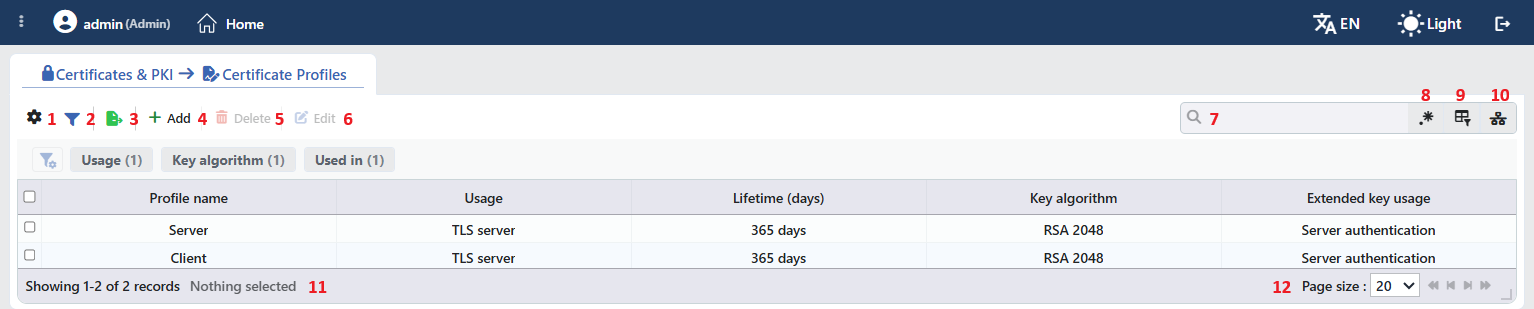 The Certificate Profiles Listing Form
The table opens with the following columns by default:
| Column | Description |
|---|---|
| Profile Name | The name of the profile. |
| Usage | The area of use of the profile: TLS Server or Client / mTLS. |
| Lifetime (days) | The validity period of the produced certificate, in the 365 days form. |
| Key Algorithm | The algorithm of the key that will be produced: RSA 2048, RSA 3072, RSA 4096, ECDSA P-256, ECDSA P-384. |
| Extended Key Usage | The EKU values that will be written to the certificate with commas: Server Authentication, Client Authentication; if it is empty, -. |
There is no column hidden by default; these five columns take place in the column selector. The Renew this many days before expiry and SAN Template values are not shown in the table, they are listed only in the preview. The table is not sorted when it is opened; when a column header is clicked, first a descending and then an ascending sorting is applied, and at the third click the sorting is removed.
The items in the toolbar are arranged from left to right in the following order; the last two items (Page Information and Page Size) are located in the information strip below the table.
Columns
Which columns will be shown in the table is selected; all five columns are on by default. In the same panel the columns are reordered by dragging and the alignment is selected per column; with the Fit rows to the page button the row height is fitted to the page and with the Reset button the column layout is returned to the default. When the width badge next to a column that has been widened manually is clicked, the column returns to the automatic width. The layout is stored per user.
Filter
The Filter button is used in order to filter the profiles shown in the list according to certain criteria; the button shows the number of active filters with a badge. In the strip there are three cards: Usage, Key Algorithm and Used in. In the cards the values seen in the list are listed with their row counts and more than one value can be selected together; the selections are displayed above the strip as closable labels.
Because the Used in card counts whether the record is bound to a vService, it does not produce a distinction on this screen and all the profiles are listed under Unused Entries. Which certificates a profile is used in is tracked from the Certificate Profile column in the Issued Certificates (Internal PKI) tab.
Export
The table is exported as Excel, CSV or PDF by clicking the Export button. In the window that opens, the Filename, Format and Data Source, together with the Columns to be exported, are determined; the remaining fields are displayed according to the format: CSV Separator for CSV, Excel Sheet Name for Excel, and Page Orientation and Page Size for PDF.
Add
By clicking the Add button, the form for creating a new profile opens in the Add tab.
Delete
When one or more profiles are selected and the Delete button is clicked, the related profiles are deleted. Before the deletion the "Are you sure that you want to delete certificate profile object?" (in a multiple selection "Are you sure you want to delete N certificate profile objects?") confirmation is asked.
WARNING
A profile that is in use can also be deleted and the confirmation window does not show the usage locations. The certificates and the production records produced with the profile are not deleted, they continue to be offered; however the automatic renewal of these certificates cannot be done: because the profile cannot be read, the built-in 30 days is used as the renewal threshold and for every record whose remaining period falls below 30 days the Internal CA certificate could not be renewed. Common name: <CN>. Reason: profileMissing record falls to the User Logs screen at every check (07:00, 22:00 and 5 minutes after the start-up). The certificate must be produced again with another profile before it expires.
When a certificate bound to this profile is come across during the rekeying (rekey) of the internal CA, the operation is rejected entirely; because the planning is done before the writing, no record including the CA itself is changed. The deletion operation is written to the user operation record.
Edit
By clicking the Edit button, the edit form of the selected profile opens in the Edit tab. The button becomes enabled only when a single profile is selected.
The editing form is the same as the adding form; the name of the tab and of the button of the form becomes Edit and all the fields including the name can be changed. The change is saved without confirmation being asked. The new values do not change the certificates that have been produced earlier; they are applied in the subsequent productions, in the automatic renewals of the server certificates produced with this profile and in the certificates that are cut again during the rekeying of the internal CA. A SAN Template change is effective only in the new productions; in a renewal the SAN list in the production record is preserved.
Search
Used to search all information in the table.
RegExp Search
Used to search all information in the table with a regular expression (RegExp).
Column Based Search
It is used in order to search the information in the table based on the column; next to every box there are the Negate switch that inverts the result and its own RegExp option.
Usage Filter
It is used in order to filter which vServices the profiles are bound to. Because the profiles in this collection are not bound to the vServices directly, in the selector there is only the Unused Entries option and it is selected by itself; the list is limited to the records that are not used in any definition. While the filter is active, the selector takes the place of the search box; when the icon is clicked again, the search box returns.
Page Information
Contains information about the total number of defined profiles and the number of profiles displayed in the list: Showing N-M of T records and the number of selected profiles (N selected, or Nothing selected when there is no selection). If a selection has been made in the filter strip, the number of applied filters and the shown/total row information are added to the same line.
Page Size
The maximum number of profiles to be displayed on the page is selected. The default is 20; the options are 5, 10, 20, 50, 100, 200, 500 and All.
Right-Click Menu
When a row is right-clicked, a menu with the profile's name in its title opens. Both operations in the menu apply only to the right-clicked profile; a selection made in the list does not affect the menu.
| Operation | What it does |
|---|---|
| Edit | Opens the editing form of the profile in the Edit tab; it is the same as the form opened by the Edit button in the toolbar. |
| Delete | Deletes the right-clicked profile; the same confirmation question as the deletion in the toolbar is displayed. |
Preview of the Selected Profile
When a row in the list is clicked, the preview of the profile opens on the right of the screen; when the selected row is clicked again, the panel closes. In the header there are the profile icon, the name of the profile and the Certificate profile subheading, and at the top right there is a single operation.
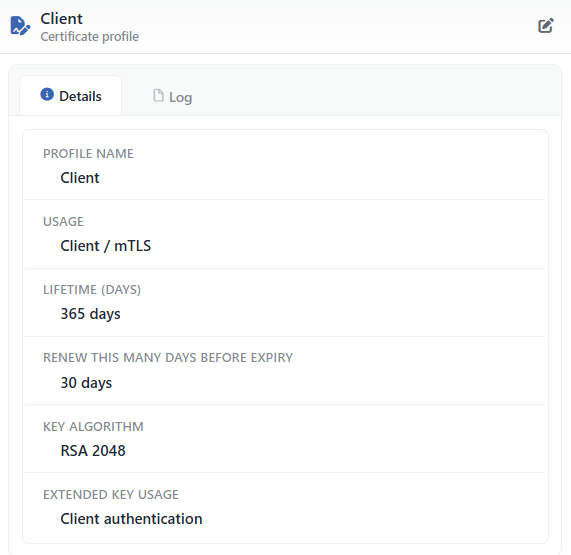 Preview of the Selected Profile
| Operation | What it does |
|---|---|
| Edit | Opens the editing form of the profile in the Edit tab. |
The panel has two tabs:
Details
Lists the settings of the profile line by line (the table below).
Log
Lists the user actions on the profile (adding, editing, deleting) as a timeline.
A tab that shows the definitions that use the profile is not present in this collection.
The rows in the Details tab are as follows, in order:
| Row | Description | Visibility condition |
|---|---|---|
| Profile Name | The name of the profile. | Always |
| Usage | TLS Server / Client / mTLS. | Always |
| Lifetime (days) | The period in the 365 days form. | Always |
| Renew this many days before expiry | The threshold in the 30 days form (0 days = the renewal is off). | If the value is defined |
| Key Algorithm | The key algorithm. | Always |
| Extended Key Usage | The EKU values with commas. | If there is at least one value |
| SAN Template | The template text. | If it is full |
Profile Add Form
A new certificate profile is added onto the TR7 device by following the Certificates & PKI → Certificate Profiles → Add steps.
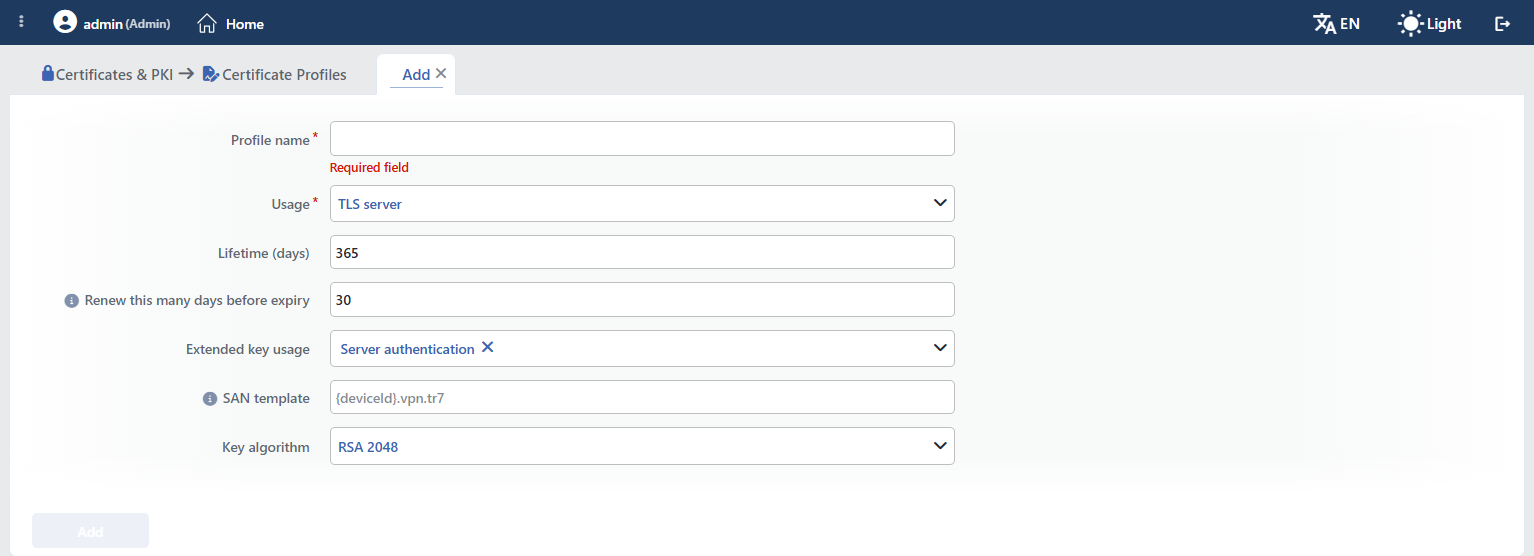 The Certificate Profiles Profile Add Form
INFO
Profile Name Required
The name of the profile is entered. The name identifies the profile in the list, in the profile selection in the certificate forms, in the production records and in the logs, and it must be unique on the device; when the same name is entered, the form gives the Name is used warning.
INFO
Usage Default: TLS Server
The area of use of the profile:
- TLS Server: the server certificates that will be offered in the vServices; the profile is listed only in the Certificate Profile selector of the Internal CA type on the SSL/TLS Certificates screen and production can be done only with the internal CAs with server usage.
- Client / mTLS: the client identities; the profile is listed only in the profile selector on the Client Certificates screen and production cannot be done with a CA with server usage.
INFO
Lifetime (days) Default: 365
The validity period of the produced certificate (days); an integer between 1 and 3650.
INFO
Renew this many days before expiry Default: 30
How many days before the end the server certificates produced with this profile will be produced again by themselves; an integer between 0 and 364. 0 turns the automatic renewal off. The renewal is done in the check described on the SSL/TLS Certificates screen (07:00, 22:00 and 5 minutes after the start-up); the certificate is produced with the current values of the profile and with a new key and serial number, the identity of the certificate record and the vService assignments do not change, the production record is replaced with a new row and the old row becomes Superseded. The client certificates are not affected by this threshold.
INFO
Extended Key Usage Default: Server Authentication
The extended key usage values that will be written to the certificate; Server Authentication and/or Client Authentication is selected, at least one value is compulsory. In the client certificate production Client Authentication is added to the certificate even if it is not selected in the profile.
INFO
SAN Template
The template that will be used when an additional domain name (SAN) is not entered in the form in the server certificate production; at most 256 characters. More than one name separated with commas can be written and the {cn} placeholder is replaced with the CN value of the certificate (for example {cn},www.{cn}). When a SAN is entered in the form, the template is not used; the CN is added to the SAN list in every case. In the client certificate production and in the automatic renewal the template is not applied.
In the placeholder of the field the {deviceId}.vpn.tr7 example is displayed; because only {cn} is resolved in the production, when another placeholder is written into the template it passes to the certificate as it is.
INFO
Key Algorithm Default: RSA 2048
The algorithm of the key that will be produced for the certificate: RSA 2048, RSA 3072, RSA 4096, ECDSA P-256 or ECDSA P-384.
INFO
Add
The profile adding operation is completed by clicking the Add button. As long as there is a field that has not been validated in the form, the button stays passive.
Operating Mechanism
INFO
- It is read at production, it is not copied. The profile values are read while the certificate is being cut; the profile identity is kept only in the production record in the Issued Certificates (Internal PKI) tab, it does not take place in the certificate record. If the validity period is undefined, 365 days, if the algorithm is not recognized, RSA 2048, and if the EKU is empty, Server Authentication is applied.
- The area of use check. In the server certificate production the profile and the CA are checked in both directions: a server profile cannot be had signed by a CA with client usage, and a client profile cannot be had signed by a CA with server usage. In the client certificate production only the CA is checked and a CA with server usage is rejected; the area of use of the profile is not checked. Because the CA selector in the certificate form also lists only the CAs that are of the Internal Issuing CA type, whose area of use matches and in which there is both certificate and key content, this distinction is seen only in production over the API.
- The SAN resolution. The SAN values entered in the form take precedence over the template; the template is applied only while the list is empty and
{cn}is replaced. If the CN is not in the list, it is added at the beginning. - The automatic renewal. Every day at 07:00 and 22:00 and 5 minutes after the device starts up, the remaining period of the server certificates produced with this profile is compared with the Renew this many days before expiry threshold; the ones that fall below the threshold are produced again with the current values of the profile. Both the successful renewals and the failures are written to the User Logs screen and the records fall in the name of the system user; the records whose profile has been deleted cannot be renewed. In a cluster only the device that produces the certificate does the renewal.
- The client certificates. The period, algorithm and EKU values of the profile are applied; Client Authentication is added in every case. The SAN list consists only of the e-mail addresses and the Windows logon names entered in the form, the CN is not added to this list. The SAN template and the renewal threshold are not used in the client certificates.
- The cluster. The profiles are synchronized between the devices together with the LB configuration.
- The logs. Adding, editing and deleting are tracked as the certificate profile object on the User Logs screen.
Scope and Limits
INFO
- The permission. The screen is bound to the certificate permission area; in a user who does not have the permission the You don't have access to this page card is displayed instead of the page.
- The name is unique. A second profile that carries the same name is not saved.
- The value ranges. The validity of 1–3650 days and the renewal threshold of 0–364 days are enforced both in the form and in the server schema; the 256 character limit of the SAN template and the condition of at least one EKU value are only a form validation.
- There is no usage count. The Used in card and the preview tab do not show usage in this collection; the confirmation window does not list the usage locations before the deletion.
- Only
{cn}is resolved. The other placeholders in the template stay as they are. - Renewal only in the server certificates. A production record is not kept for the client certificates; the renewal threshold and the SAN template are ineffective in these certificates.
Usage Locations
SSL/TLS Certificate Production
When Internal CA is selected in the Type field on the SSL/TLS Certificates screen, only the profiles with TLS Server usage are listed in the Certificate Profile field; a new profile can be defined with the adding icon next to the field and it is selected if it has server usage. The produced certificate shows the profile that is used in the Certificate Profile column in the Issued Certificates (Internal PKI) tab.
Client Certificate Production
When production from an internal CA is selected on the Client Certificates screen, only the profiles with Client / mTLS usage are listed in the profile selector.
