
Smarter by Design.Simpler for Business
Whitelist & Blacklist
What Is Whitelist & Blacklist?
Whitelist & Blacklist manages the exceptions of the WAF inspection at the two ends. The blacklist side blocks the requests coming from the source IPs whose reputation is bad: the global IP Intelligence & Reputation feed and the IP list specific to the vService are evaluated together. The whitelist side, on the other hand, leaves the selected traffic entirely outside the WAF inspection: the static content requests and the requests that meet the defined condition do not enter the inspection at all.
The priority order
The whitelist has priority over the blacklist: a request that enters the scope of the static content or of the conditional whitelist is let through without even entering the blacklist inspection. The Frontend Blacklist Exclusions list on the blacklist side, on the other hand, only cancels the blacklist match; the request continues to pass through the WAF inspection.
The other usage layers of the blacklist
The reputation lists can be used in four separate layers in the product: the WAF layer here, the Traffic Protection step of the vService, in Conditions the Blacklist IP Category condition, and the automatic DDoS rules of the network firewall. The settings on this page manage only the WAF layer.
The scope
The Whitelist & Blacklist settings are valid across the vService and are common in all the host groups.
The Whitelist & Blacklist Card on WAF Management
The Whitelist & blacklist card in the Inspection & Blocking section of the WAF Management screen summarizes the state of the settings in sentences:
- While Blacklist Protection is on, it writes Requests from bad-reputation source IPs are blocked — category: All; if a category filter has been selected, instead of All the selected category names are listed.
- While Blacklist Protection is on, if the lists specific to the vService are full, the line N pool-specific blocks and X exclusions are defined for this vService is added.
- While Do Not WAF Static Contents is on, the line Static content bypasses WAF inspection is seen.
- While Whitelist Condition is on, below the line Requests matching this condition skips WAF inspection: the condition itself is displayed.
- The settings that are off are listed in a pale … is off / … are off line (Blacklist protection, Static content whitelist, Conditional whitelist); if all three settings are off, the card goes dim and the Disabled badge is seen on it.
When the pencil icon at the top right of the card is clicked, the edit screen opens.
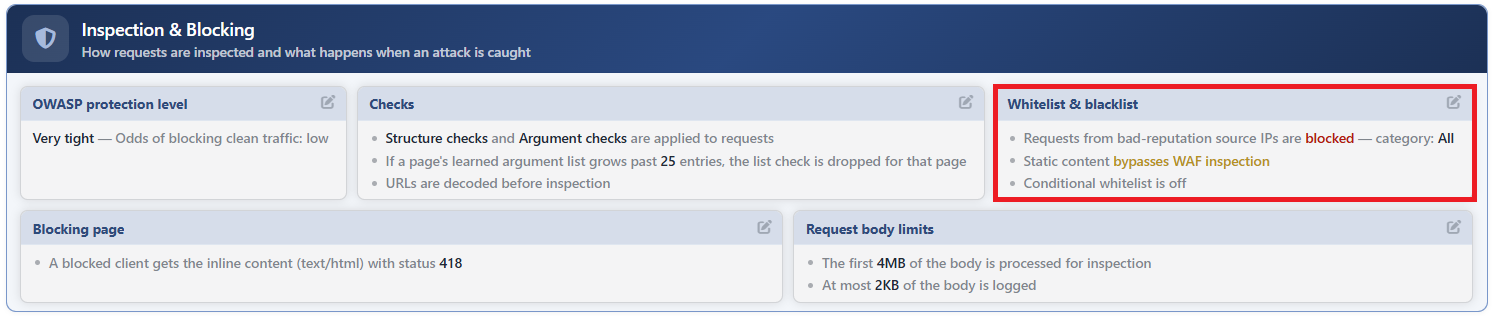 WAF Management - The Whitelist & Blacklist Card
The Whitelist & Blacklist Edit Screen
- The WAF Management tab is opened.
- The pencil icon at the top right of the Whitelist & blacklist card in the Inspection & Blocking section is clicked; the editing window titled Whitelist & blacklist opens.
- The following fields are edited and confirmed with the
Editbutton.
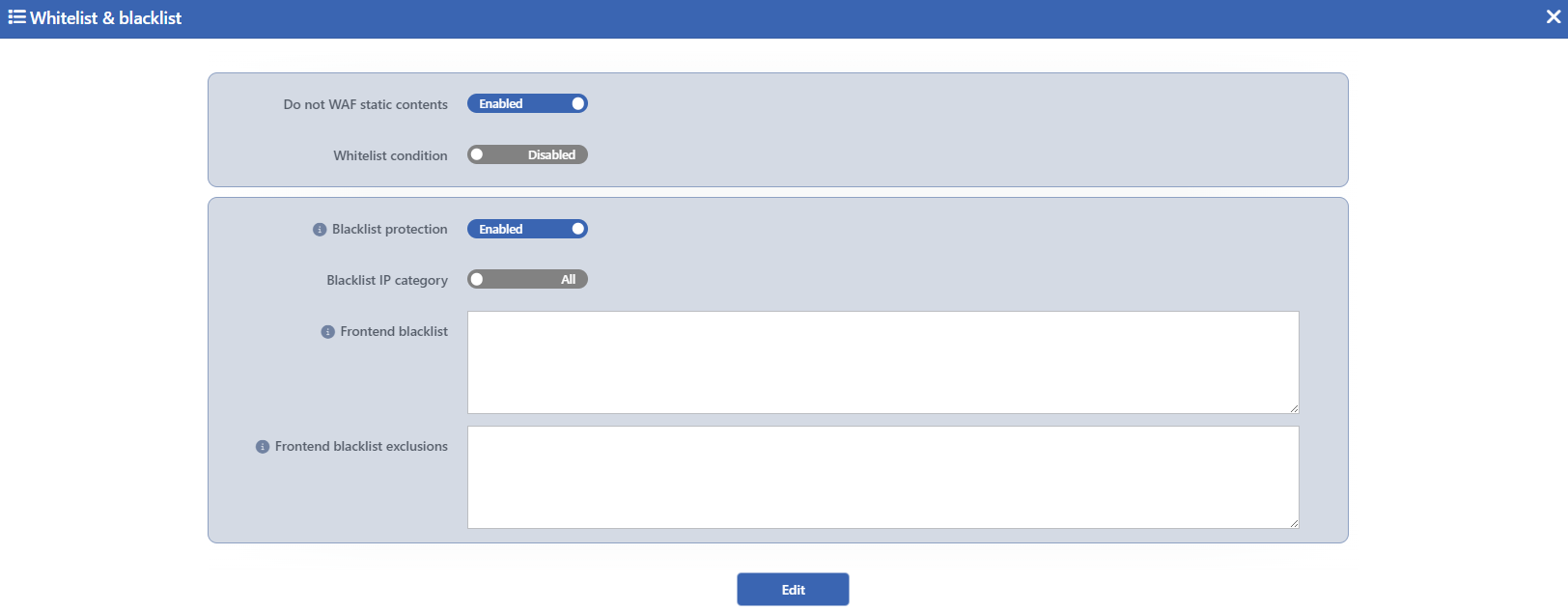 The Whitelist & Blacklist Edit Screen
INFO
Do Not WAF Static Contents Default: Checked
While it is checked, the static content requests are kept entirely outside the WAF inspection; it is checked by default. For a request to count as static, four conditions need to be met together: the path must end with a known static file extension, the method must be GET, and there must be no query section and no body in the request. The extensions covered:
.txt .bmp .jpeg .pdf .ps .ttf .jpg .svg .webp .css .svgz .woff .csv .gif .mid .png .swf .woff2 .doc .midi .ppt .tif .xls .docx .pptx .tiff .xlsx .mp4 .flv .mov .wmv .avi .ogg .mkv .mpg
The requests that carry a query or a body enter the inspection even if their extension is static; thus the requests with parameters hidden behind a static file name cannot go out of the scope.
INFO
Whitelist Condition Default: Not checked
When it is checked, the condition combiner appears below it and the requests that meet the defined Conditions are kept entirely outside the WAF inspection; it is not checked by default. Only the HTTP conditions belonging to the request side can be selected as the condition; a selection can be made from the saved conditions and a new condition can also be created from here. A save cannot be made by leaving the condition field empty (the Empty condition error); while the switch is off, the field is not seen.
INFO
Blacklist Protection Default: Checked
While it is checked, the requests coming from the source IPs whose reputation is bad are blocked; it is checked by default. The information text of the field summarizes the scope: Blocks requests from source IPs that are known to be bad: the global reputation feed and this pool's own list below are evaluated together. The global reputation feed is managed from the IP Intelligence & Reputation screen; the list specific to the vService is entered in the Frontend Blacklist field below.
Blacklist IP Category
It is displayed while Blacklist Protection is checked. It is determined which reputation categories will be used in the blacklist match. While the switch is in the All position, all the categories are evaluated; when it is put into the Filter position, the categories are narrowed with a multiple selection (at least one category must be selected). The category set is the same as the categories on the IP Intelligence & Reputation screen (User blacklist, External and the attack type categories).
INFO
Frontend Blacklist
The source IPs to be blocked for this vService are entered; one IP address or CIDR block is written in every line (Source IPs blocked for this pool. One IP address or CIDR block per line.). The list is always evaluated independently of the global reputation feed.
INFO
Frontend Blacklist Exclusions
The source IPs to be exempted from the blacklist are entered; one IP address or CIDR block is written in every line. The addresses here override both the list above and the global reputation feed; however the field is not a WAF whitelist: the requests coming from these addresses continue to pass through the WAF inspection. If it is wanted that the inspection be skipped entirely, Whitelist Condition should be used.
INFO
Edit
The changes in the form are saved by clicking the Edit button; the button becomes enabled when no error remains in the form. There is no additional confirmation window or deployment (deploy) step; the WAF configuration is automatically produced again and applied.
The mode behavior and the records
A blacklist match is the violation type with the highest score and, whatever the selected OWASP Protection Level is, it exceeds the blocking threshold on its own: in the Blocking mode the request is blocked and the blocking page is returned to the client, in the Monitor mode it is reported as an attack but is let through, and in the Learning mode it is not blocked but an attack record falls. In the record the violation is seen as the Blacklisted IP rule, with the highest risk grade Blacklist.
The traffic taken into the whitelist does not enter the learning either
For the requests within the scope of the static content and of the conditional whitelist the WAF engine does not run at all: the inspection, the blacklist check and the learning are skipped, no attack/learning record is written. These requests are counted into the whitelisted slice on the WAF Dashboard. If the conditional whitelist is defined widely, the traffic that needs to be protected also goes out of the scope silently; it is recommended that the condition be kept narrow.
