
Smarter by Design.Simpler for Business
HTTP TCP Multiplexing
What Is the HTTP TCP Multiplexing Action?
The HTTP TCP Multiplexing action is used to determine how the connections between TR7 and the Backend Services will be shared among the sessions in the HTTP-based vServices on TR7. This action is put into effect only at the response stage and manages the reuse policy of the Backend Service connections.
When it is configured correctly, thanks to the efficient use of the Backend Service connections, the connection setup costs decrease, the resource consumption is optimized and a more stable service behavior is obtained, especially under high traffic. When it is configured incorrectly, it can conflict with the connection/session expectations of the Backend Services and lead to unexpected behavior.
Less sharing · isolationMore sharing · performance
Never
Safe
Aggressive
Always
This action is one of the basic actions used for the connection management and performance optimization needs on the Backend Services side of TR7.
The Importance of the HTTP TCP Multiplexing Action
In live environments, the Backend Services can give different reactions according to the number of connections, the connection life time and the connection reuse behavior. Especially in services that receive high traffic, opening a new connection for each request can both increase the latency and lead to capacity problems on the Backend Service side because of the connection limit.
The HTTP TCP Multiplexing action;
- enables the Backend Service connections to be used more efficiently,
- increases the performance by reducing the connection setup costs,
- helps to keep the number of connections under control on the Backend Service side,
- provides a more predictable connection behavior under load,
- offers flexible strategies according to the suitability of the application for connection reuse.
For this reason, the HTTP TCP Multiplexing action is a critical optimization tool on TR7 in terms of performance and capacity management.
Supported vService Types
HTTP
L7 TCP
Network
Execution Timing
On Request
On Response
How to Add?
A new HTTP TCP Multiplexing Action can be added through the TR7 web management interface by following the steps below:
- The Configuration Menu is opened by clicking the TR7 logo at the bottom left.
- The Load Balancer → Actions → Add steps are followed.
- A unique and descriptive name is entered for the action.
- HTTP TCP Multiplexing is selected as Action Type.
- The related configurations of the action are made.
- The action is added by clicking the
Addbutton.
HTTP TCP Multiplexing Action Add Form
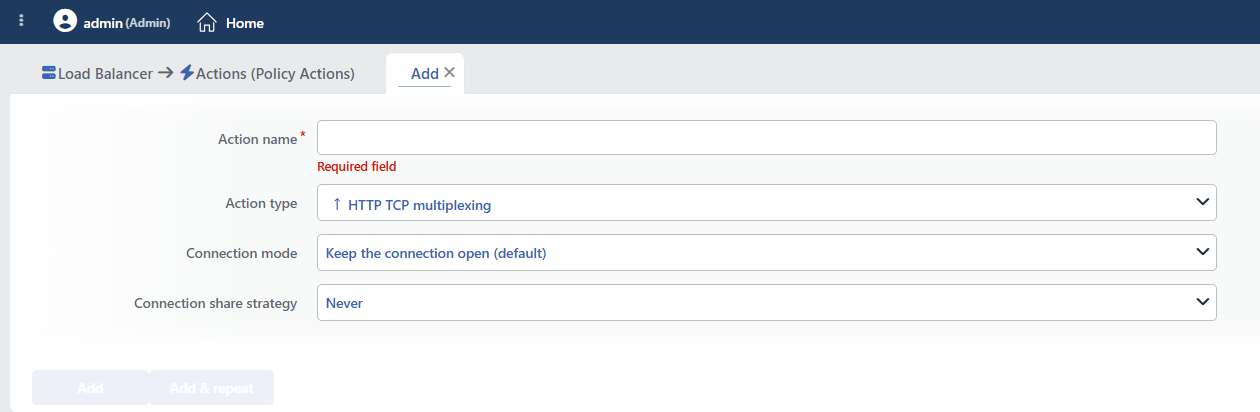 HTTP TCP Multiplexing Action Add Form
INFO
Connection Mode Default: Keep the connection open
Determines whether the connection between TR7 and the Backend Service will remain open after the request is completed.
- Keep the connection open (default): The connections are kept open after the request and can be reused in the subsequent requests. Connection sharing is meaningful only in this mode.
- Close the backend service connection (not recommended): The connection on the client side remains open, and the Backend Service connection is closed after every response.
- Close after every request (not recommended): After every request, the connection on both sides is closed.
The cost of the closing modes
The default should be changed only for the Backend Services that do not work properly with a persistent connection. In the closing modes, every request means a new connection (a new TLS negotiation if it is HTTPS); the per-second connection and SSL limits in the limit profile come under pressure. When Close after every request is selected, the HTTP KeepAlive value in the timeout profile also becomes ineffective.
INFO
Connection Share Strategy
This field is the field in which at which level TR7 can share the TCP connections it establishes with the Backend Services among the sessions is determined.
The selected strategy has a direct effect on the number of connections, the latency, the resource usage and the Backend Service compatibility.
The field is visible only while Keep the connection open is selected as the Connection Mode; since no connection pool is created in the closing modes, the field is removed from the form and, if a strategy has been selected earlier, it is ignored.
The field does not have a preselected value; if it is left empty, the strategy line is not written to the configuration and the Safe behavior is valid.
- Never: The idle TCP connections opened on the Backend Service side are never shared among the sessions. Each client session communicates over its own connection. It is preferred for the Backend Services where connection isolation is critical and which are old or do not support connection reuse.
- Safe: The first request of a session is always transmitted to the Backend Service over a new connection belonging to itself. The subsequent requests of the same session can be sent over the existing connections if it is suitable. It offers safe default behavior and is the recommended strategy for most standard web applications.
- Aggressive: The first requests are transmitted only over the Backend Service connections that have been successfully reused at least once before. This approach provides higher efficiency in the environments where it is known that the Backend Services support connection sharing without a problem. It should be used carefully in incorrectly configured Backend Services.
- Always: It allows even the first request of a session to be transmitted over an existing Backend Service connection. It provides the highest level of connection sharing and the lowest connection opening cost. It is suitable for high-traffic, modern Backend Services that are fully compatible with connection reuse.
Sharing must not be done in connection-bound authentication
NTLM and Kerberos (SPNEGO) authentication is bound to the TCP connection itself: if an authenticated connection is given to the request of another client, an authorization leak or a continuous 401 loop occurs. TR7 does not detect and prevent this situation.
In the Backend Services that use these authentication methods (Exchange, SharePoint, IIS-based in-house applications), Never or Safe must be used; Always must not be used, and Aggressive is risky.
Only one HTTP TCP Multiplexing action can be added to the same vService; when a second action is to be added, a usage limit exceeded warning is given.
INFO
Form Buttons
Add
The action adding process is completed by clicking the Add button.
Add & Repeat
With the Add & Repeat button, the action adding process is completed, and another new action can be added with different configurations without leaving the related window.
 Action Added
WARNING
The HTTP TCP Multiplexing action does not require a condition and is applied unconditionally on the vService on which it is defined.
This is not a preference but a technical necessity: the connection mode and the sharing strategy are configuration settings applied not to individual requests but to all the Backend Service connections of the vService. For the same reason, the Hit Counter and Set Variable on Hit fields are not located in the form either.
Actions that run unconditionally directly affect all traffic or behavior on the related vService, without an evaluation based on traffic content.
In live environments, it is recommended that target service behaviors and possible effects be evaluated carefully before such actions are enabled. Otherwise, unexpected service behaviors or operational problems can occur.
Operational and Safe Usage Recommendations
The HTTP TCP Multiplexing action can increase the performance on TR7; however, it must be selected in accordance with the connection behavior of the Backend Services.
- Decide on the Connection Mode First. The sharing strategy is meaningful only when the connections are kept open; if the closing modes are selected, the strategy field is removed anyway.
- Start with Safe. If the Backend Service behavior is not clear, Safe should be selected, and the aggressive strategies should be moved to after measurement is made.
- Verify the Authentication Method. If the Backend Service uses NTLM/Kerberos, the sharing must be limited with Never or Safe.
- The Backend Service connection behavior is verified. It is verified that the Backend Service supports keep-alive, the connection pool and connection reuse correctly; otherwise unexpected session behavior can be seen.
- Observe under Load. After the strategy change, the number of connections, the latency and the error rates should be monitored; the improvement or the negative effect should be measured.
- Make a Gradual Transition in Critical Applications. The transition to more aggressive strategies should be applied gradually in the live environment and the service behavior should be verified.
- Make the Selection According to the Application Type. In applications where the session dependency is high or the connection management is sensitive, more controlled strategies should be preferred.
Common Usage Scenarios in Live Environments
The examples below show how the related action is applied in the most frequently encountered use cases in real systems. These scenarios are based on practices that are widely preferred in live environments and rest on experience gained in the field.
Scenario 1: Performance Optimization of a High-Traffic E-Commerce Site
Problem: Under high traffic (1000+ simultaneous users), an e-commerce site opens a large number of TCP connections to the Backend Service (2-3 connections for each user). The Backend Service connection limit is filled, new requests are rejected and the site slows down.
Solution: With the Always strategy, the TCP connections are reused at the highest level and the number of Backend Service connections is reduced significantly.
Configuration: Connection mode → Keep the connection open · Connection share strategy → Always
Result:
- ✅ The number of connections → Independently of the number of simultaneous users, the number of connections in the pool decreases significantly.
- ✅ The connection setup latency → Is minimized, and the page loading speed increases.
- ✅ The Backend Service → The connection limit problems disappear.
- ✅ Performance → Since the connection opening cost disappears, the processing speed increases.
- ⚠️ Precondition → It must be verified that the Backend Service does not use connection-bound authentication.
Scenario 2: A Session-Based WordPress/Drupal Application
Problem: It has not been verified that the Backend Service supports connection sharing without a problem; it is desired to avoid the connection errors that aggressive sharing can lead to, but it is also not desired to give up the performance gain completely.
Solution: With the Safe strategy, the first request of each session is sent from a new connection, and the subsequent requests are reused from the existing connections.
Configuration: Connection mode → Keep the connection open · Connection share strategy → Safe
Result:
- ✅ The first request → Is sent from a new connection of its own, and no surprises caused by reuse are experienced.
- ✅ The performance gain → The subsequent requests use the existing connections, and the connection setup latency decreases.
- ✅ Balance → Balanced behavior between compatibility and performance is provided.
- ℹ️ Note → This behavior is also valid when the strategy is left empty.
Scenario 3: A Compatibility Problem of a Legacy Java EE Application
Problem: An in-house application performs authentication with NTLM. Since the authentication is bound to the TCP connection, when an authenticated connection is given to the request of another user, the users continuously encounter the credentials window or are processed with the authorization of another user.
Solution: With the Never strategy, the connections are not shared among the sessions at all; each session uses its own authenticated connection.
Configuration: Connection mode → Keep the connection open · Connection share strategy → Never
Result:
- ✅ Authentication → An authenticated connection is not transferred to another session.
- ✅ Authorization security → Users being processed through each other's session is prevented.
- ✅ Compatibility → The Backend Services that use NTLM/Kerberos work without a problem.
- ❌ Performance → Since there is no connection reuse, more connections are opened.
Scenario 4: REST API Gateway Optimization
Problem: A REST API gateway receives high traffic and it has been tested that the Backend Service supports connection reuse. The Safe strategy is used, but a greater performance gain is desired.
Solution: With the Aggressive strategy, the first requests are also sent over previously tested connections and the performance is increased.
Configuration: Connection mode → Keep the connection open · Connection share strategy → Aggressive
Result:
- ✅ Performance → A higher performance gain than the Safe strategy is obtained.
- ✅ The number of connections → Is kept at a minimum level, and the Backend Service resources are preserved.
- ✅ The first request speed → Since tested connections are used, the latency decreases.
- ⚠️ Requirement → It must be verified beforehand that the Backend Service supports connection reuse.
