
Smarter by Design.Simpler for Business
Path
What Is Path?
Path summarizes the four path level inspections of the rule selected in the Page Types list: Allowed Methods, Path Length, Path Depth and OWASP Check. These settings are configured while the rule is being added or edited; this tab is the place where the current values are read and where the editing is passed to.
Accessing the Screen
When a rule is clicked in the list, the detail panel opens on the right; when another rule is passed to, the panel shows the information of that rule, and when the row selection is removed, it closes. In the panel title there is the path of the rule (the Any Paths label in the Any Paths rule), and below it the name of the host group and the copy icon that copies the path to the clipboard. The Edit and Delete buttons in the title do the same as the Edit and Delete operations on the toolbar.
In the tab strip below the title there are seven tabs: Path, Query, Header, JSON, XML, Form, RAW. The tab set is the same for every rule; the tabs for which the rule defines an inspection are shown distinct, the empty ones pale. The panel comes with the Path tab at the first opening; at the following openings the last viewed tab is remembered (this preference is not per rule but per user).
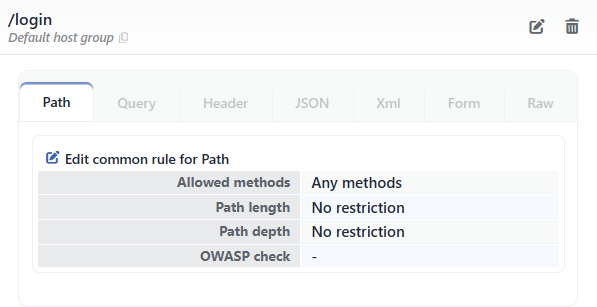 The Detail Panel - The Path Tab
The Displayed Fields
The table in the Path tab lists the path level inspections of the rule with their configured values:
| Field | Display |
|---|---|
| Allowed Methods | Any Methods if there is no method restriction; the full list separated by commas if certain methods have been selected (for example GET, OPTIONS, HEAD, POST, PUT, PATCH, DELETE); None if no method is allowed. |
| Path Length | No Restriction if there is no restriction; the one-way restrictions are shown in the ≤ 8192, ≥ 1 form, the equality as a bare number and the range in the [1 - 8192] form. |
| Path Depth | The same display as Path Length is used (for example ≤ 256). |
| OWASP Check | - is shown while the scanning is off, ✓ while it is on; if OWASP Exclusions is defined, the number of the exclusions is stated next to the mark. |
This set of four fields is the same for every rule; the difference is in the values. Since the Path Length and Path Depth restrictions can be configured only in the rules with a glob path and in the Any Paths rule, these rows are seen as No Restriction in the rules with an exact path; in the rules with a glob path and in the Any Paths rule, on the other hand, the configured restrictions (for example [1 - 8192] and ≤ 256) are shown.
For the meanings of the fields and the validation rules see Add.
The path inspections are not inherited
The values in this tab always belong to the rule itself. Contrary to the field inspections in the other tabs, the path inspections are not inherited from another rule; whatever the rule has defined is what is shown.
Edit Common Rule for Path
The pencil icon Edit common rule for Path button above the table opens the same Edit Interface form as the Edit button in the title; the form comes filled with the current values of the rule. The content of the form changes according to the rule type: in the rules with a glob path there are also the Path Length, Path Depth fields and the live Path Test Table; in the Any Paths rule there are the Path Length and Path Depth fields but the test table does not take place; in the rules with an exact path these fields do not take place in the form (see Add). When the change is saved, no additional deployment (deploy) step is needed; the WAF configuration is applied automatically and the values in the panel are updated instantly.
