
Smarter by Design.Simpler for Business
User Authentication (On HTTP Request)
What Is the User Authentication (On HTTP Request) Action?
The User Authentication (On HTTP Request) action verifies the user name and password with the HTTP Basic Authentication mechanism. This action opens a login window in the browser and asks the user for the credentials.
This action works only at the request stage and needs to be used together with the User Authentication condition.
How Does User Authentication (On HTTP Request) Work?
User Authentication (On HTTP Request) is a standard authentication mechanism defined in RFC 7617.
The operation:
- The client tries to access the protected resource.
- The server sends a
401 Unauthorizedresponse and aWWW-Authenticateheader. - The browser shows a login window to the user.
- The user enters the credentials.
- The browser sends the request again with an
Authorizationheader. - The server verifies the credentials.
Client →GET /admin (no credentials)
← TR7401 Unauthorized · WWW-Authenticate: Basic realm="Admin Panel"
🔒The browser opens a login window, the user name/password are asked for.
Client →GET /admin · Authorization: Basic dXNlcjpwYXNz (Base64)
← TR7200 OK (the identity is verified)
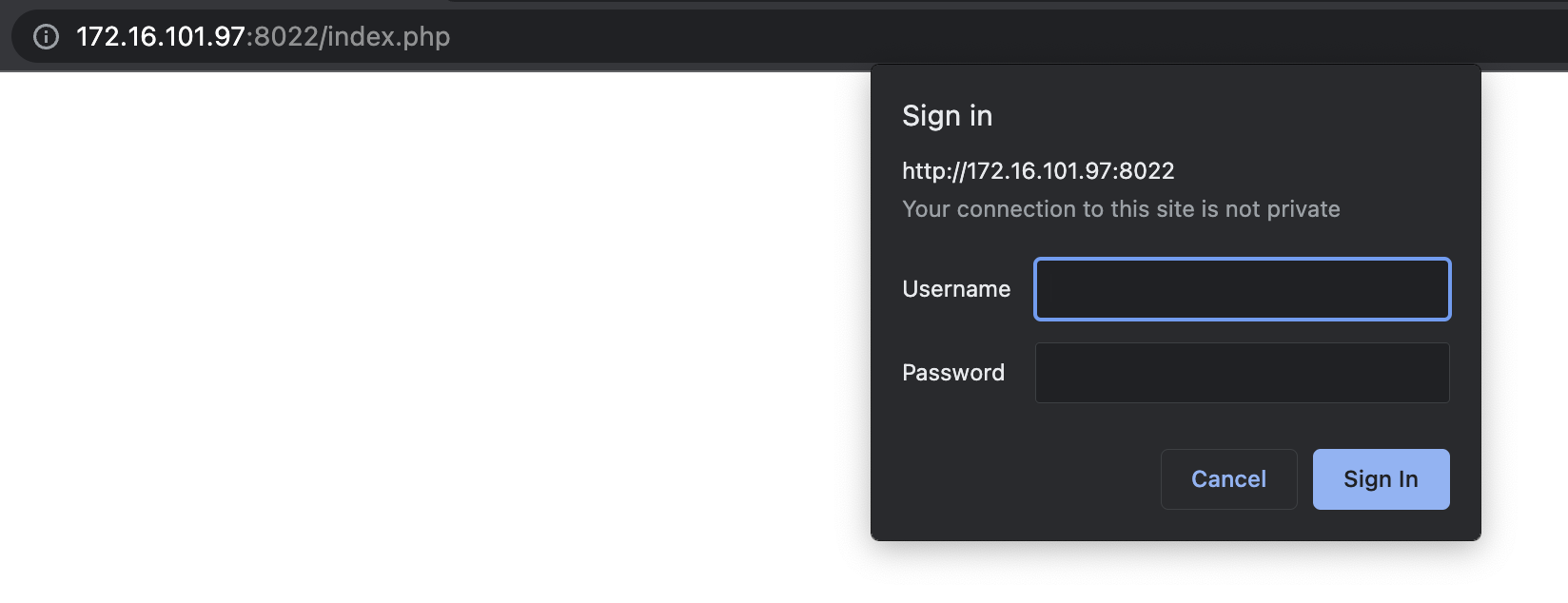 The HTTP Basic Authentication Login Window in the Browser
Security Warning
HTTP Basic Authentication encodes the credentials with Base64 but does not encrypt them. When it is used without HTTPS, the credentials become visible on the network. This action is always used together with HTTPS.
Relationship Between the Condition and the Action:
| Component | Role |
|---|---|
| The User Authentication (On HTTP Request) Action | Triggers the login window in the browser and performs the verification |
| The User Authentication Condition | Defines the valid user name/password pairs |
The Importance of the User Authentication (On HTTP Request) Action
HTTP Basic Authentication is widely used for simple and fast access control.
The User Authentication (On HTTP Request) action;
- protects the admin panels,
- restricts access to the development/test environments,
- protects the API endpoints with simple authentication,
- protects the staging environments from unauthorized access,
- adds an extra security layer to certain pages.
For this reason, the User Authentication (On HTTP Request) action is a practical solution for fast and simple access control.
Supported vService Types
HTTP
L7 TCP
Network
Execution Timing
On Request
On Response
How to Add?
A new User Authentication (On HTTP Request) Action can be added through the TR7 web management interface by following the steps below:
- The Configuration Menu is opened by clicking the TR7 logo at the bottom left.
- The Load Balancer → Actions → Add steps are followed.
- A unique and descriptive name is entered for the action.
- User Authentication (On HTTP Request) is selected as Action Type.
- The related configurations of the action are made.
- In the Conditions tab, the condition/conditions under which the action takes effect are determined.
- The action is added by clicking the
Addbutton.
Important
This action must be used together with the User Authentication condition. In this condition, the valid user name and password combinations are defined.
User Authentication (On HTTP Request) Action Add Form
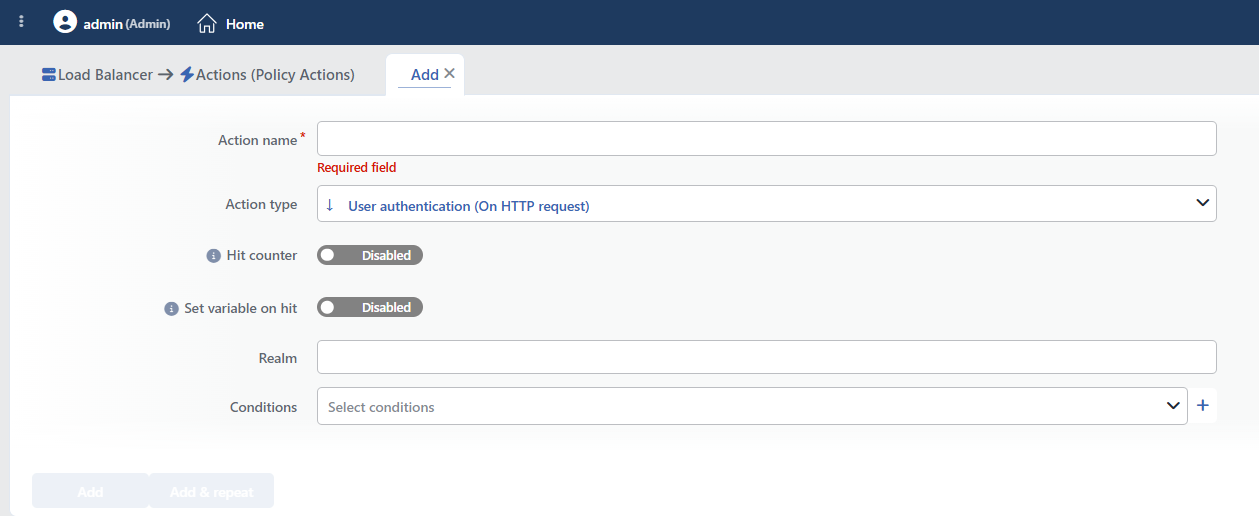 User Authentication (On HTTP Request) Action Add Form
INFO
Hit Counter Default: Off
Hit Counter counts every run of the action (it is evaluated together with the action's own condition; the count is not lost even in terminating actions such as Deny). Action-based rates and totals are displayed in the Action Hits tab of the vService dashboard and on the live statistics screen; they do not appear as a separate column in the lists. The counter is cumulative; there is no interface for resetting it manually: it starts from zero when the set of counted actions changes or when the vService is reloaded, while the history is preserved on the dashboard as a rate (hit/s).
In this action, the counter counts the requests for which authentication is asked (for which a 401 is sent); it does not count the successful logins.
INFO
Set Variable on Hit
A variable name whose value is assigned each time the action runs can be entered (optional; empty by default). The name can consist of letters, digits and underscores (at most 32 characters). When the action is triggered, the variable is set to 1, and chained behaviors can be built by reading it with the %TR7VAR(name) smart variable in other conditions and actions on the same vService.
INFO
Realm Default: Restricted
The realm information to be displayed in the HTTP Basic Authentication window is entered. This text states to the user which area they are logging in to.
Sample Values
Admin Panel: For the management panelStaging Environment: For the test environmentAPI Access: For API accessProtected Area: For the protected area
Tip
The realm value is used by the browser to cache the credentials. Once a login is made for the same realm, the browser does not ask again throughout the session.
INFO
Conditions
In this field, it is defined under which condition or conditions the related action takes effect.
By adding one or more conditions, the behavior can be applied in a targeted and controlled way with the and/or structure.
Detailed information about conditions is on the Conditions page.
The User Authentication Condition Is Required
For this action to work, the User Authentication condition must definitely be added. In this condition, the valid user name and password combinations are defined.
By being used together with other conditions, verification can be performed only for certain paths or IP addresses.
INFO
Form Buttons
Add
The action adding process is completed by clicking the Add button.
Add & Repeat
With the Add & Repeat button, the action adding process is completed, and another new action can be added with different configurations without leaving the related window.
 Action Added
The passwords are kept in the configuration as plain text
The user names and passwords are stored unencrypted in the form in which they are entered in the condition definition, and they are also displayed unmasked in the interface. This method is suitable only for low-sensitivity access restrictions; it should not be used on the services that require corporate authentication.
In addition, the Authorization header is forwarded to the Backend Service as it is; if this header needs to be processed on the application side, it must be taken into account.
There is no attempt limit
When wrong credentials are entered, the request is asked again; the number of attempts is not limited and no account lockout is performed. Against brute force attempts, this action must be marked with Set Variable on Hit and used together with the Quarantine action.
If no condition is defined, the action does not work
This action is designed to be used together with the User Authentication condition; the user names and passwords are defined in that condition.
If it is saved without a condition being defined, the rule is written to the configuration in such a way that it will never run and no warning is given. If the Realm field is left empty, Restricted is displayed in the browser window.
Operational and Safe Usage Recommendations
- Always Use HTTPS. HTTP Basic Authentication does not encrypt the credentials. Using it without HTTPS causes the credentials to be transmitted on the network as plain text.
- Strong passwords are used. The passwords defined in the User Authentication condition must be strong; complex passwords are preferred for protection against brute-force attacks.
- It is used together with rate limiting. Against brute-force attacks, the action is applied together with the Quarantine action; this limits the failed login attempts.
- Not Sufficient for Sensitive Systems. HTTP Basic Authentication provides simple protection. For sensitive systems, AGS - AAM (Application Access Management) or more advanced authentication systems should be preferred.
- The realm is kept meaningful. The realm value tells the user what they are logging in to; descriptive and meaningful realm values are used.
