
Smarter by Design.Simpler for Business
Add
What Is Add?
Add adds a new page type manually to the Page Types list of a host group. A page type is the combination of a path pattern and the inspection settings (the allowed HTTP methods, the path length/depth limits, the OWASP scanning and the field inspections) to be applied to the requests coming to that path.
The page types are normally produced by Analysis & Learning by being learned from the past traffic; the requests that are taught to WAF over Event Logs are also processed into this list as page types. Add, on the other hand, is the way of defining the rule directly without waiting for the learning or for the endpoints whose traffic has not formed yet (such as an API path that will be newly put into service). The added page type belongs to the host group from which the form is opened; every host group keeps its own page type list separately.
A page type is actually a WAF rule
Every page type is a WAF rule in the background and is at the center of the blocking decision. When a request arrives, WAF first matches the path of the request with the page types; the request is inspected with the configuration of the matching rule: the HTTP method is compared with the Allowed Methods list, the path length and depth with the defined restrictions; the path content is scanned with the OWASP signatures; the query, header and body fields are examined according to the Check Fields definitions of the rule. Every violation that is detected is added to the attack score of the request. If the host group works in the Blocking mode and the total score reaches the blocking threshold, the request is blocked; otherwise the request is forwarded to the Backend Service. That is, whether an incoming request will be blocked or not is decided by looking at the page type (the rule) that matches that request.
The form works in two ways according to the value typed in the Path field:
| Path form | Example | Behavior |
|---|---|---|
| Exact (Full) Path | /login | The path is matched exactly; the form shows only the Allowed Methods and OWASP fields. |
| Glob Path | /api/v*/login | The path is matched as a pattern; a live path test table appears in the form and, in addition to the pattern, the Path Length and Path Depth restrictions can be defined. |
Accessing the Page Types Screen
- Left Monitor Panel is opened.
- WAF-Protected vServices is selected from the category tabs at the top left.
- The vServices defined on TR7 with WAF protection enabled are listed.
- The vService to be monitored is clicked; the screen opens with the Dashboard tab that carries the vService's name.
- The WAF Management tab is clicked on the screen that opens.
- The pencil icon next to the N Page Types row below the mode card is clicked; the Page Types tab opens with the name of the relevant host group in its title (Default Host Group for the default group).
- The Add button on the toolbar is clicked.
The columns of the list and the toolbar are explained in the Page Types Listing Screen section.
The Add Screen - Exact (Full) Path
When a value that contains no wildcard character is entered in the Path field, the form stays in its plain state: only the Virtual Host Group, Path, Allowed Methods and OWASP fields are seen.
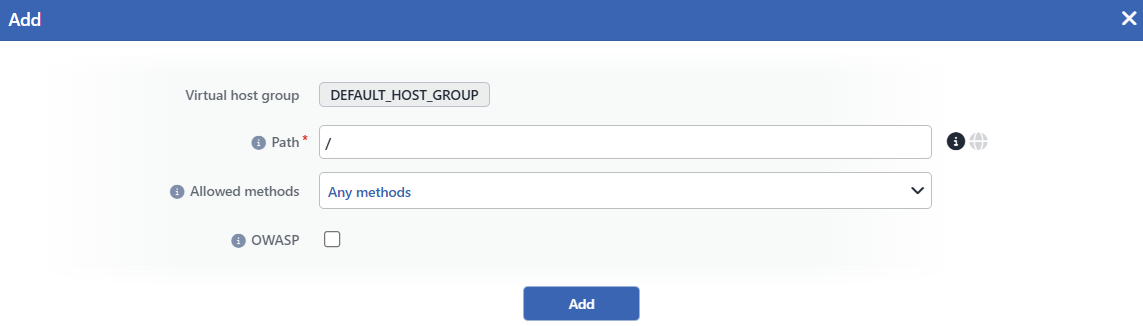 The Page Type Add Screen (Exact Path)
INFO
Virtual Host Group
The host group to which the rule will be added is shown as a read-only badge; it is determined according to which group's Page Types tab the form is opened from and cannot be changed from the form. In the Virtual Host Groups, when the badge is hovered over, the host patterns the group covers are listed.
INFO
Path
The request path the rule will match is entered (a required field). The value must start with / and is case sensitive; the query string of the request is not taken into account in the matching. When the info icon on the right of the field is clicked, the help page that explains the glob syntax opens in a new tab.
The values that contain no wildcard character (e.g. /login, /api/users) are interpreted as Exact (Full) Path: the rule is applied when the request path matches the entered value exactly.
Mind the trailing / character
Before the matching, the / character at the end of the request path is dropped. For this reason, if the full path is entered in the /api/login/ form (ending with /), it does not match any request; it must be entered as /api/login.
INFO
Allowed Methods
With which HTTP methods a request can be made to this path is determined:
- Any Methods: all the HTTP methods are allowed (the default).
- Multiple Methods: only the selected methods are allowed; a multiple selection is made from the fixed method list and at least one method must be selected. A free-text method outside the list cannot be entered.
- None: no HTTP method is allowed.
The list of selectable methods: ACL, BASELINE-CONTROL, BIND, CHECKIN, CHECKOUT, CONNECT, COPY, DELETE, GET, HEAD, LABEL, LINK, LOCK, MERGE, MKACTIVITY, MKCALENDAR, MKCOL, MKREDIRECTREF, MKWORKSPACE, MOVE, OPTIONS, ORDERPATCH, PATCH, POST, PRI, PROPFIND, PROPPATCH, PUT, REBIND, REPORT, SEARCH, TRACE, UNBIND, UNCHECKOUT, UNLINK, UNLOCK, UPDATE, UPDATEREDIRECTREF, VERSION-CONTROL.
A request that arrives with a method that is not allowed is scored as an Allowed Methods violation in the Structure Policies category and falls into the attack record.
INFO
OWASP Default: Not checked
When it is checked, the path section of the requests coming to this path is subjected to the OWASP signature scanning (by default it is not checked). When it is checked, the OWASP Exclusions field appears in the form; the OWASP rules to be excluded from the scanning are determined from here with a multiple selection. In the scanning, the signature set that is enabled on the OWASP Rules screen of the vService is used; for the detailed listing of the signatures see Signature & Rule Library.
This box manages only the path scanning: the OWASP scannings of the query, header and body fields depend on their own settings in the Path Check Fields configuration of the rule. In the Any Paths rule this setting is on by default.
INFO
Add
The page type adding operation is completed by clicking the Add button; the button becomes enabled when no error remains in the form. There is no additional confirmation window or deployment (deploy) step; the WAF configuration is automatically produced again and applied, and the rule comes into force within seconds. The N Page Types number on the mode card also increases with the new rule.
A second rule that has the same path pattern cannot be added in the same host group; in this case the server returns a rule conflict error.
The Add Screen - Glob Path
When a value that contains a wildcard character is entered in the Path field, the form passes into the glob mode: the globe icon on the right of the field becomes active, a live test table appears below the path field and the Path Length and Path Depth restriction fields are added to the form.
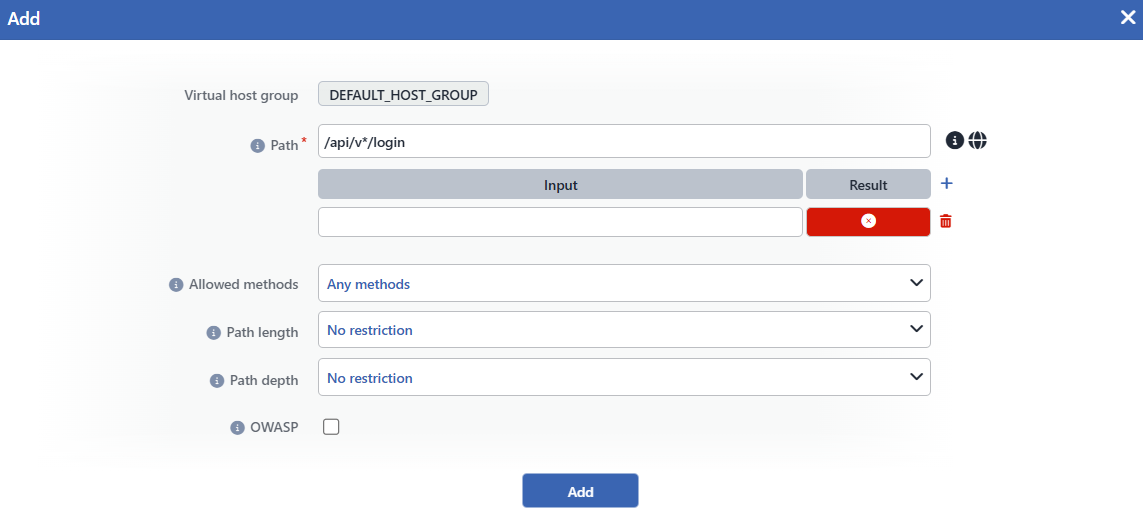 The Page Type Add Screen (Glob Path)
INFO
Virtual Host Group
The host group to which the rule will be added is shown as a read-only badge; it is determined according to which group's Page Types tab the form is opened from and cannot be changed from the form. In the Virtual Host Groups, when the badge is hovered over, the host patterns the group covers are listed.
INFO
Glob Path
When the value contains the glob wildcard characters, it is interpreted as a pattern: * matches any character sequence within a single directory (it does not cross the / boundary), ** crosses the directory boundaries as well; ? matches a single character, and the [abc] and {a,b} forms match character/alternative sets. All the requests that match the pattern enter the scope of the rule: for example the /api/v*/login pattern matches /api/v1/login and /api/v2/login; since * does not cross the directory boundary, it does not match /api/v1/auth/login. For the detail of the glob syntax see Glob (programming).
The Path Test Table
It is the table with the Input / Result columns that appears right below the Path field. Example request paths are added with the + icon; the Result column of every row shows instantly with the ✓ / ✗ badges whether the entered example matches the pattern or not. The rows are deleted with the trash icon.
The test tool uses the same matching logic that will be used at runtime for the pattern; before the rule is saved, whether the pattern covers the intended paths or not is verified with this table.
INFO
Allowed Methods
With which HTTP methods a request can be made to this path is determined:
- Any Methods: all the HTTP methods are allowed (the default).
- Multiple Methods: only the selected methods are allowed; a multiple selection is made from the fixed method list and at least one method must be selected. A free-text method outside the list cannot be entered.
- None: no HTTP method is allowed.
The list of selectable methods: ACL, BASELINE-CONTROL, BIND, CHECKIN, CHECKOUT, CONNECT, COPY, DELETE, GET, HEAD, LABEL, LINK, LOCK, MERGE, MKACTIVITY, MKCALENDAR, MKCOL, MKREDIRECTREF, MKWORKSPACE, MOVE, OPTIONS, ORDERPATCH, PATCH, POST, PRI, PROPFIND, PROPPATCH, PUT, REBIND, REPORT, SEARCH, TRACE, UNBIND, UNCHECKOUT, UNLINK, UNLOCK, UPDATE, UPDATEREDIRECTREF, VERSION-CONTROL.
A request that arrives with a method that is not allowed is scored as an Allowed Methods violation in the Structure Policies category and falls into the attack record.
INFO
Path Length
It defines a restriction on the path length (the number of characters excluding the query string) of the requests that match the pattern:
| Option | Meaning |
|---|---|
| No Restriction | No restriction is applied (the default). |
| Less Than or Equal To | The measured value must be equal to or smaller than the entered number. |
| Equals To | The measured value must be equal to the entered number. |
| Greater Than or Equal To | The measured value must be equal to or greater than the entered number. |
| Range | The measured value must stay between the entered lower and upper limits (two values are entered). |
Only a number can be entered in the value field. The requests that violate the restriction are scored as a Path Length violation within the scope of the Structure Limits inspections.
Since the length is already fixed in an Exact (Full) path, this field is provided only in the patterned paths.
INFO
Path Depth
It defines a restriction on the directory depth of the requests that match the pattern; the depth is the number of the / characters in the path (e.g. 3 for /a/b/c):
| Option | Meaning |
|---|---|
| No Restriction | No restriction is applied (the default). |
| Less Than or Equal To | The measured value must be equal to or smaller than the entered number. |
| Equals To | The measured value must be equal to the entered number. |
| Greater Than or Equal To | The measured value must be equal to or greater than the entered number. |
| Range | The measured value must stay between the entered lower and upper limits (two values are entered). |
Only a number can be entered in the value field. The requests that violate the restriction are scored as a Path Depth violation within the scope of the Structure Limits inspections.
INFO
OWASP Default: Not checked
When it is checked, the path section of the requests that match this pattern is subjected to the OWASP signature scanning (by default it is not checked). When it is checked, the OWASP Exclusions field appears in the form; the OWASP rules to be excluded from the scanning are determined from here with a multiple selection. In the scanning, the signature set that is enabled on the OWASP Rules screen of the vService is used; for the detailed listing of the signatures see Signature & Rule Library.
This box manages only the path scanning: the OWASP scannings of the query, header and body fields depend on their own settings in the Path Check Fields configuration of the rule. In the Any Paths rule this setting is on by default.
INFO
Add
The page type adding operation is completed by clicking the Add button; the button becomes enabled when no error remains in the form. There is no additional confirmation window or deployment (deploy) step; the WAF configuration is automatically produced again and applied, and the rule comes into force within seconds. The N Page Types number on the mode card also increases with the new rule.
A second rule that has the same path pattern cannot be added in the same host group; in this case the server returns a rule conflict error.
The Check Fields are configured afterwards
The Check Fields column of the newly added page type starts empty: the rule is created only with the path/method/limit/OWASP settings. The field inspections for the query, header, form, JSON, XML and body fields are defined separately from the tabs in the detail panel that opens by clicking the rule in the list (Path Check Fields).
Runtime: Rule Matching
When a request arrives, its path is matched with the page types of the host group in the following priority order:
01 · ExactExact (Full) PathIf there is a full path rule whose path matches exactly, it wins; the field inspections it does not define are completed from the Glob and Any Paths layers.
02 · GlobGlob PathIf there is no exact match, all the glob rules that match the path are evaluated together and their inspections are combined.
03 · Any PathsAny PathsThe requests that match no rule are inspected with the settings of the Any Paths (catch-all) rule.
The inheritance is at the inspection section level: the field inspections that a rule does not define at all (the Check Fields sections: the query, the header, the body etc.) are completed by the glob rule that matches the path or by the Any Paths rule. The rule's own path settings (including Any Methods, No Restriction or an unchecked OWASP), on the other hand, are applied as they are and take the place of the path settings of Any Paths for that path. The order in which the rule was defined has no importance in the ordering.
The mode behavior
Allowed Methods, Path Length and Path Depth are structural inspections: the violations lead to blocking only in the Blocking mode; in the Monitor mode they are reported as an attack but the request is let through, and in the Learning mode these inspections are not run at all. The structural violations have a high score; at the default blocking threshold a single violation is enough for the request to be blocked. The OWASP scanning, on the other hand, contributes to the attack score over the signature matches.
Operational Best Practices
- The rule base should be formed with the learning suggestions. It is recommended that the greater part of the rule base be formed with the suggestions of Analysis & Learning; manual adding is preferred for the paths the learning cannot see yet (the endpoints that will newly go into service or that have not received traffic yet).
- The glob patterns should be tested before they are saved. The patterns should be tried on real request examples with the Path Test Table; the unexpected matching or non-matching cases are caught most easily at this stage.
- A
/should not be added to the end of the exact paths. Since the trailing/character of the request path is dropped before the inspection, a rule defined in the/api/login/form does not match any request. - Glob should be kept limited to the segments that really vary. An exact path should be preferred whenever possible; the exact rules always come first in the matching priority and their scopes are clear. The glob patterns are suitable for the segments that really vary, such as a version number.
