
Smarter by Design.Simpler for Business
Bot Type
What Is the Bot Type Condition?
Bot Type is a condition type that detects whether an HTTP request is made by a bot/crawler by analyzing the request's User-Agent header, and is used to make traffic routing and manipulation decisions according to this information.
Bots usually introduce themselves in the User-Agent header:
User-Agent
Mozilla/5.0 (compatible; Googlebot/2.1; +http://www.google.com/bot.html)
Search engines: Googlebot
TR7 can recognize 11 different bot categories by comparing the User-Agent header with known bot signatures (pattern matching). Detection is entirely User-Agent-based; no behavioral scoring is performed.
WARNING
Security Note
Malicious bots can imitate the User-Agent. Bot detection should not be relied on alone for critical security decisions.
This condition is different from the Bot Protection on the vService: the Bot Type condition looks only at the User-Agent category, whereas Bot Protection scores the likelihood of the client being a bot with more than one factor and takes action according to the score.
The Importance of the Bot Type Condition
A significant portion of web traffic is generated by bots. Managing this traffic correctly is critical for both SEO and security.
With the Bot Type condition:
- Special content can be served to search engine bots,
- Malicious bots can be blocked,
- Bot traffic can be separated from normal user traffic,
- SEO crawlers can be prioritized,
- Bot traffic statistics can be collected.
Bot Type vs Browser vs Mobile Platform:
| Condition | What It Detects | Example |
|---|---|---|
| Bot Type | Automation software | Googlebot, Bingbot |
| Browser | Browser application | Chrome, Firefox, Safari |
| Mobile Platform | Operating system | Android, iOS |
Supported vService Types
HTTP
L7 TCP
Network
How to Add?
A new Bot Type Condition can be added through the TR7 web management interface by following the steps below:
- The Configuration Menu is opened by clicking the TR7 logo at the bottom left.
- The Load Balancer → Conditions → Add steps are followed.
- Bot Type is selected as Criteria.
- The related configurations of the condition are made.
- The condition is added by clicking the
Addbutton.
Bot Type Condition Add Form
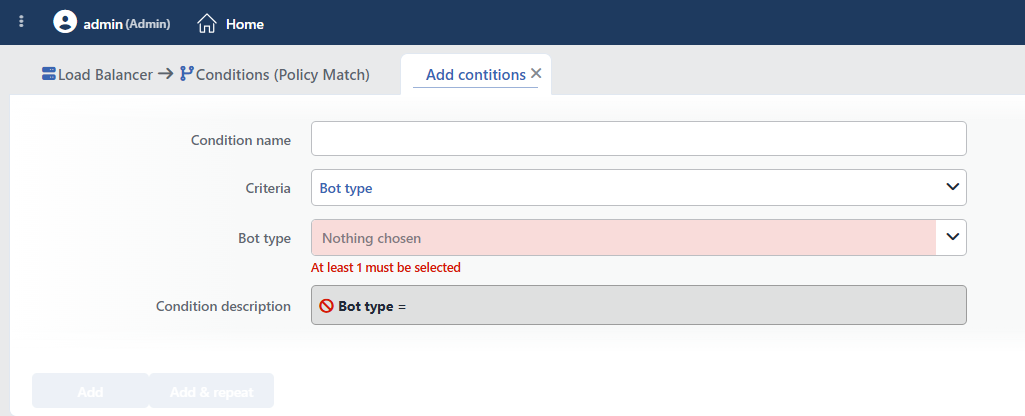 Bot Type Condition Add Form
INFO
Condition Name
An optional name can be entered for the condition to be created.
This field is especially important in the following scenarios:
- When many conditions are defined under the same vService,
- When conditions with similar criteria need to be distinguished,
- When it is necessary to quickly understand which business rule the condition represents.
When this field is left empty, TR7 analyzes the content of the related condition and creates an automatic, descriptive name in the Condition Description field. This generated description is used as the name in condition lists.
INFO
Criteria Required
The field that determines the type of the condition; Bot Type is selected from the searchable dropdown list. This selection determines the fields displayed in the form. The criterion cannot be changed after the condition is saved: if a different criterion is needed, a new condition is defined. For all criteria in the list and their scopes, the criteria catalog on the Conditions page can be referred to.
INFO
Bot Type Required
The bot types to be detected are selected from the searchable list; selecting at least one type is required (the form opens empty). TR7 can recognize 11 different bot categories.
Available Bot Types:
The options in the list appear in the interface with the following names, with examples in parentheses:
| Bot Type | Description |
|---|---|
| Malicious bots | Bots engaged in malicious attack, scanning or exploitation activities |
| Development tools (wget, curl, Postman etc.) | Tools for development and testing purposes |
| Search engines (Googlebot, Yahoo, bingbot etc.) | Search engine bots |
| Social media (facebookplatform, LinkedInBot etc.) | Social media preview and integration bots |
| Crawler (Google Search Console, etc.) | Crawler bots for site crawling and indexing |
| Monitoring (CloudflareDiagnostics, Datadog Agent etc.) | Monitoring and diagnostic bots |
| Service (SkypeUriPreview, YahooMailProxy, Grammarly etc.) | Service and helper bots |
| Benchmark (ApacheBench etc.) | Performance and load testing bots |
| Security checker (Nmap Scripting Engine, sqlmap/, TLSProbe etc.) | Security scanning and testing tools |
| Feed (FeedBurner, FreshRSS etc.) | RSS and content feed bots |
| Other | Other bot types that do not fall into the categories above |
In condition lists and in the Condition Description field, the short names of these types are used (e.g. Bad bots, Search engine, Development tools).
More than one bot type can be selected. It works with OR logic: if any of the selected types matches, the condition is met.
TIP
If only a check of "whether the client is any bot" is wanted without distinguishing between categories, the If the client is a bot condition, which is offered ready-made in the condition selection lists, can be used; there is no need to define a separate condition for this.
INFO
Condition Description
It is created automatically by TR7 in line with the entered criteria and values.
This description:
- which value the condition applies to,
- which criterion it works on,
- the quick understanding of the condition on listing screens
is produced dynamically by the system so as to provide these.
INFO
Form Buttons
Add
The condition adding process is completed by clicking the Add button.
Add & Repeat
With the Add & Repeat button, the condition adding process is completed, and another new condition can be added with different configurations without leaving the related window.
 Condition Added
Operational Usage Recommendations
- Search Engine Bots Should Be Allowed. Search engine crawlers should be allowed to access the site for SEO.
- Malicious Bots Should Be Blocked. The Malicious bots category should be detected and blocked.
- Rate Limiting Should Be Applied. A rate limit different from that of normal users should be applied to bot traffic.
- Bot Spoofing Should Be Watched For. Malicious bots can imitate legitimate bot User-Agents; IP verification (does it come from Google IP blocks?) provides additional security.
Common Usage Scenarios in Live Environments
The examples below show how the related condition is applied in the most frequently encountered use cases in real systems. These scenarios are based on practices that are widely preferred in live environments and rest on experience gained in the field.
Scenario 1: Blocking Malicious Bots
Purpose: To detect web scraper and spam bots in the Malicious bots category and protect API endpoints and content pages.
Configuration: Bot type → Malicious bots
Action Recommendations:
- ✅ Block → Requests from malicious bots are blocked and a 403 Forbidden response is returned.
- ✅ Quarantine → Detected bot IPs are quarantined for 24 hours.
- ✅ Advanced Traffic Inspection → Bot behavior patterns are analyzed and scraping activity is reported.
Scenario 2: Search Engine Bot Prioritization (SEO)
Purpose: To detect search engine crawlers such as Googlebot and Bingbot, serve SEO-friendly content and perform cache optimization.
Configuration: Bot type → Search engines
Action Recommendations:
- ✅ Add HTTP Header → The
X-SEO-Bot: trueandCache-Control: public, max-age=3600headers are added, and the Backend Service returns an SEO-optimized response. - ✅ Advanced Traffic Inspection → Search engine crawl activity and indexing rate analysis are reported.
Scenario 3: Monitoring Bot Log Filtering
Purpose: To detect uptime monitoring and health check bots (such as CloudflareDiagnostics and Datadog Agent) and reduce log noise.
Configuration: Bot type → Monitoring
Action Recommendations:
- ✅ Add HTTP Header → The
X-Monitoring-Bot: trueheader is added, and the Backend Service recognizes the monitoring request. - ✅ Advanced Traffic Inspection → Monitoring bot activity and uptime check frequency analysis are reported.
Scenario 4: Social Media Preview Optimization
Purpose: To detect Facebook, Twitter and LinkedIn bots and ensure that Open Graph and Twitter Card meta tags are rendered correctly.
Configuration: Bot type → Social media
Action Recommendations:
- ✅ Add HTTP Header → The
X-Social-Bot: trueandX-Render-OG: enabledheaders are added, and the Backend Service performs the social preview rendering. - ✅ Advanced Traffic Inspection → Social media share distribution and preview generation analysis are reported.
Scenario 5: Development Tool Rate Limiting
Purpose: To detect development tools such as wget, curl and Postman and apply rate limiting to prevent API abuse.
Configuration: Bot type → Development tools
Action Recommendations:
- ✅ Bandwidth Limitation → Development tool traffic is limited to 10 Mbps.
- ✅ Quarantine → Development tool IPs that make more than 100 requests per minute are quarantined for 30 minutes.
- ✅ Advanced Traffic Inspection → Automated testing and API integration patterns are analyzed.
Scenario 6: Security Scanner Control
Purpose: To detect security scanner tools such as Nmap, sqlmap and TLSProbe and block unauthorized security scans.
Configuration: Bot type → Security checker
Action Recommendations:
- ✅ Block → Security scanners that are not in the authorized IP list are blocked and a 403 Forbidden response is returned.
- ✅ Advanced Traffic Inspection → Security scan attempts and vulnerability scanning activity are reported.
- ✅ Advanced Captcha → Manual verification is required by showing a CAPTCHA challenge to automated security tools.
Scenario 7: Comprehensive Bot Traffic Analysis
Purpose: To detect all bot categories, analyze the bot vs human traffic ratio and report the bot traffic distribution.
Configuration: Bot type → (all bot types selected)
Action Recommendations:
- ✅ Add HTTP Header → The
X-Bot-Detected: trueheader and theX-Bot-Categoryheader, whose value is bound via fx to the Bot type smart variable, are added; the header carries the detected bot category, and the Backend Service performs category-based processing. - ✅ Advanced Traffic Inspection → Comprehensive bot vs human traffic distribution, category breakdown and hourly pattern analysis are reported.
