
Smarter by Design.Simpler for Business
Edit
What Is Edit?
Edit is the edit window that gathers the settings of the L7 DDoS Protection card that are independent of the blocks. The four settings here work not on a single block but on the whole of the protection: in which mode the protection will work, whether the verified search engine bots will be exempted from the source limits, and which traffic will not enter any block of the protection.
The limits, the time windows and the actions of the blocks are not on this screen; every block is edited from its own screen opened with its own pencil icon.
4
Settings
The mode, the trust in the verified bots and the whitelist defined in two forms
Monitor
Default Mode
The protection measures at the first moment; the operator turns on the blocking
Across the Protection
The Scope of the Whitelist
The traffic listed does not enter any block and is not caught by the hard ceilings either
100
Whitelist Row Limit
The rows of the IP, CIDR, ASN and country type are in an or relationship with each other
Source-Based
The Scope of the Bot Trust
The verified bots are exempted only from the source limits
Address Range
The Bot Verification
The User-Agent is not looked at; the network range that the bot comes from is checked
The Edit Link on the L7 DDoS Protection Card
The link is right below the mode badge at the top right corner of the card. The badge shows the current mode, and the link opens the window in which the mode is changed. The three information rows at the top right of the card (Trust Verified Bots, Whitelist, Whitelist Rules) are also the summary of the settings in this window.
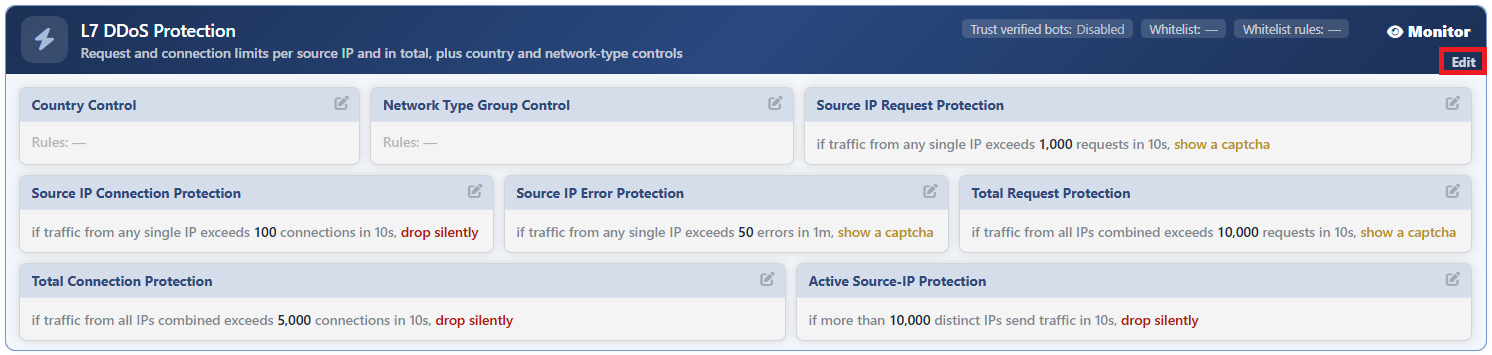 The Edit Link on the L7 DDoS Protection Card
The Edit Screen
- The Bot/DDoS Management tab is opened.
- The Edit link at the top right of the L7 DDoS Protection card is clicked; the edit window titled Edit - L7 DDoS Protection opens.
- The following fields are edited and confirmed with the
Editbutton.
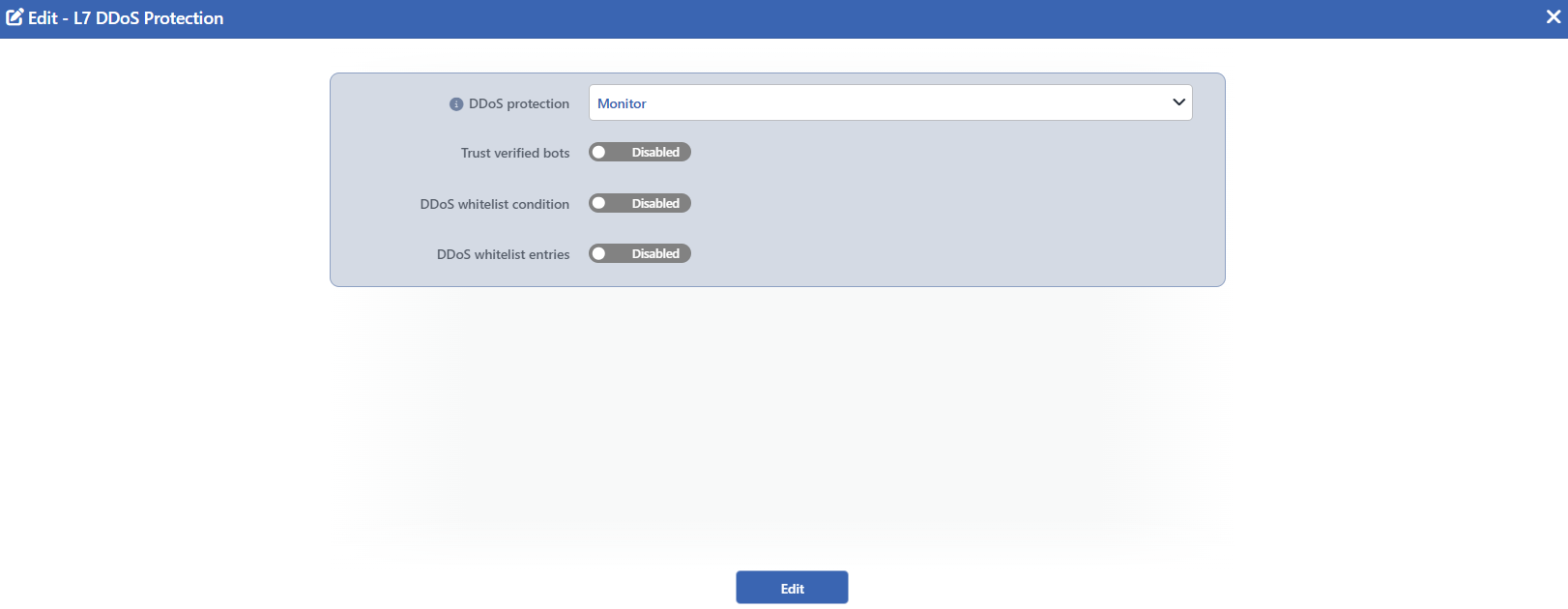 The L7 DDoS Protection Edit Screen
INFO
DDoS Protection Default: Monitor
The working mode of the protection is selected; its default value is Monitor.
| Option | Behavior |
|---|---|
| Off | The protection does not work. The blocks do not make measurements and do not produce events. |
| Monitor | The blocks make measurements and produce events, but no request is stopped. |
| Active | The blocks make measurements and when the limit is exceeded, the defined action is applied. |
While Monitor is selected, when the field is focused on, an information tooltip appears: Actions fire only while the pillar is Active — in Monitor everything here stays staged and no traffic is affected.
If the field has not been written at all, the effective value is Monitor: the protection measures from the first moment, and the operator turns on the blocking.
INFO
Trust Verified Bots Default: Off
When it is checked, the verified search engine bots are exempted from the source-based limits; it is off by default.
The exemption covers three blocks and the source IP hard ceiling: Source IP Request Protection, Source IP Connection Protection and Source IP Error Protection. The country and network type rules, the total limits and the number of active sources are not affected by this setting.
The verification is not made by looking at the User-Agent header: the address range from which the bot comes is compared with the verified bot group in the network type database. For this reason a client that introduces itself as a search engine cannot benefit from this exemption. Since the comparison is address-based, the setting works in the same way on L7 TCP vServices as well.
If an explicit rule that covers the verified bot group has been written in the Network Type Group Control block, that rule takes precedence over this exemption.
INFO
DDoS Whitelist Condition
The traffic to be exempted from the whole of the protection is defined with a condition. The field is opened with a switch; while it is off, the condition is not defined and — is written on the card.
The traffic that meets the condition is not caught by the limit of any block and does not enter the hard ceilings either. On the other hand it continues to feed the counters: the load that an exempted client produces pushes the total limits and the ceiling up on behalf of the other clients. The own exemption lists of the country and network type blocks, on the contrary, do not inflate the counter either.
INFO
DDoS Whitelist Entries Default: Empty
It is the shortcut list of the same exemption written row by row. It is used to enter values one by one instead of writing a condition; the field is opened with a switch and is empty by default.
| Type | The value entered |
|---|---|
| IP Address | A single address. |
| IP Network (CIDR) | An address and a network mask (24 by default). |
| ASN (Autonomous System) | An autonomous system number. |
| Country | A country. |
The rows are in an "or" relationship with each other and they combine with the condition in an "or" relationship as well: the traffic that matches one of the two is counted as exempt. The design limit of the list is 100 rows.
INFO
Edit
Changes in the form are saved by clicking the Edit button. There is no additional confirmation window or deploy step; the Load Balancer configuration is regenerated and applied automatically. The operation is written to the user log with a change summary.
The whitelist and the block exemption are not the same thing
The whitelist on this screen bypasses the whole of the protection: the traffic listed does not enter any block and the hard ceilings are not applied either. The Exempt lists within the country and network type controls, on the other hand, bypass only the rule rows of that block; an exempted country or group continues to be subject to the source and total limits and to the hard ceilings.
Exempting a country with the Country type of the whitelist and writing the same country into the Exempt Countries list of the Country Control block therefore give different results.
The exemption is calculated in the monitor mode as well
The whitelist is not an enforcement but a classification: it is evaluated while the protection is in the Monitor mode as well. In this way the exempt traffic is read separately in the monitoring reports and, when the protection is enabled, the behavior is not a surprise.
Scope and Limits
INFO
- The settings work on the whole of the protection. The limits, the windows and the actions of the blocks are not on this screen.
- The default mode is Monitor. In a record that has not been written at all, the protection measures but does not block.
- The trust in the verified bots covers only the source-based blocks. The total limits and the number of active sources are outside this exemption; a crawling storm also stays under the flood ceiling.
- While the protection is off, the two fields other than the mode are removed from the form. Trust Verified Bots and DDoS Whitelist Condition are hidden; their written values are not deleted, they come back when the protection is turned on again. The DDoS Whitelist Entries list continues to stay in the form, but since the whitelist is not evaluated at all while the protection is off, the rows entered have no effect.
- The design limit of the whitelist is 100 rows. The limit is applied in the single-row adding shortcut in the event log and in the writes made from the external interfaces; in the save made from this window the number of rows is not checked separately.
- The window opens only on the users that have edit permission. The card is displayed with read-only permission; the Edit link is displayed only on the users that have edit permission.
