
Smarter by Design.Simpler for Business
What It Concluded
What Is What It Concluded?
What It Concluded reports the result the engine reached in the last evaluation in a single sentence: it writes how many rules were judged, for how many of them there is a recommendation and that the rest were found suitable as they are. The refreshing of the result is also done from here; the Re-assess button in the title runs the engine again over the settings in force and the traffic learned up to that moment.
It is only a surface for reading and for having a recalculation made: it changes no setting and does not open an editing window. What will be done with the result is decided on the third card of the Learning strip.
The number the card gives is the summary of the results the engine produces row by row. The same results are also seen as badges at the end of the individual rule rows; the card reduces these into a collective sentence.
It reads the same evaluation as the numbers in the upper band
The Rules Reviewed and Suggestions Waiting counters in the upper band of the strip and the sentence on this card come from the same evaluation. The "how many rules were judged" value in the sentence is the same number as Rules Reviewed, and the "for how many of them there is a recommendation" value the same number as Suggestions Waiting.
The Verified number below the card, on the other hand, is a third value that has no counterpart in the upper band.
The What It Concluded Card in the Learning Strip
The card is the one in the middle among the three cards in the body of the strip. At the top the title, the icon and the Re-assess button; in the middle the result sentence; at the bottom the number of the verified rules are located.
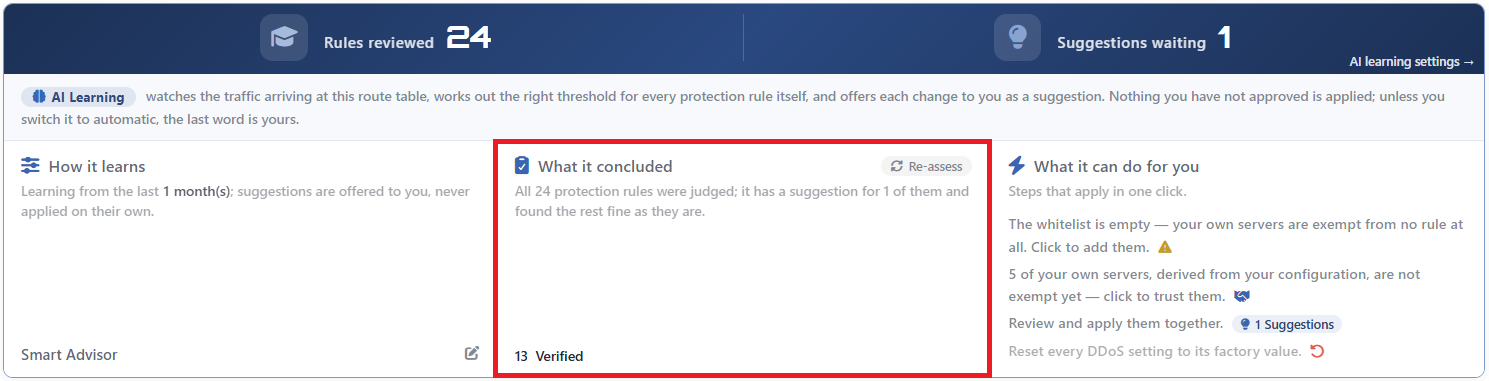 The Learning Strip - The What It Concluded Card
The anatomy of the card:
| Section | What it shows |
|---|---|
| Title | What It Concluded and the clipboard icon. |
Re-assess | The button at the right end of the title; it runs the engine again. |
| Sentence | The result of the last evaluation. It takes one of the three variants below. |
| The Verified number | Below the card; the number of rules for which the engine looked and found no touching necessary. |
The Variants of the Sentence
| State | Sentence |
|---|---|
| There is a recommendation | All <total> protection rules were judged; it has a suggestion for <suggestion> of them and found the rest fine as they are. |
| There is no recommendation | All <total> protection rules were judged; nothing needs changing right now. |
| No evaluation has been made | Preparing suggestions… |
The third state is seen not only when the engine has never run but also when it has run and no result has returned: in the case of an error the counters are reset and the card returns to this sentence.
The Verified Number
The number in the lower band counts the rules that the engine has reviewed and in which it has found nothing to be changed.
The sum of this number and the number of recommendations does not have to be equal to the number of rules reviewed. The difference between them comes from the rules for which neither a recommendation could be produced nor which could be considered "suitable": the rules whose data has not accumulated yet, that could not separate the attack from the normal or that cannot advance because of a setting do not enter either of these two numbers.
Re-assess
The Re-assess button in the title runs the engine again with the current settings and the traffic learned up to that moment. The tooltip of the button says this exactly: Runs the engine again over the current settings and the traffic learned so far.
| Subject | Behavior |
|---|---|
| What it does | It calculates the evaluation from the beginning; it refreshes the result sentence, the Verified number, the badges in the rule rows and the actions on the third card. |
| What it does not do | It changes no setting and applies no recommendation. It is a read-only operation. The first card is not affected by this run either: it reads its content from the configuration. |
| While it is in progress | The icon turns, the button does not take clicks. A second evaluation is not started at the same time. |
| Duration | The operation is waited for up to five minutes. |
The evaluation does not change the settings
The only thing the button refreshes is the result. The modes, the limits and the exemption list of the rules stay as they are; what changes is only the opinion of the engine about these.
The evaluation is also refreshed on its own
Re-assess is not the only way of refreshing. An evaluation is made every time the screen is opened; in addition, when the setting of any rule, the exemption list or the peer trust changes, the engine runs again on its own. That is, editing a limit and saving it produces a new result without the button being pressed as well.
A second request that comes while an evaluation is in progress is not lost: it is marked and when the running evaluation ends it is repeated once.
A failed evaluation empties the card
When the evaluation fails, the counters return to zero, the card writes Preparing suggestions…, the Verified row is hidden completely, the badges in the rule rows disappear and the recommendation package row on the third card falls off.
Whether the error is reported to the user changes according to the reason: if an error response returns from the server (for example an authorization refusal), a warning box is displayed on the screen; in the cases of a timeout and the server not being reached at all, on the other hand, no message comes out, only the card empties.
The third card emptying completely is seen only if no successful evaluation has been made at all. If there has been a successful run before, the return to the default row, the peer trust row and, if there is one, the exemption warning stay in place on that card.
This view must not be confused with "learning is off": in the off mode the card is seen full again.
The Evaluation States
The engine produces a result for every rule and this result is one of seven states. The state is read in writing when the badge in the row of the rule is hovered over and in the evaluation window opened by clicking the badge.
| State | What it means |
|---|---|
| No change | The rule was checked against the traffic learned, nothing to be changed was found. |
| Applicable recommendation | A value that fits the traffic better was learned; it can be applied with a single click. |
| Mode recommendation | The value is correct, but it is recommended that the rule runs in another mode. |
| First value | The rule does not have a value yet; a starting value is ready. |
| Blocked | The engine wants to carry the rule forward, but a setting does not allow this. |
| Uncertain | In this period the normal traffic and the attack traffic could not be separated from each other; instead of guessing a number the engine leaves the decision to the administrator. |
| Early | Enough data has not accumulated for this rule yet; the learning is in progress. |
A blocked recommendation does not disappear
A recommendation in the Blocked state stays on the list. The source of the obstacle is most of the time the administrator's own setting: the mode promotion not having been allowed, the rule having been closed to learning or the exemption list being empty in a rule protecting the device's own management ports.
The exemption list being empty is an obstacle only in the management access rules. In the other rules the same situation is a warning: it is attached to the recommendation but does not stop its application.
Next to the obstacles and the warnings whose solution is in a setting, the Open the setting → link is found in the evaluation window and leads directly to that screen. For the situations the engine itself waits for (enough history not having accumulated, the value not having settled, the measurement that the recommended value would cut the clean traffic as well, the confidence staying low) no such link is found.
The rule having been closed to learning is outside both of these: no separate justification row comes out in the window, the lock is read only from the padlock icon in the rule row.
The Badges in the Rule Rows
The same evaluation is also seen as a badge at the end of the rule rows. The seven states are gathered in four badges:
| Badge | Which states it carries | Appearance |
|---|---|---|
| Suggestion | Applicable recommendation · Mode recommendation · First value | Light bulb icon. Amber in the mode recommendation, the highlighted color in the other two. |
| Locked | Blocked | Lock icon, amber. |
| Learning | Uncertain · Early | Hourglass icon, dim. |
| Verified | No change | Check icon, green. |
Three separate states carry the same word
The Suggestion badge represents three different results at once: a new limit, a mode change or a value to be assigned for the first time. The word of the badge does not separate these; the separation is made only in the explanation that comes out when the badge is hovered over and in the evaluation window.
In the same manner the Learning badge also combines two separate states: "the data was not enough" and "I could not separate the normal from the attack" carry the same badge.
The badge stands after the pencil icon in the rule row. When it is hovered over, the meaning of the state and the tooltip calling for a click are displayed; in the badges carrying a recommendation, one more row showing how the sentence will be read in the case that the recommendation is applied is added between these two. When it is clicked, the evaluation window belonging to that rule opens; in the window the current setting of the rule, how it will be read if the recommendation is applied, the obstacles if there are any and the justifications of the engine together with the calculation steps are located. If the recommendation is in the applicable state, the Apply suggestion button that applies it on its own is also found at the bottom of the window.
Scope and Limits
INFO
- The card shows not a measurement but a summary. Its content is the output of the last evaluation.
- The sum of the Verified number and the number of recommendations may not give the number of rules reviewed. If no evaluation has been made at all, the Verified row is not displayed at all; it does not write zero.
Re-assesschanges no setting. It is a read-only operation and it is not the only way of refreshing: the opening of the screen and every setting change also refresh the evaluation.- On a timeout and when the server cannot be reached no warning comes out; the card returns to the Preparing suggestions… view.
- The evaluation result is not stored. It is recalculated every time the screen is opened.
- The badges are four, the states seven. The word of the badge does not separate the state on its own.
- The evaluation requires change authorization in the Network area. With a monitoring-only authorization the card permanently shows Preparing suggestions….
