
Smarter by Design.Simpler for Business
HTTP Header 1.0 Compatibility
What Is the HTTP Header 1.0 Compatibility Action?
The HTTP Header 1.0 Compatibility action ensures that the HTTP header names transmitted by TR7 are written with a specific upper/lower case spelling. It solves the compatibility problems with old systems that are sensitive to the spelling of the header names.
In the HTTP standards, header names are case-insensitive. However, some old systems and applications can expect the headers to be in a specific format (e.g. Content-Type vs content-type).
TR7 reduces all the header names it receives to lowercase in its internal processing; this action reapplies the defined spelling while writing the headers to the other side. The conversion is applied regardless of the HTTP version of the client that sends the request.
The Importance of the HTTP Header 1.0 Compatibility Action
Some legacy applications expect the HTTP headers to be in a specific case format.
The HTTP Header 1.0 Compatibility action;
- solves the header parsing problems of the applications,
- provides integration with legacy systems,
- provides consistent behavior with header normalization,
- provides compatibility with the applications that perform case-sensitive header control.
For this reason, the HTTP Header 1.0 Compatibility action is a critical component for compatibility in heterogeneous environments.
How Does It Work?
This action adds the specified header names to a conversion map. The map is applied in both directions:
- The header names are reduced to lowercase inside TR7.
- While the header is being written to the other side, it is searched in the map.
- If it is found in the map, it is written in the form written in the list: in the requests going to the Backend Service and in the responses returning to the client.
It is valid only in HTTP/1.x connections
In the HTTP/2 and HTTP/3 protocols, header names being lowercase is a requirement of the standard. This action is effective only in the connections established over HTTP/1.x; in the response returning to a client that connects with HTTP/2, the header spelling does not change.
TIP
More than one header can be defined; one header is written per line.
Supported vService Types
HTTP
L7 TCP
Network
Execution Timing
On Request
On Response
The action works in both directions at once; the Execution Level selection is not located in the form. Since the response headers (Set-Cookie, WWW-Authenticate, Location, Server) are also in the default list, they are transmitted to the client with this spelling.
How to Add?
A new HTTP Header 1.0 Compatibility Action can be added through the TR7 web management interface by following the steps below:
- The Configuration Menu is opened by clicking the TR7 logo at the bottom left.
- The Load Balancer → Actions → Add steps are followed.
- A unique and descriptive name is entered for the action.
- HTTP 1.0 header compatibility is selected as Action Type.
- The related configurations of the action are made.
- The action is added by clicking the
Addbutton.
HTTP Header 1.0 Compatibility Action Add Form
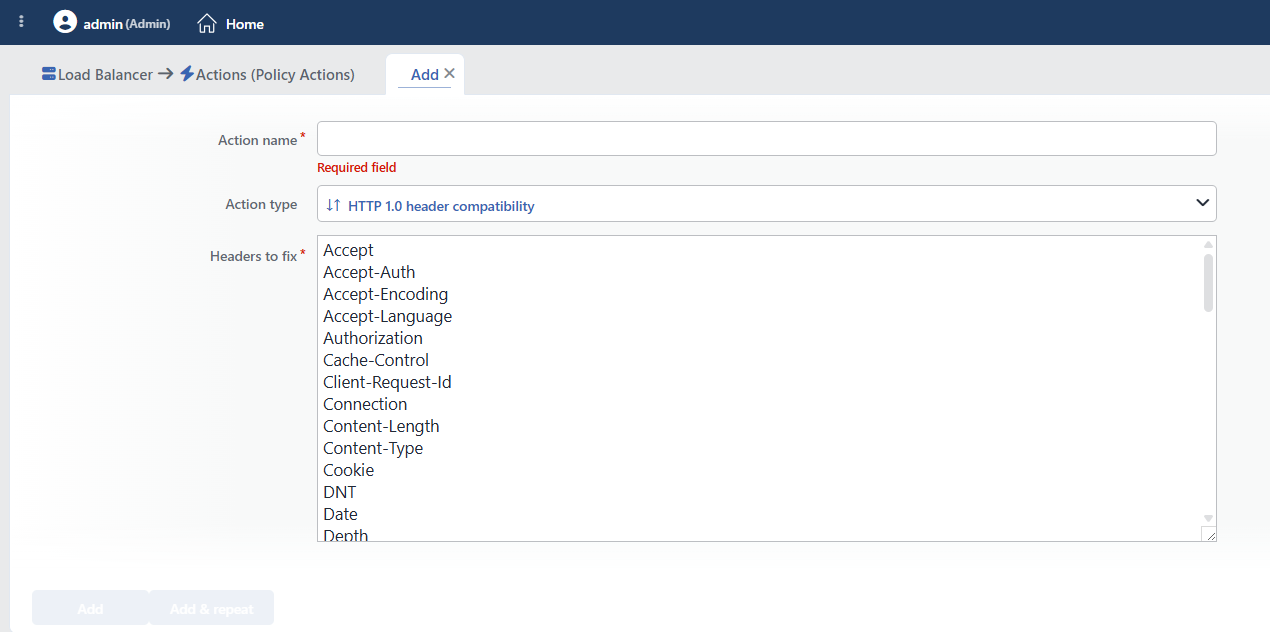 HTTP Header 1.0 Compatibility Action Add Form
INFO
Action Type
HTTP 1.0 header compatibility is selected as the action type.
Since the action works in HTTP vServices and in both directions at once, the Execution Level, Rule Protocol and Conditions fields are not located in the form. The counter is not supported either; the Hit Counter and Set Variable on Hit fields are not present.
INFO
Headers to Fix Required
It is the list of the headers to be fixed. One header name is written per line. The field cannot be left empty.
The field opens filled with a ready-made list consisting of the 61 headers listed below; rows are added or removed as needed.
The header is transmitted in the form written in the list
There is no conversion table of a "correct form" for the headers: whatever is written in the list is transmitted to the other side with that spelling.
For this reason, the header names must be entered with the targeted spelling. Writing content-type is of no use (the header still goes in lowercase); Content-Type must be written. In the same way, X-Request-ID and X-RequestId are two different spellings and whichever is written is transmitted.
Entering the same header in the list with two different spellings (Host and host) should be avoided. There must be no space, colon or additional character other than the header name in the rows.
A list change restarts the service
The header list is read while the configuration is being resolved and is not read again during an uninterrupted reload. For this reason, every change made in the list requires the restart of the related vService; in live environments, it is recommended to apply it in a maintenance window.
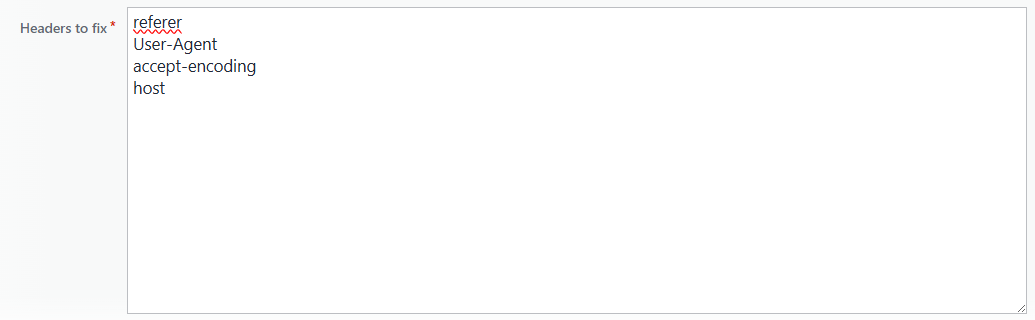 Defining Manual Header Information in Headers to Fix
The HTTP headers used in the default list:
| Header | Area of Use |
|---|---|
Accept | The accepted content types |
Accept-Auth | The supported authentication methods |
Accept-Encoding | The supported compression types |
Accept-Language | The preferred languages |
Authorization | The authentication information |
Cache-Control | The cache behavior |
Client-Request-Id | The request tracking identity |
Connection | Connection management |
Content-Length | The content length |
Content-Type | The content media type |
Cookie | The client cookies |
DNT | The tracking preference (Do Not Track) |
Date | The message date |
Depth | The WebDAV request depth |
Expires | The content validity period |
Host | The target server name |
Location | The redirection address |
Persistent-Auth | The persistent authentication state |
Pragma | The old cache control |
Purpose | The request purpose information |
Sec-Fetch-Dest | The target resource of the request |
Sec-Fetch-Mode | The request mode |
Sec-Fetch-Site | The source-site relationship |
Sec-Fetch-User | The user interaction information |
Server | The server software information |
Set-Cookie | The cookie set by the server |
Transfer-Encoding | The transfer encoding |
Upgrade-Insecure-Requests | The request to upgrade an insecure request |
User-Agent | The client application information |
WWW-Authenticate | The authentication instruction |
X-Accept | Custom accepted content information |
X-AnchorMailbox | The Exchange target mailbox |
X-AspNet-Version | The ASP.NET version information |
X-AutoDiscoverArchiveAsSmtp | The Exchange autodiscover setting |
X-BEServer | The backend Exchange server |
X-CalculatedBETarget | The calculated Backend Service target |
X-CasErrorCode | The Exchange CAS error code |
X-ClientApplication | The client application name |
X-ClientInfo | Additional client information |
X-DiagInfo | The diagnostic information |
X-EWS-TargetVersion | The EWS target version |
X-ExpirationInfo | The expiry information |
X-FEServer | The frontend server information |
X-FeatureVersion | The feature version |
X-MS-Account-Type | The Microsoft account type |
X-MS-CookieUri-Requested | The cookie URI request |
X-MS-Negotiate | The Microsoft negotiation information |
X-MapiHttpCapability | The MAPI HTTP capabilities |
X-OAuth-Enabled | The OAuth activity state |
X-OWA-Version | The Outlook Web Access version |
X-PendingPeriod | The waiting period information |
X-Powered-By | The server technology |
X-RequestId | The unique identity of the request |
X-RequestType | The request type |
X-ResponseCode | The application response code |
X-SOAP-Enabled | The SOAP support state |
X-ServerApplication | The server application |
X-TunnelExpirationTime | The tunnel validity period |
X-User-Identity | The user identity information |
X-WSSecurity-Enabled | The WS-Security state |
X-WSSecurity-For | The WS-Security target |
INFO
Form Buttons
Add
The action adding process is completed by clicking the Add button.
Add & Repeat
With the Add & Repeat button, the action adding process is completed, and another new action can be added with different configurations without leaving the related window.
 Action Added
WARNING
The HTTP Header 1.0 Compatibility action does not require a condition and is applied unconditionally (Always) on the vService on which it is defined.
Actions that run unconditionally directly affect all traffic or behavior on the related vService, without an evaluation based on traffic content.
In live environments, it is recommended that target service behaviors and possible effects be evaluated carefully before such actions are enabled. Otherwise, unexpected service behaviors or operational problems can occur.
Operational and Safe Usage Recommendations
- Only the necessary headers are added. Instead of all the headers, only the headers that the Backend Service expects and with which problems are experienced are added; unnecessary conversions can affect the performance.
- The Backend Requirements Should Be Determined. Which headers are expected in which format should be learned from the Backend Service documentation or from the developer team.
- It is verified in a test environment. The change is first applied in the test environment and it is verified that the Backend Service responds correctly.
- It Is Generally Not Necessary in Modern Applications. This action is designed especially for legacy systems. Modern HTTP/1.1+ applications generally perform case-insensitive header processing.
Common Usage Scenarios in Live Environments
The examples below show how the related action is applied in the most frequently encountered use cases in real systems. These scenarios are based on practices that are widely preferred in live environments and rest on experience gained in the field.
TIP
The HTTP Header 1.0 Compatibility action does not require a condition and is applied unconditionally (Always) on the vService. The scenarios below show different purposes of use.
Scenario 1: Legacy Java Application Server: Case-Sensitive Header Parsing
Problem: The legacy Java servlets running on old Tomcat 5.x and JBoss 4.x servers read the HTTP headers as case-sensitive. Modern HTTP clients send lowercase headers (content-type, authorization), but the servlet searches with an uppercase letter with getHeader("Content-Type") and cannot find the header. This situation causes authentication and content-type parsing errors.
Solution: To make the legacy servlets work correctly by transmitting the lowercase headers with the spelling defined in the list with the HTTP Header 1.0 Compatibility action.
Configuration:
- Headers to Fix:
Content-Type,Authorization,Accept,Accept-Encoding,Host,User-Agent,Connection
Result:
- ✅
content-type: application/json→Content-Type: application/jsonis transmitted to the Backend Service. - ✅
authorization: Bearer xyz→Authorization: Bearer xyzis transmitted to the Backend Service. - ✅ The legacy servlets read the header correctly with
getHeader("Content-Type"), and the authentication and content parsing are successful. - ✅ No backend code change is required, and HTTP/1.0 client compatibility is provided.
Scenario 2: IoT Device Firmware: HTTP/1.0 Minimal Client
Problem: The IoT devices running in the field equipment use old firmware and have a minimal HTTP client implementation with the HTTP/1.0 protocol. These devices send all the headers in lowercase (host, content-length, connection). The backend API uses a modern HTTP library and parses the headers case-insensitively, but some middleware and legacy integrations work case-sensitively. The firmware of the IoT devices cannot be updated (field equipment, no access).
Solution: To provide backend and middleware compatibility by normalizing the lowercase headers coming from the IoT devices with HTTP Header 1.0 Compatibility.
Configuration:
- Headers to Fix:
Host,Content-Length,Content-Type,Connection,User-Agent,Date,Accept
Result:
- ✅ IoT device:
host: api.example.com→Host: api.example.comis transmitted to the Backend Service. - ✅ IoT device:
content-length: 256→Content-Length: 256is transmitted to the Backend Service. - ✅ The backend API and the middleware parse all the headers correctly, and the device recognition and routing are successful.
- ✅ No firmware update is required, and the IoT devices continue to work without a problem.
Scenario 3: Microsoft Exchange: Legacy Outlook Client Custom Headers
Problem: The old Outlook 2007/2010 versions and the legacy OWA (Outlook Web Access) clients send the Exchange-specific custom headers in lowercase. The Exchange Backend Service (CAS - Client Access Server) parses these headers (x-anchorMailbox, x-owa-version, x-requesttype) case-sensitively. When the headers cannot be read because of the wrong format, the mailbox routing fails and the user cannot access their mailbox.
Solution: To make the CAS perform the correct mailbox routing by transmitting the Exchange-specific headers with the spelling defined in the list with HTTP Header 1.0 Compatibility.
Configuration:
- Headers to Fix:
X-AnchorMailbox,X-OWA-Version,X-ClientApplication,X-RequestType,X-EWS-TargetVersion,X-ClientInfo,X-BEServer,X-MapiHttpCapability
Result:
- ✅ Legacy Outlook:
x-anchormailbox: user@example.com→X-AnchorMailbox: user@example.comis transmitted to Exchange. - ✅ OWA client:
x-owa-version: 15.0.847→X-OWA-Version: 15.0.847is transmitted to Exchange. - ✅ The Exchange CAS parses the mailbox routing headers correctly, and access to the user mailbox is provided.
- ✅ The legacy Outlook clients continue to work without being upgraded.
Scenario 4: Multi-Tier Reverse Proxy: Header Case Preservation
Problem: There is more than one reverse proxy layer in the network architecture (CDN → TR7 → Internal Proxy → Backend). Some of the upstream legacy proxies convert the (X-Forwarded-For, X-Real-IP, X-Forwarded-Proto) headers to lowercase. The backend application searches for these headers with an uppercase letter and, when it cannot find them, loses the client IP and protocol information. This situation affects logging, security audit and rate limiting.
Solution: To make the backend receive the client information correctly by normalizing the X-Forwarded-* headers with HTTP Header 1.0 Compatibility.
Configuration:
- Headers to Fix:
X-Forwarded-For,X-Real-IP,X-Forwarded-Proto,X-Forwarded-Host,X-Original-URL,X-Request-ID
Result:
- ✅ Upstream proxy:
x-forwarded-for: 203.0.113.45→X-Forwarded-For: 203.0.113.45is transmitted to the Backend Service. - ✅ Upstream proxy:
x-real-ip: 203.0.113.45→X-Real-IP: 203.0.113.45is transmitted to the Backend Service. - ✅ The backend application reads the client IP and protocol information correctly, and the logging and the audit trail work completely.
- ✅ The rate limiting and the security policies are applied according to the correct client IP.
Scenario 5: Legacy ASP.NET: Custom X-Headers Dependency
Problem: An old ASP.NET 2.0/3.5 application reads the custom X- headers (X-AspNet-Version, X-Powered-By, X-User-Identity) case-sensitively. The frontend load balancer sends these headers in lowercase. ASP.NET searches with an uppercase letter with Request.Headers["X-User-Identity"], cannot find the header and cannot create the authentication context. Although the user logs in, the application opens an anonymous session.
Solution: To make the authentication context be created correctly by normalizing the ASP.NET-specific X-headers with HTTP Header 1.0 Compatibility.
Configuration:
- Headers to Fix:
X-AspNet-Version,X-Powered-By,X-User-Identity,X-ClientInfo,X-RequestId,X-SessionId
Result:
- ✅ Frontend LB:
x-user-identity: john.doe@example.com→X-User-Identity: john.doe@example.comis transmitted to ASP.NET. - ✅ ASP.NET reads the header correctly with
Request.Headers["X-User-Identity"], and the authentication context is created. - ✅ The user receives an authenticated session, and the anonymous session problem is solved.
- ✅ No legacy ASP.NET code change is required.
Scenario 6: SOAP Web Services: WS-Security Header Normalization
Problem: A legacy SOAP web service parses the WS-Security headers (X-WSSecurity-Enabled, X-WSSecurity-For) case-sensitively. Some of the SOAP clients send these headers in lowercase. When the web service cannot find the headers, the WS-Security validation fails and a SOAP fault is returned. This situation interrupts critical B2B integrations.
Solution: To make the SOAP service perform the validation correctly by normalizing the WS-Security headers with HTTP Header 1.0 Compatibility.
Configuration:
- Headers to Fix:
X-WSSecurity-Enabled,X-WSSecurity-For,X-SOAP-Enabled,SOAPAction,Content-Type
Result:
- ✅ SOAP client:
x-wssecurity-enabled: true→X-WSSecurity-Enabled: trueis transmitted to the web service. - ✅ SOAP client:
soapaction: "urn:example:method"→SOAPAction: "urn:example:method"is transmitted to the web service. - ✅ The WS-Security validation of the web service is successful, and a SOAP response is returned.
- ✅ The B2B integration works without interruption, and the SOAP faults disappear.
