
Smarter by Design.Simpler for Business
Destination IP
What Is the Destination IP Condition?
Destination IP is a condition type that enables requests coming to a vService running on TR7 to be evaluated according to the destination IP address they are directed to.
This condition is based on the VIP / Virtual IP address information that the client wants to access, and plays a critical role especially in vService architectures that serve through more than one IP address.
The Destination IP condition does not perform an operation by itself; only when the defined IP address matches is the condition considered met, and it enables the actions bound to this condition to take effect.
Single vService · multiple VIPs
203.0.113.10PublicStrict security policy
10.30.0.10InternalInternal network policy
A request coming to the same vService is separated according to which destination IP (VIP) it is directed to, and a different policy can be applied for each IP.
The Importance of the Destination IP Condition
In modern application architectures, the same service can be published through different IP addresses for different purposes. For example, while one IP is used only for internal network access, another IP may be open to internet access.
With the Destination IP condition:
- Different security policies can be applied for different IPs on the same vService,
- Management or special-purpose IPs can be isolated,
- Public and internal traffic can be clearly separated,
- VIP-based access controls can be managed centrally together with actions.
In this respect, the Destination IP condition is one of the basic building blocks of traffic separation on TR7.
Supported vService Types
HTTP
L7 TCP
Network
The condition can be used at both the request (At Request) and response (At Response) stages; the destination IP information is detected at the time of the request and is evaluated over the same value at the response stage as well.
How to Add?
A new Destination IP Condition can be added through the TR7 web management interface by following the steps below:
- The Configuration Menu is opened by clicking the TR7 logo at the bottom left.
- The Load Balancer → Conditions → Add steps are followed.
- Destination IP is selected as Criteria.
- The related configurations of the condition are made.
- The condition is added by clicking the
Addbutton.
Destination IP Condition Add Form
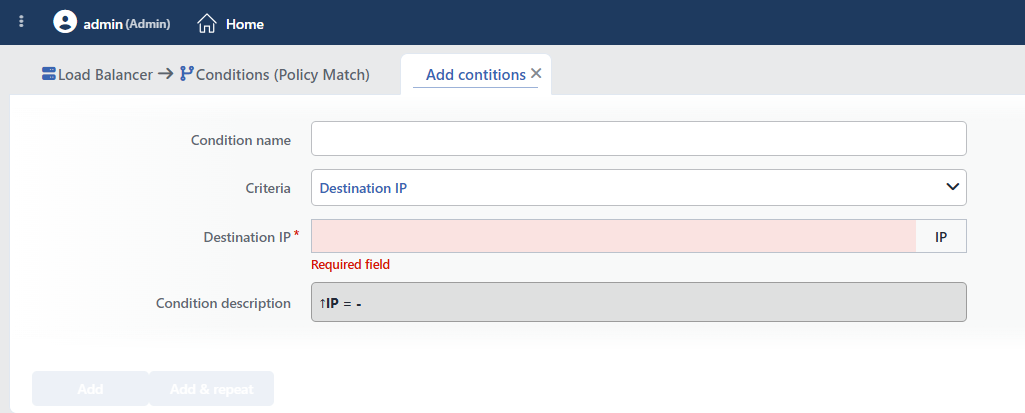 Destination IP Condition Add Form
INFO
Condition Name
An optional name can be entered for the condition to be created.
This field is especially important in the following scenarios:
- When many conditions are defined under the same vService,
- When conditions with similar criteria need to be distinguished,
- When it is necessary to quickly understand which business rule the condition represents.
When this field is left empty, TR7 analyzes the content of the related condition and creates an automatic, descriptive name in the Condition Description field. This generated description is used as the name in condition lists.
INFO
Criteria Required
The field that determines the type of the condition; Destination IP is selected from the searchable dropdown list. This selection determines the fields displayed in the form. The criterion cannot be changed after the condition is saved: if a different criterion is needed, a new condition is defined. For all criteria in the list and their scopes, the criteria catalog on the Conditions page can be referred to.
INFO
Destination IP Required
The destination IP address that must match for the condition to be considered met is entered in this field.
The field accepts a single IP address, and the match is an exact match:
- IPv4 Addresses: E.g.
1.1.1.1 - IPv6 Addresses: E.g.
2001:db8::1(the address is stored by being converted to the standard short form;2001:DB8::0001→2001:db8::1)
CIDR/subnet input is not supported; if more than one destination IP is to be checked, a separate condition is defined for each IP.
When the entered value exactly matches the destination IP address that the client wants to access, the condition is considered met.
TIP
This matching is critically important for IP-based separation and policy applications in architectures that have more than one IP address (VIP) defined on the vService.
TIP
If the destination IP needs to be checked against a CIDR block, the Dynamic Condition condition is used: Destination IP address is selected as the variable, and the block to be compared is entered with IP/cidr match as the operator.
INFO
Condition Description
It is created automatically by TR7 in line with the entered criteria and values.
This description:
- which value the condition applies to,
- which criterion it works on,
- the quick understanding of the condition on listing screens
is produced dynamically by the system so as to provide these.
INFO
Form Buttons
Add
The condition adding process is completed by clicking the Add button.
Add & Repeat
With the Add & Repeat button, the condition adding process is completed, and another new condition can be added with different configurations without leaving the related window.
 Condition Added
Common Usage Scenarios in Live Environments
The examples below show how the related condition is applied in the most frequently encountered use cases in real systems. These scenarios are based on practices that are widely preferred in live environments and rest on experience gained in the field.
Scenario 1: Public VIP Security Hardening
Purpose: To apply aggressive security policies to the traffic coming to the internet-facing VIP address and narrow the attack surface.
Configuration: Destination IP → 203.0.113.10
Action Recommendations:
- ✅ Manage HTTP Security Headers → Aggressive CSP, HSTS max-age=31536000 and X-Frame-Options: DENY headers are added, and maximum security against internet traffic is provided.
- ✅ Bandwidth Limitation → Bandwidth is limited per client (Dynamic mode + Client IP address key) over the public IP, and protection against DDoS attacks is provided.
Scenario 2: Regional VIP Security and Compliance
Purpose: To detect the traffic coming to different VIPs according to geographic regions and apply regional security and compliance policies.
Configuration: Destination IP → 192.0.2.10
Action Recommendations:
- ✅ Redirect to HTTPS → HTTPS enforcement is applied for the EU region VIP, and compliance with GDPR data security requirements is ensured.
- ✅ Add HTTP Header → The
X-Region: EUandX-Datacenter: Frankfurtheaders are added, and the Backend Service performs processing according to the region information. - ✅ Show Content → EU-specific compliance messages and cookie consent pages are shown, and regional legal requirements are met.
Scenario 3: Development and Production VIP Separation
Purpose: To apply different environment-based security and rate limiting policies by separating development and production VIPs.
Configuration: Destination IP → 10.30.0.10
Action Recommendations:
- ✅ Block → It is used together with a Source IP check, and access from the development network to the production VIP is blocked.
- ✅ Add HTTP Header → The
X-Environment: productionandX-Debug-Enabled: falseheaders are added, and the Backend Service disables debug mode. - ✅ Quarantine → IPs that make an abnormally high number of requests to the production VIP are quarantined automatically, and protection against DoS attacks is provided.
