
Smarter by Design.Simpler for Business
Factors
What Is Factors?
Factors is the list of the detection signals that produce the bot score. Every factor represents a single observation: the address coming from a data center, the TLS fingerprint belonging to an automation library, the Sec-Fetch header not being present, requests going to the same path at the same speed for minutes. The weights of the factors triggered on a request are totaled and the score is produced from this total.
The factors are divided into eight groups. Seven groups increase the score and the last one (Human Verification) lowers it: a client that has logged in, that has solved the challenge or that has shown a real interaction produces the trust signals in this group and its score is pulled down.
46
Detection Factors
They are gathered in eight groups; on L7 TCP vServices 17 of them work
8
Factor Groups
Seven groups increase the score and Human Verification lowers it
All
Default Mode
The factors added in the following versions also come into play by themselves
It Narrows
Turning Off a Factor
The weight of the remaining factors does not increase; only the evidence scope narrows
By Families
Ceiling Model
The related sub-signals do not charge the same observation twice
17
Active on L7 TCP
Only the address-, reputation- and TLS-based factors have a counterpart
The Factors Box on the Bot Protection Card
The box is the lower one of the two boxes in the body of the Bot Protection card. In its title the number of the selected factors and the total number of factors suitable for the vService type, and at its top right the pencil icon are located; in its body the eight groups are listed with their own counters.
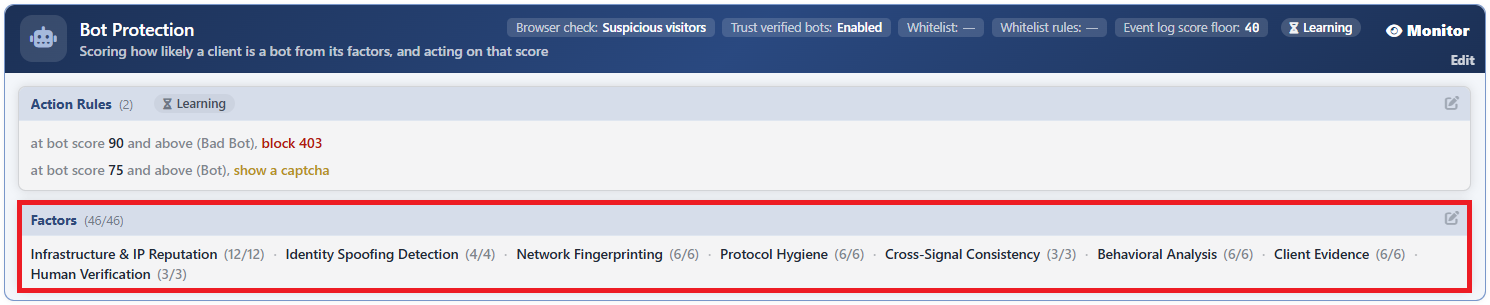 Bot Protection - The Factors Box
The meaning of the counters:
| Counter | What it says |
|---|---|
The 46/46 in the title | The number of the selected factors and the total number of factors that can be used on this vService type. It is 46 in total on HTTP vServices and 17 on L7 TCP vServices. |
The (12/12) next to the group name | The same information at the group level: the number of the selected factors in that group and the total number of factors of the group. |
When a part of the factors in a group is turned off, the counter of that group is written in the warning color; when all of them are turned off, the counter fades. The groups that have no counterpart on L7 TCP vServices are not seen in the box at all.
The Factors Edit Screen
- The Bot/DDoS Management tab is opened.
- The pencil icon at the top right of the Factors box in the body of the Bot Protection card is clicked; the edit window titled Edit - Factors opens.
- The factor selection is edited and confirmed with the
Editbutton.
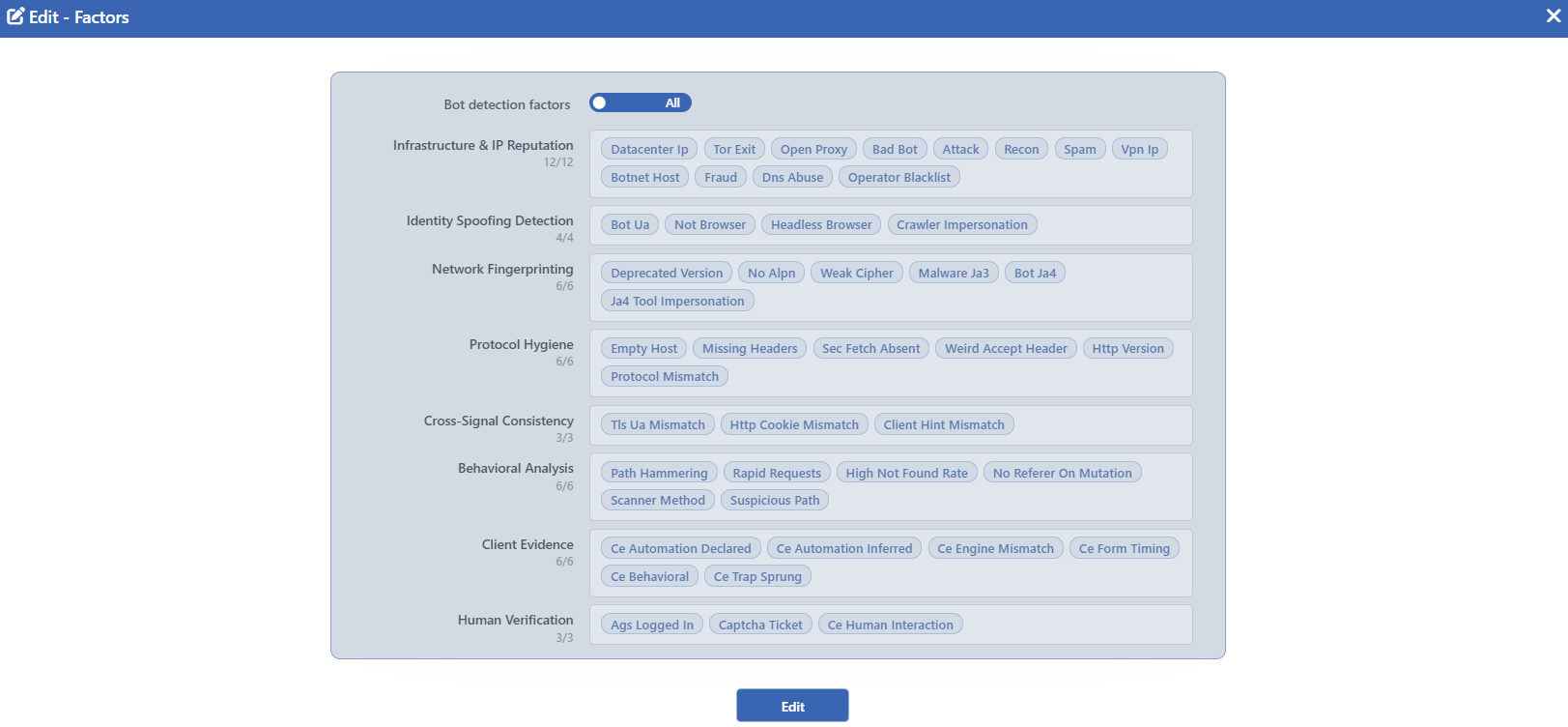 Bot Protection - The Factors Edit Screen
INFO
Bot Detection Factors
It is the switch that determines the mode of the factor selection and it has two positions:
| Position | Meaning |
|---|---|
| All | There is no restriction: all the factors are active. This is the default position. |
| Select | The factors are selected one by one. When the switch is taken to this position, the whole of the factor list of that day is written as an open list and the selection is narrowed from here. |
While it is in the All position, the chips appear selected but cannot be clicked, the group checkboxes are not displayed at all and the cards fade a notch: this position is not a selection but a declaration. The only way of passing to the selection and of returning from the selection is the switch itself; the All position is not returned to by checking the chips one by one.
With the three-state checkbox in the group titles, the whole of a group can be turned on and off. When the Human Verification group is turned off completely, a warning appears below it: Turning trust signals off removes the score discounts — verified real users will score higher.
INFO
Edit
Changes in the form are saved by clicking the Edit button. There is no additional confirmation window or deploy step; the Load Balancer configuration is regenerated and applied automatically. The operation is written to the user log with a change summary.
The difference between All and Select grows over time
The All position means "all the factors" and covers the factors added to the product later as well. The Select position, on the other hand, writes and freezes the factor list that exists at that moment: a factor added in the following versions never reaches that vService. If there is no valid reason to narrow the selection, it is recommended that the switch is left in the All position.
The Factor Groups
The tables below give the factors of every group and what they mark. The chip names in the interface are produced from the technical identifier; for this reason they are written in English and abbreviated (such as Bot Ua, Dns Abuse, Ce Trap Sprung).
Infrastructure & IP Reputation
The type of the network the address comes from and its reputation record. The whole of the group works on both HTTP and L7 TCP vServices; its data comes from the network type database and from the reputation lists managed from the IP Intelligence & Reputation screen.
| Factor | What it marks |
|---|---|
| Datacenter Ip | The address comes from a data center or cloud provider network. It is a weak signal on its own: the legitimate services hosted in the cloud, the monitoring systems and an important part of the company exits also fit this definition. Its weight has therefore been kept low; its meaning appears only when it combines with other signals. |
| Tor Exit | The address is a Tor exit node. The use of an anonymity network is not a crime on its own, but since the density of automation and abuse is high, it produces points on both the automation and the maliciousness side. |
| Open Proxy | The address is on the open proxy list. It is traffic that passes through a server that a third party has left open in order to hide its identity. |
| Bad Bot | The address is recorded on the malicious bot list. The addresses on this list have been reported with bot behavior on other targets before. |
| Attack | The address is recorded in one of the attack categories: a brute-force attempt, a web application attack, an SQL injection, a general intrusion attempt, DDoS participation, a compromised server, FTP and SSH brute force, a protocol flood or address spoofing. It is one of the heaviest reputation signals on the maliciousness side. |
| Recon | The address carries a port scan record: it is the behavior of looking for a surface before choosing a target. |
| Spam | The address carries a web, e-mail or blog spam record. |
| Vpn Ip | The address is a VPN exit. Since a large part of the corporate and individual users connects to the service over a VPN, its weight is deliberately very low. |
| Botnet Host | The address carries a compromised IoT device record. The traffic that comes from such a device is by definition unattended automation; for this reason it also weighs heavily on the automation side. |
| Fraud | The address is recorded in the fraud categories: phishing, fraud orders or VoIP fraud. |
| Dns Abuse | The address is recorded in the DNS abuse categories: DNS poisoning or a compromised DNS infrastructure. |
| Operator Blacklist | The address is on the operator's own blacklist or in the external feed sources that it defines. Since this list is also used for policy decisions outside maliciousness (such as blocking a business partner or closing a region), it is not heavy enough to reach the top band on its own. |
Since the reputation records in this group (the ten factors from Open Proxy to Operator Blacklist) are different records about the same address, they saturate at a common ceiling: an address being on five lists at once does not bring five times the points of being on one list. Datacenter Ip and Tor Exit are outside this ceiling; their weights are added without looking at the ceiling. On the other hand, several independent abuse records overlapping can be decisive on its own on the maliciousness side.
Identity Spoofing Detection
Whether the client lies when it says who it is. It works only on HTTP vServices.
| Factor | What it marks |
|---|---|
| Bot Ua | The User-Agent matches known bot signatures or the header has not been sent at all or has been left empty. An empty User-Agent is not counted as an accident: all the real clients fill this header, and leaving it empty is the cheapest way of evading. Together with Headless Browser it is the heaviest signal of the group. |
| Not Browser | The User-Agent does not fit any of the known browsers. The tools that are not on the bot list either and that come with their own name produce this signal. |
| Headless Browser | The User-Agent or the client hint headers carry the name of a headless browser or an automation tool. The desktop application frameworks have deliberately been kept outside this definition: since a part of the widespread corporate applications uses the same browser engine, counting them as bots would produce false positives. |
| Crawler Impersonation | The client introduces itself as a search engine bot, but the address it comes from is not in the published ranges of that bot. The check is made only for the search engines that publish their address ranges; otherwise the "could not be verified" result would really mean "there was no data to compare with". Since it is an identity lie, it weighs heavily on the maliciousness side; its weight on the automation side is measured. |
Network Fingerprinting
The trace that the TLS handshake leaves. It looks not at what the client says but at how it establishes the connection; for this reason it cannot be hidden by changing the User-Agent. The factors other than Ja4 Tool Impersonation work on L7 TCP vServices as well.
| Factor | What it marks |
|---|---|
| Deprecated Version | The connection has been established with a TLS version that is no longer used. Since the current browsers left these versions years ago, it generally points to an old library. |
| No Alpn | The connection has been established with TLS but the extension that states the application protocol has not been sent. Browsers always send this extension. |
| Weak Cipher | The connection has been established with a weak or retired cipher suite. |
| Malware Ja3 | The TLS fingerprint matches known malware signatures. It is the heaviest single signal on the maliciousness side and can take a client to the top band on its own: a client that produces this fingerprint has no legitimate explanation. |
| Bot Ja4 | The JA4 fingerprint matches the signatures of known bots and automation tools. It is heavy on the automation side and light on the maliciousness side: using a tool is not hostility yet. |
| Ja4 Tool Impersonation | The TLS fingerprint belongs to a library or tool stack, but the User-Agent claims that it is a browser. It has the same weight as Bot Ua: lying must not be cheaper than telling the truth. When this signal is triggered, Tls Ua Mismatch is suppressed, because the two are two names of the same observation. It works only on HTTP vServices. |
Protocol Hygiene
The layout of the request at the HTTP level. Real browsers have habits that have not changed for years; this group measures the deviations from those habits. It works only on HTTP vServices.
| Factor | What it marks |
|---|---|
| Empty Host | The request does not carry a Host header. |
| Missing Headers | The Accept-Language or Accept-Encoding header is not present. Browsers send both of them in every request; scripts most of the time do not. |
| Sec Fetch Absent | The Sec-Fetch-Mode header that states the nature of the request is not present. Since it is triggered in a large part of the live traffic, its weight has been kept low. |
| Weird Accept Header | The Accept header is exactly */*. It is the typical signature of the command line tools and the script libraries; browsers fill this header in detail. |
| Http Version | The request has come with HTTP/1.0. None of the current clients uses this version. |
| Protocol Mismatch | The request is inconsistent within itself. One of four separate situations is enough: a body being sent with a method that must be without a body; in an HTTP/1.1 request, a value other than websocket or h2c being present in the Upgrade header; the Content-Length or Host header being sent twice; the Content-Length and Transfer-Encoding headers being sent together. The last two situations are at the same time the classic signature of request smuggling attempts; for this reason they also produce points on the maliciousness side. |
Cross-Signal Consistency
Whether the identity claims that come from different layers hold together or not. When they are looked at one by one, every signal can appear reasonable; this group asks whether the two are possible together. It works only on HTTP vServices.
| Factor | What it marks |
|---|---|
| Tls Ua Mismatch | The client family that the TLS fingerprint points to and the family that the User-Agent says are known, are different from each other and at least one of them is a browser family. Two tool families coming out different does not produce points; if the User-Agent has not been sent at all, this is also counted as a separate family and enters the comparison. Its weight is deliberately measured: the real browser behind a corporate intermediate server that makes a TLS check also carries the fingerprint of the intermediate server and can produce this signal by mistake. |
| Http Cookie Mismatch | The request has come with HTTP/1.0 but it carries a cookie. The two being together is almost never seen in real clients. |
| Client Hint Mismatch | The User-Agent says that it is Chrome, but the client hint headers that Chrome has been sending in every request for a long time are not present. It is one of the most distinctive signals against the scripts and the automation tools that imitate a browser name. |
Behavioral Analysis
The behavior of the client over time. This group looks not at a single request but at what the same client does one after another; for this reason it can also catch the clients whose headers and fingerprint appear flawless. It works only on HTTP vServices.
| Factor | What it marks |
|---|---|
| Path Hammering | The same client sends requests to the same path continuously on the scale of minutes: at the level of approximately one request per second, without interruption. The threshold has been adjusted according to the live traffic; the regular polls of the single-page applications and the asset file bursts stay outside this definition. The static file requests that do not contain a query are exempt from the counting, but when a query is added to the same path, the exemption drops. The exemption covers only the known asset extensions; the page and data requests (such as .html, .js, .json) are outside the exemption. |
| Rapid Requests | The same client sends many requests on the scale of seconds. Its difference from Path Hammering is that the path can change: what is measured here is the speed, not the target. |
| High Not Found Rate | The client sends at least ten requests in a ten-second window and more than forty percent of these requests receive a not-found response. The two conditions are looked for together. It is the signature of the behavior of looking for a surface by trying addresses that do not exist and it weighs heavily on the maliciousness side. |
| No Referer On Mutation | A request that comes with a method that changes data (POST, PUT, PATCH, DELETE) does not carry a Referer header. The absence of this header, which shows that the form submissions come from a page, is the typical indicator of credential stuffing and form spam attempts. |
| Scanner Method | The request has come with the TRACE or CONNECT method. OPTIONS has deliberately been kept outside: the preflight requests of the browsers are legitimate. |
| Suspicious Path | The path requested points to targets that must not be present in the application. The main patterns covered: environment variable files (.env); version control directories (.git, .svn, .hg, .bzr); identity and key files (.ssh, id_rsa, .aws, .kube, .pem, .key, .crt, .p12, .pfx); database dumps (.sql, .dump); database management interfaces (phpMyAdmin, Adminer, pgAdmin); application configuration files (wp-config.php, web.config, config.php); debugging and information pages (phpinfo.php, test.php, trace.axd); server status and management endpoints (/server-status, /actuator, elmah.axd); log files; package and deployment files (composer.json, package.json, Dockerfile, docker-compose.yml); server and editor leftovers (.htaccess, .htpasswd, .DS_Store, .vscode, .idea); installation scripts (install.php); backup and temporary file extensions (.bak, .old, .orig, .save, .swp). Requesting these paths is not an indicator of automation but directly an indicator of intent; for this reason it is one of the heaviest signals on the maliciousness side and can take a client to the top band on its own. |
Client Evidence
The evidence that the browser check collects. While the other groups look outside the request, this group looks inside the client: is the environment in which the page is run really a browser, is there a human interacting with the page. It works only on HTTP vServices. The evidence is collected in one of two situations: Browser Check has been set to a value that is not off, or the vService carries an AGS session cookie. In the second situation the evidence is produced by the AGS service and these factors can be triggered even if Browser Check is off.
| Factor | What it marks |
|---|---|
| Ce Automation Declared | The browser states with its own standard interfaces that it is running under automation, or it carries traces of remote control. In the default configurations of the automation tools this declaration is on. |
| Ce Automation Inferred | There is no explicit declaration, but the environment itself is inconsistent: the plugin and permission lists being in a form that is not found in a real browser, impossible screen dimensions and so on. |
| Ce Engine Mismatch | The own declaration of the engine that runs the page contradicts the TLS fingerprint or the User-Agent. At this point the identity claim has been checked from a third source. |
| Ce Form Timing | The form has been submitted in a time too short for a human to read and fill it. The time is measured not on the client but on the server. |
| Ce Behavioral | The fields being filled directly without being typed, the machine-like regularity of the key and click times, or no pointer movement being present on the page. Any one of the three is enough. |
| Ce Trap Sprung | The trap field placed on the page, which the real user cannot see, has been filled, or the measurement code has been deliberately removed from the submission. Removing the evidence itself is also evidence. |
This group increases the score only on the automation axis: the client evidence can take a visitor to the challenge band, but it cannot take it to the top band on its own. This is not a limit specific to the group: since the ceiling of the automation axis is 84, no automation signal can produce 85 and above on its own.
Human Verification
Three trust signals that lower the score. They work only on HTTP vServices.
| Factor | What it marks |
|---|---|
| Ags Logged In | The client has a verified session. The validity of the session is passed through two separate checks; in this way a copied session cookie cannot earn this signal. |
| Captcha Ticket | The client has solved the challenge and carries a valid ticket. The ticket may have come from any one of the defined challenge configurations. More than one piece of evidence being present does not strengthen the signal: it is a single flag. |
| Ce Human Interaction | The browser check has measured a real mouse or keyboard interaction. |
The trust signals are produced only with evidence bound to the session: a copied cookie can carry the incriminating signals, but it cannot lower the score. These signals do not work on the maliciousness axis either; the configuration file scanning of a user that has logged in is still counted as an attack.
The Effect of Turning Off a Factor
The factor weights are not the share of a percentage but absolute evidence values. When a factor is turned off:
- The weight of the remaining factors does not increase; the scores fall as a whole.
- The ceiling does not change: a partial selection also saturates at the same ceiling as the full selection. The ceilings are bound not to the eight groups on the screen but to the factor families that have sub-signals; just as a group can contain more than one family, it can also carry factors without a ceiling.
- If all the factors of a group are turned off, that group is not evaluated at all.
If no factor is selected, the protection silently goes quiet
When all the factors are turned off, the bot score is not calculated at all: even if the mode is Active and the rule list is full, no rule is applied and no warning is given. The right way of stopping the protection while the rules are preserved is to make the mode Off.
The Human Verification group behaves differently from the others: the selection of the three factors in this group is not reflected in the configuration produced. Even if the chips are turned off, the signals that lower the score continue to be applied; turning the checkboxes off only shows the warning text below the group. For these signals to be really removed, the surfaces that produce them must be turned off: the session verification, the defined challenge configurations and Browser Check.
The Factors on L7 TCP vServices
Since on L7 TCP vServices there is no such thing as HTTP headers, browser behavior and client evidence, most of the factors have no counterpart. On this type only two groups work:
| Group | Active factors |
|---|---|
| Infrastructure & IP Reputation | All of the 12 factors |
| Network Fingerprinting | The 5 factors other than Ja4 Tool Impersonation |
On this type the box writes 17/17 and only these two group rows are displayed.
Saving on an L7 TCP vService can delete the HTTP factor selection
The factor selection is filtered according to the vService type. When a save is made from this window while a vService is of the L7 TCP type, the selection of the factors that work only in HTTP drops from the list and does not come back even if the vService is later taken to the HTTP type. On the vServices whose type is changed, the factor selection must be reviewed again.
Scope and Limits
INFO
- The factor selection is not learned. The learning engine never touches this screen; it only takes the mode and the rule thresholds as its subject.
- The All position is forward-looking. The factors added in the following versions come into play by themselves; in the Select position they do not.
- The transition to the Select position can be reversed. When the switch is taken to the All position again, the restriction is removed completely.
- Turning off a factor loosens the protection. The remaining factors do not compensate; the scores fall.
- If no factor is selected, the scoring stops. No warning is given.
- Turning off the Human Verification factors is not reflected in the score. The signals that lower the score are applied independently of the selection.
- On L7 TCP vServices 17 of the 46 factors work.
- Some factors depend on the engine version. The Bot Ja4, Ja4 Tool Impersonation and Tls Ua Mismatch factors that are based on the JA4 fingerprint produce a value only on the versions that have JA4 support; of Ce Engine Mismatch, on the other hand, only the User-Agent arm works. On the versions that are not supported, even if the chip appears selected, these factors are never triggered. Malware Ja3 is not caught by this gate.
- The pencil icon depends on the permission. The box is displayed with read-only permission; the pencil icon is displayed only on the users that have edit permission. While the protection is Off, the pencil icon of the box is not seen either.
