
Smarter by Design.Simpler for Business
Cookie Encryption
What Is the Cookie Encryption Action?
The Cookie Encryption action automatically encrypts the contents of the cookies in the HTTP traffic passing through the vService. The cookies created by the Backend Service are encrypted before being sent to the client, and the encrypted cookies in the requests coming from the client are decrypted before being forwarded to the Backend Service.
This action works both at the request and at the response stage:
- Response: The cookie values in the
Set-Cookieheaders returning from the Backend Service are encrypted. - Request: The encrypted cookies coming from the client are decrypted and forwarded to the Backend Service.
The Importance of the Cookie Encryption Action
Cookies can contain sensitive data such as session information, user preferences and the application state. Storing these data as plain text on the client side creates security risks.
The Cookie Encryption action;
- prevents the cookie contents from being read on the client side,
- prevents the session information from being manipulated,
- enables sensitive application data to be protected,
- makes it difficult for the cookie contents to be disclosed in man-in-the-middle attacks,
- provides encryption without requiring a change in the Backend Service.
For this reason, the Cookie Encryption action is a critical security layer for the protection of sensitive cookie data.
Supported vService Types
HTTP
L7 TCP
Network
Execution Timing
On Request
On Response
How to Add?
A new Cookie Encryption Action can be added through the TR7 web management interface by following the steps below:
- The Configuration Menu is opened by clicking the TR7 logo at the bottom left.
- The Load Balancer → Actions → Add steps are followed.
- A unique and descriptive name is entered for the action.
- Cookie Encryption is selected as Action Type.
- The related configurations of the action are made.
- The action is added by clicking the
Addbutton.
Cookie Encryption Action Add Form
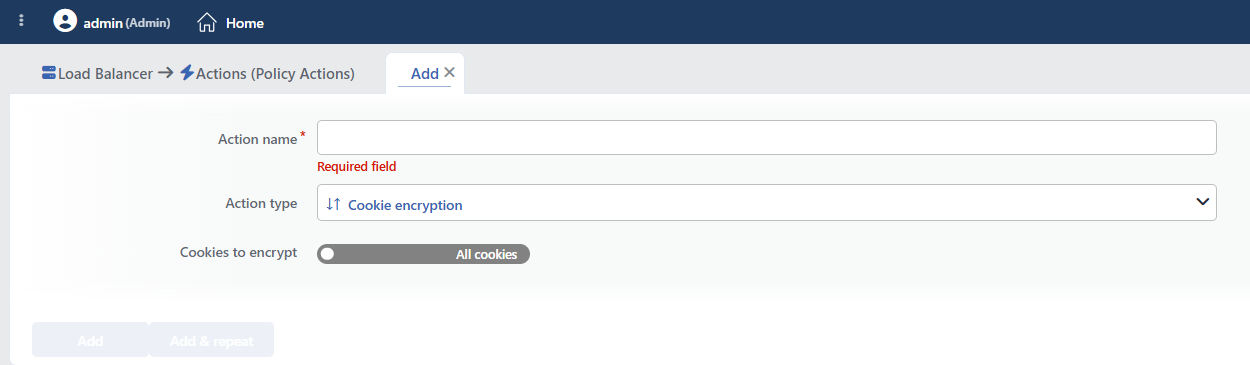 Cookie Encryption Action Add Form
INFO
Cookies to Encrypt
The scope of the cookies to be encrypted is determined in this field.
The selected scope determines both directions of the action at once: the cookies in this scope are encrypted in the response, and the cookies in the same scope are decrypted in the request. There is no separate "cookies to be decrypted" setting.
All Cookies
All the cookies created by the Backend Service are encrypted. This is the default scope.
All cookies breaks the cookies that TR7 does not encrypt
Since the scope is applied to the request direction as well, in the All Cookies mode an attempt is made to decrypt every cookie coming from the client. However, not every cookie that arrives in the request is a cookie encrypted by TR7: the cookies created with JavaScript (document.cookie), third-party/analytics cookies and the cookies given before the action was enabled have never been encrypted.
TR7 cannot decrypt these cookies and forwards them to the Backend Service after replacing their values with the fixed text FAILED_COOKIE_DECRYPTION:
text
Coming from the client:          SESSIONID=U2FsdGVkX1...; _ga=GA1.2.884; theme=dark
Going to the Backend Service:    SESSIONID=abc123; _ga=FAILED_COOKIE_DECRYPTION; theme=FAILED_COOKIE_DECRYPTION
For this reason, All Cookies is used only if all the cookies on the site are produced by the Backend Service. On sites that produce cookies on the client side or carry third-party cookies, only the cookies produced by the Backend Service must be named with Certain Cookies; the cookies that are not in the list are not touched.
Certain Cookies
Only the cookies that have the specified names are encrypted. The Certain Cookies mode is switched to by clicking the toggle.
The names of the cookies to be encrypted are added one by one:
 Certain cookies cookie names
If Certain cookies is selected and no cookie name is entered, no encryption is performed
When the Certain Cookies mode is switched to, an empty row comes to the list. If the action is saved without this row being filled in, the form does not give a warning and the action is created without a problem; however, since the cookie list consists of a single empty name, no cookie matches this name and no cookie is encrypted.
For this reason, at least one cookie name must be entered while Certain Cookies is used. The last row in the list cannot be deleted; when the scope is to be returned to all the cookies again, the toggle is set to the All Cookies state.
The Encryption Key and Validity
The encryption key is derived from the vService identity; this value is the same on all the cluster devices and does not change on configuration reloads or service restarts: therefore the encrypted cookies are not affected by these operations. (If the vService is deleted and recreated, all the encrypted cookies given previously become invalid.)
The cookie is bound to the client
In addition to the vService identity, the key also contains the IP address and the User-Agent information of the client. This has two consequences:
- Security advantage: A stolen cookie cannot be decrypted from a different IP address or from a different browser; session takeover through cookie theft is practically prevented.
- Point to be careful about: If the IP address or the
User-Agentinformation of the client changes, the cookie cannot be decrypted and the content is forwarded to the Backend Service asFAILED_COOKIE_DECRYPTION; the user session drops. Switching between the mobile network and Wi-Fi, an operator-related IP change (CGNAT), proxy pools and browser version updates can trigger this situation. This behavior should be taken into account in long-lived session cookies.
The encryption is performed with AES-256-CBC; the encrypted value is stored in base64 format together with a salt produced randomly for each cookie. On the response side, only the name=value part of the cookie is encrypted; attributes such as Path, Domain, Secure, HttpOnly and SameSite are preserved as they are.
WARNING
Adding, changing or deleting this action requires the restart of the related vService while the configuration is being applied; the ongoing connections can be affected during this.
Encryption Example
Below is the appearance of the cookie named test_cookie created by the Backend Service before and after encryption.
Before encryption:
 Before encryption
After encryption:
 After encryption
The encrypted cookie value becomes unreadable and unmodifiable by the client.
INFO
Form Buttons
Add
The action adding process is completed by clicking the Add button.
Add & Repeat
With the Add & Repeat button, the action adding process is completed, and another new action can be added with different configurations without leaving the related window.
 Action Added
WARNING
The Cookie Encryption action does not require a condition and is applied unconditionally (Always) on the vService on which it is defined.
Actions that run unconditionally directly affect all traffic or behavior on the related vService, without an evaluation based on traffic content.
In live environments, it is recommended that target service behaviors and possible effects be evaluated carefully before such actions are enabled. Otherwise, unexpected service behaviors or operational problems can occur.
WARNING
Only one Cookie Encryption action can be added per vService.
Operational and Safe Usage Recommendations
- Sensitive Cookies Should Be Targeted. Instead of encrypting all the cookies, naming only the cookies that contain sensitive data (session IDs, user information, etc.) with Certain Cookies is both more efficient in terms of performance and prevents the cookies that TR7 does not encrypt (produced with JavaScript, third-party) from being broken.
- The Moment of Deployment Should Be Chosen. The cookies given to the clients before the action is enabled are unencrypted and can no longer be decrypted; deployment means that the sessions open at that moment drop. A low-traffic time interval should be preferred for the transition.
- It Should Be Used Together with HTTP Cookie Security. Cookie encryption provides maximum protection when it is used together with the HTTP Cookie Security action. While the encryption protects the content, the Secure/HttpOnly/SameSite attributes control the access.
- Application compatibility is tested. Some applications read the cookie values with JavaScript; this functionality can be affected after encryption. The change is tested before it is taken to the live environment.
- The Cookie Size Limits Should Be Taken into Account. Encryption increases the size of the cookie value. The cookie size limits of the browsers (usually 4KB) must not be exceeded.
Common Usage Scenarios in Live Environments
The examples below show how the related action is applied in the most frequently encountered use cases in real systems. These scenarios are based on practices that are widely preferred in live environments and rest on experience gained in the field.
Scenario 1: Encrypting the Session Cookies
Problem: A web application stores the session information in the SESSIONID and auth_token cookies. Attackers can read these cookies with the browser developer tools or network sniffing and make a session hijacking attack.
Solution: The session cookies are encrypted and made unreadable on the client side, and the session security is increased.
Configuration:
- Cookies to Encrypt: Certain Cookies
- The rows in the Cookies to Encrypt list:
SESSIONID,JSESSIONID,session_token,auth_token
Result:
- ✅ The session cookies → Are sent to the client in an encrypted format and cannot be read in the browser.
- ✅ Security → Session hijacking attacks become harder, and the cookie values cannot be manipulated.
- ✅ The Backend Service → No code change is required, TR7 performs the encryption/decryption operation.
Scenario 2: Protecting E-Commerce Cart Data
Problem: An e-commerce site stores the shopping cart information in the cart_data cookie. Users read this cookie from the browser console and try to shop at a discount by changing the price information.
Solution: The cookies containing the cart data and the user preferences are encrypted and manipulation is prevented.
Configuration:
- Cookies to Encrypt: Certain Cookies
- Cookie Names:
cart_data,user_prefs,user_profile,discount_code
Result:
- ✅ The cart cookies → Are encrypted, the user cannot change the price or product information.
- ✅ Data integrity → Cart manipulation is prevented, and correct pricing is preserved.
- ❌ The tracking cookies → Are not encrypted, the analytics and the performance are not affected.
Scenario 3: PHP Application Security (Legacy)
Problem: An old PHP application keeps sensitive information in the PHPSESSID, user_id and role cookies. Changing the application code is time-consuming and risky, but the cookie security must be increased.
Solution: Encrypt the sensitive cookies through TR7 without making a code change in the Backend Service.
Configuration:
- Cookies to Encrypt: Certain Cookies
- Cookie Names:
PHPSESSID,user_id,role,permissions
Result:
- ✅ The sensitive cookies → Are encrypted, and the user role and authorization information is protected.
- ✅ The Backend Service → The security is increased without any code change being made.
- ❌ The visual preference cookies (language, theme) → Are not encrypted, and the JavaScript compatibility is preserved.
Scenario 4: Encrypting All the Cookies (All Cookies)
Problem: A banking or health application processes very sensitive data and the compliance standards (PCI-DSS, KVKK) require all the cookie data to be protected. It is difficult to determine one by one which cookies are sensitive.
Pre-check: This scenario depends on the condition that all the cookies on the site are produced by the Backend Service. If the application creates cookies with JavaScript or if there are third-party/analytics cookies on the page, All Cookies is not used: an attempt is made to decrypt these cookies although they are not encrypted, and they reach the Backend Service with a corrupted value. In such a case, the cookie names are listed with Certain Cookies as in Scenario 1.
Solution: If the condition is met, the scope is left as All Cookies; none of the cookies produced by the Backend Service goes to the client as plain text.
Configuration:
- Cookies to Encrypt: All Cookies
Result:
- ✅ All the cookies → Every cookie produced by the Backend Service is encrypted automatically, and the cookie names are not listed one by one.
- ✅ Compliance → Meets the PCI-DSS, KVKK and HIPAA requirements.
- ❌ The client-side cookies → On sites that have cookies produced with JavaScript or third-party cookies, this scope is not used.
