
Smarter by Design.Simpler for Business
Management Ports
What Is Management Ports?
Management Ports limits per source the concurrent connections opened to the management surface of the device itself (SSH, HTTP and HTTPS); the three rules of the TR7 Management Access band are gathered in this box.
The management surface is a small surface: a few administrators are expected to connect at the same time, hundreds of sessions are not expected. This expectation makes the rules useful; a concurrency far above the ordinary use is either an error or an attempt.
The three rules apply the same measure to three separate surfaces: the command line access, and the unencrypted and encrypted access of the management interface. What is measured is not the rate but the concurrency: how many connections a source holds open at a given moment.
3
Rules
SSH · HTTP · HTTPS management access
5
Default SSH Ceiling
The concurrent command line connections per source
100
Default Interface Ceiling
The concurrent connections per source for HTTP and HTTPS
Concurrency
The Magnitude Measured
Not the rate per second but the number of connections open at the same time
3
Able to Send to Quarantine
All three can take the source into quarantine
Block
Default Mode
All three are born in enforcement on a device that has never been touched
The Management Ports Box on L4 DDoS Management
The box is the only box of the TR7 Management Access band. In its header there are its name and the number of rules it carries, and in its body three rule rows.
 TR7 Management Access - The Management Ports Box
| Row | Rule | What it limits |
|---|---|---|
| 1 | TR7 SSH Concurrent Conn | The concurrent command line connections per source. |
| 2 | TR7 HTTP Concurrent Conn | The concurrent unencrypted management interface connections per source. |
| 3 | TR7 HTTPS Concurrent Conn | The concurrent encrypted management interface connections per source. |
TR7 SSH Concurrent Conn
Determines how many command line connections a source can hold at the same time. Its definition in the information band is as follows: TR7 SSH access limitation (concurrent open connections per source IP).
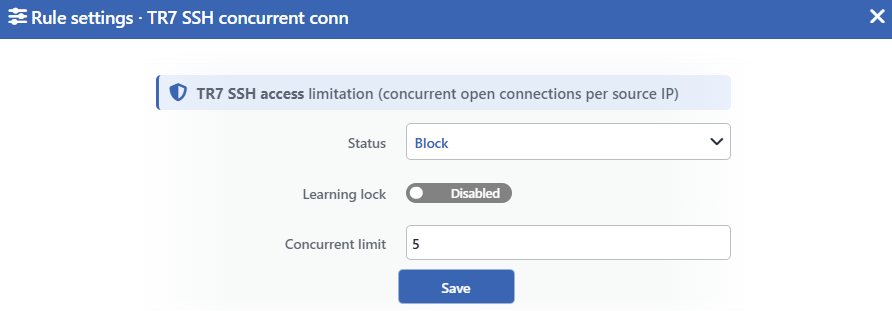 TR7 SSH Concurrent Conn Edit Screen
INFO
Status
Selects the rule's operating mode. Four values are offered, and the selected value also determines the sentence on the row:
| Value | The sentence in the row |
|---|---|
| Disabled | A limit of <limit> TR7 SSH connections at once is configured, but the rule is off |
| Monitor | A source may hold at most <limit> TR7 SSH connections at once; anything beyond is only monitored |
| Block | A source may hold at most <limit> TR7 SSH connections at once; anything beyond is dropped |
| Quarantine | A source may hold at most <limit> TR7 SSH connections at once; a source that exceeds it is quarantined |
INFO
Learning Lock Default: Off
Closes the rule to the learning engine. When the switch is turned on, the engine cannot change the ceiling and the mode of this rule; the rule is changed only manually from this window.
It is off by default. While the lock is on, an unlabeled padlock icon is displayed on the row, to the left of the pencil.
INFO
Concurrent Limit Default: 5
Determines how many connections a source can hold at the same time. Its default value is 5. Only an integer can be entered and the smallest value is 1; there is no upper bound.
The field carries no unit: the value is not a rate per second but the number of connections open at that moment.
INFO
Save
Saves the change made and puts it into force immediately. Only the changed fields are updated.
TR7 HTTP Concurrent Conn
Determines how many unencrypted management interface connections a source can hold at the same time. Its definition in the information band is as follows: TR7 HTTP access limitation (concurrent open connections per source IP).
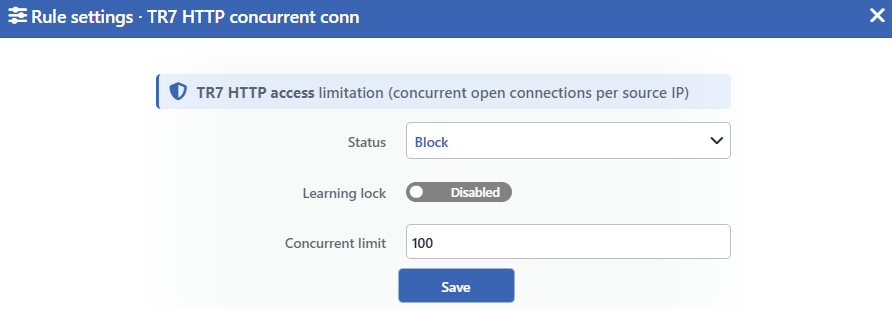 TR7 HTTP Concurrent Conn Edit Screen
INFO
Status
Selects the rule's operating mode. Four values are offered, and the selected value also determines the sentence on the row:
| Value | The sentence in the row |
|---|---|
| Disabled | A limit of <limit> TR7 HTTP connections at once is configured, but the rule is off |
| Monitor | A source may hold at most <limit> TR7 HTTP connections at once; anything beyond is only monitored |
| Block | A source may hold at most <limit> TR7 HTTP connections at once; anything beyond is dropped |
| Quarantine | A source may hold at most <limit> TR7 HTTP connections at once; a source that exceeds it is quarantined |
INFO
Learning Lock Default: Off
Closes the rule to the learning engine. When the switch is turned on, the engine cannot touch this rule.
It is off by default. While the lock is on, an unlabeled padlock icon is displayed on the row, to the left of the pencil.
INFO
Concurrent Limit Default: 100
Determines how many connections a source can hold at the same time. Its default value is 100. Only an integer can be entered and the smallest value is 1; there is no upper bound.
INFO
Save
Saves the change made and puts it into force immediately. Only the changed fields are updated.
TR7 HTTPS Concurrent Conn
Determines how many encrypted management interface connections a source can hold at the same time. Its definition in the information band is as follows: TR7 HTTPS access limitation (concurrent open connections per source IP).
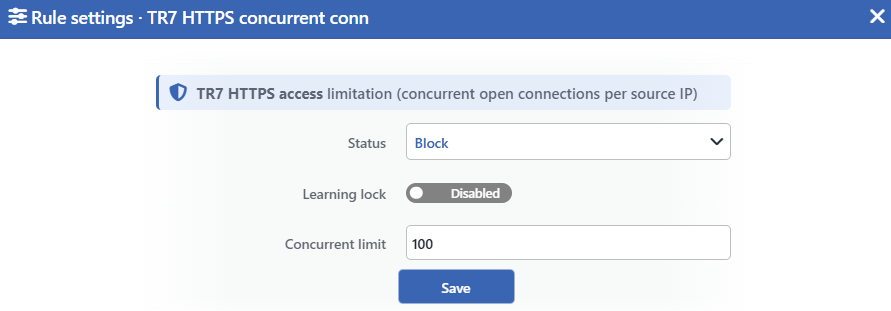 TR7 HTTPS Concurrent Conn Edit Screen
INFO
Status
Selects the rule's operating mode. Four values are offered, and the selected value also determines the sentence on the row:
| Value | The sentence in the row |
|---|---|
| Disabled | A limit of <limit> TR7 HTTPS connections at once is configured, but the rule is off |
| Monitor | A source may hold at most <limit> TR7 HTTPS connections at once; anything beyond is only monitored |
| Block | A source may hold at most <limit> TR7 HTTPS connections at once; anything beyond is dropped |
| Quarantine | A source may hold at most <limit> TR7 HTTPS connections at once; a source that exceeds it is quarantined |
INFO
Learning Lock Default: Off
Closes the rule to the learning engine. When the switch is turned on, the engine cannot touch this rule.
It is off by default. While the lock is on, an unlabeled padlock icon is displayed on the row, to the left of the pencil.
INFO
Concurrent Limit Default: 100
Determines how many connections a source can hold at the same time. Its default value is 100. Only an integer can be entered and the smallest value is 1; there is no upper bound.
INFO
Save
Saves the change made and puts it into force immediately. Only the changed fields are updated.
Common Behaviors
The browser opens more than one connection for a single page
The default of the interface ceilings is 100. The high value has a practical counterpart: a browser opens several connections at once to the same server for a single page, and the long sessions that stay open are added to these.
When the ceiling is pulled down to a small number, the management interface can become unusable without an attack as well. The form goes down to the value 1 and does not give a warning; before the change it is appropriate to read the current concurrency from the Connection Limits tab of the dashboard.
The ceiling is applied only to the new connections
Although the rule counts the connections a source already has open, it gives the decision while a new connection is being established. When a value below the ceiling is saved, the open sessions are not cut; only the new connection attempts are refused.
In the same manner an open management session does not fall when the rule is taken into enforcement either.
The enforcement works only on the IPv4 traffic
All three rules are applied only to the IPv4 management traffic; the management connections that come over IPv6 are not caught by these ceilings.
The measurement, on the other hand, does not separate the two IP versions: the graph on the dashboard counts the IPv4 and IPv6 connections together. For this reason, on a device that takes heavy access over IPv6, even if the graph looks like it has exceeded the ceiling the rule may not have come into play.
Some paths are outside the ceiling
The three rules count the connections that come to the published management address of the device. There are two paths that stay outside this:
| Path | Why it is outside |
|---|---|
| The in-device management interface | The management traffic coming from within the zone is accepted before the rules. |
| The cluster synchronization interface | The synchronization traffic made with the peer device in the cluster is also accepted before the rules. |
The sources in the exemption list are not caught by the ceiling either; moreover the connections of these sources are not written to the measurement. For this reason the sessions an exempt administrator opens are not seen on the graph on the dashboard.
The returning to the default operation limits the management access again
The returning to the default operation on the Learning strip takes these three rules back to the Block mode and to their default ceilings. The same operation returns the exemption list to its default state as well and deletes all the manually added entries.
Since the two happen together, the exemption of an administrator connecting remotely may not be found after the operation. Before the operation is run, a plan has to be made taking into account that the exemption list will be set up again.
The learning engine recommends a ceiling for these rules
The engine can learn the ceiling of the three rules from the traffic and recommend it. The recommended ceiling does not go below 5 in the TR7 SSH Concurrent Conn rule and below 50 in the TR7 HTTP Concurrent Conn and TR7 HTTPS Concurrent Conn rules; since a single browser opens more than one connection to the management interface, the floor of the web rules is higher.
For the promotion of the rules from monitoring into enforcement, the exemption list must be filled, the Mode Promotion permission must be on, the learned ceiling must have settled, the back-test must come out clean and the confidence threshold must be exceeded.
Measurement and Dashboard
The measurement of the three rules is displayed only on the dashboard of the DEFAULT route table of the device.
| Feature | Its value |
|---|---|
| Panel tab | Connection Limits |
| What is measured | The highest source concurrency, the p95 value, the number of active sources and the configured ceiling line |
| Quarantine panel | Yes |
| Dropped Traffic panel | Yes; it produces a value only in the enforcement modes |
| Live View family | Management |
The measurement is read not from the rule but from the connection table
The rules of the band produce no firewall rule at all in the monitoring mode; on the other hand their graphs continue to fill. The measurement is read directly from the open connection table of the device.
The counting imitates the behavior of the firewall at two points: the connections in the closing stage are not counted, and the connections that pass through the management address translation are matched with the correct port as well.
Scope and Limits
INFO
- All three rules measure concurrency, not a rate; their fields carry no unit.
- The rules are applied only to the management traffic directed at the device; the traffic passed through the device is outside the scope.
- The enforcement works only on the IPv4 traffic; the measurement counts both IP versions together.
- The established management sessions are not cut; the ceiling is applied only to the new connections. In the quarantine mode the open connections passed through the device are outside this protection.
- In the monitoring mode no firewall rule is written; the measurement comes from the connection table.
- The traffic coming from the in-device management interface and from the cluster synchronization interface is outside the ceilings.
- The sources in the exemption list are not caught by the ceiling and are not written to the measurement either.
- The quarantine cuts not only the management access of the source but all its traffic in the route table; while the established sessions directed at the device are preserved, the open connections passed through the device fall as well.
- On a device that has never been touched all three are born in the Block mode and with their default ceilings.
- Editing requires modify permission in the Network area.
