
Smarter by Design.Simpler for Business
L7 DDoS Protection
What Is L7 DDoS Protection?
L7 DDoS Protection is the protection layer that limits the traffic coming to the vService over volume. It measures the number of requests and connections that a single source or all the sources together produce in a certain time window; when the defined limit is exceeded, it directs the request to the challenge, drops it silently or applies another selected enforcement. The measurement and the enforcement are made before the traffic reaches the Backend Services.
The protection does not consist of a single threshold: in the body of the card there are eight separate controls. Every control carries its own metric, its own time window, its own limit and its own action; they can be turned on and off independently of each other. The difference between them is not only the threshold value, it is what they look at: a part of them monitors a single address, a part of them totals all the traffic, and a part of them asks where the traffic comes from without looking at the number at all.
| Control | What it looks at |
|---|---|
| Country Control | The country from which the traffic comes. It carries not a threshold but a rule list: a separate limit and action are defined for the selected countries, and a row without a limit turns directly into a membership rule. |
| Network Type Group Control | The type of the network from which the traffic comes: cloud and hosting providers, content delivery networks, anonymity networks, mobile operator and home user networks. It uses the same rule structure as the country control. |
| Source IP Request Protection | The number of requests that a single address produces in a certain window. It is the first line of defense for the classic single-source flood. |
| Source IP Connection Protection | The number of connections that a single address keeps open. It catches the slow attacks that consume connections without producing requests. |
| Source IP Error Protection | The number of 4xx client errors that a single address receives. Independently of the volume, it catches scanning and trial-and-error behavior: a client that receives few but continuous errors may not be caught by the other limits at all. |
| Total Request Protection | The number of requests that all the sources produce together. It comes into play in the distributed loads in which no single address exceeds the limit. |
| Total Connection Protection | The number of connections that all the sources hold together. It protects the connection capacity of the Backend Services. |
| Active Source-IP Protection | The number of different addresses that produce traffic at the same time. It measures not the volume but the width of the traffic. |
Seven of these controls ask the same question at different scales: "how much?" Active Source-IP Protection, on the other hand, stands on a separate axis and asks "from how many places?". The difference appears in a distributed attack: when each of tens of thousands of addresses sends only a few requests per second, no source-based limit is triggered, and the total limits can look the same as a legitimate campaign traffic. In this case the only thing that is abnormal is that the number of different addresses that produce traffic at the same time rises far above its usual level; this control measures exactly that and for this reason catches an attack form that the others cannot see.
The country and network type controls are also separated from the others: both of them carry not a threshold but an ordered rule list and, when a limit is not written, they can decide without looking at the number at all. In this way "do not accept the traffic coming from these countries at all" and "limit the traffic coming from these countries to a thousand requests per minute" are expressed with the same structure.
8
Limit Blocks
The country and network type controls, three limits per source IP, two total limits and the number of active sources
3
Measurement Axes
A single source · all the sources together · the number of different sources that produce traffic at the same time; the country and network type blocks count per member or per cluster instead
First Match
Evaluation Model
The blocks are ordered from the most specific to the most general; the first block that matches gives the decision
8
Action Options
From silent dropping to the challenge, from bandwidth limiting to the quarantine; the option set narrows from block to block
Two Tiers
Limit and Hard Ceiling
The hard ceiling can be defined in four blocks and is off by default; when it is turned on, the range between the limit and the ceiling takes a separate enforcement from the one above the ceiling
Monitor
Default Mode
The protection observes at the first moment; blocking is turned on by the decision of the operator
Two Layers
Exemption
Exempting from the whole of the protection and exempting only from a single block are defined separately
With Learning
The Thresholds Are Recommended
The engine calculates the threshold of the six numeric blocks from the traffic; the country and network type rules are processed with a separate generator
In Every Type
HTTP and L7 TCP
The connection blocks and the active source block are in both types; the source IP request, source IP error and total request blocks are specific to HTTP
Active
The limits are applied
The blocks make measurements and when the threshold is exceeded, the defined action is applied. The penalty box and the challenge are filled only in this mode.
Monitor
It measures, it does not intervene
It is the default mode. The blocks continue to make measurements and to produce events, but no request is stopped. The configuration can be written and is kept in this mode as well.
Off
The protection does not work
The card and its blocks fade: the configuration that has been written continues to be read on the screen, it is only not applied.
The mode is changed from this card
The status band at the very top of the strip gives the combined reading of the three protections; the own mode of L7 DDoS Protection is shown with the mode badge at the top right of this card and is changed from the Edit link below it. Details: Edit.
The L7 DDoS Protection Card on Bot/DDoS Management
The card is the third band of the Bot/DDoS Management screen: below the status band and the learning strip, it is the first of the protection cards. In its title the name of the protection and a definition sentence, at its top right the trust and exemption information and the mode badge, and in its body eight block cards are located.
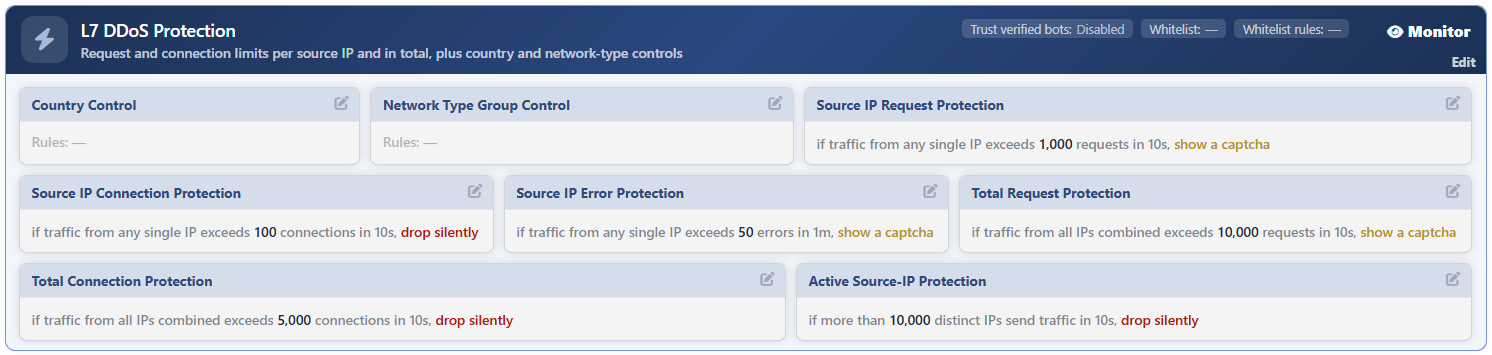 Bot/DDoS Management - The L7 DDoS Protection Card
The anatomy of the card:
| Section | What it shows |
|---|---|
| The title | The name of the protection and its one-line definition: Request and connection limits per source IP and in total, plus country and network-type controls |
| Trust Verified Bots | Whether the verified search engine bots are exempted from the source-based limits or not. Disabled by default. |
| Whitelist | The condition that defines the traffic to be exempted from the whole of the protection. If it is not defined, — is written. |
| Whitelist Rules | The number of rows defined in the shortcut list next to the condition. If it is empty, — is written. |
| The mode badge | The own mode of the protection: Active, Monitor or Off. The Edit link below the badge opens the general settings of the protection. |
| The block cards | Eight limit blocks. Every card carries its own sentence and its own pencil icon. |
A block that is off does not disappear
When a block is turned off, its card does not leave the screen: it fades and the Disabled badge appears on it, and the limit and action that have been written continue to be read. The same applies to all the blocks while the protection is Off. A block that is configured but that does not work staying visible is a conscious choice: the screen does not hide what the record really contains.
In Which Order Are the Blocks Evaluated?
The blocks are not thresholds independent of each other; with the first match wins rule, they are evaluated in order from the most specific to the most general. The visual order on the card is the same as the evaluation order at runtime: what the operator reads from top to bottom is also what the engine looks at first.
| Order | Block | What it measures |
|---|---|---|
| 1 | Country Control | The traffic according to the country rules; the rule rows also work according to the first match within themselves. |
| 2 | Network Type Group Control | The traffic according to the network type groups (such as a hosting provider or a mobile operator). |
| 3 | Source IP Request Protection | The number of requests of a single source address. |
| 4 | Source IP Connection Protection | The number of connections of a single source address. |
| 5 | Source IP Error Protection | The number of 4xx client errors that a single source address receives. |
| 6 | Total Request Protection | The number of requests that all the sources produce together. |
| 7 | Total Connection Protection | The number of connections that all the sources produce together. |
| 8 | Active Source-IP Protection | The number of different source addresses that produce traffic at the same time. |
The screen, the configuration form and the engine itself follow the same order; when the order is changed, the three are changed together.
How Is the Block Sentence Read?
Every block reduces its settings to a single sentence. The sentence consists of three parts: who is measured, how much of it is counted as enough and what will be done. The limit value is written in bold, the time window faded, and the action in its own color (as the enforcement gets harder, the color gets darker).
| Block type | The sentence pattern |
|---|---|
| Source-based | if traffic from any single IP exceeds <limit> <metric> in <window>, <action> |
| Total | if traffic from all IPs combined exceeds <limit> <metric> in <window>, <action> |
| Active source | if more than <limit> distinct IPs send traffic in <window>, <action> |
| A block that has a hard ceiling | It is added to the end of the sentence with a semicolon: over <ceiling> <metric>, <action> |
In the country and network type controls, instead of a single sentence, rule rows are listed; if there is no row at all, the card writes Rules: —.
The Default Values
| Block | Default limit | Default window | Default action |
|---|---|---|---|
| Country Control | No rule | 1 minute | It is selected per rule; a new row opens with Block |
| Network Type Group Control | No rule | 1 minute | It is selected per rule; a new row opens with Block |
| Source IP Request Protection | 1,000 requests | 10 seconds | Show Captcha |
| Source IP Connection Protection | 100 connections | 10 seconds | Silent Drop |
| Source IP Error Protection | 50 errors | 1 minute | Show Captcha |
| Total Request Protection | 10,000 requests | 10 seconds | Show Captcha |
| Total Connection Protection | 5,000 connections | 10 seconds | Silent Drop |
| Active Source-IP Protection | 10,000 sources | A fixed measurement window | Silent Drop |
Why are some blocks set to the challenge and some to silent dropping?
In the blocks that count requests, the default action is a recoverable enforcement: a real visitor can solve the challenge and continue on its way. In the blocks that count connections, on the other hand, the default is Silent Drop; since the challenge and the blocking page are responses specific to HTTP, these blocks use silent dropping in order to be able to work on L7 TCP vServices as well. In this way, while the limit tier stays recoverable, the hard ceiling tier takes on the enforcement that has no return.
A block that has not been touched is not counted as off
The default value of the block switches is on: when the configuration is saved, the switches are written as on and the blocks work with their default limits. While the protection is in the Monitor mode, these blocks make measurements and produce events; only the enforcement is not applied. For a block to be really off, the operator must turn it off manually.
Edit
The Edit link below the mode badge of the card opens the general settings of the protection that are not block-based: the working mode, the trust in the verified bots and the two-layer exemption definition. The limits of the blocks are edited not on this screen but on the screen opened with the own pencil icon of every block.
| Setting | What it does |
|---|---|
| DDoS Protection | Determines the mode of the protection: Active, Monitor or Off. |
| Trust Verified Bots | Exempts the verified search engine bots from the source-based limits. It is off by default: for the sake of availability, a crawling storm is also kept under the ceiling. |
| DDoS Whitelist Condition | Defines the traffic to be exempted from the whole of the protection with a condition. |
| DDoS Whitelist Entries | The shortcut list of the same exemption written row by row; the rows are in an "or" relationship with each other. |
Details: Edit.
The two exemption layers do not replace each other
The exemption on this screen works across the protection: the traffic listed is not caught by the limit of any block. The country and network type controls have their own block-local exemption list within themselves; the exemption there only bypasses the rule rows of that block, and the source and total limits and the hard ceilings continue to be applied.
The Blocks on the Card
Each of the eight cards in the body is edited with its own pencil icon and has its own detail page.
| Block | Its scope |
|---|---|
| Country Control · Network Type Group Control | The two blocks that carry a rule list: not a threshold but membership and rate rules are defined. The Bandwidth Limit action, which is not present in the other blocks, can be selected only in these two. |
| The three Source IP … blocks | The blocks that measure a single source address. The hard ceiling of the source IP limits is fixedly the quarantine. |
| The two Total … blocks | The blocks that measure all the traffic together. |
| Active Source-IP Protection | It measures not the volume of the traffic but its width: it counts how many different addresses produce traffic at the same time. |
Country Control
Country-based rule rows are defined. Every row carries which countries it covers, which metric it counts, its limit and its action; when a limit is not written, the row turns into a membership rule and the action is applied the moment the country matches. The rows work according to the first match. The block also carries its own exemption list.
Details: Country Control.
Network Type Group Control
It is the network type counterpart of the country control: the same rule structure is used for groups such as cloud and hosting providers, content delivery networks, Tor exit nodes, mobile operator and home user networks.
Details: Network Type Group Control.
Source IP Request Protection
It limits the number of requests that a single source address produces in a certain window. It is present only on HTTP vServices.
Details: Source IP Request Protection.
Source IP Connection Protection
It limits the number of connections that a single source address opens. It is present on both HTTP and L7 TCP vServices.
Details: Source IP Connection Protection.
Source IP Error Protection
It limits the number of 4xx client errors that a single source address receives; it catches scanning and trial-and-error behavior independently of the volume. The 5xx errors originating from the server are not counted and the block has no hard ceiling. It is present only on HTTP vServices.
Details: Source IP Error Protection.
Total Request Protection
It limits the number of requests that all the sources produce together: even if no single address exceeds the threshold, it keeps the total load under the ceiling. It is present only on HTTP vServices.
Details: Total Request Protection.
Total Connection Protection
It is the counterpart of the total connection number; it is present on both vService types.
Details: Total Connection Protection.
Active Source-IP Protection
It measures the width of the traffic: it counts how many different source addresses produce traffic in a fixed measurement window. The distributed attacks in which every address sends few requests one by one are caught in this block without being caught by the volume thresholds. It has no time window field of its own.
Details: Active Source-IP Protection.
Scope and Limits
INFO
- The default mode is Monitor. The protection measures and produces events at the first moment, but it does not stop any request; blocking is turned on by the decision of the operator.
- The blocks are on by default. When the configuration is saved, the switches are written as on; turning a block off is the decision of the operator.
- The first match wins. A request is concluded with the decision of the most specific block; the more general blocks below are not evaluated again for the same request. The hard ceilings and the rule rows that limit the bandwidth are outside this chain.
- Three blocks are only in HTTP. The source IP request, source IP error and total request blocks are not present on L7 TCP vServices; the connection blocks and the active source block work in both types.
- The challenge and the blocking page are specific to HTTP. On L7 TCP vServices the selectable action is only Silent Drop in the source and total blocks, and Silent Drop and Bandwidth Limit in the country and network type blocks. In this type the quarantine comes into play only as the fixed enforcement of the source IP hard ceiling.
- The hard ceiling is not defined by default. It is present in four blocks but the field comes empty; the second tier comes into play only when the operator writes a value and while the protection works in the Active mode.
- The hard ceilings are subject to the whitelist as well. Their being outside the chain does not mean that they are without exemption: the traffic that matches the whitelist definition of the card is not caught by the ceilings either.
- The action of the source IP hard ceiling cannot be selected. The enforcement applied when the ceiling is exceeded is always the quarantine; the hard ceiling of the total blocks, on the other hand, is silent dropping.
- The penalty box and the challenge are filled only in the Active mode. In the monitor mode the selected action is not applied.
- The pencil icons depend on the permission. The card and its blocks are displayed with read-only permission; the edit surfaces are displayed only on the users that have edit permission.
