
Smarter by Design.Simpler for Business
IPFIX Log Sending
What Is the IPFIX Log Sending Action?
The IPFIX Log Sending action sends the detailed log information of the HTTP traffic passing through the vService to an external collector server over UDP in IPFIX (IP Flow Information Export) format.
This action works both at the request and at the response stage and produces comprehensive flow data for each HTTP transaction. The data sent contains the source/destination IP addresses, the ports, the HTTP headers, the status codes and the traffic statistics.
The Importance of the IPFIX Log Sending Action
IPFIX is a network flow data export protocol standardized by the IETF. This protocol provides a critical data source for central log management and network analytics.
The IPFIX Log Sending action;
- enables detailed traffic analysis on a vService basis,
- offers the possibility of integration with central SIEM systems (Graylog, Splunk, ELK, etc.),
- creates a data source for network security monitoring and threat detection,
- provides metrics for capacity planning and performance analysis,
- keeps records for meeting compliance and audit requirements.
For this reason, the IPFIX Log Sending action is an important component of the corporate network visibility and security monitoring infrastructure.
Supported vService Types
HTTP
L7 TCP
Network
Execution Timing
On Request
On Response
How to Add?
A new IPFIX Log Sending Action can be added through the TR7 web management interface by following the steps below:
- The Configuration Menu is opened by clicking the TR7 logo at the bottom left.
- The Load Balancer → Actions → Add steps are followed.
- A unique and descriptive name is entered for the action.
- IPFIX Log Sending is selected as Action Type.
- The related configurations of the action are made.
- The action is added by clicking the
Addbutton.
IPFIX Log Sending Action Add Form
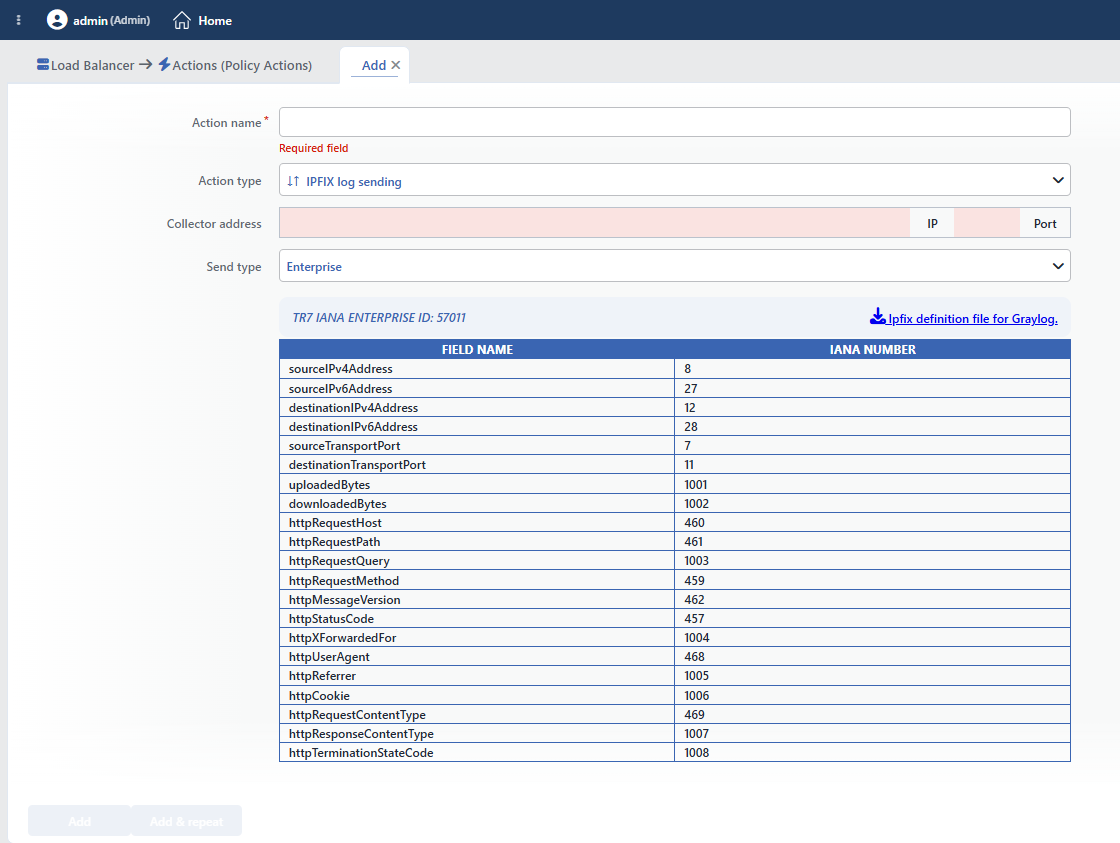 IPFIX Log Sending Action Add Form
INFO
Action Type
IPFIX log sending is selected as the action type. The action type cannot be changed after it is saved.
Since the action does not take a condition and does not support a counter, the Conditions, Execution Level, Rule Protocol, Hit Counter and Set Variable on Hit fields are not located in the form.
INFO
Collector Address Required
The IP and Port information of the collector server to which the IPFIX logs will be sent is entered in this field. The logs are sent over the UDP protocol.
- IP: The IPv4 address of the collector server is entered.
- Port: The UDP port on which the collector server listens is entered. (It usually serves over port 4739 or 2055.)
The collector address must be IPv4
The sending path supports only IPv4 targets. The field accepts an IPv6 address formally on entry and saves it, but no record is sent: no error is produced either, the flow silently remains empty.
INFO
Send Type Default: Enterprise
The format type of the IPFIX data to be sent is selected in this field.
Enterprise
Customized field names are sent by using the TR7 IANA Enterprise ID: 57011. This format uses the field definitions specific to TR7 and contains some non-standard HTTP information. It provides more readable field names in systems such as Graylog.
The customized fields in the Enterprise format:
| Field Name | IANA ID | Description |
|---|---|---|
| uploadedBytes | 1001 | The amount of uploaded bytes |
| downloadedBytes | 1002 | The amount of downloaded bytes |
| httpRequestQuery | 1003 | The HTTP request query string |
| httpXForwardedFor | 1004 | The X-Forwarded-For header value |
| httpReferrer | 1005 | The Referrer header value |
| httpCookie | 1006 | The Cookie header value |
| httpResponseContentType | 1007 | The response Content-Type value |
| httpTerminationStateCode | 1008 | The connection termination status code (in this version it is sent with the fixed value ----) |
Standard
The standard IPFIX field numbers defined by IANA are used. This format provides maximum compatibility with all IPFIX-compatible systems. The standard field definitions can be reached at https://www.iana.org/assignments/ipfix/ipfix.xhtml.
The corresponding fields in the Standard format:
| Standard Field | IANA ID | Enterprise Equivalent |
|---|---|---|
| initiatorOctets | 231 | uploadedBytes |
| responderOctets | 232 | downloadedBytes |
| httpReasonPhrase | 470 | httpRequestQuery |
| observationDomainName | 300 | httpXForwardedFor |
| virtualStationName | 350 | httpReferrer |
| applicationCategoryName | 372 | httpCookie |
| applicationGroupName | 374 | httpResponseContentType |
| informationElementDescription | 340 | httpTerminationStateCode |
INFO
The IPFIX Fields Sent
A total of 21 fields are sent in each record. 8 of these carry a different IANA number according to the sending type (the Send Type tables above); the 13 fields below, on the other hand, are sent with the same number in both types.
| Field Name | IANA ID | Description |
|---|---|---|
| sourceIPv4Address | 8 | The source IPv4 address |
| sourceIPv6Address | 27 | The source IPv6 address |
| destinationIPv4Address | 12 | The destination IPv4 address |
| destinationIPv6Address | 28 | The destination IPv6 address |
| sourceTransportPort | 7 | The source port |
| destinationTransportPort | 11 | The destination port |
| httpRequestHost | 460 | The HTTP Host header |
| httpRequestPath | 461 | The HTTP request path |
| httpRequestMethod | 459 | The HTTP method (GET, POST, etc.) |
| httpMessageVersion | 462 | The HTTP version |
| httpStatusCode | 457 | The HTTP status code |
| httpUserAgent | 468 | The User-Agent header |
| httpRequestContentType | 469 | The request Content-Type value |
INFO
Graylog Integration
The definition file needed for the IPFIX logs to be displayed in Graylog is downloaded from the Ipfix definition file for Graylog. link that appears when Enterprise is selected as the Send Type in the action add form.
This file contains the schema definitions needed for Graylog to resolve the IPFIX fields correctly.
Sample Graylog log view:
 Graylog-1
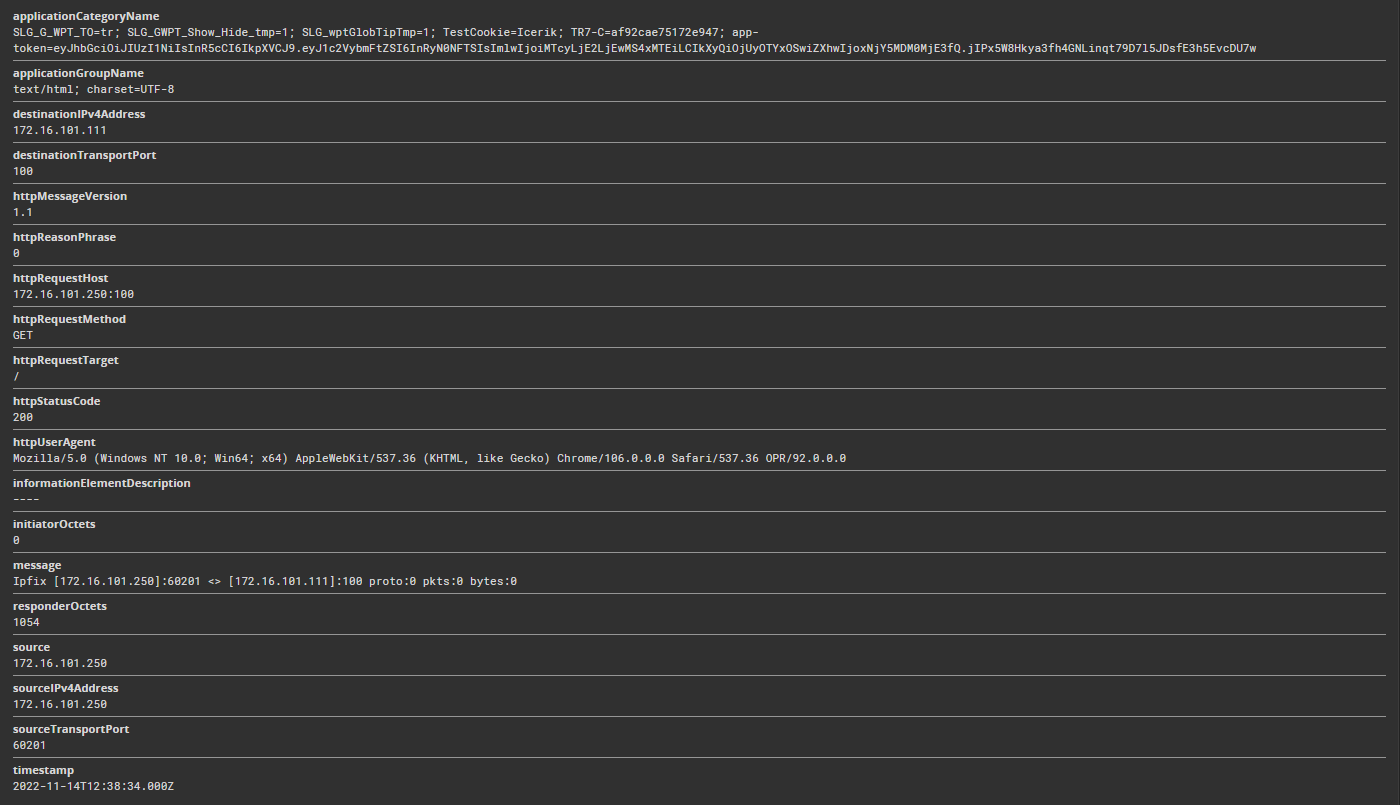 Graylog-2
INFO
Form Buttons
Add
The action adding process is completed by clicking the Add button.
Add & Repeat
With the Add & Repeat button, the action adding process is completed, and another new action can be added with different configurations without leaving the related window.
 Action Added
Sending Behavior
INFO
When the Record Is Produced
At the request stage, only data is collected; the IPFIX record is sent while the response is being processed and one record is produced for each HTTP transaction. If 10 requests have passed over a persistent (keep-alive) connection, 10 separate records are created; the records are not sent collectively when the connection is closed.
If the collector is unreachable, the traffic is not affected, and the loss is silent
The sending is done over UDP and without waiting for a delivery confirmation. If the collector is down or the address is wrong, the request/response flow is not affected, but the records are also lost without producing any warning. Since no sequence number is carried in the packets, loss detection cannot be performed on the collector side either; the liveness of the flow must be verified regularly through the collector.
A setting change restarts the service
Changing the collector address or the sending type requires the restart of the load balancer service; in live environments, it is recommended to apply it in a maintenance window.
The cookie content goes out unencrypted
In the records, the httpCookie field carries the whole of the cookie header and the traffic is sent with UDP without being encrypted. The session tokens are in plain text on the way to the collector and on the collector.
For this reason, the collector must be positioned in a secure management network, access to the collector must be restricted and the retention period must be determined according to the data policy of the organization.
INFO
Its Relationship with the Other Log Mechanisms
IPFIX sending is configured only with this action; it is independent of the syslog/SIEM forwarding profiles under Settings → General Settings → Log Forwarding. The Log Forwarding settings do not affect the IPFIX flow, and this action does not change the syslog sending either.
Even if the IP Log Masking action is defined in the same vService, the client address in the IPFIX records is not masked: the record information is taken with the real address before the masking in the action list.
Which end the source and destination fields in the records correspond to must be verified on the collector side over a sample record at the first installation.
WARNING
The IPFIX Log Sending action does not require a condition and is applied unconditionally (Always) on the vService on which it is defined.
Actions that run unconditionally directly affect all traffic or behavior on the related vService, without an evaluation based on traffic content.
In live environments, it is recommended that target service behaviors and possible effects be evaluated carefully before such actions are enabled. Otherwise, unexpected service behaviors or operational problems can occur.
WARNING
Only one IPFIX Log Sending action can be added per vService.
WARNING
The logs are sent with the UDP protocol.
Operational and Safe Usage Recommendations
- The Collector Server Should Be Positioned in a Secure Network. The IPFIX data contains sensitive traffic information. It should be ensured that the collector server is in an isolated and secure network segment.
- Sufficient network capacity is provided. In vServices with heavy traffic, the IPFIX logs produce a significant amount of data; it is verified that the collector server and the network can handle this load.
- The Send Type Selection Should Be Made According to the Systems Used. Enterprise: for Graylog or the systems that support the field names specific to TR7. Standard: maximum compatibility for general IPFIX-compatible systems.
- The collector server is monitored. There can be packet loss in UDP-based transmission; the health of the collector server and the log reception state are monitored regularly.
- A Log Retention Policy Should Be Determined. The IPFIX logs can grow quickly. Appropriate log rotation and retention policies should be configured on the collector server.
