
Smarter by Design.Simpler for Business
URL
What Is the URL Condition?
URL is a condition type used to make traffic routing and manipulation decisions by evaluating the full URL of the HTTP request (including the scheme and the host).
The URL covers the whole of the target address of the request.
http://www.tr7.com/api/users?id=123&q=7777
URL (full): protocol + host + path + query
This condition is used when a full URL match including the protocol (http/https) and the host information is required.
URL Structure
 Full URL Structure
| Component | Description |
|---|---|
| Scheme | Expresses the protocol used (http/https). |
| Domain Name | Specifies the server address to which the request is sent. |
| Port | The service port of the server; it is included in the URL value only if the client explicitly sends the port in the Host header (it is not present on the default 80/443). |
| Path to the File | Specifies the path of the resource to be accessed on the server. |
| Parameters (Query) | Contains the query string parameters sent with the request. |
| Anchor | Expresses the in-page location; it is not sent to the server. |
TIP
The URL condition evaluates the URL components transmitted to the server in the HTTP request (the scheme, the domain name (literally from the Host header), the path and the query string). The full form evaluated is http(s)://host[:port]/path?query; the scheme is determined according to whether the connection is terminated with SSL on TR7. Since the fragment (anchor) information is processed on the client side, it is not included in the URL condition.
The fragment (anchor) (#...) exists for the in-page navigation of the browser and:
- It is not included in the HTTP request line.
- It cannot be seen by TR7 (Load Balancer & WAF).
- It does not appear in the logs.
- It cannot be used as a condition.
The Importance of the URL Condition
In some scenarios, not only the path but the full URL information is required. The URL condition is used especially in multi-tenant environments or when different behaviors need to be applied for different protocols.
With the URL condition:
- Full URL based matching can be performed,
- Control including the protocol (HTTP/HTTPS) can be provided,
- Host and path combinations can be targeted,
- Rules can be defined for specific URLs in multi-domain environments.
URL vs Path + Query vs Path:
| Criterion | Scope | Example |
|---|---|---|
| URL | Protocol, host, path, query | http://www.tr7.com/api/users?id=123 |
| Path | Path only | /api/users |
| Path + Query | Path and query string | /api/users?id=123 |
Supported vService Types
HTTP
L7 TCP
Network
How to Add?
A new URL Condition can be added through the TR7 web management interface by following the steps below:
- The Configuration Menu is opened by clicking the TR7 logo at the bottom left.
- The Load Balancer → Conditions → Add steps are followed.
- URL is selected as Criteria.
- The related configurations of the condition are made.
- The condition is added by clicking the
Addbutton.
URL Condition Add Form
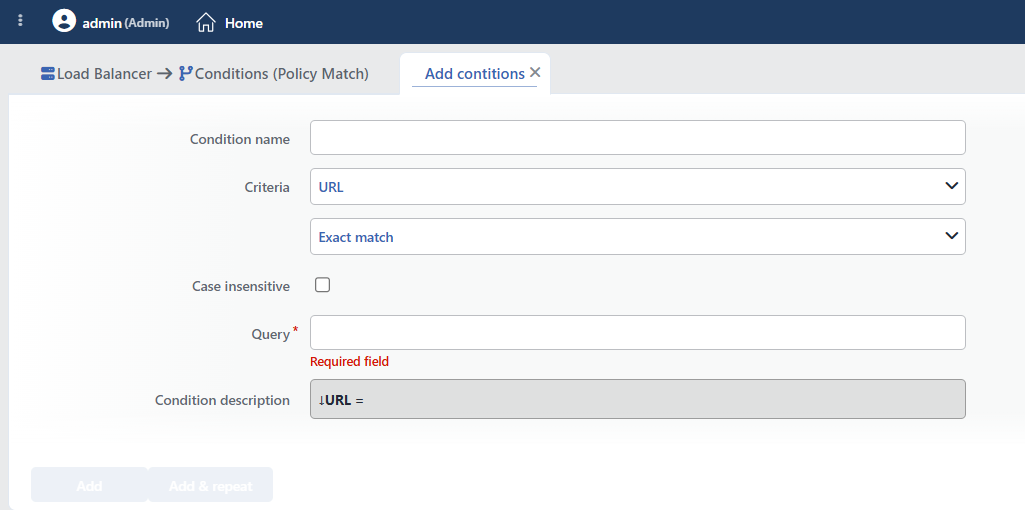 URL Condition Add Form
INFO
Condition Name
An optional name can be entered for the condition to be created.
This field is especially important in the following scenarios:
- When many conditions are defined under the same vService,
- When conditions with similar criteria need to be distinguished,
- When it is necessary to quickly understand which business rule the condition represents.
When this field is left empty, TR7 analyzes the content of the related condition and creates an automatic, descriptive name in the Condition Description field. This generated description is used as the name in condition lists.
INFO
Criteria Required
The field that determines the type of the condition; URL is selected from the searchable dropdown list. This selection determines the fields displayed in the form. The criterion cannot be changed after the condition is saved: if a different criterion is needed, a new condition is defined. For all criteria in the list and their scopes, the criteria catalog on the Conditions page can be referred to.
INFO
Content Matching Method Default: Exact match
Determines how the content is matched. The field appears in the form as an unlabeled dropdown list right below Criteria and opens with Exact match selected. The Is present option is not offered in this criterion.
| Option | Code | Description |
|---|---|---|
| Exact match | exactMatch | The value must match exactly. |
| Start | start | The value must start with the specified text. |
| End | end | The value must end with the specified text. |
| Includes | sub | The value must contain the specified text. |
| Regex | regex | The value must match the regular expression. |
Sample URL matchings:
| Method | Query | Matching URLs |
|---|---|---|
| Exact Match | http://www.tr7.com/ | http://www.tr7.com/ |
| Start | https:// | All HTTPS requests |
| Includes | tr7.com | http://www.tr7.com/api, https://api.tr7.com |
| Regex | ^https?://[^/]+/api/ | API endpoints |
INFO
Case Insensitive Default: Off
Controls case sensitivity.
- Active:
example,EXAMPLE,Exampleare considered the same - Not Active: An exact match is required (default)
INFO
Query Required
The value to be matched is entered in this field. According to the selected matching method:
- Exact match: Checks for an exact match of the value.
- Start: Checks the beginning of the text to be searched for.
- End: Checks the end of the text to be searched for.
- Includes: Checks whether the text to be searched for is contained.
- Regex: Checks with a regular expression pattern (Regex).
Sample values:
http://www.tr7.com/login.php?id=7: For Exact match (full URL)https://: For Start (HTTPS traffic).tr7.com: For Includes (TR7 domains)
URL Encoding and Host Source
The condition evaluates the URL in its raw (unencoded) form; encodings such as %2F are not decoded and the URL Normalization action runs after the condition. The host part is taken literally from the Host header sent by the client; in requests without a Host header, the vService address information is used instead of the host: host-based patterns do not match these requests.
INFO
Condition Description
It is created automatically by TR7 in line with the entered criteria and values.
This description:
- which value the condition applies to,
- which criterion it works on,
- the quick understanding of the condition on listing screens
is produced dynamically by the system so as to provide these.
TIP
The evaluated URL can be used in actions with the %URL smart variable. In addition, ready-made conditions regarding the URL structure are offered in the condition selection lists: If URL structure is standard, If URL starts with /, If URL is *: these are product-defined checks independent of this criterion.
INFO
Form Buttons
Add
The condition adding process is completed by clicking the Add button.
Add & Repeat
With the Add & Repeat button, the condition adding process is completed, and another new condition can be added with different configurations without leaving the related window.
 Condition Added
Operational Usage Recommendations
- Path Should Be Preferred Unless Necessary. If the host information is not needed, the Path condition should be used; it is simpler and more performant.
- Protocol-Agnostic Rules. If the same rule is to be applied for HTTP and HTTPS, the matching should be done from
://or from the host part. - Attention to www and non-www.
www.example.comandexample.comare different URLs. An appropriate matching method should be selected to cover both.
Common Usage Scenarios in Live Environments
The examples below show how the related condition is applied in the most frequently encountered use cases in real systems. These scenarios are based on practices that are widely preferred in live environments and rest on experience gained in the field.
Scenario 1: Redirecting HTTP Traffic to HTTPS
Purpose: To provide encrypted communication by automatically redirecting all requests arriving with the HTTP protocol to HTTPS as required by the security policy.
Configuration: Content Matching Method → Start · Query → http://
Action Recommendations:
- ✅ Redirect to HTTPS → All requests arriving with HTTP are redirected to the HTTPS protocol with a 301 Permanent Redirect.
- ✅ Advanced Traffic Inspection → Detailed logging is performed for the analysis of the HTTP vs HTTPS usage ratio.
Scenario 2: API Rate Limiting for a Specific Subdomain
Purpose: Special bandwidth limitation and custom header addition for the API subdomain (api.tr7.com) in a multi-domain environment.
Configuration: Content Matching Method → Includes · Query → api.tr7.com
Action Recommendations:
- ✅ Bandwidth Limitation → An IP-based 20 Mbps throughput limit is applied to the API subdomain.
- ✅ Add HTTP Header → The
X-API-Domain: trueandX-Rate-Limit-Policy: strictheaders are added to API requests.
Scenario 3: www Prefix Normalization
Purpose: To redirect the URLs containing the www prefix to the non-www version for SEO and consistency.
Configuration: Content Matching Method → Includes · Query → ://www.
Action Recommendations:
- ✅ Location Redirection → www.tr7.com URLs are redirected with a 301 redirect to the non-www version tr7.com.
- ✅ Advanced Traffic Inspection → www vs non-www usage statistics are collected and SEO analysis is performed.
Scenario 4: Custom Security Headers for a Secure Subdomain
Purpose: To add extra security headers to the secure subdomain (secure.tr7.com) where critical operations are performed.
Configuration: Content Matching Method → Regex · Query → ^https://secure\.tr7\.com/
Action Recommendations:
- ✅ Manage HTTP Security Headers → The HSTS, CSP, X-Frame-Options and X-Content-Type-Options security headers are added to the secure subdomain.
- ✅ Add HTTP Header → The
X-Secure-Endpoint: trueandStrict-Transport-Security: max-age=31536000headers are added.
