
Smarter by Design.Simpler for Business
User Authentication
What Is the User Authentication Condition?
User Authentication is a condition type that defines the valid username and password pairs for HTTP Basic Authentication.
This condition is used together with the User Authentication (On HTTP Request) action and provides the user information required for the action to be able to perform authentication.
1Client → TR7:
GET /admin/2TR7 → Client: 401 Unauthorized +
WWW-Authenticate: Basic realm="Admin"3Client → User: Shows the login window
4User → Client: Enters username:password
5Client → TR7:
Authorization: Basic dXNlcjpwYXNz ← Base64(user:pass)6TR7: Checks the User Authentication condition
7TR7 → Backend Service: If the authentication is successful, forwards the request
WARNING
This condition is not meaningful on its own; it is the User Authentication (On HTTP Request) action that produces the 401 identity challenge, and the condition is selected in the Conditions section of this action. When the condition is bound to a rule, TR7 automatically applies it in the form "if valid credentials have NOT been presented": thus the action is triggered only on unauthenticated requests and the identity challenge runs.
The Importance of the User Authentication Condition
HTTP Basic Authentication is a simple but effective access control mechanism.
With the User Authentication condition:
- Admin panels can be protected with a username/password,
- Access to development and staging environments can be restricted,
- Simple authentication can be added to API endpoints,
- An extra security layer can be added to specific pages,
- Different credentials can be defined for more than one user.
Relationship Between the Condition and the Action:
| Component | Role |
|---|---|
| User Authentication Condition | Defines the valid username/password pairs |
| User Authentication (On HTTP Request) Action | Triggers the login window in the browser and performs the authentication |
Supported vService Types
HTTP
L7 TCP
Network
The condition can be used only at the request (At Request) stage.
How to Add?
A new User Authentication Condition can be added through the TR7 web management interface by following the steps below:
- The Configuration Menu is opened by clicking the TR7 logo at the bottom left.
- The Load Balancer → Conditions → Add steps are followed.
- User authentication is selected as Criteria.
- The related configurations of the condition are made.
- The condition is added by clicking the
Addbutton.
User Authentication Condition Add Form
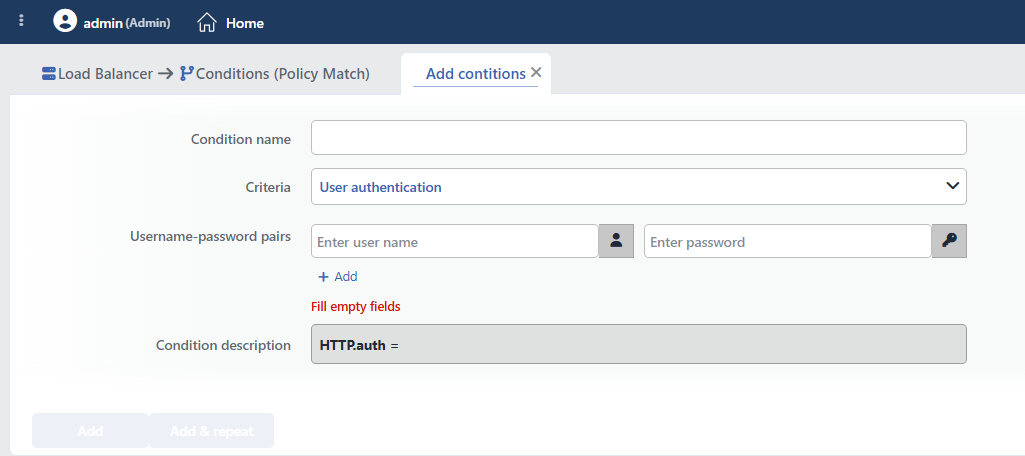 User Authentication Condition Add Form
INFO
Condition Name
An optional name can be entered for the condition to be created.
This field is especially important in the following scenarios:
- When many conditions are defined under the same vService,
- When conditions with similar criteria need to be distinguished,
- When it is necessary to quickly understand which business rule the condition represents.
When this field is left empty, TR7 analyzes the content of the related condition and creates an automatic, descriptive name in the Condition Description field. This generated description is used as the name in condition lists.
INFO
Criteria Required
The field that determines the type of the condition; User authentication is selected from the searchable dropdown list. This selection determines the fields displayed in the form. The criterion cannot be changed after the condition is saved: if a different criterion is needed, a new condition is defined. For all criteria in the list and their scopes, the criteria catalog on the Conditions page can be referred to.
INFO
Username-Password Pairs Required
At least one username-password pair must be defined; the usernames must be unique. More than one pair can be added with (+): a request authenticated with any of the pairs meets the condition.
Password Storage
The passwords in this field are stored as plain text in the load balancing configuration; anyone who has access to the configuration or its backups can see the passwords. This condition should be used only for basic protection; AGS should be preferred for corporate authentication.
The valid username and password pairs for authentication are defined.
TIP
More than one username/password pair can be defined by clicking the (+) button. If any pair matches, the condition is met (OR logic).
Sample User Definitions:
| Username | Password | Purpose |
|---|---|---|
admin | SecurePass123! | Administrator access |
developer | DevPass456! | Developer access |
readonly | ViewOnly789! | Read-only access |
WARNING
- Strong passwords should be used. (at least 12 characters, upper/lower case letters, digits, special characters)
- The passwords should be changed regularly.
- This condition should definitely be used over HTTPS.
- For sensitive systems, more advanced solutions such as AGS should be preferred.
INFO
Condition Description
It is created automatically by TR7 in line with the entered criteria and values.
This description:
- which value the condition applies to,
- which criterion it works on,
- the quick understanding of the condition on listing screens
is produced dynamically by the system so as to provide these.
INFO
Form Buttons
Add
The condition adding process is completed by clicking the Add button.
Add & Repeat
With the Add & Repeat button, the condition adding process is completed, and another new condition can be added with different configurations without leaving the related window.
 Condition Added
Usage with the User Authentication Action
The User Authentication condition is used together with the User Authentication (On HTTP Request) action.
1
Step 1 Creating the Condition
First, the condition containing the valid user information is created.
- Criteria:
User authentication - Username:
admin - Password:
SecurePassword123
2
Step 2 Creating the Action
Then the action is created and the condition is added.
- Action Type:
User authentication (On HTTP request) - Realm:
Admin Panel - Conditions: The user authentication condition that was created + (optional) a path condition
Result:
- When the specified path is accessed, a login window opens in the browser.
- If the user enters the correct information, access is provided.
- If wrong information is entered, it is asked again.
Operational Usage Recommendations
- HTTPS Is Mandatory. HTTP Basic Authentication encodes the passwords with Base64, it does not encrypt them. It should definitely be used with HTTPS.
- Strong Passwords. Against brute-force attacks, complex passwords at least 12 characters long should be used.
- Rate Limiting Should Be Added. In order to limit failed login attempts, the Rate Limiting action should also be used.
- The Access Scope Should Be Narrowed. Instead of the whole site, only the necessary paths should be protected (e.g.
/admin/,/api/private/). - Not Sufficient for Sensitive Systems. For systems containing financial or personal data, more advanced solutions such as AGS or OAuth should be preferred.
