
Smarter by Design.Simpler for Business
Set HTTP Header
What Is the Set HTTP Header Action?
The Set HTTP Header action is used to determine or change the value of a header in the HTTP traffic. If the header exists, its value is updated, if it does not exist, a new header is added.
This action can work both at the request and at the response stage. According to the Execution Level selection, the header is set in the request before it is sent to the Backend Service or in the response before it is returned to the client.
Set HTTP Header (this action)
Before: X-Env: old
After: X-Env: new
The existing value is changed (a single header remains).
Add HTTP Header
Before: X-Env: old
After: X-Env: old
X-Env: new
A second header with the same name is added.
The Difference from Add HTTP Header
The Set HTTP Header action changes the value of the header if it already exists. The Add HTTP Header action, on the other hand, does not change the existing header, it adds a second header with the same name.
The Importance of the Set HTTP Header Action
Setting the HTTP headers with the correct values directly affects the behavior and the security of the application. The ability to update the existing headers provides great flexibility in traffic manipulation.
The Set HTTP Header action;
- makes it possible to update or correct the existing header values,
- makes it possible to standardize the headers going to the Backend Service,
- makes it possible to set the headers returning to the client in a controlled way,
- makes it possible to arrange the Host header according to the Backend Service requirements,
- supports the creation of dynamic header values with Smart Variables.
For this reason, the Set HTTP Header action is an ideal tool for keeping the header values under full control.
Supported vService Types
HTTP
L7 TCP
Network
Execution Timing
On Request
On Response
How to Add?
A new Set HTTP Header Action can be added through the TR7 web management interface by following the steps below:
- The Configuration Menu is opened by clicking the TR7 logo at the bottom left.
- The Load Balancer → Actions → Add steps are followed.
- A unique and descriptive name is entered for the action.
- Set HTTP Header is selected as Action Type.
- The related configurations of the action are made.
- In the Conditions tab, the condition/conditions under which the action takes effect are determined.
- The action is added by clicking the
Addbutton.
Set HTTP Header Action Add Form
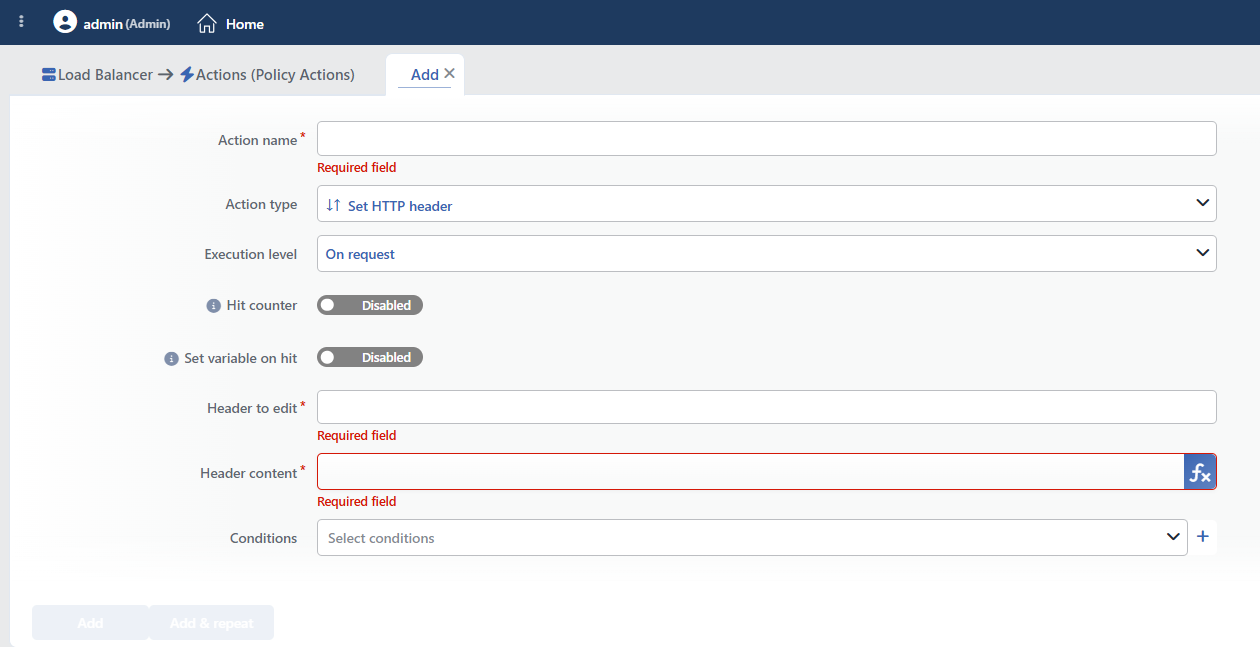 Set HTTP Header Action Add Form
INFO
Execution Level
Determines at which stage the action will be run. This field cannot be changed after saving; if a change of direction is needed, a new action is defined.
- On Request: The action is applied before the request is forwarded to the related Backend Service. This level is used in cases where changes need to be made to the request or additional information needs to be passed to the Backend Service.
- On Response: The action is applied before the response is forwarded to the client. This level is used in cases where edits or additions need to be made to the response sent to the client.
INFO
Hit Counter Default: Off
Hit Counter counts every run of the action (it is evaluated together with the action's own condition; the count is not lost even in terminating actions such as Deny). Action-based rates and totals are displayed in the Action Hits tab of the vService dashboard and on the live statistics screen; they do not appear as a separate column in the lists. The counter is cumulative; there is no interface for resetting it manually: it starts from zero when the set of counted actions changes or when the vService is reloaded, while the history is preserved on the dashboard as a rate (hit/s).
INFO
Set Variable on Hit
A variable name whose value is assigned each time the action runs can be entered (optional; empty by default). The name can consist of letters, digits and underscores (at most 32 characters). When the action is triggered, the variable is set to 1, and chained behaviors can be built by reading it with the %TR7VAR(name) smart variable in other conditions and actions on the same vService.
INFO
Header to Edit Required
The name of the HTTP header to be set is entered in this field.
- If the header exists: The existing value is changed with the new value.
- If the header does not exist: A new header is added.
Header names are case insensitive.
Frequently Set Headers
Host: The host name expected by the Backend ServiceX-Forwarded-Proto: The original protocol informationContent-Type: The content typeAuthorization: The authentication information
INFO
Header Content Required
The new value of the header is entered in this field.
TIP
This field supports Smart Variables. Existing variables can be accessed with the fx button and dynamic content can be created.
Sample variables: the client IP address, the request header content, the request SSL SNI information and fixed texts. There is no separate "Host" variable; if the domain name is needed, the Request HTTP header content variable is used with the host header name.
The variable pool offered changes according to the Execution Level selection: when On Response is selected, the response stage variables (the returned status code, the response headers, the response cookies) are also listed.
Detailed information is on the Variables page.
INFO
Conditions
In this field, it is defined under which condition or conditions the related action takes effect.
By adding one or more conditions, the behavior can be applied in a targeted and controlled way with the and/or structure.
Detailed information about conditions is on the Conditions page.
WARNING
If no condition is defined in this field, the related action runs unconditionally (Always). In this case, the action is applied to all traffic coming to the related vService.
In live environments, using an action without defining a condition can lead to unexpected situations (service outages). For this reason, it is recommended that at least one condition always be defined when an action is created.
INFO
Form Buttons
Add
The action adding process is completed by clicking the Add button.
Add & Repeat
With the Add & Repeat button, the action adding process is completed, and another new action can be added with different configurations without leaving the related window.
 Action Added
Behavior Details
- The header name is offered together with suggestions; the suggestion list changes according to the selected Execution Level (request headers / response headers). The names that are not in the list can be written manually.
- No format check is made for the header name; writing the headers that determine the body framing, such as
Content-LengthandTransfer-Encoding, manually leads to broken responses. - When On Response is selected, the action is applied only to the responses returning from the Backend Service; the responses produced by TR7 itself (blocking, redirection, error pages) are not affected.
- The uppercase/lowercase form in which the header name is written is not forwarded to the other side as it is; if it needs to be preserved, the Keep Header Names action is used.
- The action has no number limit per vService.
Operational and Safe Usage Recommendations
Make the Set HTTP Header vs Add HTTP Header Choice Correctly.
Scenario Recommended Action Updating an existing header Set HTTP Header Adding if the header does not exist, updating if it does Set HTTP Header Adding multiple values (e.g. more than one Cookie) Add HTTP Header Adding if the header does not exist, not touching it if it does A conditional Add HTTP Header Set the Host Header Carefully. The
Hostheader sent to the Backend Service is critical for the application to work correctly. A wrong Host value can break virtual host routing, prevent SSL certificate verification and cause the in-application URLs to be created incorrectly.Forward the Protocol Information. If TLS termination is done on TR7, the Backend Service can learn the original protocol from the
X-Forwarded-Protoheader:Header (Key): X-Forwarded-Proto Value: httpsIt is used together with conditions. Instead of assigning the same value to all the traffic, different values are assigned under certain conditions.
Common Usage Scenarios in Live Environments
The examples below show how the related action is applied in the most frequently encountered use cases in real systems. These scenarios are based on practices that are widely preferred in live environments and rest on experience gained in the field.
Scenario 1: Setting the Host Header for Virtual Host Routing
Problem: The Backend Service hosts more than one virtual host and serves different applications according to the Host header. However, while the Host header in the requests coming to TR7 is the external domain (www.example.com), the Backend Service expects the internal domain (internal-api.example.com). Since the Host header is wrong, the Backend Service returns a 404 or the default site.
Solution: The Host header is set as the internal domain expected by the Backend Service and the correct operation of virtual host routing is provided.
Configuration:
- Execution Level: On Request
- Header to Edit:
Host - Header Content:
internal-api.example.com - Conditions:
- Unconditional (it is applied to all the requests)
Result:
- ✅ Virtual host routing → The Backend Service gets the correct Host and serves the correct application.
- ✅ Multi-tenant support → More than one application can run on the same IP.
- ✅ SSL SNI compatibility → The internal certificate match is provided.
- ✅ Application URLs → The correct URLs are created in the Backend Service responses.
Example transformation:
- The client request:
Host: www.example.com - TR7 setting:
Host: internal-api.example.com - The Backend Service accepts this and returns the related application
Scenario 2: Forwarding the Protocol Information After SSL Offloading
Problem: SSL termination is done on TR7 and the traffic is forwarded to the Backend Service as HTTP. However, the Backend Service does not know that the original request was HTTPS and creates the redirect URLs as http://. This leads to mixed content errors and security problems.
Solution: The X-Forwarded-Proto header is set as https and the Backend Service is enabled to know the original protocol.
Configuration:
- Execution Level: On Request
- Header to Edit:
X-Forwarded-Proto - Header Content:
https - Conditions:
- If SSL is terminated
Result:
- ✅ Protocol awareness → The Backend Service knows the original protocol and produces the correct URL.
- ✅ Redirect correction → The Location headers are created with
https://. - ✅ Framework support → Frameworks such as Django, Rails and Spring read X-Forwarded-Proto.
- ✅ Mixed content prevention → HTTP resources are blocked on HTTPS pages.
Application Behavior:
- The Backend Service framework reads
X-Forwarded-Proto: https - Functions such as
url_for()andredirect_to()produce HTTPS URLs - The absolute URLs are created with the correct protocol
Scenario 3: Correcting the Content-Type in the API Responses
Problem: Although the legacy API Backend Service returns JSON, it sends the Content-Type wrong (text/plain or text/html). The JavaScript application on the client side trusts the Content-Type and processes it as text instead of parsing JSON. This causes the API integration to break.
Solution: On the API paths, the Content-Type header is set to the correct value (application/json) and the parsing on the client side is corrected.
Configuration:
- Execution Level: On Response
- Header to Edit:
Content-Type - Header Content:
application/json; charset=utf-8 - Conditions:
- Path starts with
/api/
- Path starts with
Result:
- ✅ JSON parsing → The JavaScript
response.json()works automatically. - ✅ Browser behavior → The browser renders it as JSON and does syntax highlighting.
- ✅ Charset specification → The UTF-8 encoding is stated explicitly, character corruption is prevented.
- ✅ RESTful compatibility → A header suitable for the API best practices is returned.
Example transformation:
- Backend Service:
Content-Type: text/plain - TR7 setting:
Content-Type: application/json; charset=utf-8 - The client parses the JSON correctly
Scenario 4: Adding Authorization with a Static Token
Problem: In the communication between the internal microservices, every service expects mutual authentication. However, some legacy clients cannot send the Authorization header. A fixed service token needs to be added for these clients, but it is not possible to change the application code.
Solution: In the requests going to certain paths, the Authorization header is set with a static token and service-to-service authentication is provided.
Configuration:
- Execution Level: On Request
- Header to Edit:
Authorization - Header Content:
Bearer eyJhbGciOiJIUzI1NiIsInR5cCI6IkpXVCJ9... - Conditions:
- Path starts with
/internal-api/ ANDHTTP HeaderAuthorizationdoes not exist
- Path starts with
Result:
- ✅ Service auth → The legacy clients can access the microservices.
- ✅ Conditional adding → It is added only to the requests that do not have Authorization, the existing token is preserved.
- ✅ Zero-code change → No application change is needed, the solution is at the TR7 level.
- ✅ Internal API security → It takes effect only on the internal paths, it does not affect the public API.
Example transformation:
- The legacy client request:
GET /internal-api/status(no Authorization) - TR7 setting:
Authorization: Bearer eyJhbGci...is added - The microservice accepts the request and returns a response
Scenario 5: Setting Cache-Control for Static Content
Problem: The Backend Service sends the Cache-Control header on the static files (CSS, JS, images), but the value is very short (max-age=300) or it does not send it at all. This causes the static files to be downloaded again on every page load, bandwidth waste and slow page loading.
Solution: On the static file paths, the Cache-Control header is set for long-term caching and browser caching is improved.
Configuration:
- Execution Level: On Response
- Header to Edit:
Cache-Control - Header Content:
public, max-age=31536000, immutable - Conditions:
Result:
- ✅ Long-term caching → The static files are cached for 1 year.
- ✅ Bandwidth saving → The files are not downloaded on repeat visits.
- ✅ Page performance → The page loading time decreases by 50%+.
- ✅ Immutable flag → In modern browsers, revalidation is not even done.
Cache Behavior:
- The first visit: The static files are downloaded and cached
- The subsequent visits: The browser reads from the disk cache, it does not make an HTTP request
max-age=31536000→ 1 year = 365 days of caching
