
Smarter by Design.Simpler for Business
User Cookie Name
What Is the User Cookie Name Condition?
User Cookie Name is a condition type used to make traffic routing and manipulation decisions by checking the presence or the value of the cookie information in the HTTP request.
Cookies are small pieces of data used to store and carry state information between the client (browser) and the server. Since HTTP is stateless, session and user tracking is provided with cookies.
Cookies are carried inside the Cookie HTTP header.
This condition checks the request cookies coming from the client.
WARNING
The User Cookie Name condition can be selected in rules both at the Request and the Response stage; the cookie value is read from the Cookie header in the request at both stages.
The Importance of the User Cookie Name Condition
Cookies are widely used for session management, user preferences, tracking and authentication.
With the User Cookie Name condition:
- The presence of session cookies can be checked,
- Different content can be offered according to user preferences,
- Custom operations can be applied according to the value of tracking cookies,
- Authentication cookies can be checked.
User Cookie vs Server Cookie:
| Criterion | User Cookie | Server Cookie |
|---|---|---|
| Direction | Request | Response |
| Header | Cookie | Set-Cookie |
| Usage | Client → Server | Server → Client |
| Evaluation | Request + Response stage (the value is read from the request) | Response stage only |
Supported vService Types
HTTP
L7 TCP
Network
The condition can be used at both the request (At Request) and response (At Response) stages; the cookie value is read at the time of the request and is evaluated over the same value at the response stage as well: for server-side cookies, Server Cookie Name is used.
How to Add?
A new User Cookie Name Condition can be added through the TR7 web management interface by following the steps below:
- The Configuration Menu is opened by clicking the TR7 logo at the bottom left.
- The Load Balancer → Conditions → Add steps are followed.
- User cookie name is selected as Criteria.
- The related configurations of the condition are made.
- The condition is added by clicking the
Addbutton.
User Cookie Name Condition Add Form
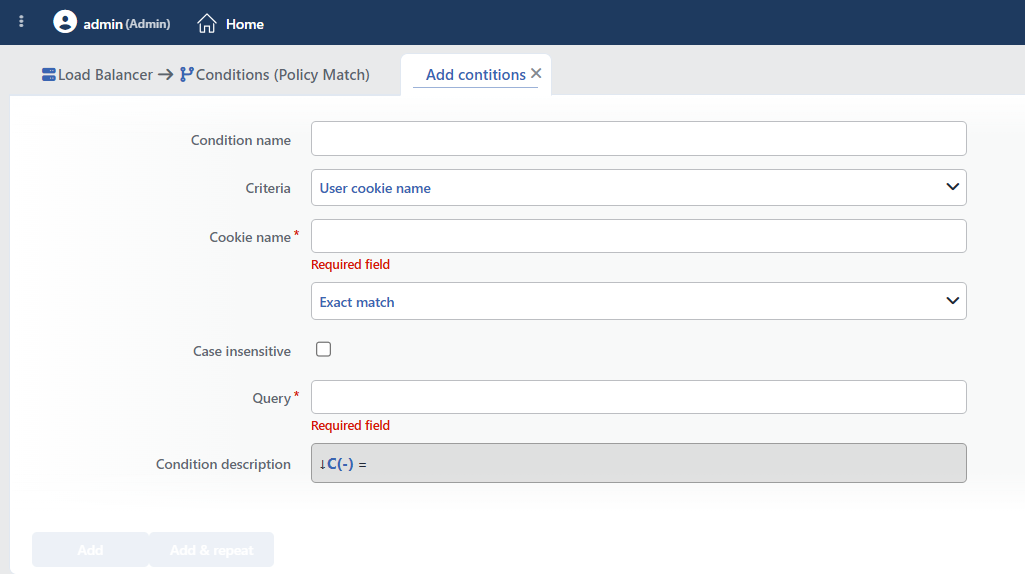 User Cookie Name Condition Add Form
INFO
Condition Name
An optional name can be entered for the condition to be created.
This field is especially important in the following scenarios:
- When many conditions are defined under the same vService,
- When conditions with similar criteria need to be distinguished,
- When it is necessary to quickly understand which business rule the condition represents.
When this field is left empty, TR7 analyzes the content of the related condition and creates an automatic, descriptive name in the Condition Description field. This generated description is used as the name in condition lists.
INFO
Criteria Required
The field that determines the type of the condition; User cookie name is selected from the searchable dropdown list. This selection determines the fields displayed in the form. The criterion cannot be changed after the condition is saved: if a different criterion is needed, a new condition is defined. For all criteria in the list and their scopes, the criteria catalog on the Conditions page can be referred to.
INFO
Cookie Name Required
The name of the cookie to be checked is entered in this field.
Common Cookie Examples:
| Cookie Name | Typical Usage |
|---|---|
session_id | Session identifier |
JSESSIONID | Java session cookie |
PHPSESSID | PHP session cookie |
_ga | Google Analytics |
ab_test | A/B test group |
user_pref | User preferences |
INFO
Content Matching Method Default: Exact match
Determines how the content is matched. The field appears in the form as an unlabeled dropdown list right below Criteria and opens with Exact match selected.
| Option | Code | Description |
|---|---|---|
| Exact match | exactMatch | The value must match exactly. |
| Start | start | The value must start with the specified text. |
| End | end | The value must end with the specified text. |
| Includes | sub | The value must contain the specified text. |
| Regex | regex | The value must match the regular expression. |
| Is present | found | Only a presence check is performed. (the value does not matter) |
TIP
When Is Present is selected, only whether the cookie exists is checked. Its value does not matter.
Example: checking the presence of the session_id cookie.
INFO
Case Insensitive Default: Off
Controls case sensitivity.
- Active:
example,EXAMPLE,Exampleare considered the same - Not Active: An exact match is required (default)
INFO
Query Required
The value to be matched is entered in this field. According to the selected matching method:
- Exact match: Checks for an exact match of the value.
- Start: Checks the beginning of the text to be searched for.
- End: Checks the end of the text to be searched for.
- Includes: Checks whether the text to be searched for is contained.
- Regex: Checks with a regular expression pattern (Regex).
When Is present is selected, this field and Case Insensitive are hidden.
Sample Values:
abc123: Exact session ID matchingdark: Theme preference check^[a-f0-9]{32}$: MD5 hash format regex
INFO
Condition Description
It is created automatically by TR7 in line with the entered criteria and values.
This description:
- which value the condition applies to,
- which criterion it works on,
- the quick understanding of the condition on listing screens
is produced dynamically by the system so as to provide these.
TIP
The matching is done on the value of the cookie; the Case Insensitive option is also applied only to the value: the cookie name is always case-sensitive. The cookie value can also be used in actions with the Request cookie content smart variable, by giving the cookie name.
INFO
Form Buttons
Add
The condition adding process is completed by clicking the Add button.
Add & Repeat
With the Add & Repeat button, the condition adding process is completed, and another new condition can be added with different configurations without leaving the related window.
 Condition Added
Operational Usage Recommendations
- Is Present Should Be Used for Session Control. The Is Present method should be used to check the presence of the session cookie; its value can be variable.
- Security Cookies Should Be Evaluated. When the value of sensitive cookies (auth token, session) is checked, format validation should be done with a regex.
- Cookie Names Are Case-Sensitive. Cookie names are case-sensitive.
Session_IDandsession_idare different cookies. - Attention to URL Encoding. TR7 does not decode the cookie value: the matching is done on the raw (encoded) value. Cookie values can be URL encoded. This should be taken into account for special characters.
Common Usage Scenarios in Live Environments
The examples below show how the related condition is applied in the most frequently encountered use cases in real systems. These scenarios are based on practices that are widely preferred in live environments and rest on experience gained in the field.
Scenario 1: Session Cookie Check and Login Redirection
Purpose: To check the presence of the session cookie and to redirect unauthorized accesses to the login page.
Configuration: Cookie name → session_id · Content Matching Method → Is present
Action Recommendations:
- ✅ Location Redirection → If there is no session cookie, the user is redirected with a 302 to the
/login?redirect={original_path}page.
Scenario 2: User Preferences (Theme, Language)
Purpose: To offer customized content according to user preferences and to perform theme/language-based routing.
Configuration: Cookie name → theme · Content Matching Method → Exact match · Query → dark
Action Recommendations:
- ✅ Set HTTP Header → The
X-Theme: darkandX-CSS-Variant: dark-modeheaders are added.
Scenario 3: GDPR Cookie Consent Compliance
Purpose: To check the GDPR/cookie consent status and to monitor the compliance metrics.
Configuration: Cookie name → cookie_consent · Content Matching Method → Exact match · Case insensitive → checked · Query → accepted
Action Recommendations:
- ✅ Manage HTTP Security Headers → The
X-Consent-Status: grantedheader is added, and the tracking consent is confirmed.
Scenario 4: Beta Feature Access Control
Purpose: To check the beta feature access cookie and to apply a rate limit.
Configuration: Cookie name → beta_access · Content Matching Method → Is present
Action Recommendations:
- ✅ Quarantine → IPs that attempt 5+ accesses to the
/beta/*paths without beta access are quarantined for 15 minutes.
