
Smarter by Design.Simpler for Business
IP Log Masking
What Is the IP Log Masking Action?
The IP Log Masking action shows the client IP addresses masked in the log records. This action is used in the compliance work for data protection regulations such as KVKK/GDPR.
This action works only at the request stage and replaces the client source IP address with the specified CIDR mask.
The Importance of the IP Log Masking Action
IP addresses are considered personal data within the scope of KVKK and GDPR. For this reason, storing IP addresses completely in the log files can lead to legal problems.
The IP Log Masking action;
- provides KVKK/GDPR compliance,
- masks the last octets of the IP addresses,
- preserves enough information for geographic analysis to be performed,
- prevents individual user tracking,
- provides data minimization in the log files.
For this reason, the IP Log Masking action is a critical component for data protection compliance.
How Does CIDR Masking Work?
The CIDR (Classless Inter-Domain Routing) mask determines how many bits of the IP address will be preserved. The remaining bits are zeroed.
Examples for IPv4:
| Original IP | CIDR Mask | Result | Description |
|---|---|---|---|
172.16.101.111 | /24 | 172.16.101.0 | The last octet is masked |
172.16.101.111 | /16 | 172.16.0.0 | The last 2 octets are masked |
172.16.101.111 | /8 | 172.0.0.0 | The last 3 octets are masked |
Masking is for IPv4 addresses
The mask value is written to the configuration as a single IPv4 mask. This has two consequences:
- The address of IPv6 clients is not masked; these addresses continue to be written to the logs as they are.
- If a number greater than 32 is entered as the mask value, the configuration produced becomes invalid and cannot be loaded.
For this reason, the field should be used only in the range 0–32. In a vService that receives IPv6 traffic, it should be verified with a sample request over the log record that the masking is really applied.
Supported vService Types
HTTP
L7 TCP
Network
Execution Timing
On Request
On Response
How to Add?
A new IP Log Masking Action can be added through the TR7 web management interface by following the steps below:
- The Configuration Menu is opened by clicking the TR7 logo at the bottom left.
- The Load Balancer → Actions → Add steps are followed.
- A unique and descriptive name is entered for the action.
- IP Log Masking is selected as Action Type.
- The related configurations of the action are made.
- The action is added by clicking the
Addbutton.
IP Log Masking Action Add Form
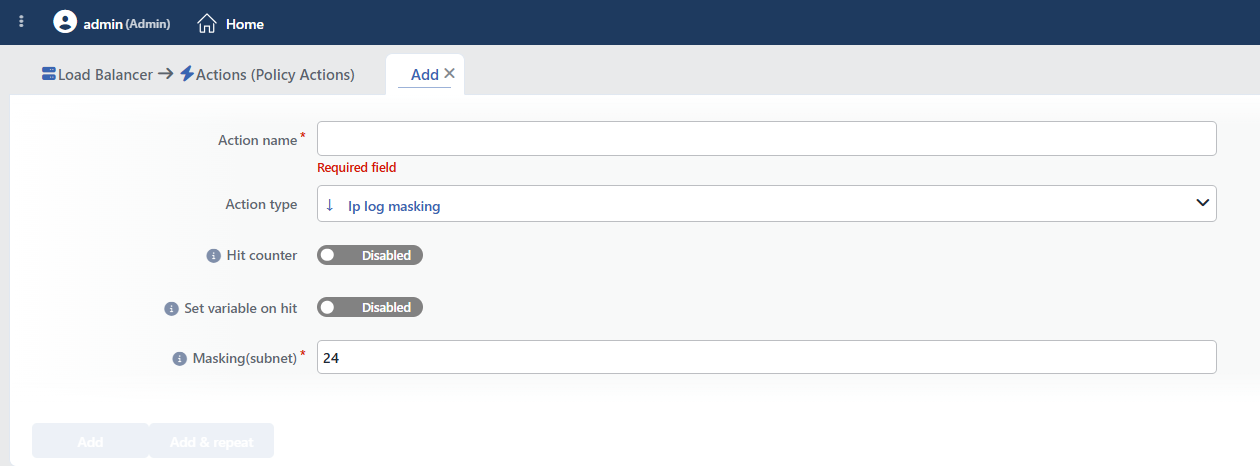 IP Log Masking Action Add Form
INFO
Hit Counter Default: Off
Hit Counter counts every run of the action (it is evaluated together with the action's own condition; the count is not lost even in terminating actions such as Deny). Action-based rates and totals are displayed in the Action Hits tab of the vService dashboard and on the live statistics screen; they do not appear as a separate column in the lists. The counter is cumulative; there is no interface for resetting it manually: it starts from zero when the set of counted actions changes or when the vService is reloaded, while the history is preserved on the dashboard as a rate (hit/s).
Since this action does not take a condition, the counter increases on every request coming to the vService.
INFO
Set Variable on Hit
A variable name whose value is assigned each time the action runs can be entered (optional; empty by default). The name can consist of letters, digits and underscores (at most 32 characters). When the action is triggered, the variable is set to 1, and chained behaviors can be built by reading it with the %TR7VAR(name) smart variable in other conditions and actions on the same vService.
INFO
Masking(subnet) Required Default: 24
The CIDR mask value to be applied to the IP address. This value determines how many bits of the IP address will be preserved.
The range that should be used: 0 - 32
The form accepts values up to 128; however, values greater than 32 do not produce a valid configuration.
Common values for IPv4:
| Value | Masking | Preserved Information |
|---|---|---|
24 | The last 8 bits | The network + subnet information |
16 | The last 16 bits | Only the network information |
8 | The last 24 bits | Only the class information |
INFO
Form Buttons
Add
The action adding process is completed by clicking the Add button.
Add & Repeat
With the Add & Repeat button, the action adding process is completed, and another new action can be added with different configurations without leaving the related window.
 Action Added
The Scope of the Masking
The action is not a filter specific to the log line: it replaces the source address of the request with the masked value. The change is applied at the position of the action in the vService action list. The WAF scan, the Bot/DDoS and IP reputation evaluation, the quarantine and traffic tracking, and the source address read by the conditions are determined before this point and use the real address; the components that read the source address after this point see the masked address.
The X-Forwarded-For header going to the Backend Service is masked as well
If the Add X-Forwarded-For Header option is on in the vService, the header is produced from the source address at the moment the request is forwarded, and this address is already masked at that point. That is, the Backend Service also sees the masked address.
If the application needs the real client address, the header that carries the address must be added with an Add HTTP Header action ordered before this action.
INFO
The Records That Are Masked and Not Masked
| Record or Component | Is it masked? |
|---|---|
| The log line sent to the Syslog/SIEM with the log profile¹ | ✅ Yes |
| The HTTP traffic logs and the Debug logs in the interface¹ | ✅ Yes |
| The vService Report records¹ | ✅ Yes |
The X-Forwarded-For header going to the Backend Service | ✅ Yes (usually not wanted) |
| %SRCIP in the actions ordered after this action | ✅ Yes |
| The Traffic Protection (Bot/DDoS) event records | ⚠️ Partly; the monitoring and signal records are masked, and the blocking, redirection, content showing and silent drop records keep the real address |
| The records sent with IPFIX Log Sending | ❌ No |
| The WAF event logs | ❌ No |
| The source IP tables on the live statistics screens | ❌ No |
| The quarantine records, the country, DDoS and traffic tracking counters | ❌ No |
| The Source IP criterion used in the conditions (including the country and the ASN) | ❌ No; the real address is evaluated |
¹ It is valid only for the requests that reach the masking step. The requests terminated by Traffic Protection or by the Deny, Show Content or Redirect actions ordered before the masking in the action list are recorded with the real address. The masked address appears in the log line of the requests blocked by the WAF; the WAF event log, however, keeps the real address.
While the data protection obligations are being evaluated, the records that are not masked must also be included in the scope; masking alone does not provide anonymization in all the records.
INFO
The Security Decisions Are Not Affected
The source IP condition, the country/ASN conditions, the WAF, Traffic Protection and the quarantine keys continue to use the real client address; masking does not blind these checks.
The only exception is the Blacklist IP Category condition: this condition reads the source address directly and, if it is used in a rule ordered after the masking action, it searches with the masked address; in this case, the list matching fails silently. The rules that use this condition must be ordered before the masking action.
The action order is decisive
The masking is applied at the point where it is located in the rule flow. The %SRCIP smart variable of the actions that run after this action gives the masked address, and that of the ones that run before it gives the real address.
If a masked address is needed only in a specific header or content, the IPMASK smart function (e.g. %SRCIP.IPMASK(24)), which does not change the source address at all, is a more accurate solution.
WARNING
The IP Log Masking action does not require a condition and is applied unconditionally (Always) on the vService on which it is defined.
Actions that run unconditionally directly affect all traffic or behavior on the related vService, without an evaluation based on traffic content.
In live environments, it is recommended that target service behaviors and possible effects be evaluated carefully before such actions are enabled. Otherwise, unexpected service behaviors or operational problems can occur.
Log Output Comparison
Before masking (the original IP):
 The original IP: 172.16.101.111
After masking (the /24 mask):
 The masked IP: 172.16.101.0
TIP
- Original:
172.16.101.111 - Masked:
172.16.101.0
The last octet (111) is zeroed and personal identification is prevented, but the network information is preserved.
Operational and Safe Usage Recommendations
- Use /24 for KVKK/GDPR. The
/24mask prevents individual user tracking while providing enough information for geographic analysis and network troubleshooting. This value is the widely accepted standard. - /16 is used for stronger anonymization. In situations that require higher privacy, the
/16mask is selected; however, this can make geographic analyses difficult. - Keep the Mask Value in the 0–32 Range. Larger values do not produce a valid configuration; the address of IPv6 clients, on the other hand, is not masked.
- Do Not Add More Than One Masking. There is no limit to the number per vService; a second masking action is applied to the already masked address and produces an unexpected result.
- X-Forwarded-For Is Masked as Well. The
X-Forwarded-Forheader transmitted to the Backend Service also carries the masked address. If the real address needs to be transmitted to the application, the Add HTTP Header action that does this must be ordered before the masking action in the action list. - It is used together with the log retention policy. IP masking alone may not be sufficient; the log storage periods and the log access policies are also arranged according to the KVKK/GDPR requirements.
Common Usage Scenarios in Live Environments
The examples below show how the related action is applied in the most frequently encountered use cases in real systems. These scenarios are based on practices that are widely preferred in live environments and rest on experience gained in the field.
Scenario 1: Standard IP Anonymization for KVKK/GDPR Compliance
Problem: An e-commerce site is audited within the scope of KVKK/GDPR. It is detected that full IP addresses (192.168.1.105) are kept in the log files, and this is evaluated as personal data storage. There is a risk of legal sanction.
Solution: With the /24 CIDR mask, the last octet of the IP addresses is masked; individual user tracking is prevented while the network information is preserved.
Configuration: Masking (Subnet) → 24
Result:
- ✅ KVKK/GDPR compliance → The IP addresses are anonymized, and the legal risk disappears.
- ✅ Geographic analysis → The network and subnet information is preserved (192.168.1.0), and general location analysis can be performed.
- ✅ Security monitoring → The network-based security analyses continue.
- ❌ Individual tracking → The last octet is zeroed, and user-based monitoring cannot be performed.
Scenario 2: High Privacy Requirements of a Health Application
Problem: A health application processes sensitive patient data and the IP addresses in the log files must be anonymized at a higher level. The /24 mask does not provide sufficient privacy, stronger protection is needed.
Solution: Provide stronger anonymization by masking the last two octets of the IP addresses with the /16 CIDR mask.
Configuration: Masking (Subnet) → 16
Result:
- ✅ High privacy → The last two octets are zeroed (192.168.0.0), and individual and subnet tracking is prevented.
- ✅ HIPAA/KVKK → Meets the health data privacy standards.
- ✅ The network class information → The ISP and general network information is preserved.
- ❌ Subnet analysis → The subnet details are lost, and detailed network analysis cannot be performed.
Scenario 3: Sending Anonymous Records to a Log Collector with Restricted Access
Problem: The log records are transferred to an analysis platform outside the organization. The platform contract does not allow the transfer of personal data, but the traffic volume and geographic distribution analysis must continue.
Solution: With masking, the client addresses in the records going out are reduced to the network level.
Configuration: Masking(subnet) → 24
Result:
- ✅ The records transferred out → The client addresses are anonymized at the network level.
- ✅ Analysis → The geographic distribution and volume analyses are not affected.
- ⚠️ Scope → The WAF logs, the IPFIX records and the quarantine records continue to keep the real address; the transfer of these records out must be restricted separately.
Scenario 4: Transmitting the Real Address to the Application together with Masking
Problem: Anonymization is wanted in the logs, but the application needs the real client address for session security. When the masking is turned on, since the X-Forwarded-For header also carries the masked address, the checks on the application side break.
Solution: The header that carries the real address is added with a separate action ordered before the masking action.
Configuration:
- Add HTTP Header → The
X-Client-IPheader, its value is bound to the client address smart variable through fx (before the masking in the action list) - IP Log Masking → Masking(subnet) →
24
Result:
- ✅ The application → Reads the real address from the
X-Client-IPheader. - ✅ The log records → Contain the masked address.
- ⚠️ Order → The order of the two actions in the list must be in this order; in the reverse order, the header also carries the masked address.
