
Smarter by Design.Simpler for Business
Bot Protection
What Is Bot Protection?
Bot Protection evaluates the request by looking neither at its volume nor at a list: it measures how much the client behaves like a bot. Every request is passed through dozens of separate signals (the network the address comes from, the TLS fingerprint, the header layout, the request rhythm, the browser's own declaration) and from these signals a single bot score between 0 and 100 is produced. What will be done is defined with the rules that look at the score: the client above a certain score is challenged, and at a higher one it is blocked.
The signals that produce the score are gathered in eight categories. The categories look at different layers: a part of them measures where the client comes from, a part of them how it introduces itself, and a part of them what it does.
| Category | What it looks at |
|---|---|
| Infrastructure & IP Reputation | The type of the network the address comes from and its reputation record: a data center, a Tor exit, an open proxy, and attack and fraud records. |
| Identity Spoofing Detection | Whether the identity claim of the client is true or not: bot User-Agents, headless browsers, and the imitation of a search engine bot. |
| Network Fingerprinting | The trace that the TLS handshake leaves: old protocol versions, weak cipher suites, and known automation and malware fingerprints. |
| Protocol Hygiene | The layout of the request at the HTTP level: missing headers, inconsistent header combinations, and signatures specific to tools. |
| Cross-Signal Consistency | Whether the claims that come from different layers hold together or not: the agreement of the TLS fingerprint with the User-Agent, and of the browser name with the client hints. |
| Behavioral Analysis | The behavior of the client over time: continuous requests to the same path, a pile of requests in a very short window, a high not-found rate, the methods that browsers do not use and the paths that look for a configuration file. |
| Client Evidence | The evidence that the browser check collects: an automation declaration, a form-filling time impossible for a human, the complete absence of pointer movement, and the filling of the hidden trap field. |
| Human Verification | The trust signals that lower the score: a verified session, a solved challenge and a real interaction. |
Most of these categories look at a single moment of the request. Behavioral Analysis, on the other hand, is separated from the others: it looks not at a single request of the client but at its pattern over time. Even a client whose every request looks flawless, whose headers are complete and whose fingerprint belongs to a real browser receives points from this category when it sends requests to the same path at a constant speed for minutes, when it tries addresses that cannot be found one after another or when it reaches out to the paths that look for a configuration file and a backup file. The other categories say what the client is, and this category what it does; for this reason the signals that catch well-hidden scrapers and scanners mostly come from here. The signals of the category also weigh heavily on the maliciousness axis: one of them alone can take a client to the top band.
The protection therefore consists of more parts than the other two. Which signals produce the score is on Factors, what will be done with the score on Action Rules, and the general settings of the protection on the Edit screen.
46
Detection Factors
They are gathered in eight groups; three of them are trust signals that lower the score. On L7 TCP vServices 17 of them work
0–100
Bot Score
A single number calculated for every request; this number gives the decision
4
Score Bands
Clean · Suspicious · Bot · Bad Bot
Two Axes
Scoring Model
"Is this a machine?" and "is this hostile?" are measured separately
Monitor
Default Mode
On HTTP vServices the protection scores and produces events at the first moment; on L7 TCP the default is Off
By Band
Rule Model
The rules are ordered according to their thresholds; only a single rule fits a score
7
Action Options
On L7 TCP vServices it is limited to Silent Drop and Quarantine
It Lowers the Score
Trust Signals
The score of a client that has logged in, that has solved the challenge and that shows a real interaction is pulled down
In Every Type
HTTP and L7 TCP
On L7 TCP only the address- and TLS-based factors work
Active
The rules are applied
The score is calculated and the request that exceeds the threshold undergoes the defined action. The challenge and the penalty box are filled only in this mode.
Monitor
It scores, it does not intervene
It is the default mode on HTTP vServices. The score, the factor telemetry and the event log work exactly; which action would be applied is written to the event, but no request is stopped.
Off
The protection does not work
The score is not calculated at all: the factor counters, the bot events and the score telemetry stop. The card fades and the pencil icon of the two boxes in the body disappears.
The mode is changed from this card
The status band at the very top of the strip gives the combined reading of the three protections; the own mode of Bot Protection is shown with the mode badge at the top right of this card and is changed from the Edit link below it. While the protection is Off, this link also stays in a working state: it is the way of turning a protection that is off on again.
The Bot Protection Card on Bot/DDoS Management
The card is the last of the protection cards on the Bot/DDoS Management screen. In its title the name and the definition of the protection, at its top right five information chips and the mode badge, and in its body two boxes are located. On L7 TCP vServices, since the Browser Check chip is not produced, the number of chips goes down to four.
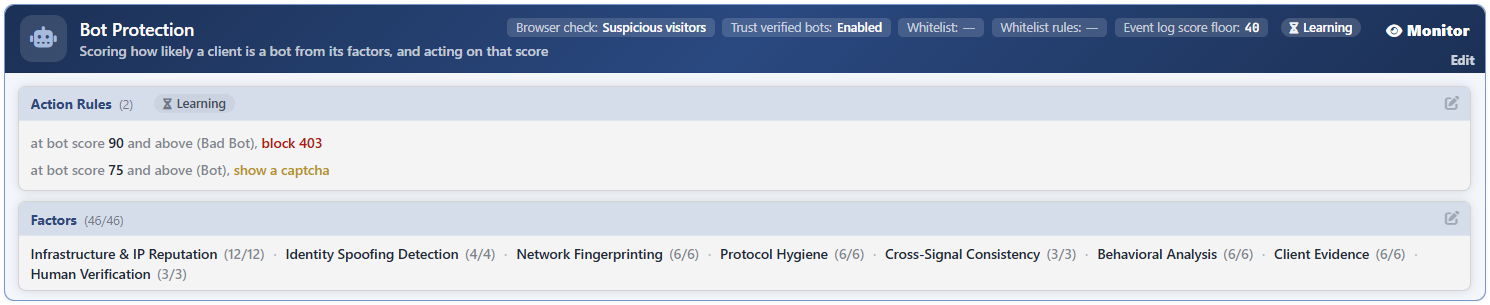 Bot/DDoS Management - The Bot Protection Card
The anatomy of the card:
| Section | What it shows |
|---|---|
| The title | The name of the protection and its one-line definition: Scoring how likely a client is a bot from its factors, and acting on that score |
| Browser Check | To which visitors the browser check is applied: Off, Suspicious Visitors or Every Visitor. |
| Trust Verified Bots | Whether the verified crawler bots are exempted from the rules or not. Enabled by default. |
| Whitelist | The condition that defines the traffic to be exempted from the protection. If it is not defined, — is written. |
| Whitelist Rules | The number of rows defined in the shortcut list next to the condition. If it is empty, — is written. |
| Event Log Score Floor | The lowest score to be written to the event log. 40 by default. |
| The Learning badge | A badge with the hourglass icon; it reports that the learning engine has not collected enough data for this protection yet. |
| The mode badge | The own mode of the protection: Active, Monitor or Off. The Edit link below it opens the general settings. |
| Action Rules | The action rules bound to the score thresholds. The number in parentheses is the number of rules. |
| Factors | The detection factors that produce the score. The number in parentheses is the number of the selected factors and the total number of factors. |
How Is the Bot Score Calculated?
The scoring works not over a single total but over two independent axes. Every factor has separate weights on these two axes:
| Axis | The question it answers | Its character |
|---|---|---|
| Automation | Is this client a machine? | It is flat and forgiving: a single signal is not enough, several signals that support each other are looked for. |
| Maliciousness | Is this client hostile? | It is early and sharp: a single signal can be decisive on its own. |
The raw totals of the two axes are calculated separately, are passed through separate curves and seated in the 0-100 range, and the larger one is output. The automation axis also has a ceiling: the score that comes from this axis cannot pass 84. The consequence of this is operationally important: an honest but automatic client (a command line tool, a monitoring system) cannot enter the top band just because it is a machine. 85 and above comes only from the maliciousness axis.
In order not to charge the same observation twice, the related signals are gathered in groups and saturate at the group's own ceiling. A client's User-Agent both being on the bot list and not being on the browser list are two faces of the same observation; the two together bring only a pinch more points than the strongest one alone brings.
Turning off a factor does not strengthen the remaining factors
The weights are not the share of a percentage but absolute evidence values. When a factor is turned off, the weight of the remaining ones does not increase: only the scope of the evidence collection narrows and the scores fall as a whole. For this reason narrowing the factor list is the way not of sharpening the protection but of loosening it.
How Do the Trust Signals Lower the Score?
The eighth group of the factors (Human Verification) does not increase the score, it lowers it. A user that has logged in, a visitor that has solved the challenge and a browser that shows a real mouse or keyboard interaction produce the signals of this group, and the score is pulled down.
The trust signals are calculated only in a configuration that applies enforcement: in the Monitor mode the score is read everywhere in its raw form.
This decrease is not made from the calculated score; it is made from the raw evidence total before entering the curve. The difference is important: since the curve is not linear, subtracting a fixed number from a finished score would erase a different amount of evidence at every point of the score. The trust signals work only on the automation axis; the maliciousness axis is not affected by them.
These three signals are also independent of the factor selection on the Factors screen: turning off the chips does not disable the signals.
The Score Bands
The score is divided into four bands. The bands appear with the same names on the cards, in the threshold fields and in the event log.
| Band | Range | Meaning |
|---|---|---|
| Clean | 0–39 | Ordinary visitor traffic. |
| Suspicious | 40–59 | There is suspicion, the evidence is insufficient. The default base of the browser check is here. |
| Bot | 60–84 | The automation evidence has settled. The tools that do not hide their identity and the legitimate clients that are not browsers can also reach this band. |
| Bad Bot | 85–100 | There is maliciousness evidence. It can be reached only from the maliciousness axis. |
Below every field in which a threshold is written, there is an explanation row that tells into which band the number entered falls and its position according to the base of that band.
The Boxes on the Card
Each of the two boxes in the body is edited with its own pencil icon and has its own detail page.
Action Rules
It carries the action rules bound to the score threshold. Every rule contains a threshold score, an action and the sub-fields bound to the action; the card turns these into the sentence at bot score <threshold> and above (<band>), <action>. The default configuration is two rules and their thresholds are 90 and 75. On HTTP vServices 90 and above is blocked and 75 and above is challenged; on L7 TCP vServices the same thresholds carry the quarantine and the silent dropping actions respectively.
A Learning badge can also appear in the title of the box; this badge reports that the learning engine has not reached a conclusion about the rules yet.
Details: Action Rules.
Factors
It lists the detection factors that produce the score in eight groups. The 46/46 counter in the title gives the number of the selected factors and the total number of factors suitable for the vService type; the counters next to the group names repeat the same information at the group level.
When a part of the factors of a group is turned off, the counter of that group is written in the warning color: a group with holes tells about itself.
Details: Factors.
Edit
The Edit link below the mode badge of the card opens the general settings of the protection. The score thresholds and the factor selection are edited not on this screen but on the screens opened with the pencil icon of their own boxes.
| Setting | What it does |
|---|---|
| Bot Protection | Determines the mode of the protection: Active, Monitor or Off. |
| Browser Check | Selects to which visitors the browser check will be applied. |
| Trust Verified Bots | Exempts the verified crawler bots from the action rules. It is on by default. |
| Bot Protection Whitelist Condition | Defines the traffic to be exempted from the protection with a condition. |
| Bot Protection Whitelist Entries | The shortcut list of the same exemption written row by row. |
| Event Log Score Floor | Determines the lowest score to be written to the event log. |
Details: Edit.
Learning Badge
The Learning badge with the hourglass in the title of the card reports that the learning engine has not collected enough data to decide for this protection yet. The badge is seen only while the protection is in the Monitor mode: the only structural recommendation of the engine about this protection is to raise the protection to the Active mode, and this recommendation is offered only when enough observation has accumulated.
The badge at the box level, on the other hand, is about the rules themselves and changes according to the situation:
| Badge | Meaning |
|---|---|
| Learning | Enough data has not been collected; the measurement is continuing. |
| Verified | The rules have been measured against the traffic and verified as they are. |
| Advice | There is an evaluation that will be read but not applied: either, because Allow Learning is off in at least one rule, the rule list is counted as the operator's, or the rows that the engine produces are only for information and cannot be applied with a single click. |
| Attention | There is a finding that is asked to be looked at. |
| Suggestion | There is a recommendation ready to be applied; the recommended rows are displayed as ghosts in the rule list. |
The learning engine never recommends the factor selection: it only takes the mode and the rule thresholds as its subject.
Scope and Limits
INFO
- It is present on both vService types. On L7 TCP vServices 17 of the 46 factors work (the ones based on the address, the reputation and TLS); the factors that look at the browser, the headers and the behavior have no counterpart.
- The default mode on HTTP vServices is Monitor. The protection scores, produces events and collects telemetry at the first moment; the enforcement is turned on by the decision of the operator. On L7 TCP vServices the protection comes Off by default and is expected to be turned on manually: since on a plain TCP flow the score largely comes down to the repetition of the reputation signals, the default observation does not produce value.
- In the Off mode the scoring stops completely. The factor counters, the score histogram and the bot events are not produced.
- The rules work by band. Only a single rule fits a score; the order of the rules in the list does not affect the enforcement.
- 85 and above is formed only with maliciousness evidence. The ceiling of the automation axis is 84.
- Turning off a factor lowers the scores. The weights are absolute evidence values; the remaining factors do not compensate.
- If no factor is selected, the protection silently goes quiet. Even if the mode is Active, the score is not calculated and no rule is applied.
- The trust in the verified bots does not stop the score. The score is still calculated and enters the telemetry; only the action is not applied.
- The exemption is calculated in the monitor mode as well. The whitelist is not an enforcement but a classification.
- The Edit link depends on the permission. The card is displayed with read-only permission; the Edit link and the pencil icons of the boxes are displayed only on the users that have edit permission.
