
Smarter by Design.Simpler for Business
ACME DNS Providers
What Is an ACME DNS Provider?
ACME DNS Provider is the profile that keeps the DNS provider credentials that will be used in the DNS-01 validation of the ACME.SH type certificates on the SSL/TLS Certificates screen. In the DNS-01 validation the certificate authority has the ownership of the domain name proved with a temporary validation record added to the DNS records of the domain name; TR7 adds and removes this record itself with the API of the selected provider. The DNS-01 validation is the only way of taking a certificate for wildcard (*.) domain names and for the services that are not open to the internet.
Four provider types are supported: for Cloudflare, Amazon Route 53 and Azure DNS the credentials are entered in named fields; all the other providers are defined with the Generic (acme.sh dnsapi) type, by being selected from the 171 plugin provider catalog on the device or by the plugin name being written manually. TR7 gives the credentials only to the running environment of the ACME client without writing them to the command line during the certificate obtaining and renewal; the ACME client writes these values to its own configuration files (to the account or domain name configuration according to the plugin); this directory is not taken into the diagnostic package.
4
Provider type
Cloudflare, Amazon Route 53, Azure DNS, Generic (acme.sh dnsapi)
171
Catalog plugin
In the Generic type the variables of the plugin selected from the catalog come to the form automatically
DNS-01
Validation
When Challenge Type: DNS-01 is selected in the certificate form, the profile is compulsory
*.domain
Wildcard certificate
The wildcard domain names are taken only with DNS-01
Environment
Credential transfer
The credentials are given only to the running environment of the ACME client
07:00 / 22:00
Renewal
In the daily renewal check the credentials in the same profile are used
How does it work?
- The profile is defined on this screen: the provider type is selected and the credentials of that type are entered; in the Generic type the plugin is selected from the catalog and the environment variables the plugin expects are filled in.
- In the certificate form Type: ACME.SH, Challenge Type: DNS-01 and this profile as the DNS Provider are selected; DNS-01 is not saved without a profile being selected.
- While the certificate is being obtained, TR7 gives the credentials in the profile to the running environment of the ACME client; the client adds the validation record over the API of the provider and removes it after the authority has validated it.
- In the daily renewal check the same profile is read again; when the credentials change, the new values are used in the next obtaining/renewal operation.
Provider Types
| Provider Type | Credential fields | The variables transferred to the ACME client |
|---|---|---|
| Cloudflare | API Token (compulsory), Account ID, Zone ID | CF_Token, CF_Account_ID, CF_Zone_ID (the dns_cf plugin) |
| Amazon Route 53 | Access Key ID, Secret Access Key (both compulsory) | AWS_ACCESS_KEY_ID, AWS_SECRET_ACCESS_KEY (the dns_aws plugin) |
| Azure DNS | Subscription ID, Tenant ID, Application (client) ID, Client Secret (all compulsory) | AZUREDNS_SUBSCRIPTIONID, AZUREDNS_TENANTID, AZUREDNS_APPID, AZUREDNS_CLIENTSECRET (the dns_azure plugin) |
| Generic (acme.sh dnsapi) | DNS Provider (Catalog) or acme.sh dnsapi name, the Environment Variables table | Every row in the table that complies with the name rule (the plugin: the selected dns_* name); see Operating Mechanism |
The Cloudflare type works only with an API token (token); for the accounts that use the general API key (CF_Key / CF_Email) the dns_cf plugin is selected in the Generic type and these variables are entered.
Operational Best Practices
- The least privileged credential. On the provider side a token or an account that can edit only the DNS records of the related zone must be created; a permission other than obtaining a certificate must not be given.
- The credentials are visible. The token and the secret keys that are entered are shown again in the editing form (the password fields masked, the environment variables open) and they reach every user who has the permission to view the page; the profile must be kept on the devices that only the necessary users can access.
- Validation with the first certificate. There is no test operation on this screen; the credentials are validated from the ACME.SH tab in the certificate preview when the first certificate that uses the profile is obtained.
- The certificates before deleting. The deletion confirmation does not show the usage locations; the ACME.SH certificates that select the profile must be moved to another profile from the certificate forms before deleting, otherwise the renewal fails.
- The wildcard domain name. For the domain names in the
*.domainform DNS-01 must be selected in the certificate form and a profile must be assigned from this screen.
How to Add?
A new ACME DNS Providers profile is added over the TR7 web management interface with the following steps:
- The Configuration Menu is opened by clicking the TR7 logo at the bottom left.
- The Certificates & PKI → ACME DNS Providers → Add steps are followed.
- A unique and descriptive name is entered for the profile.
- Provider Type is selected and the credential fields that are seen according to the type are filled in.
- The profile is added by clicking the
Addbutton.
TIP
Reaching the page via quick search
Instead of navigating the menu step by step, the related page is reached directly by using the search bar in the bottom left corner of the screen. The search bar opens with the Alt + T shortcut on Windows and Opt + T on macOS; typing the name of the feature being searched for is then sufficient.
The created profile can be used in one or more ACME.SH certificates.
The profile can also be defined without leaving the page, in the Add - ACME DNS Provider window with the adding icon next to the DNS Provider field in the certificate form; the created profile comes selected in the field.
The ACME DNS Providers Listing Screen
The list of all the ACME DNS Providers profiles that are added on the TR7 device is reached by following the Certificates & PKI → ACME DNS Providers path. The profile adding, editing and deleting operations are done through this screen.
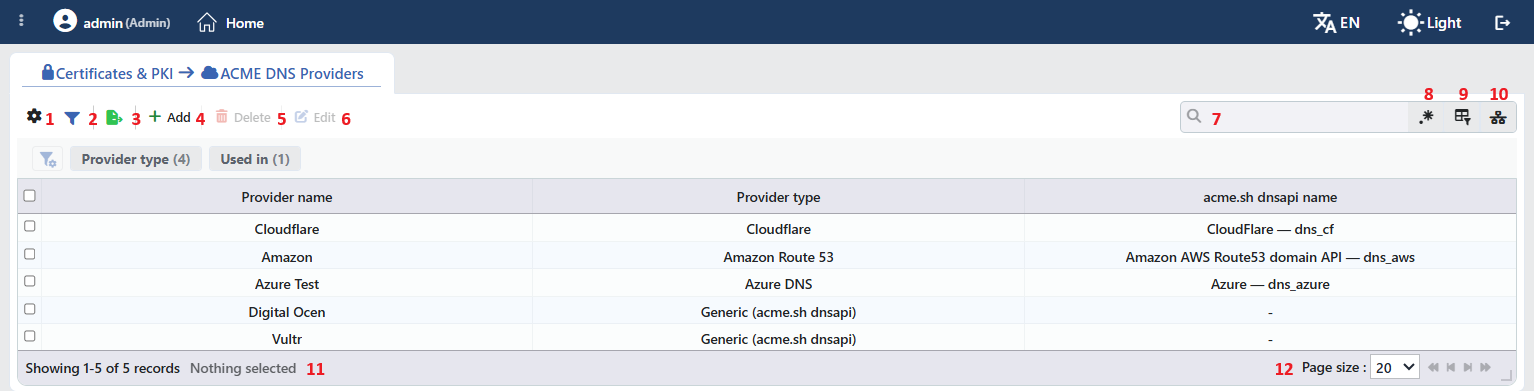 The ACME DNS Providers Profiles Listing Form
The table opens with the following columns by default:
| Column | Description |
|---|---|
| Provider Name | The name of the profile. |
| Provider Type | The provider type that determines the credential fields: Cloudflare, Amazon Route 53, Azure DNS or Generic (acme.sh dnsapi). |
| acme.sh dnsapi name | The acme.sh plugin to which the credentials are transferred. The plugins defined in the catalog are written in the <the provider name in the catalog> — dns_x form (e.g. CloudFlare — dns_cf), and the ones that are not in the catalog with the raw plugin name. In the named types the plugin is fixed according to the type and it is written in the same form: CloudFlare — dns_cf, Amazon AWS Route53 domain API — dns_aws, Azure — dns_azure. If the plugin name is not stored in the profile, the cell stays -. |
There is no column hidden by default; these three columns take place in the column selector. The credentials are not shown in the table.
The items in the toolbar are arranged from left to right in the following order; the last two items (Page Information and Page Size) are located in the information strip below the table.
Columns
Which columns will be shown in the table is selected; all three columns are on by default. In the same panel the columns are reordered by dragging, the alignment is selected per column, a manually set column width is returned to automatic sizing by clicking, and with the Reset button the column layout is returned to the default. The layout is stored per user.
Filter
The Filter button is used in order to filter the profiles shown in the list according to certain criteria. In the strip there are two cards: Provider Type and Used in.
The Used in card does not offer usage information for the profiles; because the profiles are not bound to the vServices directly, all of them are listed under Unused Entries. Which definitions use a profile is seen from the Used in tab in the profile's own preview panel and from the DNS Provider field in the certificate editing form; the certificate list and the certificate preview do not show the profile that is used.
Export
The table is exported as Excel, CSV or PDF by clicking the Export button. In the window that opens, the Filename, Format and Data Source, together with the Columns to be exported, are determined; the remaining fields are displayed according to the format: CSV Separator for CSV, Excel Sheet Name for Excel, and Page Orientation and Page Size for PDF.
There is no credential in the exported table.
Add
By clicking the Add button, the form for creating a new profile opens in the Add tab.
Delete
When one or more profiles are selected and the Delete button is clicked, the related profiles are deleted. Before the deletion the "Are you sure that you want to delete acme dns provider object?" (in a multiple selection "Are you sure you want to delete N acme dns provider objects?") confirmation is asked.
WARNING
A profile that is in use can also be deleted and the confirmation window does not show the usage locations; before the deletion the Used in tab in the preview panel must be checked.
The ACME.SH certificates that select the profile are not deleted; however the next obtaining or renewal operation fails because the profile cannot be found and a failed obtaining/renewal record falls to the User Logs screen. These certificates must be edited and another profile must be selected. The deletion operation itself is written to the user operation record as well.
Edit
By clicking the Edit button, the edit form of the selected profile opens in the Edit tab. The button becomes enabled only when a single profile is selected.
Search
Used to search all information in the table.
RegExp Search
Used to search all information in the table with a regular expression (RegExp).
Column Based Search
Used to perform a column-based search on the information in the table.
Usage Filter
It is used in order to filter which vServices the profiles are bound to. Because the profiles in this collection are not bound to the vServices directly, in the selector there is only the Unused Entries option and it is selected by itself; the list is limited to the records that are not used in any definition. While the filter is active, the selector takes the place of the search box and the RegExp Search button is hidden; when the icon is clicked again, the search box returns.
Page Information
Contains information about the total number of defined profiles and the number of profiles displayed in the list: Showing N-M of T records and the number of selected profiles (N selected, or Nothing selected when there is no selection). If a selection has been made in the filter strip, the N filters · shown/total rows information is added to the same line.
Page Size
The maximum number of profiles to be displayed on the page is selected. The default is 20; the options are 5, 10, 20, 50, 100, 200, 500 and All.
Right-Click Menu
When a row is right-clicked, a menu with the profile's name in its title opens. Both operations in the menu apply only to the right-clicked profile; a selection made in the list does not affect the menu.
| Operation | What it does |
|---|---|
| Edit | Opens the editing form of the profile in the Edit tab; it is the same as the form opened by the Edit button in the toolbar. |
| Delete | Deletes the right-clicked profile; the same confirmation question as the deletion in the toolbar is displayed. |
Preview of the Selected Profile
When a row in the list is clicked, the preview of the profile opens on the right of the screen; when the selected row is clicked again, the panel closes. In the header there are the cloud icon, the name of the profile and the ACME DNS Provider subheading, and at the top right there is a single operation.
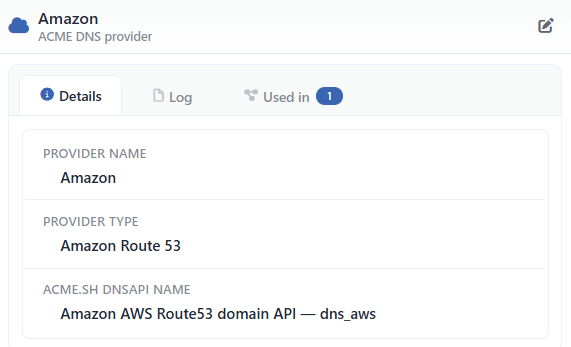 Preview of the Selected Profile
| Operation | What it does |
|---|---|
| Edit | Opens the editing form of the profile in the Edit tab. The same form is also opened with the Edit button in the toolbar and with Edit in the right-click menu of the row. |
The panel has three tabs; the last one is displayed only if there is a definition that uses the profile:
Details
Lists the definition of the profile apart from the credentials (the table below).
Log
Lists the user actions on the profile (adding, editing, deleting) as a timeline.
Used in
Lists the definitions that use the profile. The badge next to the tab name shows the number of usages; if there is no definition that uses the profile, the tab is not displayed at all.
The rows in the Details tab are as follows, in order:
| Row | Description | Visibility condition |
|---|---|---|
| Provider Name | The name of the profile. | Always |
| Provider Type | Cloudflare, Amazon Route 53, Azure DNS or Generic (acme.sh dnsapi). | Always |
| acme.sh dnsapi name | The acme.sh plugin to which the credentials are transferred, together with its name in the catalog; if the plugin name is not stored in the profile, -. | Always |
The credentials are not shown in the preview.
Profile Add Form
A new ACME DNS Providers profile is added onto the TR7 device by following the Certificates & PKI → ACME DNS Providers → Add steps.
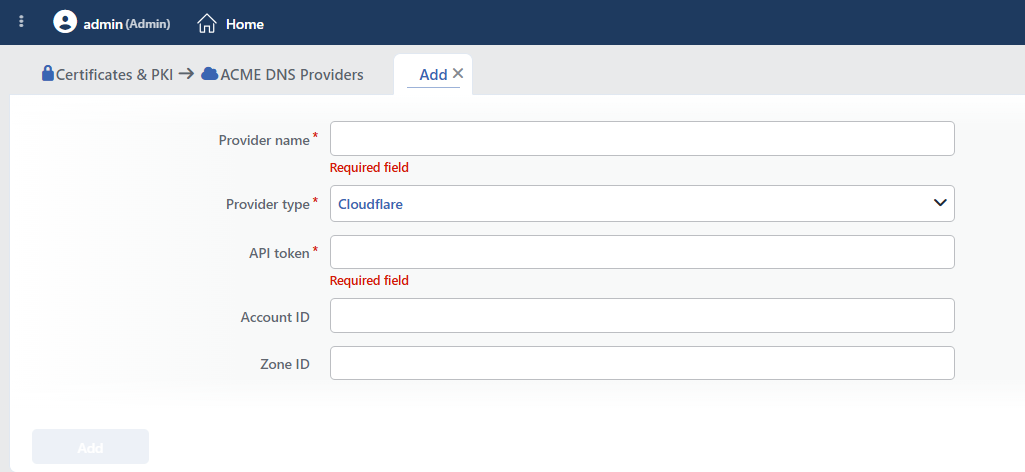 The ACME DNS Providers Profile Add Form
INFO
Provider Name Required
The name of the profile is entered. The name identifies the profile in the list, in the DNS Provider selection in the certificate form and in the logs, and it must be unique on the device; when the same name is entered, the form gives the Name is used warning.
INFO
Provider Type Default: Cloudflare
The provider type: Cloudflare, Amazon Route 53, Azure DNS or Generic (acme.sh dnsapi). When the type is changed, only the fields of the selected type are seen and saved.
Cloudflare
INFO
API Token Required
The Cloudflare API token; it is entered in a masked field. The token must have the permission to edit the DNS records in the zone of the domain name for which the certificate will be obtained. It is transferred to the plugin as CF_Token.
INFO
Account ID
The identity of the Cloudflare account; it is optional. It is transferred to the plugin as CF_Account_ID.
INFO
Zone ID
The zone identity of the domain name on Cloudflare; it is optional. It is transferred to the plugin as CF_Zone_ID.
Amazon Route 53
INFO
Access Key ID Required
The identity of the IAM access key that has the permission to edit records in the related hosted zone on Route 53. It is transferred to the plugin as AWS_ACCESS_KEY_ID.
INFO
Secret Access Key Required
The secret pair of the access key; it is entered in a masked field. It is transferred to the plugin as AWS_SECRET_ACCESS_KEY.
Azure DNS
INFO
Subscription ID Required
The identity of the Azure subscription in which the DNS zone is located. It is transferred to the plugin as AZUREDNS_SUBSCRIPTIONID.
INFO
Tenant ID Required
The identity of the tenant to which the application registration is bound. It is transferred to the plugin as AZUREDNS_TENANTID.
INFO
Application (client) ID Required
The identity of the application registration that has been given the permission to edit records in the DNS zone. It is transferred to the plugin as AZUREDNS_APPID.
INFO
Client Secret Required
The client secret of the application registration; it is entered in a masked field. It is transferred to the plugin as AZUREDNS_CLIENTSECRET.
Generic (acme.sh dnsapi)
INFO
DNS Provider (Catalog) Required
The plugin is selected from the provider catalog on the device; the list is in the <the provider name in the catalog> — dns_x form (for example GoDaddy.com — dns_gd) in alphabetical order and at the end there is the Not in the list / custom plugin option. The catalog does not cover all the plugins on the device; a plugin that is not in the list is defined with this option, by its name being written manually. When the catalog cannot be read, the field is not displayed at all and the plugin name is entered directly into the acme.sh dnsapi name field. When a plugin is selected, acme.sh dnsapi name fills by itself and the variables the plugin expects are added to the Environment Variables table as one row each; of the rows remaining from the previous selection, the ones whose value has been filled in are preserved and the empty ones are removed. If the plugin has an alternative credential set, the Alternative credential set — the plugin also accepts: … information is seen below the field.
INFO
acme.sh dnsapi name Required
It is seen only when Not in the list / custom plugin is selected in the catalog (or when the catalog cannot be loaded); the plugin name must start with dns_ and must contain only letters, digits and an underscore (like dns_gd), otherwise the form gives the Must be an acme.sh dnsapi plugin name like dns_gd warning. The plugin script must be present in the ACME client on the device.
INFO
Environment Variables
The credential variables the plugin documents are entered in the table with the Variable / Value columns (like GD_Key / GD_Secret). In every row both fields are compulsory; the variable name must start with a letter, must contain only letters, digits and an underscore and must not be used twice in the same profile. The rows are added with the plus icon next to the Environment Variables label, deleted with the cross icon at the end of the row and reordered by being dragged from the handle at the beginning; when a single row is left in the table, the cross icon is not displayed. The table must contain at least one row, and when it is left empty the form gives the At least 1 must be selected warning. In the rows that come from the catalog the placeholder of the Value field shows the description of the variable; the optional variables are marked with the (optional) suffix, and if it is unnecessary the row is deleted. The values are not masked.
INFO
Add
The profile adding operation is completed by clicking the Add button. As long as there is a field that has not been validated in the form, the button stays passive.
Operating Mechanism
INFO
- The credential transfer. During the certificate obtaining and renewal the credentials in the profile are given to the running environment of the ACME client as an environment variable, they are not written to the command line; in the named types the fields are mapped to fixed variable names (see Provider Types), and in the Generic type the rows in the table are transferred as they are. The variable name must start with a letter and must contain only letters, digits and an underscore; the rows that do not comply with the rule are not transferred. While the ACME client is adding the validation record it writes these values to its own configuration; according to the plugin the account configuration or the domain name configuration is used. This directory is not taken into the diagnostic package; the credentials are masked in the diagnostic outputs as well.
- The validation flow. In a certificate in which DNS-01 is selected the client writes the validation value the certificate authority gives to the DNS records of the domain name with the provider plugin and removes it after the authority has validated it. The waiting period is the default of the ACME client; there is no propagation period setting on this screen.
- The renewal. In the daily renewal check (07:00 and 22:00) the validation method comes from the registered domain configuration of the ACME client; the credentials in the profile are transferred again at every run. When the validation method of the certificate is changed between DNS-01 and HTTP-01 (in both directions), the certificate is obtained again; neither a change made in the profile nor the certificate being moved to another profile makes the certificate be obtained again. For this reason a credential that is entered incorrectly does not become apparent the moment it is saved, it emerges as a failure in the first obtaining or renewal attempt.
- The wildcard domain name. The domain names that start with
*.are obtained only with DNS-01; the certificate form rejects a wildcard domain name with HTTP-01 with the Wildcard domains require the DNS-01 challenge warning, and when DNS-01 is selected the profile selection is compulsory. - The cluster. The profiles are synchronized between the devices with the LB configuration; the validation runs on the device selected in the Device field of the certificate.
- The storage. The credentials are kept on the device inside the profile record as plain text. While it is being written to the backup file only the secret fields (API Token, Secret Access Key, Client Secret) and the Environment Variables values are encrypted; the fields that are of the nature of an identity or an account number are written plainly. In the diagnostic package these values are masked.
- The logs. Profile adding, editing and deleting are tracked as the ACME DNS Provider object on the User Logs screen; the certificate obtaining and renewal results as the ACME records of the certificate.
Scope and Limits
INFO
- The permission. The screen is bound to the certificate permission area; in a user who does not have the permission the You don't have access to this page card is displayed instead of the page.
- The name is unique. A second profile that carries the same name is not saved.
- There is no test operation. The credentials are validated only with a real certificate obtaining operation.
- There is no propagation period setting. The propagation waiting of the DNS record is the default of the ACME client.
- The credentials are shown in the editing. The users who can view the page can access the stored credentials from the editing form.
- There is no usage count. The Used in card and the preview do not show usage in this collection; the confirmation window does not list the usage locations before the deletion.
- It is used only in the ACME.SH certificates. The profile is listed in the DNS Provider field when Challenge Type: DNS-01 is selected in the certificate form; it is not selected on any other screen.
Usage Location
In the form of a certificate for which Type: ACME.SH is selected on the SSL/TLS Certificates screen, when the Challenge Type field is made DNS-01, the DNS Provider field is seen and becomes compulsory; the profiles defined on this screen are listed, and with the adding icon next to the field a new profile is defined in the Add - ACME DNS Provider window and selected. The obtaining and renewal results of the certificate are tracked in the ACME.SH tab in the certificate preview.
