
Smarter by Design.Simpler for Business
Source IP
What Is the Source IP Condition?
Source IP is a condition type that enables the requests coming to a vService running on TR7 to be evaluated according to the source IP address of the client.
This condition is based on the real IP address of the client sending the request and provides traffic control according to the geographic location, the network segment or specific IP addresses.
The Source IP condition does not perform an operation by itself; only when the defined IP match is achieved is the condition considered met, and it enables the actions bound to this condition to take effect.
The Importance of the Source IP Condition
In modern security architectures, access control according to the client IP address is a basic requirement. The Source IP condition of TR7 offers a flexible and powerful control mechanism with four different matching methods.
With the Source IP condition:
- Traffic management on a country or city basis can be performed with geography-based access control,
- Security policies can be created with IP whitelist/blacklist applications,
- Specific internet service providers or cloud providers can be targeted with ASN-based filtering,
- Internal/external traffic separation can be made with network segmentation,
- Traffic coming from suspicious geographies can be limited for DDoS protection.
With this aspect, the Source IP condition is one of the basic building blocks of geographic and network-based traffic control on TR7.
Source IP Type Options
TR7 can evaluate the source IP address with four different methods:
Country
Country-based GeoIP matching
City
Province-based matching for Turkey
Manual
Manual IP/CIDR definitions
ASN
Autonomous System Number
| Type | Description | Use Case |
|---|---|---|
| Country | Country-based GeoIP matching | International access control |
| City | Province-based matching for Turkey | Local access policies |
| Manual | Manual IP/CIDR definitions | Whitelist/Blacklist |
| ASN | Autonomous System Number | ISP/Cloud provider filtering |
Each type evaluates the client IP address using different GeoIP databases and considers the condition met in case of a match.
Supported vService Types
HTTP
L7 TCP
Network
The condition can be used at both the request (At Request) and response (At Response) stages. The address evaluated is the effective source IP of the client: if the Trusted Proxy configuration is used on the vService, all four methods work over the real client IP behind the proxy.
How to Add?
A new Source IP Condition can be added through the TR7 web management interface by following the steps below:
- The Configuration Menu is opened by clicking the TR7 logo at the bottom left.
- The Load Balancer → Conditions → Add steps are followed.
- Source IP is selected as Criteria.
- The related configurations of the condition are made.
- The condition is added by clicking the
Addbutton.
Source IP Condition Add Form
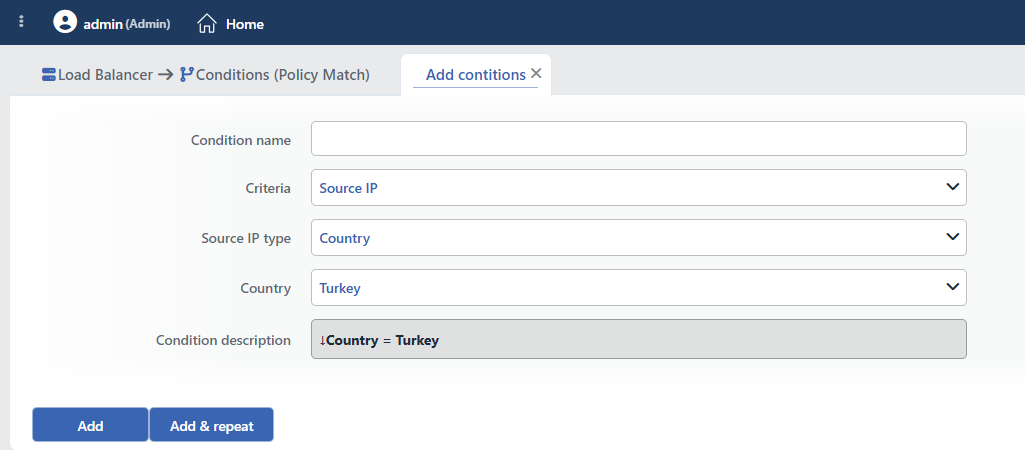 Source IP Condition Add Form
INFO
Condition Name
An optional name can be entered for the condition to be created.
This field is especially important in the following scenarios:
- When many conditions are defined under the same vService,
- When conditions with similar criteria need to be distinguished,
- When it is necessary to quickly understand which business rule the condition represents.
When this field is left empty, TR7 analyzes the content of the related condition and creates an automatic, descriptive name in the Condition Description field. This generated description is used as the name in condition lists.
INFO
Criteria Required
The field that determines the type of the condition; Source IP is selected from the searchable dropdown list. This selection determines the fields displayed in the form. The criterion cannot be changed after the condition is saved: if a different criterion is needed, a new condition is defined. For all criteria in the list and their scopes, the criteria catalog on the Conditions page can be referred to.
INFO
Source IP Type Required
Determines how the source IP address will be evaluated.
Country
When Country is selected, the IP address of the client is evaluated on a country basis using the GeoIP database.
Features:
- The MaxMind GeoLite2 country database is used
- 250 countries/regions (ISO 3166-1) + the Local networks option
- IPv4 and IPv6 addresses are supported
- The database is updated with the IP DB update package applied from the TR7 interface; after the update, the related vServices automatically work with the new data
TIP
The Local networks option catches addresses that do not belong to the public internet, such as private (RFC1918), loopback and CGNAT addresses: it is used to separate internal network traffic from country-based rules.
Use Cases:
- Allowing access only from Turkey
- Blocking traffic coming from specific countries
- Geography-based content routing
City
When City is selected, the IP address of the client is evaluated on the basis of the 81 provinces of Turkey.
Features:
- The 81 provinces of Turkey are supported; the province is selected from the list (default: Ankara)
- Matching is done with the license plate codes (01-81)
- The matching is done over the local province map and covers IPv4 addresses only
Use Cases:
- Regional promotion campaigns
- Local customer segmentation
- City-based access restrictions
WARNING
The City option works only for Turkish IP addresses. The Country option should be used for IP addresses abroad.
Manual
When Manual is selected, the IP addresses are entered directly as text.
Supported Formats:
| Format | Example | Description |
|---|---|---|
| Single IPv4 | 192.168.1.100 | A single IP address |
| Single IPv6 | 2001:db8::1 | A single IPv6 address |
| CIDR IPv4 | 10.20.0.0/24 | 256 IP addresses (10.20.0.0 - 10.20.0.255) |
| CIDR IPv6 | 2001:db8::/32 | IPv6 subnet |
| Multiple entry | One IP per line | More than one IP/CIDR |
| Comment line | #10.10.10.100 | Lines starting with # are ignored |
Entry Rules:
- One IP address or CIDR block is written per line
- IP addresses separated by a space or a tab are also accepted
- Lines starting with
#are evaluated as comments; inline comments are not supported (10.0.0.1 # notis not written) - IPv4 and IPv6 addresses can be used mixed
- No IP format validation is performed on the field: since a faulty line may lead to configuration problems, the entries must be written carefully
- If all the lines in the list are comments/empty, the condition never matches
# Office IP addresses
203.0.113.10
203.0.113.11

# VPN exit points
198.51.100.0/24

# Temporarily disabled
#192.0.2.50
ASN
When ASN (Autonomous System Number) is selected, the IP address of the client is evaluated according to the autonomous system number it belongs to.
What Is ASN?
ASN is a unique number that is assigned by IANA and that identifies an autonomous system (an internet service provider, a large organization or a cloud provider). It is used in BGP routing.
Use Cases:
- Cloud provider traffic: Detecting AWS, Azure and GCP IPs
- VPN/Proxy detection: Filtering known VPN providers
- ISP-based policies: Managing traffic coming from specific ISPs
- Bot protection: Distinguishing data center IPs
The ASN is selected from the searchable list as a number (without the AS prefix; e.g. 16509 for Amazon AWS); the evaluation is performed for IPv4 + IPv6 over the MaxMind GeoLite2 ASN database.
Common ASN Examples:
| ASN | Organization |
|---|---|
| 16276 | OVH SAS |
| 13335 | Cloudflare |
| 15169 | |
| 16509 | Amazon AWS |
| 8075 | Microsoft Azure |
| 9121 | Türk Telekom |
Geographic Location Accuracy
The Country, City and ASN options are based on geographic databases:
- The data is updated with the IP DB update package applied from the TR7 interface; keeping it up to date is the responsibility of the operator.
- Location accuracy can decrease for mobile and VPN users.
- If the geographic database cannot be loaded or read, the condition does not match (the traffic is not blocked).
In critical security decisions, GeoIP should not be used on its own; it should be supported with additional verification mechanisms and, where possible, manual IP lists should be preferred.
INFO
Condition Description
It is created automatically by TR7 in line with the entered criteria and values.
This description:
- which value the condition applies to,
- which criterion it works on,
- the quick understanding of the condition on listing screens
is produced dynamically by the system so as to provide these.
INFO
Form Buttons
Add
The condition adding process is completed by clicking the Add button.
Add & Repeat
With the Add & Repeat button, the condition adding process is completed, and another new condition can be added with different configurations without leaving the related window.
 Condition Added
Operational Usage Recommendations
- The Whitelist Approach Should Be Preferred. Where possible, the "block everything, open only to those allowed" approach should be used. This protects against unknown threats.
- CIDR Notation Should Be Used. For more than one IP in the same network, CIDR notation should be used instead of entering them one by one (such as
192.168.1.0/24). - Comment Lines Should Be Added. In manual IP lists, comments explaining the purpose of each block should be added. This makes maintenance easier.
- Regular Updating Should Be Done. IP lists change over time. Whitelists/Blacklists should be reviewed regularly.
- It Should Be Verified in a Test Environment. In order to test geographic conditions, tests should be performed from different locations using a VPN or a proxy.
Common Usage Scenarios in Live Environments
The examples below show how the related condition is applied in the most frequently encountered use cases in real systems. These scenarios are based on practices that are widely preferred in live environments and rest on experience gained in the field.
Scenario 1: Geo-Blocking: Access Only from Turkey
Purpose: It is used in cases where access to the application must be provided only from Turkey because of licensing or legal restrictions.
Configuration: Source IP Type → Country · Country → Turkey
Action Recommendations:
- ✅ Block → Requests coming from outside Turkey are blocked and a 451 Unavailable For Legal Reasons response is returned.
- ✅ Show Content → A geo-blocking warning page is shown ("This service is available only in Turkey").
- ✅ Advanced Traffic Inspection → Access attempts from abroad are monitored and a geo distribution analysis is reported.
Scenario 2: Admin Panel IP Whitelist Protection
Purpose: Security is increased and brute force attacks are prevented by allowing access to the management panel only from office IP addresses.
Configuration: Source IP Type → Manual · Manual IP List:
# Head office
203.0.113.0/28
# Branch offices
198.51.100.10
198.51.100.11
Action Recommendations:
- ✅ Block → Access to the admin path from IPs outside the whitelist is blocked and a 403 Forbidden response is returned.
- ✅ Show Content → An unauthorized access warning page is shown ("Unauthorized access - contact the IT department").
- ✅ Advanced Traffic Inspection → Admin access attempts from outside the whitelist are logged for security review.
Scenario 3: Rate Limiting for High-Traffic IP Blocks
Purpose: To detect the heavy traffic coming from specific IP blocks and to control resource consumption by applying bandwidth and connection limits.
Configuration: Source IP Type → Manual · Manual IP List:
# High traffic block
192.168.100.0/24
10.20.30.0/24
Action Recommendations:
- ✅ Bandwidth Limitation → High-traffic IP blocks are limited with a 5 Mbps throughput limit.
- ✅ Quarantine → IPs whose traffic within 10 minutes exceeds 1GB are quarantined for 30 minutes.
- ✅ Advanced Traffic Inspection → Traffic pattern analysis is performed and bandwidth consumption metrics are reported.
Scenario 4: Cloud Provider Bot Detection (ASN-Based)
Purpose: To prevent automated abuse by detecting the bot traffic coming from cloud providers such as AWS, Azure and GCP and applying a CAPTCHA challenge.
Configuration: Source IP Type → ASN · ASN → 16509 (Amazon AWS)
Action Recommendations:
- ✅ Advanced Captcha → A CAPTCHA challenge is shown for requests coming from AWS IPs (automated tool check).
- ✅ Bandwidth Limitation → Data center traffic is limited to 10 Mbps.
- ✅ Advanced Traffic Inspection → Cloud-based bot activity and scraping patterns are analyzed.
Scenario 5: Regional Campaign and Content Delivery
Purpose: City-based routing is applied in order to offer regional campaigns and special content to users coming from specific cities such as Istanbul and Ankara.
Configuration: Source IP Type → City · City → İstanbul (34)
Action Recommendations:
- ✅ Add HTTP Header → The
X-Region: Istanbulheader is added, and the Backend Service renders regional content. - ✅ Set Path → The home page is redirected to the
/istanbul-kampanyapath, and a regional landing page is shown. - ✅ Advanced Traffic Inspection → City-based traffic distribution and regional engagement metrics are reported.
