
Smarter by Design.Simpler for Business
Portal Application
What Is Portal Application?
In the Portal Application mode the vService does not serve its own login pages; it takes over the session of the user from the vServices in the Portal mode selected in the Trusted Portals list. The visitor who has no session is redirected to the trusted portal, and after logging in at the portal returns to the application with their session and uses the application without logging in again.
This mode is selected in the vService of the application published in the Portal Applications list of a portal. In the cases in which the portal session cookie does not reach the application address (the application address staying outside the Cookie Domain value of the portal), the session is carried to this vService over the handoff address of the portal.
For the applications that work with their own login flow, the Standalone Application mode is used. In the Portal Application mode there is no Start box on the Flowchart tab of the vService.
4 Fields
Gateway Mode Section
Gateway Mode · Cookie Domain · Cookie Name Prefix · Trusted Portals
No Start
Login Flow
The session comes from the portal; there is no Start box
302
Request Without a Session
It is redirected to the handoff address of the first trusted portal for which the Portal URL value is defined
401
Handoff Token
If the token is absent, if its signature is invalid or if it has expired, the handoff is refused
From the Portal
Cookie Prefix
In the Automatic position the prefix of the first trusted portal for which a prefix is defined is used
Backend Service
Default Target
The requests with a session that do not match an action go to the default Backend Service
How Does Portal Application Work?
The request that comes to the vService is evaluated in the traffic engine:
- A request without a session: A visitor who comes without a session to an address outside the AGS Root Path is redirected with HTTP 302 to the handoff address of the first portal for which the Portal URL value is defined in the Trusted Portals list (e.g.
https://portal.company.com/ags-portal/handoff). The identity of this vService and the address the visitor requested first are added to the redirection. The order of the list is taken as the basis; which portal the visitor has come from is not looked at. - The acceptance of the handoff: After the session is verified at the portal, the visitor is sent with a signed and timed token to the
/handoff-accepthandoff acceptance address of this vService under the AGS Root Path. The token is first checked in the traffic engine; if the token is absent, if its signature is invalid or if it has expired, the request is refused with HTTP 401. - A request with a session: The requests that come with a valid session issued by this vService or by a portal in the Trusted Portals list are forwarded to the Backend Service with the actions of the vService; if no action matches, they go to the default Backend Service of the vService.
- The AGS Root Path: The requests under this path are not redirected, they are forwarded directly to the AGS engine.
To the requests that come with a valid session cookie of the same name issued by a vService that is not on the list, HTTP 403 is returned with the text Session cookie issuer not trusted by this gateway. The redirection of the requests without a session to the portal does not depend on the AGS Activation Condition condition; the requests without a session that do not match the condition are redirected to the trusted portal as well. If there is no portal for which the Portal URL value is defined on the list, no redirection rule is created.
The AGS cookies of the vService together with the AGS cookies of the portals in the Trusted Portals list are stripped from the request that goes to the Backend Service.
The Session and the Policies
In a request that comes with a portal session cookie, the session information is read from its record in the session store of the portal. The user attributes and the form inputs (%AGS_USER_ATTR(<name>), %AGS_USER_INPUT(<field>) etc.) come from the session record of the portal. The fields in the login forms of the trusted portals are recognized in this vService as well; the fields of the Password type are resolved only in the places where a secret value is allowed, and in the other places they are written as [secret].
| Setting | The value applied |
|---|---|
| Session Protection Policy | The policy of this vService. In the requests that come directly to the application, the idle time of the session is renewed according to the duration of this policy, at most once a minute; if no policy has been selected or if the idle time is not defined in the policy, the duration is 1 hour. In the requests tunneled over the portal, since the duration is renewed at the portal first, the duration of the portal becomes valid. |
| Session Binding Type | The value calculated according to the binding type in the policy of this vService is compared with the binding value in the record of the portal session; the binding type and its components are selected the same as those of the portal. In the IP Address and IP + User Agent types, when the value does not match, the portal session is counted as invalid in this vService and the visitor is redirected to the handoff address of the trusted portal again. The requests that match Whitelist Conditions do not enter the comparison. |
| Bot Protection Policies | The policies of this vService; they are evaluated only in the requests directed to the AGS engine (e.g. the requests under the AGS Root Path). |
| Default Lockout Policies | The login attempts are made in the flow of the portal and are evaluated with the lockout policies of the portal; the policies selected in this vService are bound only to the own Authentication Provider steps of this vService. |
| Backend SSO Config | The profile of this vService; the injections are applied to the requests that come with a portal session as well. When the logout condition of the profile is triggered, the session record in the request is deleted; in a request that comes with a portal session this record is the session of the portal and the user has logged out of the portal and of the other applications that use the same session as well. The cookie in the browser is deleted with the Cookie Domain value and the cookie name of this vService. |
The Flow According to the Portal Access Mode
The Access Mode selected for this vService in the Portal Applications list of the portal determines where the visitor will take the session:
| The access mode on the portal side | The flow |
|---|---|
| Domain Tunnel, the application domain name is under the Cookie Domain value of the portal | The visitor who has no session is met at the portal vService and is redirected to the portal address. The request with a session is tunneled from the portal to this vService; the portal session is accepted directly in this vService. The prefixes have to be the same. |
| Domain Tunnel, the application domain name is outside the Cookie Domain value of the portal | The visitor who has no session is redirected to the handoff address of the portal; the session is transferred over the handoff address of the portal and the /handoff-accept address of this vService. |
| TR7 Application | There is no rule on the portal side. The visitor comes to the own address of the application; if they have no session, they are redirected by this vService to the handoff address of the trusted portal. If the portal and the application are under the same Cookie Domain and if the prefixes are the same, the portal session is accepted directly. |
| Private Domain Tunnel | The visitor who has no session is met at the portal vService and is redirected to the portal. The request with a session is tunneled from the private address to this vService; the portal session cookie has to reach the private address and the prefixes have to be the same. |
In the Domain Tunnel access mode, whether the handoff is needed is determined not according to the value of this vService but according to the Cookie Domain value of the portal (if it is empty, the Portal URL address). In the TR7 Application flow this vService redirects every request without a session to the handoff address without making a distinction.
Accessing the Portal Application Mode
- Left Monitor Panel is opened.
- AGS-Enabled vServices is selected from the category tabs at the top left.
- The vServices defined on TR7 with AGS access control enabled are listed.
- The vService to be monitored is clicked; the screen opens with the Dashboard tab that carries the vService's name.
- On the screen that opens, the Flowchart tab is clicked.
- The switch at the top left is taken to the Edit Mode position.
- The General Settings button on the toolbar is clicked; in the Gateway Mode section of the window that opens, Portal Application is selected in the Gateway Mode field.
The same fields are edited on the AGS Management tab as well: Gateway Mode and Trusted Portals are in the Edit / Scope & identity window of the mode section; Trusted Portals is also in the Edit / Trusted portals window of the Trusted Portals section; and Cookie Domain and Cookie Name Prefix are in the Edit / Session window of the Session section. In these windows the change is saved directly with Accept. The transition to the Portal Application mode is made from the General Settings window on the Flowchart tab.
The Gateway Mode Section
While Portal Application is selected, four fields are displayed in the Gateway Mode section of the General Settings window. The moment the mode is selected, the Trusted Portals field appears empty.
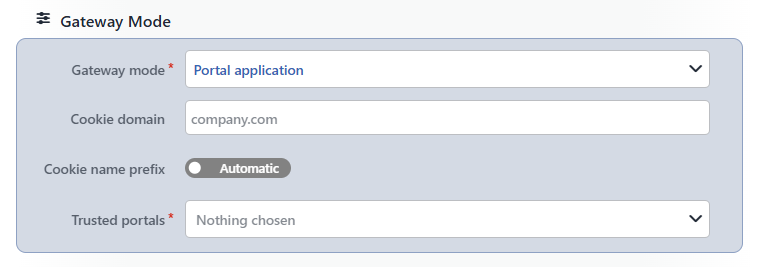 The Gateway Mode Section
INFO
Gateway Mode Mandatory Default: Standalone Application
The working mode of AGS is selected. The options in order are Standalone Application, Portal and Portal Application. When the mode is changed, the fields specific to the mode appear or disappear in the window immediately (The Mode Change).
INFO
Cookie Domain
The domain name for which the session cookie will be valid is entered (the placeholder is company.com); the format and the behavior when it is left empty are the same as those of the field in the Standalone Application mode. In this mode the value is used in the deletion of the session cookie in the browser at the Backend SSO logout; whether the portal session will be transferred, on the other hand, is determined according to the Cookie Domain value of the portal.
INFO
Cookie Name Prefix Default: Automatic
The prefix to be added to the names of the AGS cookies is determined; the Automatic and Choose positions are the same as those of the field in the Standalone Application mode.
While the switch is in the Automatic position, the prefix is taken from the first portal for which a prefix is defined, by looking at the Trusted Portals list in order; if no prefix is defined in any portal, AGS_ is used. This vService reads the session cookie only with this prefix. When a prefix different from that of the portal is entered with Choose, the portal session that comes under a Cookie Domain common with the portal or over the tunnel is not recognized in this vService.
INFO
Trusted Portals Mandatory
The portals whose session will be accepted are selected. While the field is empty, it writes Nothing chosen.
- On the list that opens, only the vServices whose Gateway Mode value is Portal are displayed with their names; they are filtered with the search box (
Enter query) above the list. The Portal vServices whose AGS access control has been turned off are displayed on the list as well. If there is no record,No optionsis written, and if there is no match in the search,No results. A new portal is not created from the list. - A vService is selected by clicking it on the list, and the selection is removed by clicking the selected item again; a new selection is added to the end. There is no upper limit for the number of selections.
- The selected portals are displayed as a tag inside the field. The icon on the tag removes the portal from the list; the tags are reordered by being dragged.
- In the list items and in the tags, the icon shows the flowchart of the portal as read-only; the icon opens the flowchart of the portal in a separate editing window.
- If a vService that has been taken out of the Portal mode or deleted has stayed on the list, its tag is displayed in the warning color; on this tag there is only the icon.
The order of the selection is used: the visitor who has no session is redirected to the first portal for which the Portal URL value is defined, and while Cookie Name Prefix is in the Automatic position the prefix of the first portal for which a prefix is defined is used; the sessions, on the other hand, are accepted from all the portals on the list. In the case in which portals with different prefixes are selected together in the same application, only the session of the portal that works with the prefix used is recognized.
When the field is left empty, no warning is shown in the window and the Accept button does not become passive; the deficiency is reported during Save with an error text that starts with At least 1 options must be selected, got 0.
INFO
The changes made in the window are transferred to the diagram with Accept and are saved with Save on the toolbar (The General Settings Window).
Portal Application on the Flowchart
- The Start box is not displayed; the mode badge PORTAL APPLICATION is located in the top left corner of the canvas.
- The flow steps defined in the previous mode stay in the diagram and in the record; a new step is added with Add AGS Action as well. These steps are not reached from Start and the visitor is not directed to the flow of this vService.
- The User Attributes panel continues to be calculated according to the steps in the diagram.
- If the Backend Session Lost Strategy value of the Backend SSO Config profile is Re-sync, the Backend SSO (Re)Sync box is displayed in this mode as well.
- The General Settings window is opened with the General Settings button on the toolbar.
The Places Where the Mode Is Displayed
| Place | What is displayed |
|---|---|
| Flowchart | The PORTAL APPLICATION badge in the top left corner of the canvas. |
| AGS-Enabled vService List | Portal application in the Gateway Mode column. |
| The Dashboard and AGS Management preview drawing | Portal application under the label of the AGS strip. In the Trusted portals box every trusted portal is a row; in the information window of the row Sessions of this portal are trusted is written. |
| The AGS Management mode section | The title Portal application, the subtitle This application serves no login pages of its own; it inherits its session from a trusted portal. |
| The AGS Management Session section | While Cookie Name Prefix is in the Automatic position, The cookie name prefix is inherited from the trusted portal; if a prefix has been entered, Cookie name prefix <prefix>. |
| The AGS Management Trusted Portals section | It is displayed only in this mode. Every portal whose record is found is listed with the row <portal> · Sessions of this portal are trusted and, if there is at least one portal, the number of portals is added to the title. If there is no portal whose record is found, No provider profile selected is displayed. The Edit link of the section opens the Edit / Trusted portals window. |
The Mode Change
When Gateway Mode is changed, the Cookie Domain, Cookie Name Prefix, the policies and the Backend SSO Config are preserved. No confirmation is asked for the change. In order to return before saving on the Flowchart, the unsaved changes are discarded by passing to the View Mode; in the AGS Management Edit / Scope & identity window the change is saved directly with Accept.
| Transition | Result |
|---|---|
| Standalone Application → Portal Application | The Trusted Portals field appears empty. With Accept the Start box is removed from the diagram and the badge passes to the top left; with Save the Start connection is deleted from the record. The steps of the flow are not deleted. |
| Portal → Portal Application | In addition to the above, the Portal URL, Private Tunnel Domain and Portal Applications values are removed from the diagram with Accept and are deleted from the record with Save. The other applications that keep this vService in their Trusted Portals list are not updated by themselves. |
| Portal Application → Standalone Application | The Trusted Portals value is removed. If the record has been saved in the Portal Application mode, the Start box comes unconnected; it should be connected to the first step of the flow before saving, and an unconnected save is not prevented. |
| Portal Application → Portal | The Trusted Portals value is removed; the Portal URL, Private Tunnel Domain and Portal Applications fields with an empty card appear and, until the mandatory fields are filled, Accept stays inactive. If the record has been saved in the Portal Application mode, the Start box comes unconnected and is connected to the first step of the flow. |
If the mode is changed while the window is open and Portal Application is selected again, the values entered are not lost; the values are filtered according to the current mode only at the moment of Accept.
Its Relation with the Portal and Authentication Providers
- The vService in this mode is selected as an Application vService in the Portal Applications list of a Portal vService, and that portal is selected in the Trusted Portals list. On the portal side, whether the application has been taken into this mode is not checked; the two sides are configured separately.
- When a portal is deleted or taken out of the Portal mode, the Trusted Portals list is not updated by itself; the list is edited manually.
- The provider of the Portal type on the Authentication Providers screen, on the other hand, is not a gateway mode but a step added to the flow, and a vService in the Portal mode is selected in the Portal Gateway field. This mode is used in the applications that take over the portal session without having their own login page.
Scope and Limits
INFO
- The login is done at the portal. This vService does not serve its own login pages; there is no Start box and the visitor is not directed to the steps in the diagram.
- The default target is the Backend Service. The requests with a session that do not match an action go to the default Backend Service of the vService.
- The redirection is independent of the condition. The requests without a session are redirected to the trusted portal even if they do not match the AGS Activation Condition condition.
- The order of the list matters. The portal redirected to and the prefix inherited are determined according to the Trusted Portals order; the sessions are accepted from the whole list.
- The policies are those of the application. The session protection, bot protection and Backend SSO are applied from the settings of this vService; in the tunnel access modes the request also passes through the session protection and Backend SSO settings of the portal first. The session binding type is selected the same as that of the portal.
- The mandatoriness is checked during the save. An empty Trusted Portals list is not prevented in the window, it is reported during Save.
