
Smarter by Design.Simpler for Business
Blacklist IP Category
What Is the Blacklist IP Category Condition?
Blacklist IP Category is a condition type used to make traffic routing and manipulation decisions by evaluating whether the client IP address is in a specific threat category.
The evaluated address is the source IP address of the client; if a Trusted Proxy configuration is used on the vService, the check is performed on the real client IP behind the proxy.
Client Request
Source IP:
192.168.1.100 IP Reputation Check
DDoS AttackNot Found
PhishingMATCHED ⚠️
Brute-ForceNot Found
Result: The source IP was found in the "Phishing" category → the condition returns TRUE.
With this condition, traffic coming from known malicious IP addresses can be detected and blocked.
TIP
Freshness of IP intelligence data
For this condition to work correctly, the related Blacklist IP addresses and categories must be up to date on the IP Intelligence & Reputation screen. As long as the IP intelligence data is not updated, this condition cannot correctly detect threatening IP addresses.
When the category lists are updated, the condition starts using the current list automatically; no manual operation by the operator is required. In addition to single IP addresses, the lists can also contain CIDR blocks; a block matches the condition for all the addresses it covers.
The Importance of the Blacklist IP Category Condition
IP intelligence is a critical defense layer in cybersecurity. Proactively blocking known malicious IP addresses makes it possible to stop attacks before they even start.
With the Blacklist IP Category condition:
- Traffic coming from DDoS attack sources can be blocked,
- Protection against phishing and fraud sources can be provided,
- Bot and crawler traffic can be detected,
- Traffic coming through proxy and VPN can be controlled,
- Brute force attack sources can be blocked,
- Web application attacks can be prevented.
Supported IP Intelligence Categories
| Category | Description |
|---|---|
| User Blacklist | User-defined custom blacklist |
| External | IP addresses collected automatically from the configured external threat feed sources |
| DNS Compromise | IPs whose DNS server has been compromised |
| DNS Poisoning | DNS poisoning attack sources |
| Fraud Orders | Fake order and fraud sources |
| DDoS Attack | DDoS attack sources |
| FTP Brute-Force | FTP brute force attack sources |
| Ping of Death | Ping of Death attack sources |
| Phishing | Phishing sources |
| Fraud VoIP | VoIP fraud sources |
| Open Proxy | Open proxy servers |
| Web Spam | Web spam sources |
| Email Spam | E-mail spam sources |
| Blog Spam | Blog spam sources |
| VPN IP | VPN exit IPs |
| Port Scan | Port scanning sources |
| Hacking | Known hacking sources |
| SQL Injection | SQL injection attack sources |
| Spoofing | IP spoofing sources |
| Brute-Force | Brute force attack sources |
| Bad Web Bot | Malicious web bots |
| Exploited Host | Compromised hosts |
| Web App Attack | Web application attack sources |
| SSH | SSH attack sources |
| IoT Targeted | Attack sources targeting IoT devices |
The category names are displayed in English in the interface.
TIP
Threat Intelligence
TR7 updates the IP intelligence data automatically from various threat intelligence sources.
Supported vService Types
HTTP
L7 TCP
Network
The condition can be used at both the request (At Request) and response (At Response) stages; the same source IP check is performed in both positions.
How to Add?
A new Blacklist IP Category Condition can be added through the TR7 web management interface by following the steps below:
- The Configuration Menu is opened by clicking the TR7 logo at the bottom left.
- The Load Balancer → Conditions → Add steps are followed.
- Blacklist IP Category is selected as Criteria.
- The related configurations of the condition are made.
- The condition is added by clicking the
Addbutton.
Blacklist IP Category Condition Add Form
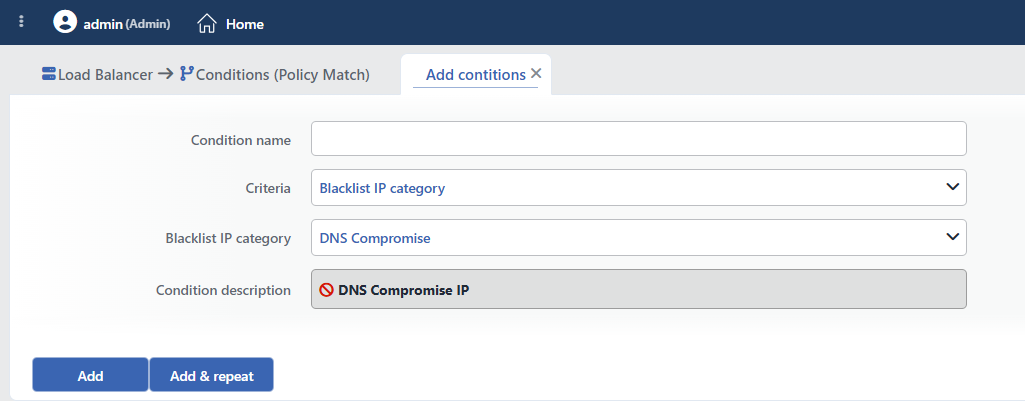 Blacklist IP Category Condition Add Form
INFO
Condition Name
An optional name can be entered for the condition to be created.
This field is especially important in the following scenarios:
- When many conditions are defined under the same vService,
- When conditions with similar criteria need to be distinguished,
- When it is necessary to quickly understand which business rule the condition represents.
When this field is left empty, TR7 analyzes the content of the related condition and creates an automatic, descriptive name in the Condition Description field. This generated description is used as the name in condition lists.
INFO
Criteria Required
The field that determines the type of the condition; Blacklist IP Category is selected from the searchable dropdown list. This selection determines the fields displayed in the form. The criterion cannot be changed after the condition is saved: if a different criterion is needed, a new condition is defined. For all criteria in the list and their scopes, the criteria catalog on the Conditions page can be referred to.
INFO
Blacklist IP Category
The IP intelligence category to be checked is selected from the searchable dropdown list. The list contains the 25 categories described in the table above.
The field allows the selection of a single category; if more than one category needs to be checked, a separate condition is defined for each category.
TIP
The User Blacklist category contains the IP addresses defined manually in the IP Intelligence module of TR7.
TIP
The External category contains the IP addresses collected automatically from the external threat feed sources configured in the IP Intelligence module.
TIP
If only a check of "whether the source IP is in any blacklist" is wanted without distinguishing between categories, the If the source IP is blacklisted condition, which is offered ready-made in the condition selection lists, can be used; there is no need to define a separate condition for this.
Whitelist Priority
An IP address added to the Whitelist on the IP Intelligence & Reputation screen is removed from all category lists; this condition does not return TRUE for that IP in any category.
INFO
Condition Description
It is created automatically by TR7 in line with the entered criteria and values.
This description:
- which value the condition applies to,
- which criterion it works on,
- the quick understanding of the condition on listing screens
is produced dynamically by the system so as to provide these.
INFO
Form Buttons
Add
The condition adding process is completed by clicking the Add button.
Add & Repeat
With the Add & Repeat button, the condition adding process is completed, and another new condition can be added with different configurations without leaving the related window.
 Condition Added
Operational Usage Recommendations
- Layered Protection Should Be Applied. Different actions should be defined for different categories (e.g. block for DDoS, challenge for VPN).
- The User Category Should Be Used. Malicious IPs identified by the operator should be added to the user category.
- Conditions Should Be Combined with Logging. A logging action should be added to log the blocked IPs.
- False Positives Should Be Watched For. The VPN and proxy categories can also affect legitimate users; CAPTCHA challenge can be preferred. A legitimate IP that falls into a category by mistake is exempted from all category checks by being added to the Whitelist on the IP Intelligence & Reputation screen.
- Regular Update. It should be ensured that the IP intelligence lists are up to date.
Common Usage Scenarios in Live Environments
The examples below show how the related condition is applied in the most frequently encountered use cases in real systems. These scenarios are based on practices that are widely preferred in live environments and rest on experience gained in the field.
Scenario 1: Blocking DDoS Attack Sources
Purpose: To prevent service interruptions by proactively detecting and blocking traffic coming from known DDoS attack sources.
Configuration: Blacklist IP category → DDoS Attack
Action Recommendations:
- ✅ Block → Connections from DDoS attack IPs are terminated immediately (drop connection).
- ✅ Quarantine → Detected DDoS IPs are quarantined for 24 hours and all their access is blocked.
- ✅ Advanced Traffic Inspection → A pattern analysis of DDoS attack sources is performed and attack vectors are reported.
Scenario 2: Phishing and Fraud Protection
Purpose: To detect suspicious traffic coming from IP addresses in the phishing and fraud categories and protect e-commerce and payment pages.
Configuration: Blacklist IP category → Phishing and Fraud Orders (a separate condition is defined for each category)
Action Recommendations:
- ✅ Block → Requests from phishing IPs are blocked and a 403 Forbidden response is returned.
- ✅ Advanced Captcha → For requests from fraud category IPs, CAPTCHA verification is performed to distinguish bots from humans.
- ✅ Advanced Traffic Inspection → A fraud pattern analysis is performed and suspicious activities on checkout pages are reported.
Scenario 3: Brute Force Attack Prevention
Purpose: To detect SSH, FTP and web login brute force attack sources and protect admin panels.
Configuration: Blacklist IP category → Brute-Force, FTP Brute-Force and SSH (a separate condition is defined for each category)
Action Recommendations:
- ✅ Quarantine → Brute force IPs are quarantined for 60 minutes and prevented from making login attempts.
- ✅ Bandwidth Limitation → The attack is slowed down by limiting the attack traffic to 1 Mbps.
- ✅ Advanced Traffic Inspection → Brute force attack patterns are analyzed and credential stuffing attempts are reported.
Scenario 4: VPN/Proxy Traffic Management
Purpose: To detect traffic coming through VPN and proxy and require additional verification for payment and sensitive transactions.
Configuration: Blacklist IP category → VPN IP and Open Proxy (a separate condition is defined for each category)
Action Recommendations:
- ✅ Advanced Captcha → Human verification is performed by showing a CAPTCHA challenge to VPN/proxy users.
- ✅ Bandwidth Limitation → Abuse is prevented by limiting VPN traffic to 5 Mbps.
- ✅ Advanced Traffic Inspection → A VPN/proxy usage pattern analysis is performed and anomaly detection is reported.
Scenario 5: Blocking Malicious Bots
Purpose: To detect web scraper and malicious bot IPs and protect API endpoints and content pages.
Configuration: Blacklist IP category → Bad Web Bot and Port Scan (a separate condition is defined for each category)
Action Recommendations:
- ✅ Block → Bad bot IPs are blocked immediately and a 403 Forbidden response is returned.
- ✅ Quarantine → Detected bot IPs are quarantined for 72 hours.
- ✅ Advanced Traffic Inspection → Bot behavior patterns are analyzed and reconnaissance activity is reported.
Scenario 6: Web Application Attack Protection
Purpose: To detect SQL injection, XSS and other web attack sources and protect web applications.
Configuration: Blacklist IP category → Web App Attack, SQL Injection and Hacking (a separate condition is defined for each category)
Action Recommendations:
- ✅ Block → Connections from attacker IPs are terminated immediately (drop connection).
- ✅ Quarantine → Web attack IPs are quarantined permanently (permanent block).
- ✅ Advanced Traffic Inspection → Attack techniques are analyzed and exploitation attempts are reported.
Scenario 7: Spam Source Filtering
Purpose: To detect e-mail, web and blog spam sources and prevent comment and form spam.
Configuration: Blacklist IP category → Email Spam, Web Spam and Blog Spam (a separate condition is defined for each category)
Action Recommendations:
- ✅ Advanced Captcha → A CAPTCHA challenge is shown for comment/form submissions from spam IPs.
- ✅ Quarantine → IPs that make more than 5 spam attempts are quarantined for 24 hours.
- ✅ Advanced Traffic Inspection → Spam source distribution and pattern analysis are reported.
Scenario 8: Compromised Host Detection
Purpose: To detect IPs in the DNS compromise and exploited host categories and block botnet traffic.
Configuration: Blacklist IP category → DNS Compromise, DNS Poisoning and Exploited Host (a separate condition is defined for each category)
Action Recommendations:
- ✅ Block → Traffic from compromised hosts is blocked immediately.
- ✅ Quarantine → Exploited host IPs are quarantined for 48 hours.
- ✅ Advanced Traffic Inspection → Botnet activity and C2 communication patterns are analyzed.
