
Smarter by Design.Simpler for Business
AI Learning Settings
What Is AI Learning Settings?
AI Learning Settings gathers in a single editing window the settings that determine how the learning engine will work: in which mode the engine will run, looking at which history it will learn, how often it will run in the automatic mode, whether a rule is allowed to be promoted from monitoring into enforcement and whether the recommendation notifications will be muted are defined from here.
The settings are applied across the route table: the learning of all the protection rules in the table is fed from the same mode, the same history and the same promotion permission. The window is opened from three places and all of them bring the same screen:
| Entry point | Its place |
|---|---|
AI Learning Settings → | The link at the bottom right corner of the upper band of the Learning strip. |
| The How It Learns card | When anywhere on the card is clicked, the same window opens; the pencil icon at the bottom right corner states this. |
Open the setting → | When a recommendation is stopped because of the mode promotion permission, the link of the obstacle row in the evaluation window. |
The name of the link and the name of the window are different
The link on the strip says AI Learning Settings; the title of the window that opens, on the other hand, is only Learning Settings. The two are the same screen.
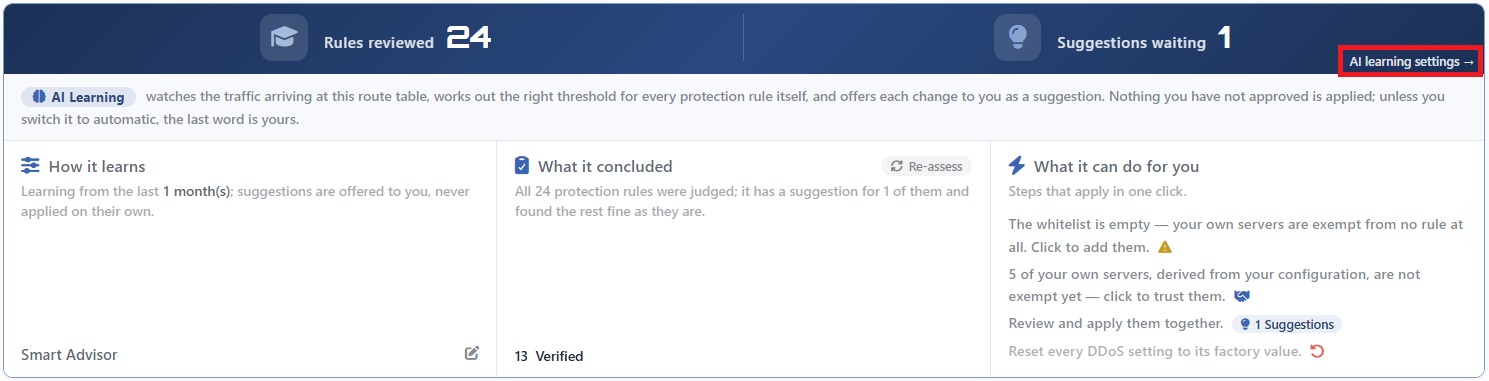 The Learning Strip - The AI Learning Settings Link
The Learning Settings Screen
- The L4 DDoS Management tab is opened.
- The
AI Learning Settings →link at the bottom right corner of the upper band of the learning strip is clicked; the editing window titledLearning Settingsopens. - The fields below are edited and confirmed with the
Savebutton. The selected mode determines which fields will be seen in the form; when the mode is changed, the form is rearranged immediately.
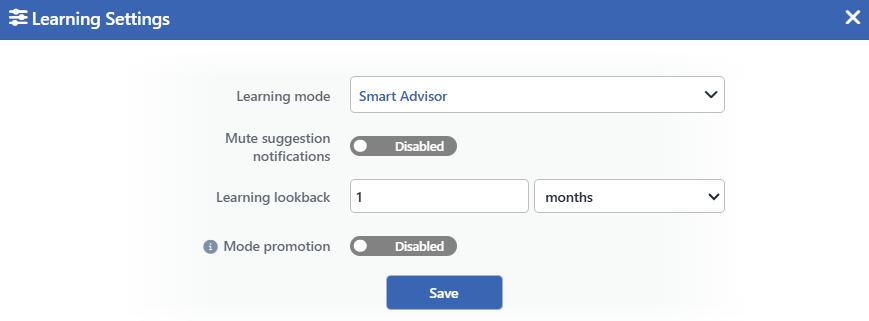 The Learning Settings Screen
Two fields exist only in certain modes
Learning Interval is displayed only in the Automatic mode and Mute Suggestion Notifications only in the Smart Advisor mode. Both of them are located right below Learning Mode; when the mode selector is changed, they appear or disappear there. In the form four fields are displayed in the Smart Advisor and Automatic modes, and three in the Off mode.
Learning Lookback and Mode Promotion are seen in every mode; they stay editable even if learning has been turned off.
INFO
Learning Mode Default: Smart Advisor
Determines the working manner of the engine. It takes three values:
| Value | Behavior |
|---|---|
| Smart Advisor | The engine learns and recommends; it applies nothing by itself. It is the default value and this value is valid in a route table in which the setting has never been saved as well. |
| Automatic | The engine applies what it has learned itself. The application time is determined from the Learning Interval field. |
| Off | The engine does not run in the background: no periodic evaluation is made, no notification is produced and no recommendation is applied. |
INFO
Mute Suggestion Notifications Default: Off
Mutes the recommendation notifications. It is off by default and is displayed only in the Smart Advisor mode.
The name of the switch is narrower than what it does: when it is turned on, not only the notification is cut, the periodic evaluation does not run at all either. If there is a waiting notification, it is closed.
The screen's own evaluation is not affected by this: when the page is opened and with Re-assess, the recommendations are produced again.
INFO
Learning Lookback Default: 1 month
Determines how far back the engine will read the traffic. It consists of a number field and a unit selector.
| Unit | Option |
|---|---|
| days | Days |
| weeks | Weeks |
| months | Months |
The default value is 1 month. The validation accepts the range between 3 days and 90 days; a value outside this range gives an error. Since the number field does not accept below 1, a value of two days can be written in the field but is caught by the validation.
INFO
Mode Promotion Default: Off
Allows a rule to be promoted from monitoring into enforcement. It is off by default and carries an information icon next to its label.
The switch does not cover all the rules. Two classes are separated:
| Rule class | Is permission required for the promotion? |
|---|---|
| The rules that measure a threshold and the packet classes that can also be seen in legitimate traffic | Yes. In addition to the rate and concurrent connection limits, the packets with an invalid state, the new packets that do not carry SYN, the packets with a suspicious MSS and the sources coming from private address spaces are also in this class: since a wrong decision can drop legitimate traffic, they do not pass into enforcement without explicit permission. |
| The rules with a definite signature (the packets that can never occur in legitimate traffic) | No. These can be promoted while the switch is off as well. |
The permission restricts only the upward direction: taking a rule from disabled into monitoring and pulling it back from enforcement into monitoring are not caught by this gate. Taking a disabled rule into monitoring is nevertheless applied only manually; the automatic mode does not do this by itself.
The switch covers both the manually applied recommendations and the automatic mode.
INFO
Learning Interval Default: Daily
Determines how often the automatic mode will run and is displayed only in the Automatic mode. Five ready values are offered:
| Value | Meaning |
|---|---|
| Hourly (Observe/Debug) | Once an hour; for observation and troubleshooting. |
| Every 6 Hours | Once every six hours. |
| Every 12 Hours | Once every twelve hours. |
| Daily | Once a day. It is the default value. |
| Weekly | Once a week. |
The run moments are aligned to the wall clock: at the top of every hour in the hourly value, at midnight in the daily value and on the first day of the week in the weekly value. A general delay of five minutes is added to the aligned moment.
The selected period is not the only trigger: if a rule applying enforcement starts to drop packets continuously, the engine can make an early run without waiting for the slot.
INFO
Save
Saves the settings. While there is a validation error, the button is inactive.
The save takes effect immediately and then one more evaluation runs: the waiting recommendations do not become invalid, they are recalculated with the new settings.
The Visibility of the Fields According to the Mode
| Field | Smart Advisor | Automatic | Off |
|---|---|---|---|
| Learning Mode | ✔ | ✔ | ✔ |
| Mute Suggestion Notifications | ✔ | - | - |
| Learning Lookback | ✔ | ✔ | ✔ |
| Mode Promotion | ✔ | ✔ | ✔ |
| Learning Interval | - | ✔ | - |
A hidden field is not reset: its value is kept and when the mode is taken back, it is displayed with the same value.
The history window entered is not the window the engine reads
The engine rounds the duration entered to a grid with five steps: 3 days, 1 week, 2 weeks, 1 month and 2 months. The rounding is two-way: the value entered can be extended to a step as well as shortened. The ceiling is two months.
| Value entered | The window the engine reads |
|---|---|
| 3 – 4 days | 3 days |
| 5 – 8 days | 1 week |
| 9 – 21 days | 2 weeks |
| 22 – 45 days | 1 month |
| 46 days and above | 2 months |
The sentence on the How It Learns card writes the entered value. That is, behind a card that says "the last 3 weeks" the engine reads the 2-week window; when 90 days is entered it reads 60 days, and when 5 days is entered it reads 1 week.
This window does not change the protection settings
No field in the window changes the mode or the limit of a rule. The save operation technically rewrites all the L4 DDoS fields of the route table, but the protection values are preserved with their current states.
This write triggers the regeneration of the firewall configuration: the rule set is replaced as a whole.
Scope and Limits
INFO
- The settings are per route table. The mode selected in one table does not affect the others.
- The default mode is Smart Advisor and it is valid in a table in which the setting has never been saved as well.
- The history window is accepted between 3 days and 90 days, but the engine rounds this to five steps.
- Learning Interval concerns only the automatic mode. The periodic evaluation in the recommendation mode is hourly and cannot be adjusted.
- Mute Suggestion Notifications also stops the periodic run, not only the notification.
- Mode Promotion does not cover the rules with a definite signature; they can be promoted while the switch is off as well.
- The save is not written to the user log. The learning operations written to the log are applying a recommendation and returning to the default.
- In a cluster the periodic learning and the automatic application run only on the first device. The applied configuration is carried to the other device with the synchronization.
- A period value that has no counterpart in the list is silently corrected.
- The operation requires change authorization in the Network area.
