
Smarter by Design.Simpler for Business
SSL SNI Info
What Is the SSL SNI Info Condition?
SSL SNI Info is a condition type used to make traffic routing decisions by evaluating the server name information sent by the client during the TLS handshake.
SNI is located in the unencrypted part of the TLS handshake and states which domain the client wants to connect to.
This condition is based on TR7 being able to read the SNI information without terminating (decrypting) the SSL/TLS connection. In this way, domain-based routing can be performed even in SSL pass-through scenarios.
The Importance of the SSL SNI Info Condition
SNI is an important TLS extension that enables more than one SSL/TLS site to be hosted over a single IP address.
With the SSL SNI Info condition:
- Domain-based routing can be performed without SSL termination,
- More than one HTTPS site on a single IP can be routed to different Backend Services,
- Traffic management can be performed while end-to-end encryption is preserved,
- Routing to different Backend Service groups can be performed according to the SNI value,
- SSL pass-through load balancing can be applied at the TCP level.
SNI vs HTTP Host Header:
| Feature | SNI | Host Header |
|---|---|---|
| Layer | TLS (Layer 5) | HTTP (Layer 7) |
| Encryption | Unencrypted | Encrypted in HTTPS |
| SSL Termination | Not required | Required |
| Visibility | Always readable | After SSL decryption |
| Usage | SSL pass-through | HTTP processing |
Supported vService Types
HTTP
L7 TCP
Network
How to Add?
A new SSL SNI Info Condition can be added through the TR7 web management interface by following the steps below:
- The Configuration Menu is opened by clicking the TR7 logo at the bottom left.
- The Load Balancer → Conditions → Add steps are followed.
- SSL SNI info is selected as Criteria.
- The related configurations of the condition are made.
- The condition is added by clicking the
Addbutton.
SSL SNI Info Condition Add Form
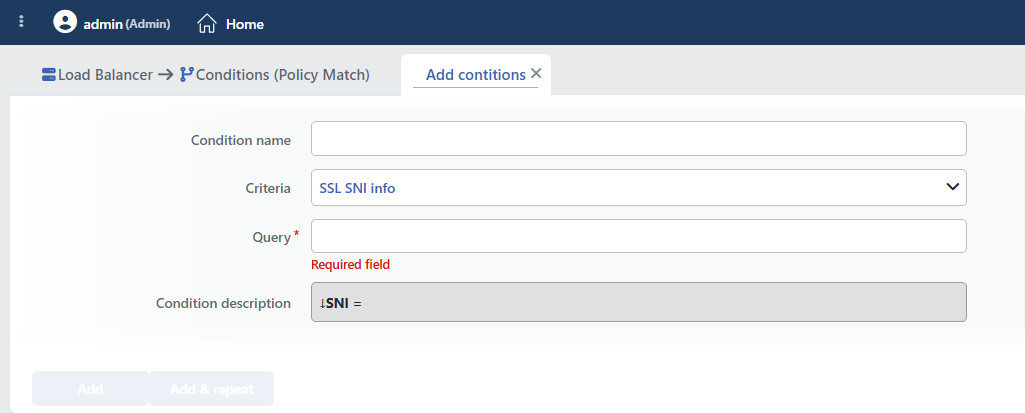 SSL SNI Info Condition Add Form
INFO
Condition Name
An optional name can be entered for the condition to be created.
This field is especially important in the following scenarios:
- When many conditions are defined under the same vService,
- When conditions with similar criteria need to be distinguished,
- When it is necessary to quickly understand which business rule the condition represents.
When this field is left empty, TR7 analyzes the content of the related condition and creates an automatic, descriptive name in the Condition Description field. This generated description is used as the name in condition lists.
INFO
Criteria Required
The field that determines the type of the condition; SSL SNI info is selected from the searchable dropdown list. This selection determines the fields displayed in the form. The criterion cannot be changed after the condition is saved: if a different criterion is needed, a new condition is defined. For all criteria in the list and their scopes, the criteria catalog on the Conditions page can be referred to.
INFO
Query Required
The SNI value (domain name) to be matched is entered. The matching is full text and case-insensitive (no additional option needs to be checked); a wildcard (*.example.com), a partial name or more than one domain cannot be entered: a separate condition is defined for each domain.
Inspection Wait
In the vService where this condition is used, TR7 inspects the first packets of the connection in order to be able to read the SNI; in connections where the TLS handshake does not arrive, acceptance can be delayed by up to 10 seconds. This behavior takes effect automatically when the condition is defined and affects all the traffic of the vService.
TIP
The SNI value can be used in actions and log formats with the SNI Received from Client smart variable. The main area of use of this condition is L7 TCP vServices where SSL is not terminated (passthrough); in vServices where SSL termination is performed, the Virtual Host / HTTP Header conditions should be preferred for host distinction.
INFO
Condition Description
It is created automatically by TR7 in line with the entered criteria and values.
This description:
- which value the condition applies to,
- which criterion it works on,
- the quick understanding of the condition on listing screens
is produced dynamically by the system so as to provide these.
INFO
Form Buttons
Add
The condition adding process is completed by clicking the Add button.
Add & Repeat
With the Add & Repeat button, the condition adding process is completed, and another new condition can be added with different configurations without leaving the related window.
 Condition Added
Operational Usage Recommendations
- It Should Be Used for SSL Pass-Through. SNI-based routing should be used in scenarios where end-to-end encryption must be preserved.
- A TCP vService Should Be Preferred. If SSL termination will not be performed, SNI-based routing should be done with a TCP vService.
- No Case Sensitivity Concern. The matching is always case-insensitive; no additional option needs to be checked.
- Subdomains Should Be Defined One by One. Since the matching is full text, there is no wildcard/
Ends withtype option; a separate condition is defined for each targeted subdomain.
Common Usage Scenarios in Live Environments
The examples below show how the related condition is applied in the most frequently encountered use cases in real systems. These scenarios are based on practices that are widely preferred in live environments and rest on experience gained in the field.
Scenario 1: SNI-Based Routing in SSL Passthrough
Purpose: To route the traffic to different Backend Service groups according to the SNI value in an L7 TCP vService where end-to-end encryption is preserved (SSL passthrough).
Configuration: Query → app.example.com (separate conditions are defined for the other domains)
Action Recommendations:
- ✅ Conditional Backend Services → Connections arriving with the
app.example.comSNI are routed to the application Backend Service group, and the others to the default group.
Scenario 2: Monitoring Unexpected SNI Traffic
Purpose: To separate and monitor the connections that arrive with an SNI outside the domain defined on the vService (misconfigured clients, scanning attempts).
Configuration: Query → www.example.com (the negation of the condition is selected at the place of use: if the SNI is not equal to this value)
Action Recommendations:
- ✅ Advanced Traffic Inspection → Unexpected SNI values are reported with the SNI Received from Client smart variable; scanning/discovery attempts become visible.
