
Smarter by Design.Simpler for Business
TR7Enterprise Application Delivery & Security Platform
One Arm Topology - Routed Backend is the form of One Arm Topology in which the servers are in other networks (a single network interface and a single IP network in TR7; the vService addresses are in this network; the Backend Services are in different networks behind the routing point, and TR7 reaches them over the same arm, through routing). TR7 does not connect directly to any server network; it reaches all servers through the network's routing point, from the arm on which it receives client traffic.
A single connection and a single address block in the network are enough for TR7. No matter how many separate networks the servers are spread across, TR7 is not given a new interface or address; defining the path to those networks is enough. This is the deployment that is added to an existing network with the least change and serves scattered server networks from a single point.
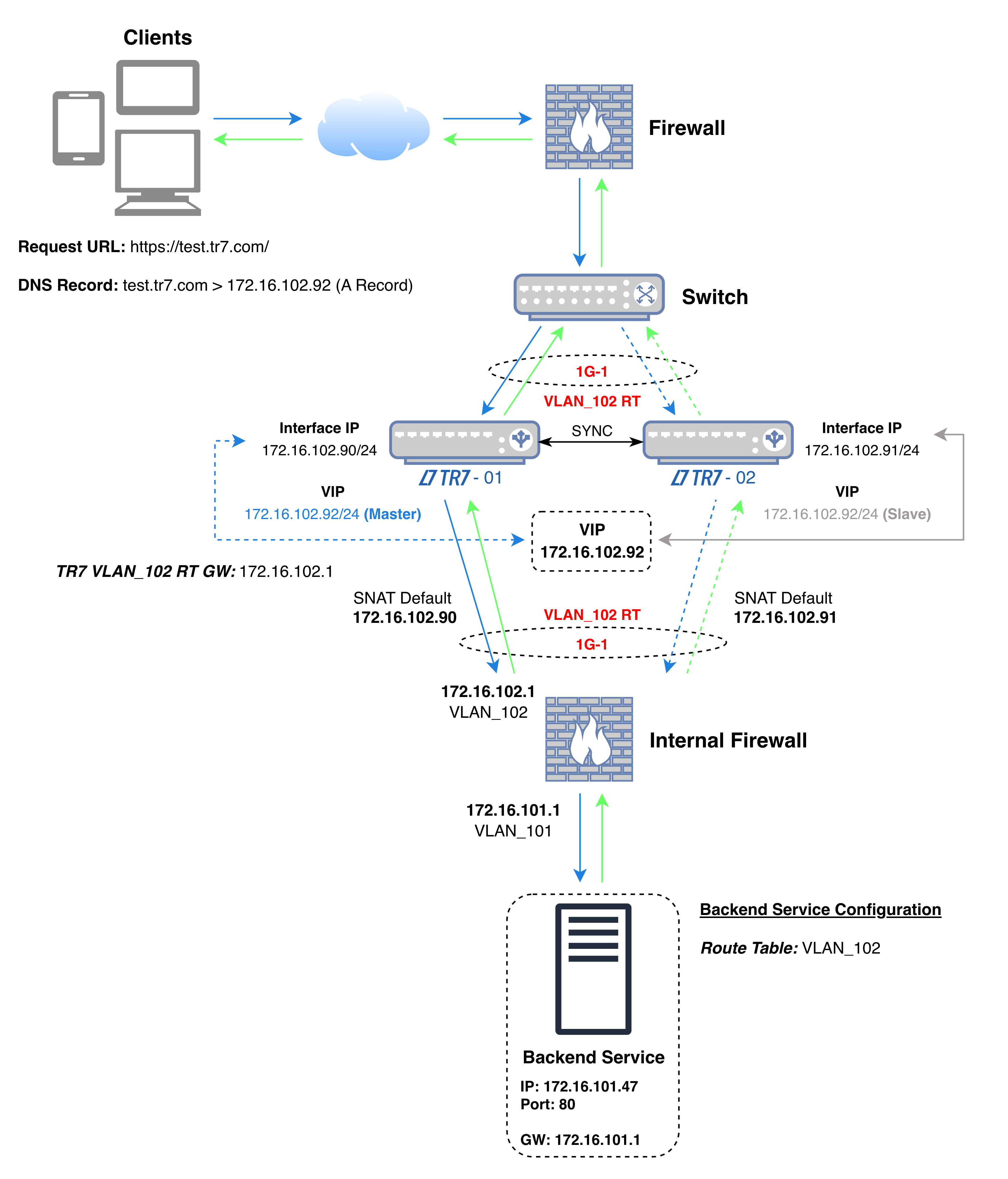 One Arm Topology - Routed Backend
The diagram shows the flow of traffic: the VIP the client connects to and the address TR7 uses when connecting to the Backend Service are on the same interface (1G-1 in the diagram) and in the same network; the Backend Service, however, is in a different network behind the routing point (Internal Firewall in the diagram).
In the diagram's example, on the Internal Firewall, access is allowed from the addresses 172.16.102.90 and 172.16.102.91, which the TR7 devices use when connecting to the Backend Service, to the address and port of the Backend Service (172.16.101.47:80). Both the application traffic and the health check are made from these addresses; the Backend Service sees these addresses as the source of the connection and returns the response to TR7 over the same path. For the health check, this applies while the Health Check Source IP field in the Backend Service is at its default value; when another address is selected in the field, the check is made from that address.
In the diagram's example, the source and destination information of the packets in the four steps of the connection is as follows (while TR7-01 is the active device):
| Step | Direction | Source IP | Source Port | Destination IP | Destination Port |
|---|---|---|---|---|---|
| 1 | Client → TR7 | Client IP | Random | 172.16.102.92 (VIP) | 443 |
| 2 | TR7 → Backend Service | 172.16.102.90 (Interface IP) | Random | 172.16.101.47 | 80 |
| 3 | Backend Service → TR7 | 172.16.101.47 | 80 | 172.16.102.90 (Interface IP) | Source port of step 2 |
| 4 | TR7 → Client | 172.16.102.92 (VIP) | 443 | Client IP | Source port of step 1 |
| Color | Meaning |
|---|---|
| Request | |
| Response |
When the VIP moves to the other device, the TR7 address in steps 2 and 3 becomes 172.16.102.91.
| One Arm in the same network as the servers | With Routed Backend |
|---|---|
| TR7 is placed in the network of the servers it load balances. | TR7 stays in its own network; the servers remain in the networks they are in. |
| For servers in different networks, an interface and an address from those networks are defined on TR7. | A new server network is brought into scope when the Backend Service's route table has a path to that network. |
| TR7 is a member of the server network. | TR7 stays outside the server networks; the servers know it only by its address in its own network. |
| The traffic between TR7 and the servers does not pass through the routing point. | The traffic going from TR7 to the servers passes through the network's routing point and is managed by the rules there. |
Since the server sends its response to TR7's address, the return path is provided by the network's ordinary routing: no additional routing rule or address translation is needed for the return traffic.
If the applications are spread across different VLANs and networks, TR7 reaches all of them over the single arm it is connected to, instead of connecting to each of them separately.
If traffic between networks is to pass through a core switch or firewall, the traffic TR7 sends to the servers also passes through the same point.
As new server networks are added, TR7's interface and address configuration stays the same; the device's single connection to the network does not change.
Requirements of this deployment
How does the client IP address appear on the server?
In this deployment, the Backend Service sees TR7's address as the source of the connection. The real client address is forwarded with the X-Forwarded-For header on HTTP vServices, and with Proxy Protocol on HTTP and L7 TCP vServices where the Backend Service supports it; both options are disabled by default.
