
Smarter by Design.Simpler for Business
TR7Enterprise Application Delivery & Security Platform
Gateway Mode - Spoofing is the deployment that delivers the result offered by Gateway Mode without touching the server's settings (on the Backend Service, the SNAT field is Use Client IP and Spoofing is on; the server's gateway setting stays as it is). TR7 connects to the server with the client's real IP address; the server's response sets out toward the gateway and TR7 picks up this response on the same network.
No setting change is required on the server: the gateway, address and routing settings stay the same. Preserving the client address stops being a work item on the server side and becomes a feature on TR7, turned on with the Spoofing switch in the Backend Service form. Because both the request and the response pass through TR7, this deployment is also known in the industry as an inline or transparent deployment.
HTTP or TCP?
On HTTP vServices, the X-Forwarded-For header should be used first to pass the client address to the Backend Service, and on HTTP and L7 TCP vServices, Proxy Protocol should be used where the Backend Service supports it; these two methods pass the client address to the server without touching the network design. Gateway Mode - Spoofing is mostly preferred on L7 TCP vServices, that is, where the client address cannot be carried in a header and the application does not support Proxy Protocol.
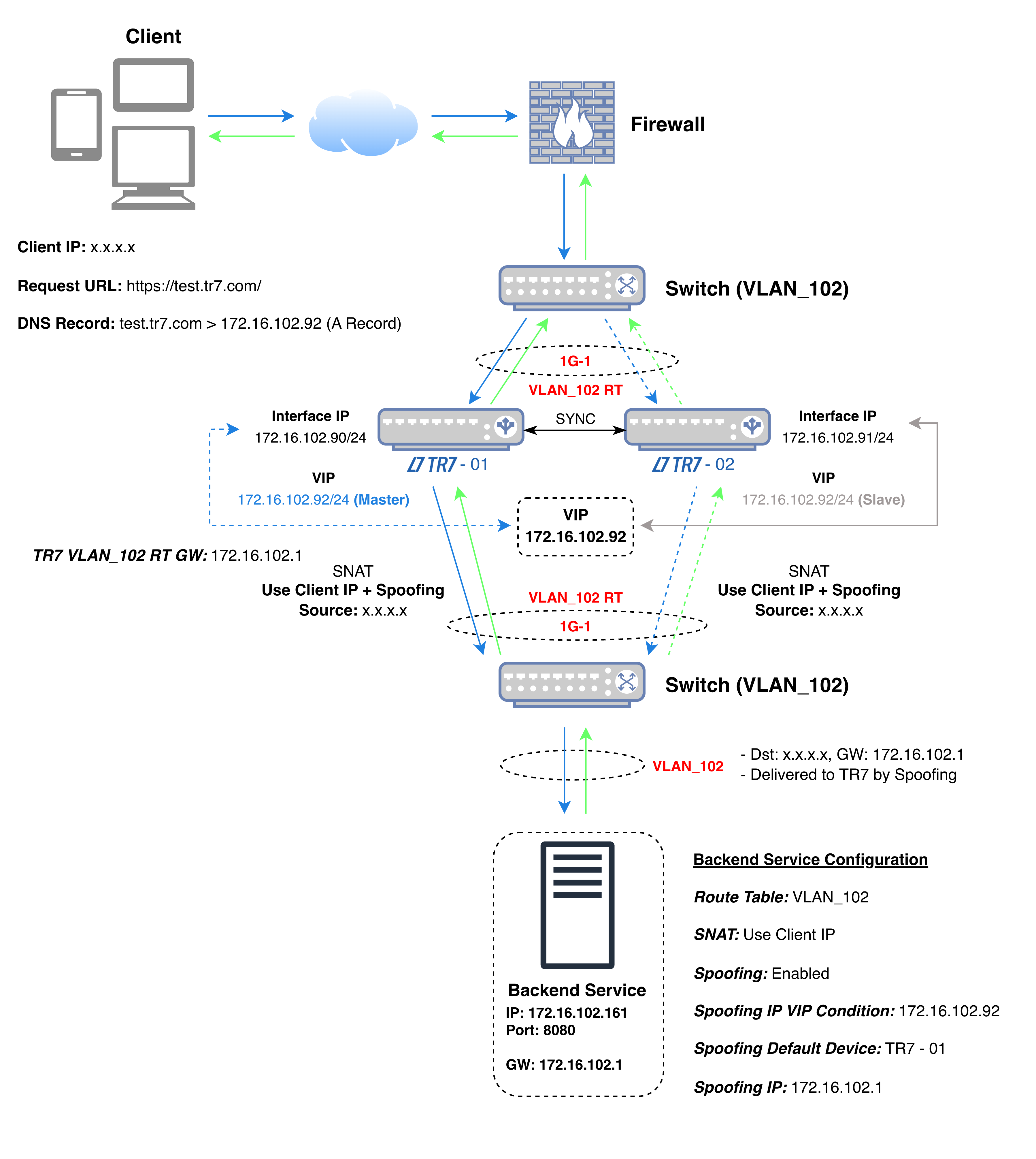 Gateway Mode - Spoofing
The diagram shows the flow of traffic: the VIP to which the client connects, TR7 and the Backend Service are on the same interface (1G-1 in the diagram) and in the same network; the client comes from another network (x.x.x.x in the diagram). The default gateway of the Backend Service has not changed: it is not TR7 but the network's own gateway (172.16.102.1).
In the diagram's example, TR7 connects to the Backend Service not with its own address but with the client's address (x.x.x.x); whichever device is active, the Backend Service sees the client's address as the source of the connection. The Backend Service sends the response out toward the client's address, to be delivered through its own gateway (172.16.102.1); since Spoofing is on, the active TR7 in the same network picks up the packet. Since the VIP (172.16.102.92) is selected in the Spoofing IP VIP Condition field, this task runs on the device where the VIP is active and moves to the other device together with the VIP.
The health check is performed not with the client address but with the TR7 address in the Backend Service's route table: in the diagram's example, the active device uses 172.16.102.90 and the other device uses 172.16.102.91. This applies while the Health Check Source IP field of the Backend Service is at its default value; when another address is selected in the field, the check is performed from that address.
In the diagram's example, the source and destination details of the packets in the four steps of the connection are as follows:
| Step | Direction | Source IP | Source Port | Destination IP | Destination Port |
|---|---|---|---|---|---|
| 1 | Client → TR7 | x.x.x.x (Client IP) | Random | 172.16.102.92 (VIP) | 443 |
| 2 | TR7 → Backend Service | x.x.x.x (Client IP) | Random | 172.16.102.161 | 8080 |
| 3 | Backend Service → TR7 | 172.16.102.161 | 8080 | x.x.x.x (Client IP); the server's gateway is 172.16.102.1, the active TR7 picks up the packet with Spoofing | Source port of step 2 |
| 4 | TR7 → Client | 172.16.102.92 (VIP) | 443 | x.x.x.x (Client IP) | Source port of step 1 |
| Color | Meaning |
|---|---|
| Request | |
| Response |
The packet addresses are the same as in Gateway Mode; the difference is in step 3: there, the server's gateway setting brings the response to TR7; here, the server's setting does not change and Spoofing brings the response to TR7.
| Gateway Mode | With Gateway Mode - Spoofing |
|---|---|
| The default gateway is changed to TR7 on each server. | The gateway setting of the servers stays as it is. |
| The change requires planning by the server team and a maintenance window. | The feature is turned on on TR7; there is no setting to change on the server. |
| The same setting is applied one by one on many servers. | The setting is made on TR7, in the Backend Service form. |
| To roll back, the gateway of the servers is changed back to the old address. | On rollback, there is no setting to revert on the server side. |
The server's settings have not changed: it sends its response to the gateway as always. Bringing the return path to the right device is TR7's job; for this, TR7, the Backend Service and the server's gateway are in the same network.
If the servers are managed by another team or a vendor and the gateway cannot be changed, the client address is still preserved.
Instead of changing the gateway one by one on dozens of servers, the feature is turned on on TR7, in the Backend Service definition; the gateway setting is not touched on newly added servers either.
The effect of Gateway Mode is tried without making a permanent change on the server side; when it is abandoned, no setting remains to be reverted on the server.
Requirements of this deployment
If the return path is to be provided on the network side
If the return path is to be provided on the network side with a routing rule, the Route Mode deployment is used.
