
Smarter by Design.Simpler for Business
TR7Enterprise Application Delivery & Security Platform
Two Arm Topology is the deployment in which TR7 connects to the network with two separate arms (two network interfaces, Bond, LACP or VLAN; two separate IP networks; on HTTP and L7 TCP vServices, a separate route table per arm if desired): client traffic is received on one arm and the Backend Services are reached through the other arm. TR7 stands between the publishing network and the server network and separates the two sides from each other.
The servers remain in a separate network that the clients do not reach directly; the entry point for application traffic is the vService addresses published on TR7. In this way, load balancing, WAF and access control become not only a service but a natural boundary point of the network architecture.
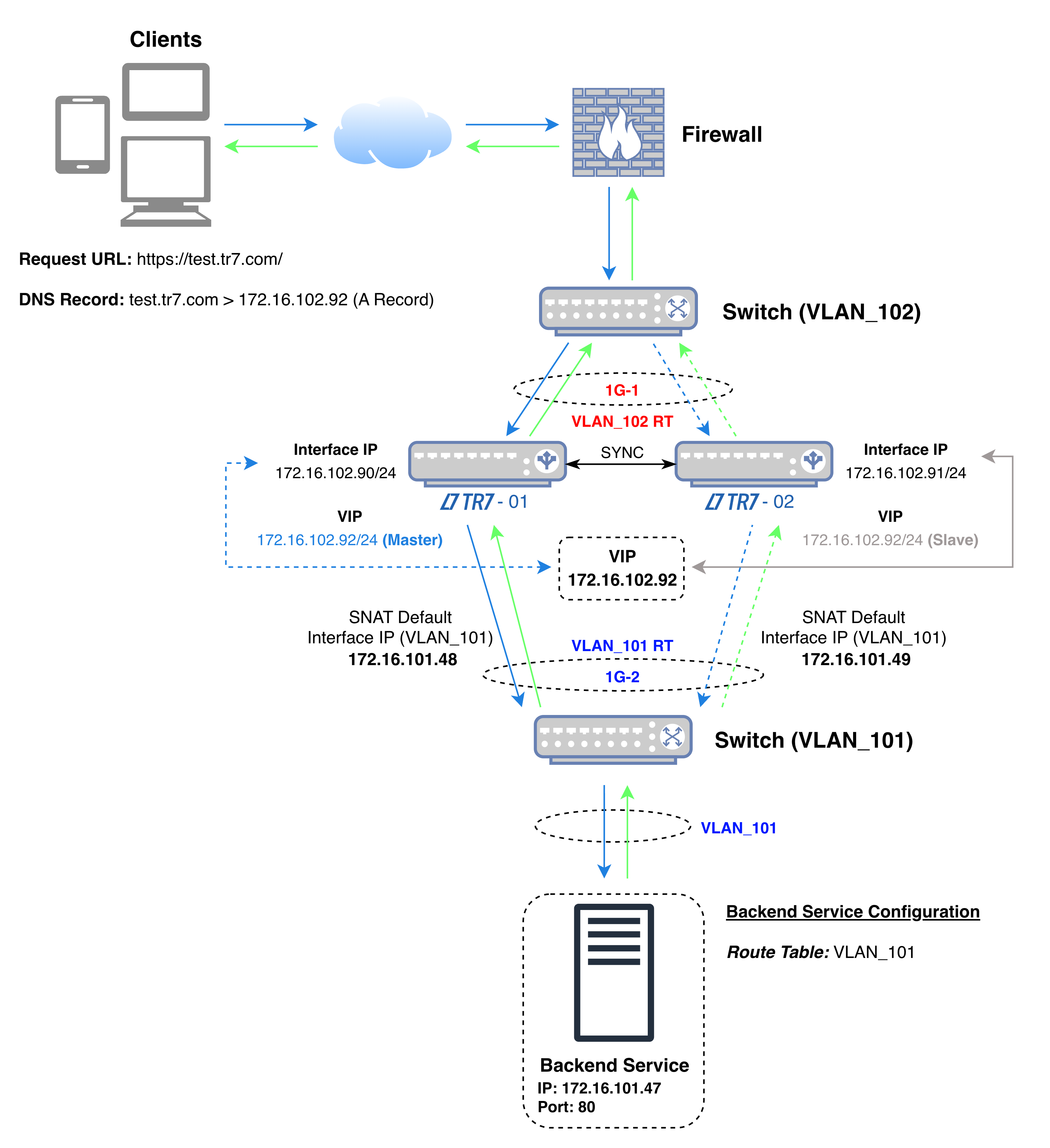 Two Arm Topology
The diagram shows the flow of traffic: the VIP the client connects to is on the interface in the publishing network (1G-1, VLAN_102 in the diagram), while the address TR7 uses when connecting to the Backend Service is on the second interface in the server network (1G-2, VLAN_101 in the diagram).
In the diagram's example, the TR7 devices connect to the Backend Service with the addresses 172.16.101.48 and 172.16.101.49 in the server network. Both the application traffic and the health check are made from these addresses; the Backend Service sees these addresses as the source of the connection and returns the response directly to TR7. For the health check, this applies while the Health Check Source IP field in the Backend Service is at its default value; when another address is selected in the field, the check is made from that address.
In the diagram's example, the source and destination information of the packets in the four steps of the connection is as follows (while TR7-01 is the active device):
| Step | Direction | Source IP | Source Port | Destination IP | Destination Port |
|---|---|---|---|---|---|
| 1 | Client → TR7 | Client IP | Random | 172.16.102.92 (VIP) | 443 |
| 2 | TR7 → Backend Service | 172.16.101.48 (Interface IP) | Random | 172.16.101.47 | 80 |
| 3 | Backend Service → TR7 | 172.16.101.47 | 80 | 172.16.101.48 (Interface IP) | Source port of step 2 |
| 4 | TR7 → Client | 172.16.102.92 (VIP) | 443 | Client IP | Source port of step 1 |
| Color | Meaning |
|---|---|
| Request | |
| Response |
When the VIP moves to the other device, the TR7 address in steps 2 and 3 becomes 172.16.101.49.
| Publishing in a single network | With Two Arm Topology |
|---|---|
| The servers and the client traffic share the same network; the servers can also be reached directly. | The servers remain in a separate network; the clients see only the vService address. |
| Application traffic and server network traffic compete on the same link. | Publishing traffic and server traffic are split into separate arms; if the arms are on separate physical interfaces, each arm uses its own link capacity. |
| The security boundary is set up separately with network devices. | Transit traffic between networks is closed by default in TR7's firewall; it is opened only with defined rules. |
| A single route table and a single rule set are used. | When the arms are placed in separate route tables, each arm is managed with its own gateway and firewall rules. |
On HTTP and L7 TCP vServices, no bridge is set up between the two networks: the client's connection terminates at TR7, and TR7 opens its own connection to the server. Every request arriving through the vService is inspected before it passes to the server network; unless a separate transit rule is defined, application traffic does not reach the servers through TR7 by any other path.
Applications accessed from outside are received in the publishing network, while the servers remain in the internal network. TR7 becomes the controlled transit point between the two networks.
If separating the servers from the client network is a security or compliance requirement, the two-arm deployment provides this separation through the architecture itself.
Client traffic and server traffic are distributed to separate interfaces; if the arms are on separate physical interfaces, each arm uses its own link capacity.
If there is more than one server network
If the servers are spread across more than one network, a separate arm (network interface, Bond, LACP or VLAN) is added to TR7 for each server network. When the number of server networks grows or a direct connection of TR7 to these networks is not wanted, the Two Arm Topology - Routed Backend deployment, in which all servers are reached through a single transit network, is used.
How does the client IP address appear on the server?
In this deployment, the Backend Service sees TR7's address in the server network as the source of the connection. The real client address is forwarded with the X-Forwarded-For header on HTTP vServices, and with Proxy Protocol on HTTP and L7 TCP vServices where the Backend Service supports it; both options are disabled by default. If the client address needs to be seen as the source address of the connection, the Gateway Mode or Gateway Mode - Spoofing deployment is preferred.
