
Smarter by Design.Simpler for Business
TR7Enterprise Application Delivery & Security Platform
Inline Mode is the deployment in which TR7 sits on the traffic path as a bridge (on TR7, a Bridge interface that joins two interfaces; on the vService, Inline Mode under QOS; on the Backend Service, the SNAT field set to Use Client IP and Spoofing enabled). The client keeps reaching the application at the server's own address as usual; TR7 intercepts this traffic on the path, inspects it and forwards it to the server with the client's real IP address.
The application's address, its DNS record and the server's gateway setting stay the same; no setting changes on the client or server side. Load balancing and security layers are added in front of a running application without touching the application address.
Name used by other vendors
This deployment is mostly known in the industry as bridge mode. The names Inline and transparent are also used in the industry for deployments that preserve the client address and operate on the traffic path, such as Gateway Mode and Route Mode. What sets Inline Mode apart from these is that the client connects to the server's own address and TR7 steps in between as a bridge. In the TR7 interface the setting is named Inline Mode, and this documentation uses that name.
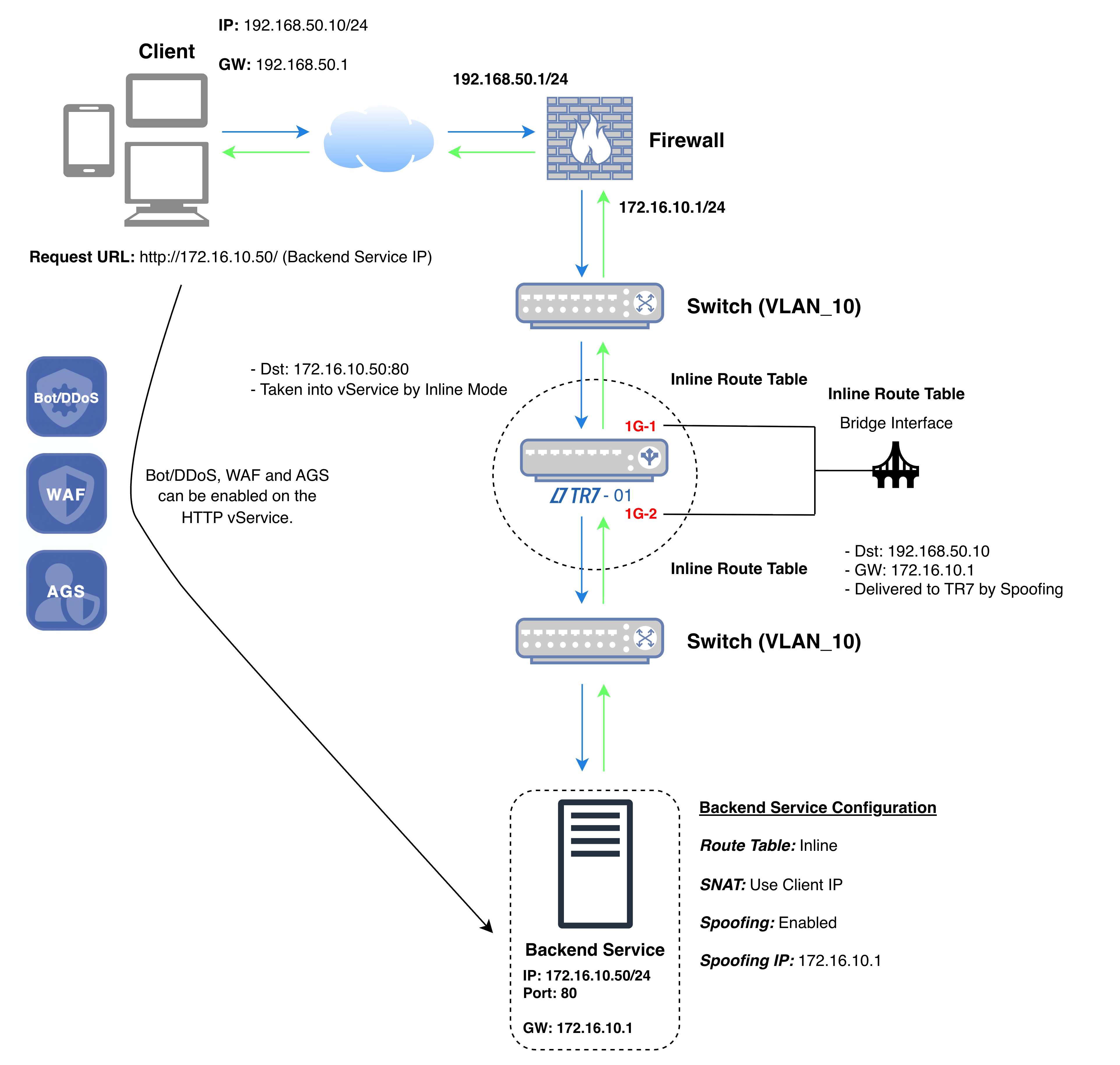 Inline Mode
The diagram shows the traffic flow in a single-device installation: TR7 sits between the gateway and the Backend Service with a Bridge interface that joins two of its interfaces (1G-1 and 1G-2 in the diagram); both sides of the bridge are the same network (VLAN_10 in the diagram), and the bridge interface and the Backend Service are in the same route table (Inline in the diagram). The client comes from another network and sends the request not to the vService address but to the Backend Service's own address (http://172.16.10.50/).
In the diagram's example, the connection destined for the Backend Service's address and port (172.16.10.50:80) is taken into the vService on TR7 with Inline Mode; on an HTTP vService, Bot/DDoS, WAF and AGS are applied at this point. TR7 connects to the Backend Service with the client's address (192.168.50.10). The Backend Service sends the response out toward the client's address via its own gateway (172.16.10.1); because Spoofing is enabled, TR7 intercepts the packet and forwards the response to the client from the Backend Service's address.
The health check is performed not with the client address but with the TR7 address in the Backend Service's route table. This applies while the Health Check Source IP field on the Backend Service is at its default value; when another address is selected in the field, the check is performed from that address.
In the diagram's example, the source and destination details of the packets in the four steps of the connection are as follows:
| Step | Direction | Source IP | Source Port | Destination IP | Destination Port |
|---|---|---|---|---|---|
| 1 | Client → Backend Service (TR7 intercepts on the path) | 192.168.50.10 (Client IP) | Random | 172.16.10.50 (Backend Service's address); the connection is taken into the vService with Inline Mode | 80 |
| 2 | TR7 → Backend Service (with the client's address) | 192.168.50.10 (Client IP) | Random | 172.16.10.50 | 80 |
| 3 | Backend Service → Client (TR7 intercepts on the path) | 172.16.10.50 | 80 | 192.168.50.10 (Client IP); the server's gateway is 172.16.10.1, TR7 intercepts the packet with Spoofing | Source port of step 2 |
| 4 | TR7 → Client (with the Backend Service's address) | 172.16.10.50 (Backend Service's address) | 80 | 192.168.50.10 (Client IP) | Source port of step 1 |
| Color | Meaning |
|---|---|
| Request | |
| Response |
The addresses the client sees are the Backend Service's address from start to finish (steps 1 and 4); the address the Backend Service sees is the client's address (steps 2 and 3). TR7, which terminates and inspects the connection in between, does not appear as an address to either side.
| Publishing through an address | With Inline Mode |
|---|---|
| The application is published from the vService address on TR7; clients are directed to the new address. | Clients keep connecting to the address they know, the server's own address. |
| The DNS record, firewall rules and client settings are updated for the new address. | The DNS record and client settings stay as they are. |
| Rollout waits for the address change to propagate to all clients. | There is no address change to wait for; it takes effect when TR7 is placed on the traffic path. |
| To preserve the client address, the server's gateway is changed or Spoofing is used. | The server sees the client's address; the gateway setting is not touched. |
The bridge is not just a pass-through: the connection destined for the Backend Service terminates on TR7 and goes through all the inspections the vService offers. No setting changes on the client or server side; what changes is that the path in between is now inspected.
Applications that clients reach at a fixed IP address, and whose DNS or client settings cannot be changed, are brought under inspection with their addresses preserved.
Security layers are placed in front of a live application without reorganizing the publishing address and access rules.
In environments where no change can be made on the server, DNS and client side, the required arrangement is made on TR7 and on the connection path.
Requirements of this deployment
No setting changes on the client or server side; the arrangement is made on TR7 and at the point where TR7 connects:
