
Smarter by Design.Simpler for Business
TR7Enterprise Application Delivery & Security Platform
Gateway Mode is the deployment in which the gateway of the Backend Services is TR7 (the default gateway of the server is an address on TR7; the SNAT field of the Backend Service is Use Client IP). TR7 connects to the server not with its own address but with the client's real IP address; the server's response returns to TR7 again through the gateway.
The server sees the client itself, not the load balancer: logs, access lists and IP-based rules work with the real address without any change in the application. Even in TCP applications where the client address cannot be carried in a header and Proxy Protocol is not supported, the source address is preserved end to end. Because both the request and the response pass through TR7, this deployment is also known in the industry as an inline or transparent deployment.
This page describes a network deployment
The Gateway Mode field in the AGS module is a different concept: it determines the operating mode of a vService as an access gateway (Standalone Application, Portal, Portal Application). For details, see AGS - AAM › Flowchart.
HTTP or TCP?
On HTTP vServices, the X-Forwarded-For header should be used first to pass the client address to the Backend Service, and on HTTP and L7 TCP vServices, Proxy Protocol should be used where the Backend Service supports it; these two methods pass the client address to the server without touching the network design. Gateway Mode is mostly preferred on L7 TCP vServices, that is, where the client address cannot be carried in a header and the application does not support Proxy Protocol.
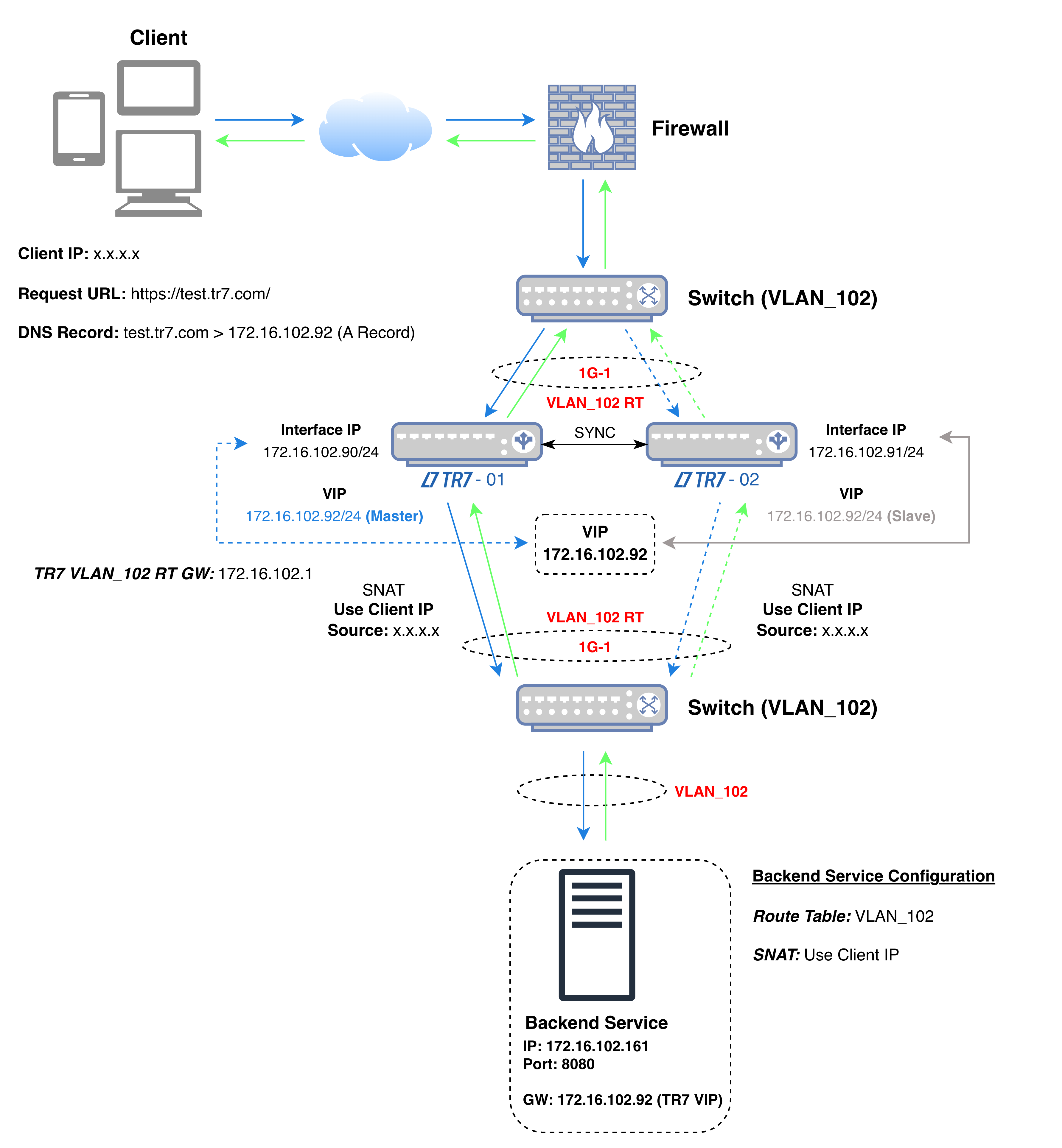 Gateway Mode
The diagram shows the flow of traffic: the VIP to which the client connects, TR7 and the Backend Service are on the same interface (1G-1 in the diagram) and in the same network; the client comes from another network (x.x.x.x in the diagram). The default gateway of the Backend Service is TR7's VIP address in this network (172.16.102.92).
In the diagram's example, TR7 connects to the Backend Service not with its own address but with the client's address (x.x.x.x); whichever device is active, the Backend Service sees the client's address as the source of the connection. The Backend Service sends the response to the client's address; since this address is not in its own network, the packet reaches the gateway, that is, TR7. The health check is performed not with the client address but with the TR7 address in the Backend Service's route table: in the diagram's example, the active device uses 172.16.102.90 and the other device uses 172.16.102.91. This applies while the Health Check Source IP field of the Backend Service is at its default value; when another address is selected in the field, the check is performed from that address.
In the diagram's example, the source and destination details of the packets in the four steps of the connection are as follows:
| Step | Direction | Source IP | Source Port | Destination IP | Destination Port |
|---|---|---|---|---|---|
| 1 | Client → TR7 | x.x.x.x (Client IP) | Random | 172.16.102.92 (VIP) | 443 |
| 2 | TR7 → Backend Service | x.x.x.x (Client IP) | Random | 172.16.102.161 | 8080 |
| 3 | Backend Service → TR7 | 172.16.102.161 | 8080 | x.x.x.x (Client IP), through the gateway 172.16.102.92 | Source port of step 2 |
| 4 | TR7 → Client | 172.16.102.92 (VIP) | 443 | x.x.x.x (Client IP) | Source port of step 1 |
| Color | Meaning |
|---|---|
| Request | |
| Response |
In step 2, the source of the packet is not TR7's address but the client's address; in step 3, the Backend Service sends the response to this address and the packet is delivered to TR7, which is the gateway. When the VIP moves to the other device, the gateway address moves with it; the addresses in the table do not change.
| Deployments with source address translation | With Gateway Mode |
|---|---|
| The server sees TR7's address as the source of the connection. | The server sees the real client IP address as the source of the connection. |
| The client address is carried in a header or with Proxy Protocol; the application needs to read it. | The address is carried in the connection itself; no additional setting is needed in the application, and on the server only the gateway is set to TR7. |
| In TCP applications that cannot carry a header, the client address reaches the server only if the application supports Proxy Protocol. | On HTTP and L7 TCP vServices, the source address is preserved whatever the application protocol is. |
| IP-based access lists and rate limits on the server see a single address, TR7. | IP-based rules on the server recognize each client separately. |
TR7's capabilities are not given up while the client address is preserved: the connection still terminates on TR7, the request and the response pass through the same device, and the inspection and distribution features offered by the vService type remain in use.
In TCP applications where the client address cannot be carried in a header and Proxy Protocol is not supported, the server continues to see the real source of the connection.
If the real client IP address must be present in server logs and application records, the address is recorded directly, without an additional field or header.
Applications that perform IP-based authorization or whose configuration cannot be changed work the same way when placed behind the load balancer.
Requirements of this deployment
If the server's gateway cannot be changed
This deployment relies on the default gateway of the Backend Service being TR7. If changing the gateway on the server side is not wanted, the same result is achieved with Gateway Mode - Spoofing, without touching the server.
