
Smarter by Design.Simpler for Business
TR7Enterprise Application Delivery & Security Platform
One Arm Topology is the deployment in which TR7 connects to the network with a single arm (a single network interface, Bond, LACP or VLAN; a single IP network and a single route table in TR7): client traffic is received on the same network interface and the Backend Services are reached through the same interface. TR7 does not sit in the middle of the traffic path; it is added alongside the existing network. For this reason, load balancing, WAF and access control are brought to a running infrastructure without changing the network design.
The IP addresses, gateways and cabling of the servers stay as they are. When the traffic going to the application is directed to the vService address, TR7 comes into play; when the redirection is rolled back, the infrastructure returns to its previous state. This is the deployment that delivers results in the shortest time with the least risk.
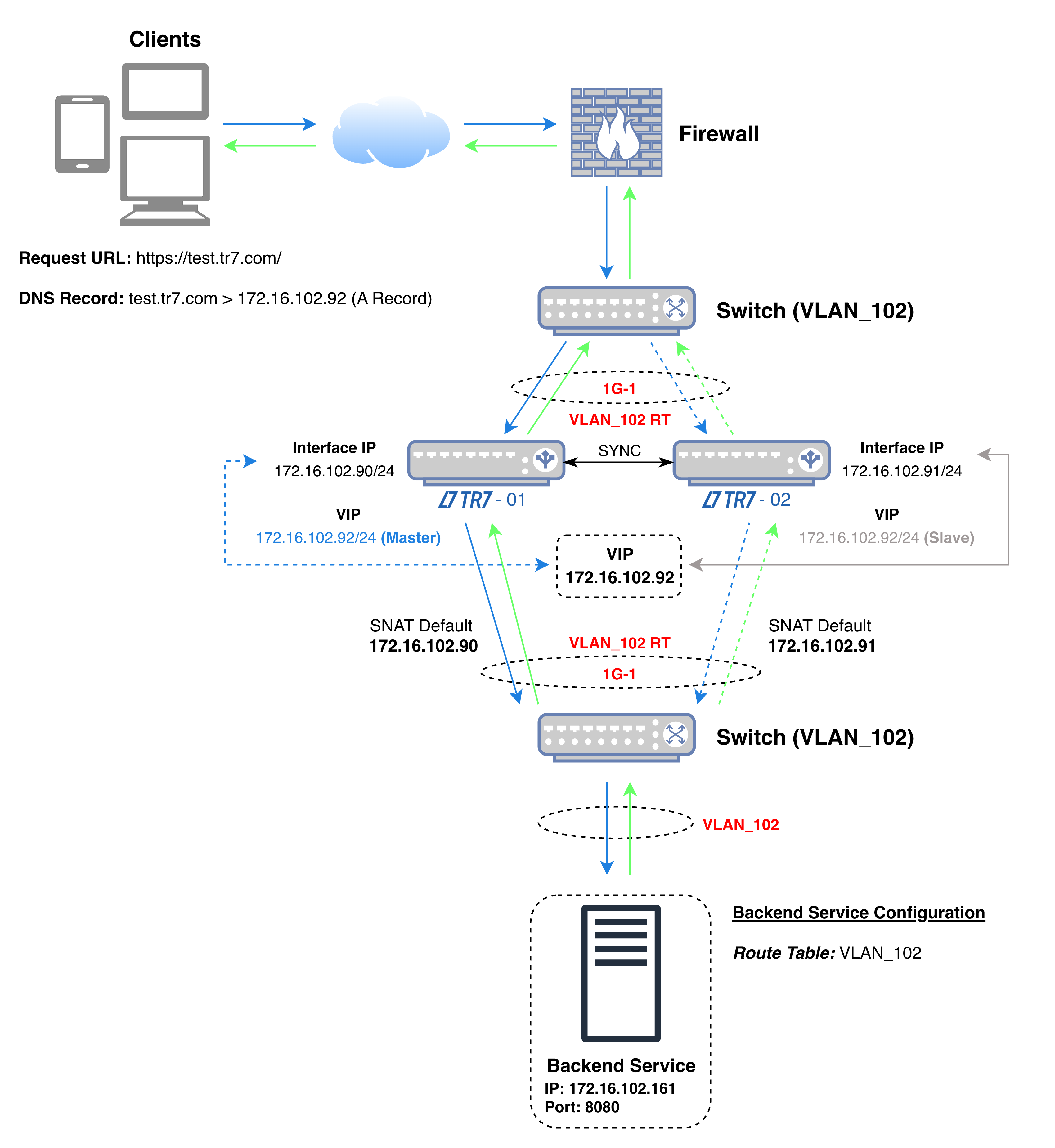 One Arm Topology
The diagram shows the flow of traffic: the VIP the client connects to and the address TR7 uses when connecting to the Backend Service are on the same interface (1G-1 in the diagram) and in the same network.
In the diagram's example, the TR7 devices connect to the Backend Service with the addresses 172.16.102.90 and 172.16.102.91. Both the application traffic and the health check are made from these addresses; the Backend Service sees these addresses as the source of the connection and returns the response directly to TR7. For the health check, this applies while the Health Check Source IP field in the Backend Service is at its default value; when another address is selected in the field, the check is made from that address.
In the diagram's example, the source and destination information of the packets in the four steps of the connection is as follows (while TR7-01 is the active device):
| Step | Direction | Source IP | Source Port | Destination IP | Destination Port |
|---|---|---|---|---|---|
| 1 | Client → TR7 | Client IP | Random | 172.16.102.92 (VIP) | 443 |
| 2 | TR7 → Backend Service | 172.16.102.90 (Interface IP) | Random | 172.16.102.161 | 8080 |
| 3 | Backend Service → TR7 | 172.16.102.161 | 8080 | 172.16.102.90 (Interface IP) | Source port of step 2 |
| 4 | TR7 → Client | 172.16.102.92 (VIP) | 443 | Client IP | Source port of step 1 |
| Color | Meaning |
|---|---|
| Request | |
| Response |
When the VIP moves to the other device, the TR7 address in steps 2 and 3 becomes 172.16.102.91.
| Deployments that sit in the path | With One Arm Topology |
|---|---|
| The server network is redesigned; the gateway, VLAN or cabling changes. | The existing network stays as it is; TR7 is added to the same network as a device. |
| All traffic going to the servers passes through the load balancer. | Only the application traffic arriving at the vService address passes through TR7; backup, management and server-to-server traffic stay on their own path. |
| Rollout requires a maintenance window and a rollback plan. | It is put into service by switching the traffic to the vService address and rolled back by switching it to the old address. |
| Making the return traffic come through the correct path is ensured separately on the network side. | Since TR7 connects to the server with its own address, the response returns to TR7. |
Since the request and the response pass through the same device, TR7 sees both ends of the connection: the connection is recorded; on HTTP vServices, the response is also inspected, compressed and cached. A one-arm deployment does not mean compromising on capabilities.
Load balancing and WAF are placed in front of a running application without waiting for a topology change from the network team. It is the shortest path for trial setups and phased migrations.
If the gateway, address plan or cabling of the server network cannot be changed, TR7 is added to the same network and takes over only the application traffic.
Only some of the servers in the same network are placed behind the load balancer; the other services and the management traffic continue to work unaffected.
If the servers are in other networks
If the Backend Services are not in the same network as TR7 but in networks behind the routing point, the same one-arm setup is used with the One Arm Topology - Routed Backend deployment.
How does the client IP address appear on the server?
In this deployment, the Backend Service sees TR7's address as the source of the connection. The real client address is forwarded with the X-Forwarded-For header on HTTP vServices, and with Proxy Protocol on HTTP and L7 TCP vServices where the Backend Service supports it; both options are disabled by default. If the client address needs to be seen as the source address of the connection, the Gateway Mode or Gateway Mode - Spoofing deployment is preferred.
