
Smarter by Design.Simpler for Business
TR7Enterprise Application Delivery & Security Platform
Route Mode is the deployment in which the client IP address is preserved without source address translation and the return path is provided on the network side (the SNAT field of the Backend Service is Use Client IP; the server's gateway stays as it is, and the return traffic of the published services is brought to TR7 by a routing rule on the firewall or router). TR7 connects to the server with the client's real IP address; the response again passes through TR7 by the network's own routing decision.
The servers' settings are not touched: TR7 has an arm and an address in the server network, and the servers continue to use their own gateways. In this deployment, the main work is done not on TR7 but on the firewall or router in the network; the return path is defined there with a rule covering the published services and covers dozens of servers at once. This is the natural deployment for enterprise networks that manage traffic paths centrally. Because both the request and the response pass through TR7, this deployment is also known in the industry as an inline or transparent deployment.
This page describes a network deployment
The LB Mode field in the Network vService form also has an option named Route Mode; that option is a distribution method for L4 traffic and is different from the deployment described on this page. For details, see Network vService.
HTTP or TCP?
On HTTP vServices, the X-Forwarded-For header should be used first to pass the client address to the Backend Service, and on HTTP and L7 TCP vServices, Proxy Protocol should be used where the Backend Service supports it; these two methods pass the client address to the server without touching the network design. Route Mode is mostly preferred on L7 TCP vServices, that is, where the client address cannot be carried in a header and the application does not support Proxy Protocol.
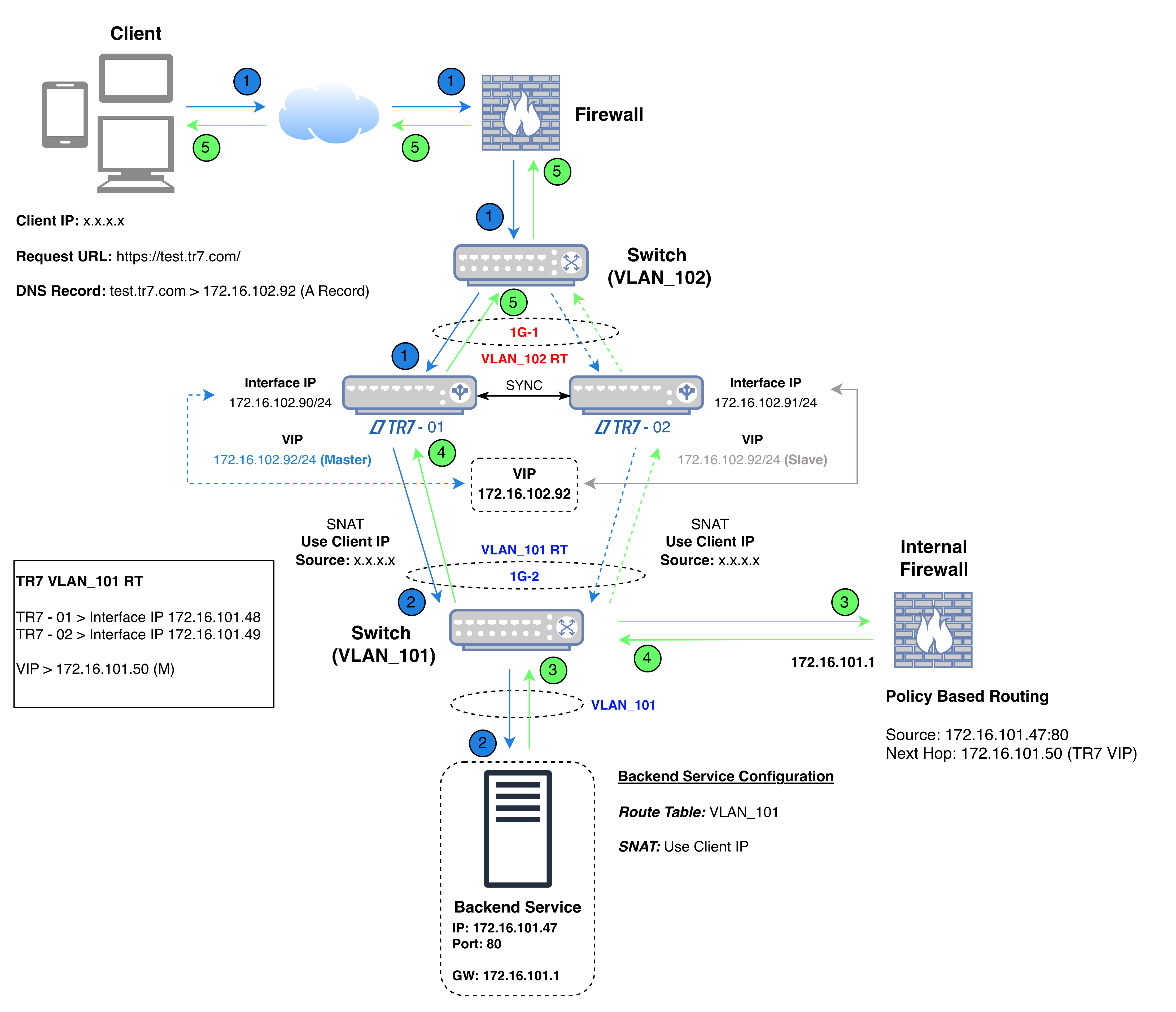 Route Mode
The diagram shows the flow of traffic in five steps: the VIP to which the client connects is on the interface in the publishing network (1G-1 in the diagram, VLAN_102), while the second interface through which TR7 reaches the Backend Service is in the server network (1G-2 in the diagram, VLAN_101). The default gateway of the Backend Service has not changed: it is not TR7 but the server network's own gateway (Internal Firewall in the diagram, 172.16.101.1).
In the diagram's example, TR7 connects to the Backend Service not with its own address but with the client's address (x.x.x.x). The Backend Service delivers the response to its own gateway to be sent to the client's address; the routing rule on the Internal Firewall (source 172.16.101.47:80, next hop 172.16.101.50) forwards the packet, without touching its addresses, to TR7's VIP address in the server network as the next hop instead of sending it to the client. The rule covers only the address and port of the Backend Service; the server's other traffic stays on its own path.
The health check is performed not with the client address but with the TR7 address in the Backend Service's route table: in the diagram's example, the active device uses 172.16.101.48 and the other device uses 172.16.101.49. This applies while the Health Check Source IP field of the Backend Service is at its default value; when another address is selected in the field, the check is performed from that address.
In the diagram's example, the source and destination details of the packets in the five steps of the connection are as follows:
| Step | Direction | Source IP | Source Port | Destination IP | Destination Port |
|---|---|---|---|---|---|
| 1 | Client → TR7 | x.x.x.x (Client IP) | Random | 172.16.102.92 (VIP) | 443 |
| 2 | TR7 → Backend Service | x.x.x.x (Client IP) | Random | 172.16.101.47 | 80 |
| 3 | Backend Service → Internal Firewall | 172.16.101.47 | 80 | x.x.x.x (Client IP); the packet is delivered to the server's gateway (172.16.101.1) | Source port of step 2 |
| 4 | Internal Firewall → TR7 | 172.16.101.47 | 80 | x.x.x.x (Client IP); the packet's addresses do not change, the routing rule forwards the packet to the address 172.16.101.50 (TR7 VIP) as the next hop | Source port of step 2 |
| 5 | TR7 → Client | 172.16.102.92 (VIP) | 443 | x.x.x.x (Client IP) | Source port of step 1 |
| Color | Meaning |
|---|---|
| Request | |
| Response |
In steps 3 and 4, the packet is the same and its addresses do not change; only its path changes. The packet addresses are the same as in Gateway Mode; the difference is that the response is brought to TR7 not by the server's gateway setting but by the routing rule in the network.
| Gateway Mode and Gateway Mode - Spoofing | With Route Mode |
|---|---|
| The return path is provided through the server's gateway; either the gateway is TR7 or TR7 picks up the return traffic in the same network. | The return path is provided at the network's routing point, with a routing rule. |
| The server's gateway traffic other than the published service also passes through TR7. | Only the service responses covered by the rule are routed to TR7; the server's other traffic stays on its own path. |
| The method is applied separately for each Backend Service or each server. | The rule is written at the network's routing point and covers the services published in that network together. |
| The decision is made at the level of the server or the server's network. | The decision is made at the central point managed by the network team and is monitored there. |
| The same setup is built again for each new server network. | A new server network is brought into scope by adding a rule to the routing point. |
The routing rule is the key to this deployment: it ensures that the response returns along the path it came from and that both directions of the connection pass through TR7. Without the rule, the response tries to go to the client without passing through TR7; TR7 cannot receive the response to the connection it opened and the connection cannot be established.
If the servers' gateway is a firewall or router and changing this setting is not wanted, the return path is directed to TR7 at that point and the client address is preserved.
If the servers' gateway cannot be changed, the return path is solved on the network side, independently of the servers.
In architectures where traffic paths are managed from a single point by the network team, the load balancer also becomes part of the same routing policy.
The main work is on the firewall side
On TR7, Use Client IP is selected on the Backend Service and TR7 has an address in the server network (a VIP in a cluster setup). No setting changes on the server or in the application. The operation of the deployment depends on three behaviors of the firewall or router in the network:
If no change is wanted on the network side either, the same result is achieved with Gateway Mode - Spoofing.
